Ok then… The dumb switches in my parent’s place have worked flawlessly for the the last 40+ years… I think they could be on to something…  . I’ve also heard of other people who have had positive experiences.
Your viewpoint is certainly justified. But there are certainly times that Zigbee and/or ZWave+ haven’t felt so rock solid.
Despite issues with the IKEA devices I had initially, things have been dramatically better with firmware updates and additional mains-powered Threads devices. My journey into the IKEA devices is inspired by several hundred dollars of IKEA store credit that started this thread, and I’ve got more to spend. I don’t want any Swedish meatballs.
You might say I’m doubling down on the IKEA devices. I’m currently using Apple TV for TBR, but it’s a single point of failure. Just in case, I’ve replaced all my old eeros with eero Pro 6Es with thread radios running Thread version 1.4. That gives me TBRs with triple redundancy in my house. I’m going to experiment with how it goes putting some Thread devices on that.
As to the future, one or more of these things will happen which will influence my love or dislike for Thread:
-
Apple TV 2026 finally gets released that has Thread version 1.4 so I can use it and my eeros together. This could happen as soon as 48 hours from now at WWDC, but I’m not holding my breath.
-
A new Hubitat model with a working Thread radio is released. I’m ordering on day one.
-
I decide to switch to another platform.
This may not be the appropiate place to post this but it kinda concerns these devices.
I had/have an interesting observation on my matte/thread network. I have an Apple TV 4K and an Apple Pod Mini. Ever since the last firmware updates in Apple Home it shows it can’t communicate with the Mini. Apparently I’m not the only one with this issue from what I can Google. However, the Mini seems to still be working, sorta.
Home shows the TV unit to be the default control hub. If I manually change that to the pod virtually all the matter/thread devices go offline. Switch it back and they eventually re-connect. If I unplug the pod then most of the thread devices go offline. Trying to reconcile this just gives me headaches. My pod is on a UPS along with my router and HE Hub. My concern is if the power goes off the TV unit will be off and who knows what will happen. Although if the power is off it probably won’t make any difference.
I’m with you in hoping some updates in Apple Thread version may help. My Deco router apparently doesn’t have a thread radio so unless I change that to something else don’t have that option. Don’t feel like spending that kinda money right now.
So will hold it together and see what comes down the pike…
EDIT: What would your thoughts be if I eliminated the pod and put a mains powered thread repeater in the same area instead?
Try factory resetting the Mini before re-adding it into Apple Home. That’s definitely an odd issue.
I say this jokingly, but now you are running a Zigbee network. It’s not completely true as they are completely different architectures, but having only one Thread Boarder Router is no technical difference than having one Zigbee controller.
In case this was in response to my comment about
In case this was in the context of my single point of failure comment, what I meant was that I’d rather not have, say, a water leak sensor which is dependent upon:
Sensor → Thread Border Router → wi-fi network → Hubitat
but rather have
Sensor → Thread Border Router and wi-fi network which are the same device → Hubitat
In my house, the Apple TV getting accidentally unplugged may go for days without being noticed. But if the eero mesh is down, it gets noticed immediately.
Zigbee is even better because the Zigbee controller and the hub are the same device, and there’s no dependency on wi-fi at all. But that will be cured with a platform that has a native working Thread radio.
My response was directed to the other user having issues with the HomePod Mini and Thread. With that said, Thread has nothing to do with WiFi. The internal LAN network is important only because Hubitat does not have a Thread radio. Hubitat is currently reliant on a Thread Boarder Router converting a thread message to IP/LAN in order to know to understand the message. My Apple Home automations work fine when my Google Nest Pros are unplugged.
Once Hubitat offers a a native way to be a Thread Boarder Router and join a Threat Network, a users LAN will not matter.
Tried that and everything else that was suggested by Apple.
I may take a day next week and unplug the mini and see if the TV picks up the slack.
That’s exactly what I was pointing out.
I can reduce the points of failure (given today’s scenario) by making my TBR the same device(s) that provide wi-fi. There is redundancy, and more visibility when the device(s) isn’t/aren’t working. Even better will be when the platform I am using (a future Hubitat or something else) has a working Thread radio, then I don’t need to worry about a TBR.
While I’m talking about it, I found that enabling Thread and getting a mesh going with all eero nodes advertising the same network is easy. What isn’t easy is figuring out how to commission a device with the eero. It isn’t done in the eero app, and apparently requires using the Alexa app which must share the same user account credentials. In theory this works, but I’ve yet to achieve any success. I stress that this is for experimentation; I’m much happier using Apple TV as TBR. I may post more about my experiments in another Thread. Right now, I’ve found that doing anything in the Alexa app drives me to drink.
Can you set that as the same as the Apple?
Not yet. The Apple TV, even in the 26.4 beta I’m running is Thread version 1.3, which doesn’t support sharing a mesh with others. That’s another thing I’m looking forward to with the next gen of Apple TV.
I wonder if an administrator can maybe move these thread discussions to another thread. Kinda hijacking the IKEA stuff.
Back to Ikea, I was there a few days ago. Have been following this thread. The price of the devices is SOOO very tempting. However, the potential headache kept me from getting anything. And by headache, a large part of it includes the WAF when some device falls off the network. 
What devices are you interested in? The MYGGSPRAY were the worst for dropping off the mesh initially, but since upgrading them to 1.1.4, I’ve not had any issue.
I’ve not had any issue with the GRILLPLATS either, and they are at 1.4.6.
I’m sure it helps that I’ve now got 10 of the GRILLPLATS scattered throughout the house, some of them with nothing to do but repeat.
My one Ikea Matter device I tried - the Bilresa button - works fine and stays connected as long as I keep it in the same room as my Apple TV.
But I really can’t justify building up a new Matter over Thread network to replace my mature, functioning Zigbee mesh.
Klippbok, Bilresa, Kajplats, Myggspray
This thread has become a good resource for info on all the IKEA Matter over Thread devices, but I thought it would be more organized to create a new thread for each device discussion going forward. I've created four for the devices I have.
Very belatedly, the button seems to work consistently with your driver. Thank you! Are you thinking about putting your drivers into HPM to make updating easier for folks?
@molod I'm getting MissingMethodException all over my logs for both Timmerflotte sensors since I switched from Generic Matter temperature driver to your driver yesterday. I'm using the latest version, installed via HPM. Any ideas?
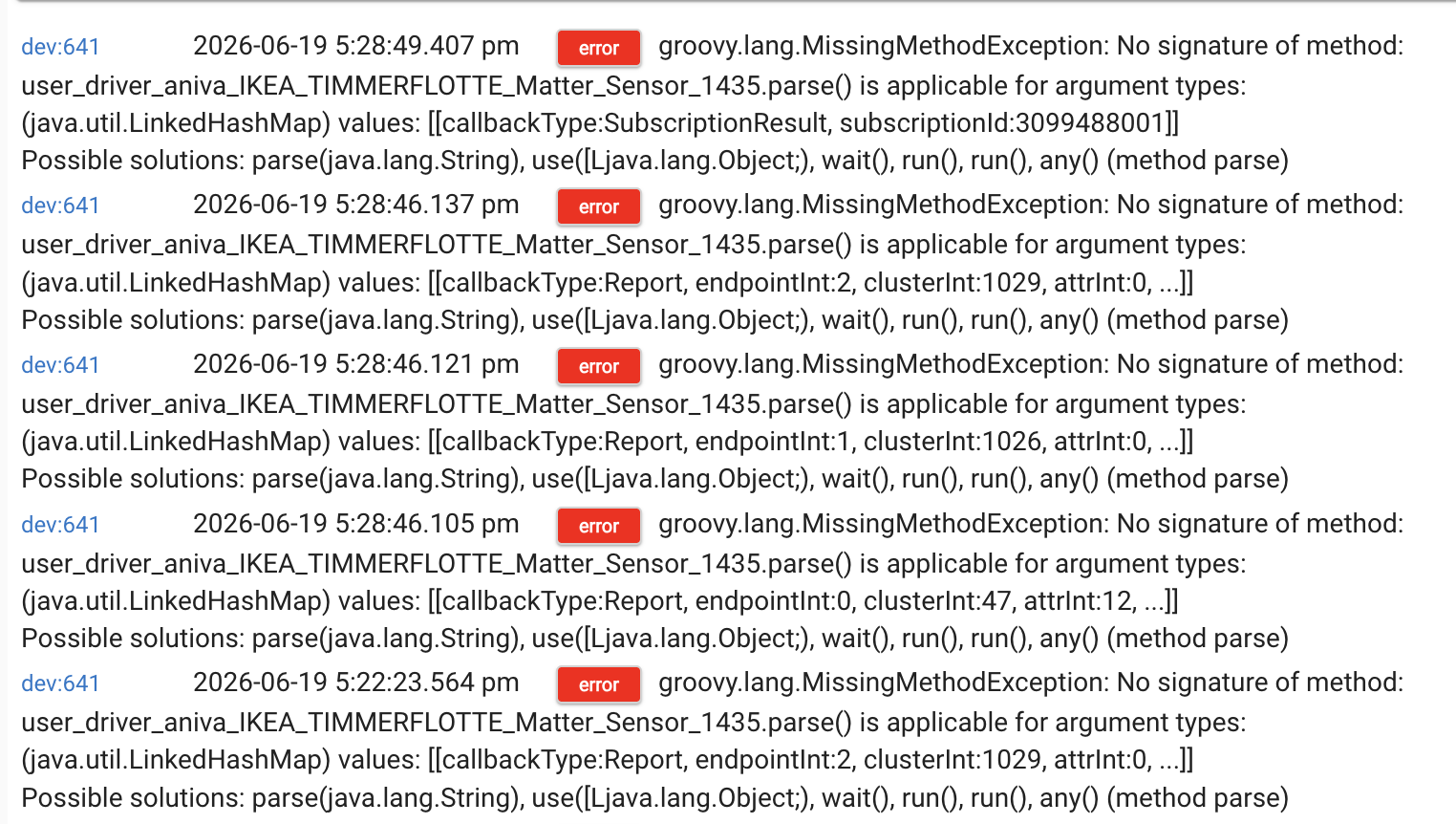
@scott9 you can add this code to @molod 's driver :
void deviceTypeUpdated() {
    log.warn "${device.displayName} driver change detected"
	device.updateDataValue('newParse', 'false')
}
Switch temporarily to the HE inbuilt 'Device' driver and then back to @molod 's driver. This will fix the issue with the different drivers using different Matter parse methods.
Thanks!