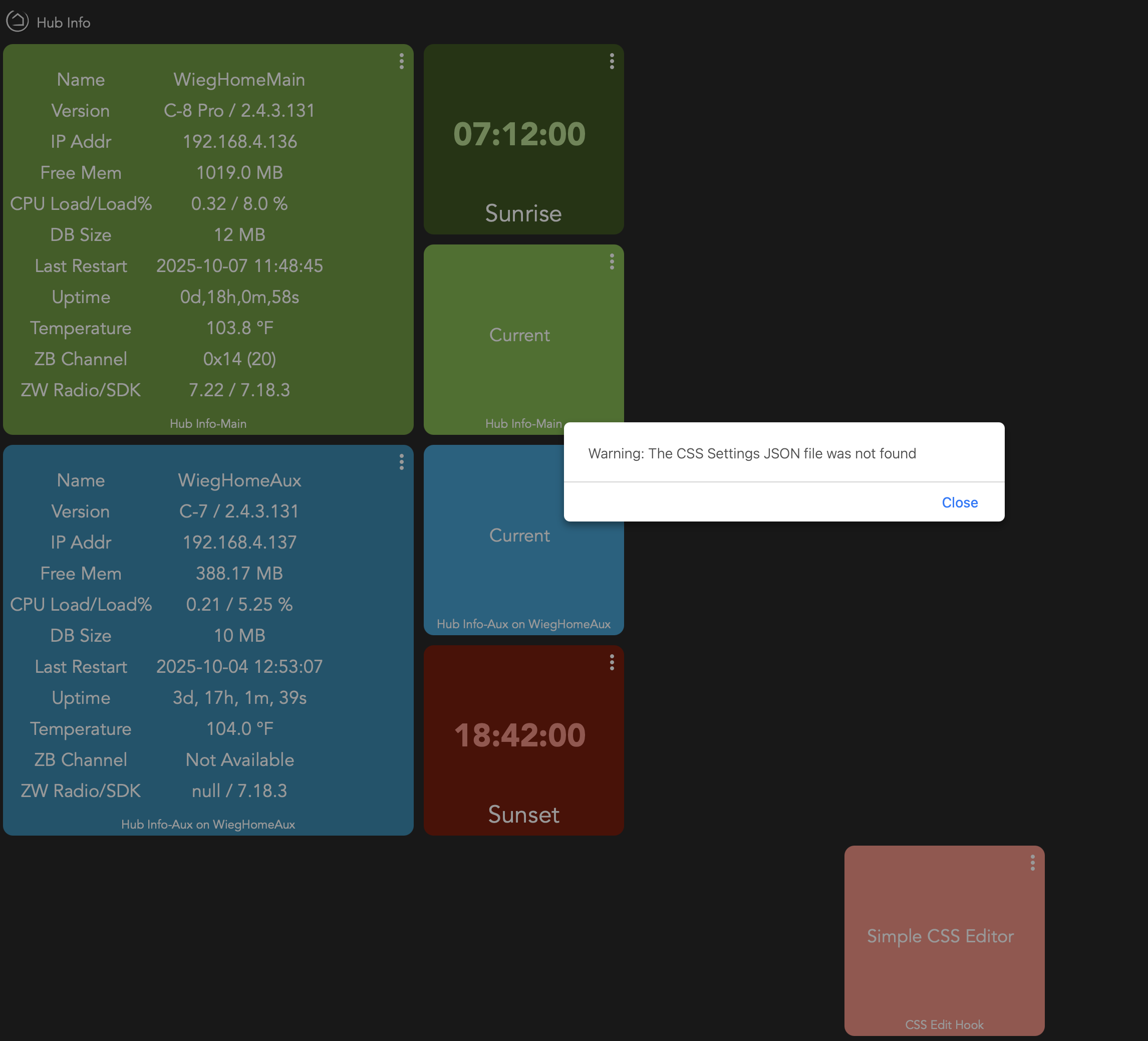
I tried to edit an existing desktop that I had edited using Simple CSS editor and when I added the Simple CSS editor tile to modify tile editing, I get "Warning: The CSS Settings JSON file was not found."
When I open the editor and click on the "CSS File" and the "Settings File" links, I get " The page requested could not be found.
The tile edits I previously made are still there and the css file still exists in file manager. I can't make any changes.
I'm not sure what changed or where to look.
I have figured this out, there has been a change in the structure of the dashboard HTML that is generated when you open a dashboard, which I rely on when generating the file names used, both when creating them and when identifying the file that the editor needs to read in, i.e. the file names for the settings and CSS JSON files are not stored, they are derived each time you open the dashboard / editor.
I always knew this could be a problem in the future and had plans to look at changing the way this worked, but never got around to it. I can make a quick update to the editor to pick up the nested span element that now includes the name, then may look at a longer-term solution at some point.
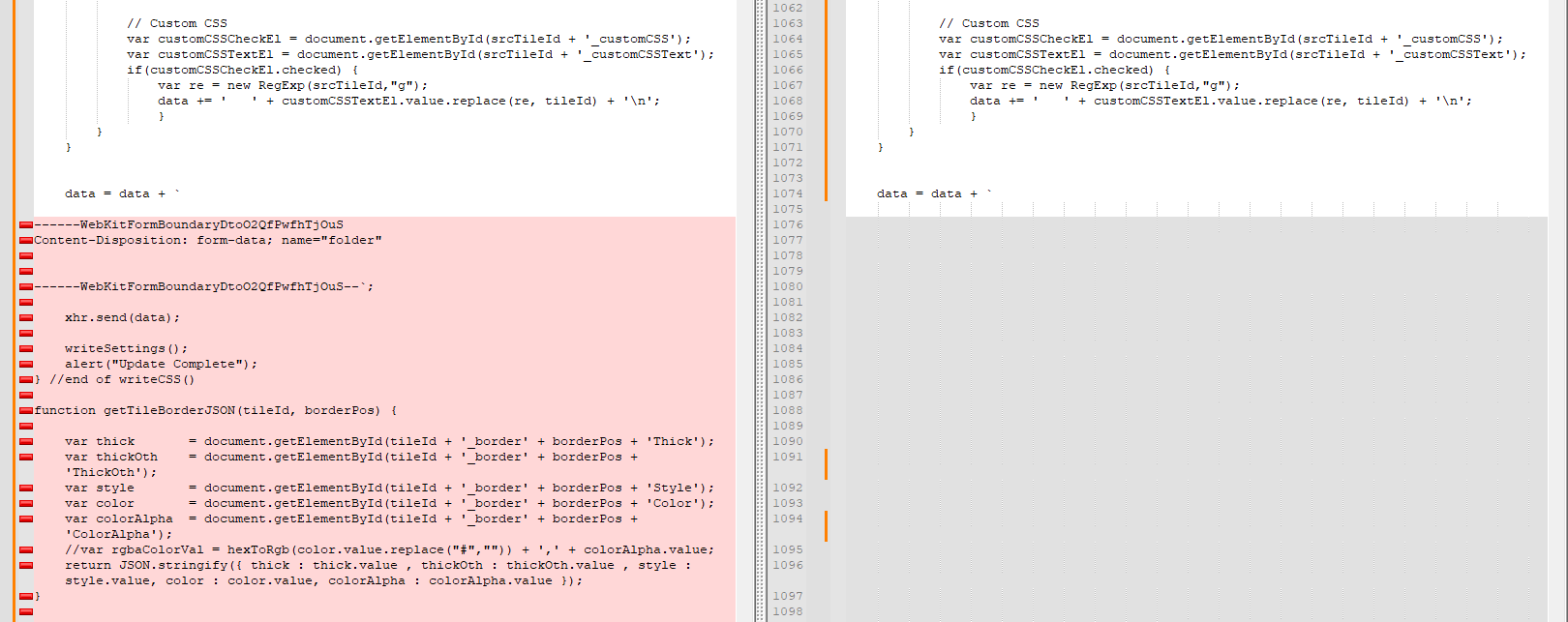
In the screenshot below the dashboard HTML on the right is the old structure, with a span including the dashName CSS class and the dashboard name contained within it. I look for this dashName class and get the contents of that span to use in the naming of the settings and CSS JSON files that the editor produces.
The HTML for the dashboard on the right is the new structure, with an additional span inside the span with the dashName class. I just need to look one element lower to get the name.
A few users have reported issues trying to use the editor after upgrading their HE hub to platform version 2.4.3. This has now been fixed and is available as an update via HPM or by downloading the updated editor files from GitHub. The updates have been done so that they still work on HE platform versions prior to 2.4.3, so you can safely update Simple CSS Editor without needing to upgrade your HE hub.
I explain the issue in more detail on this earlier post:
This is the same issue discussed here:
I have also included the HTML file in the HPM package, but have not removed the download mechanism from the driver just yet. That will likely happen at some point soon.
I updated the package.
On an existing dashboard the error is gone.
The CSS file and Settings file link are now working.
The tile editor opens, however, when I click "Save settings and Export CSS" the file isn't saved and I see this in developer tools:
SimpleCSSEditor.html:1106 Uncaught ReferenceError: writeCSS is not defined
at HTMLButtonElement.onclick (SimpleCSSEditor.html:1106:2)
onclick @ SimpleCSSEditor.html:1106
When I try to open a tile to edit it, nothing happens. I see:
SimpleCSSEditor.html:1106 Uncaught ReferenceError: expandSetting is not defined
at HTMLTableCellElement.onclick (SimpleCSSEditor.html:1106:2)
onclick @ SimpleCSSEditor.html:1106
Hmmm... That is strange, I had something similar when I was finalizing the changes. Didn't really make any sense at the time why it started happening. I should be able to fix it relatively easily (changing the order of the JavaScript functions involved)
@ray2357 - I have released an update but I am thinking now that it may not be the code itself, but the process for getting the HTML file changes onto the hub that is causing the issue.
If you update the editor via HPM to the latest version (v1.2.3) I expect you will see (like I did) a blank pop-up in your dashboard when trying to open the CSS editor. If you go into the editor device in HE, open the Device Info tab and click Save, this will trigger a fresh download of the HTML file. Doing it through the device appears to download the file in full, whereas via HPM it cuts it off around the point where I have some code for writing files. I suspect this may need to be treated differently if I want to release the HTML file via HPM.
v1.2.3 Released - Re-ordering of Javascript Functions
I have released a change in the editor pop-up page. This has no real impact to the functioning of the page and, from my last post, I don't believe it actually solves the issue @ray2357 raised with uncaught exceptions appearing in the browser console.
When applying this update, you will need to open the CSS Editor device on your HE hub and click Save on the Device Info page for the updated file to be downloaded in full, an update via HPM will not be enough. I will be working to resolve this.
I had a few issues with this app as well the other day and tried to large language model my way out..... It ended up working because I luckily have a raspberry pi running node-red and also a docker instance of HA to support my automations. So I am able to fall back on bridges and interfaces when required to offload things out of HE... Ive posted a summary of the issues found and what my resolution was to get it working using the tools available to me.
Cheers mate
Duncan
We’re using Simple CSS Editor as a community tool to live-edit Hubitat dashboard CSS.
The original design:
Groovy driver downloads SimpleCSSEditor.html to /local/… via File Manager.
Driver exposes an attribute tile (iFrameLauncher) whose value is a big HTML blob:
A button
A full-screen modal <div>
An <iframe> that loads the editor HTML from the hub.
When that attribute is used on a dashboard (template = Attribute), clicking the tile opens the modal editor over the dashboard.
This had been working for years.
Problem
After more recent Hubitat updates, the attribute-based launcher became unreliable:
On a fresh edit it would sometimes work once, then:
The tile would fall back to “Please Select an Attribute”, or
The modal/editor wouldn’t render at all (blank overlay).
The driver’s events were still correct, but the dashboard wasn’t consistently respecting the attribute content any more.
This pointed to a Hubitat dashboard side change in how attribute text is rendered/escaped or when it gets updated, rather than a bug in the editor HTML itself.
Because of that, we decided to decouple the heavy UI from Hubitat and host the editor externally.
No more giant inline CSS/JS in the Groovy file – the complex logic lives in index.html on Node-RED.
Use Hubitat’s local files for the CSS itself
The editor still needs to read/write dashboard CSS per page.
For that we kept using Hubitat’s File Manager endpoints (e.g. /hub/fileManager/upload etc.) from inside the editor HTML.
That gives us access to the same /local/Guest_Dash.css etc., even though the UI is now hosted on Node-RED.
So: UI is on Node-RED, but CSS storage remains on Hubitat.
Extra Hubitat-side Fixes
Two more details were important for stability:
Single attribute only
We removed the legacy iFrame attribute and only use iFrameLauncher.
This avoids the dashboard getting confused about which state to render.
Default Current State
In the device’s Preferences, we set Default Current State = iFrameLauncher.
That stops the dashboard from dropping back to a blank state after reload, which was part of the “Please Select an Attribute” issue.
Final Architecture
Hubitat driver
Minimal: one attribute (iFrameLauncher) + optional logging.
Responsible for:
Generating the launcher HTML for the tile.
Optionally triggering a refresh/download of the latest editor file, if we still keep a copy on /local.
Node-RED
Serves index.html for the editor.
No credentials needed for static file access (LAN only).
Editor HTML
Runs entirely in the browser.
Talks to Hubitat’s File Manager endpoints to load/save the per-dashboard CSS files.
TL;DR for another dev
A Hubitat dashboard change made an attribute-based iframe launcher unstable.
We fixed it by:
Hosting the full CSS editor UI as a static page on Node-RED.
Keeping CSS storage on Hubitat via File Manager endpoints.
Simplifying the driver to a single attribute (iFrameLauncher) and setting it as the device’s Default Current State so the dashboard reliably renders it.
If you’d like, I can turn that into a short README section or PR description for your fork of the Simple CSS Editor project.
Wow, thanks for taking the time to look at this @user1025 , and glad you got something working. Unfortunately I don't feel like the extra setup of Node RED will be necessary.
I realise now that I made the discovery and comments about where I believe the issue is in separate private discussions with @ray2357 and @thebearmay. The issue when uploading the HTML file that is the pop-up editor, either through HPM or (I now suspect) through the driver as well. If I can get that working (and there should be a way to), then the other issues relating to the platform changes have already been resolved.


 When applying this update, you will need to open the CSS Editor device on your HE hub and click Save on the Device Info page for the updated file to be downloaded in full, an update via HPM will not be enough. I will be working to resolve this.