I'm finally migrating from Wink (have a hub 1 and hub 2) to Hubitat. I'm grateful for any advice you can offer to get my new system up and running. Thanks in advance!
Before I dive into the doing of all of this, I'm wondering where you experts would start if you were switching everything listed here over to being controlled by Hubitat. Any gotchas? Any obvious order of steps to follow?
Here's what I have to work with:
Hubitat Model C-7 Hub
Lutron Caseta Smart Bridge Pro
8 Cree dimmable light bulbs (Zigbee; purchased in 2015)
1 Wink Relay (would like to re-use this since it's hardwired; purchased in 2017)
One other thing we have is a Honeywell thermostat but I use the Residio app to control that and I'm fine with this set-up. But if there's a good reason to include it in our new Hubitat set-up, fine.
Two of the Pico remotes are free floating - eg., on the coffee table where we can grab it and turn all lights on/off or dim all lights.
The other 4 Pico remotes are each installed as light switches and programmed to control just one bulb.
My goal is to replicate our current set up - sans the terrible customer support (bye Wink!). Again - many thanks for ideas and instructions.
I would recommend replacing these with something more modern.
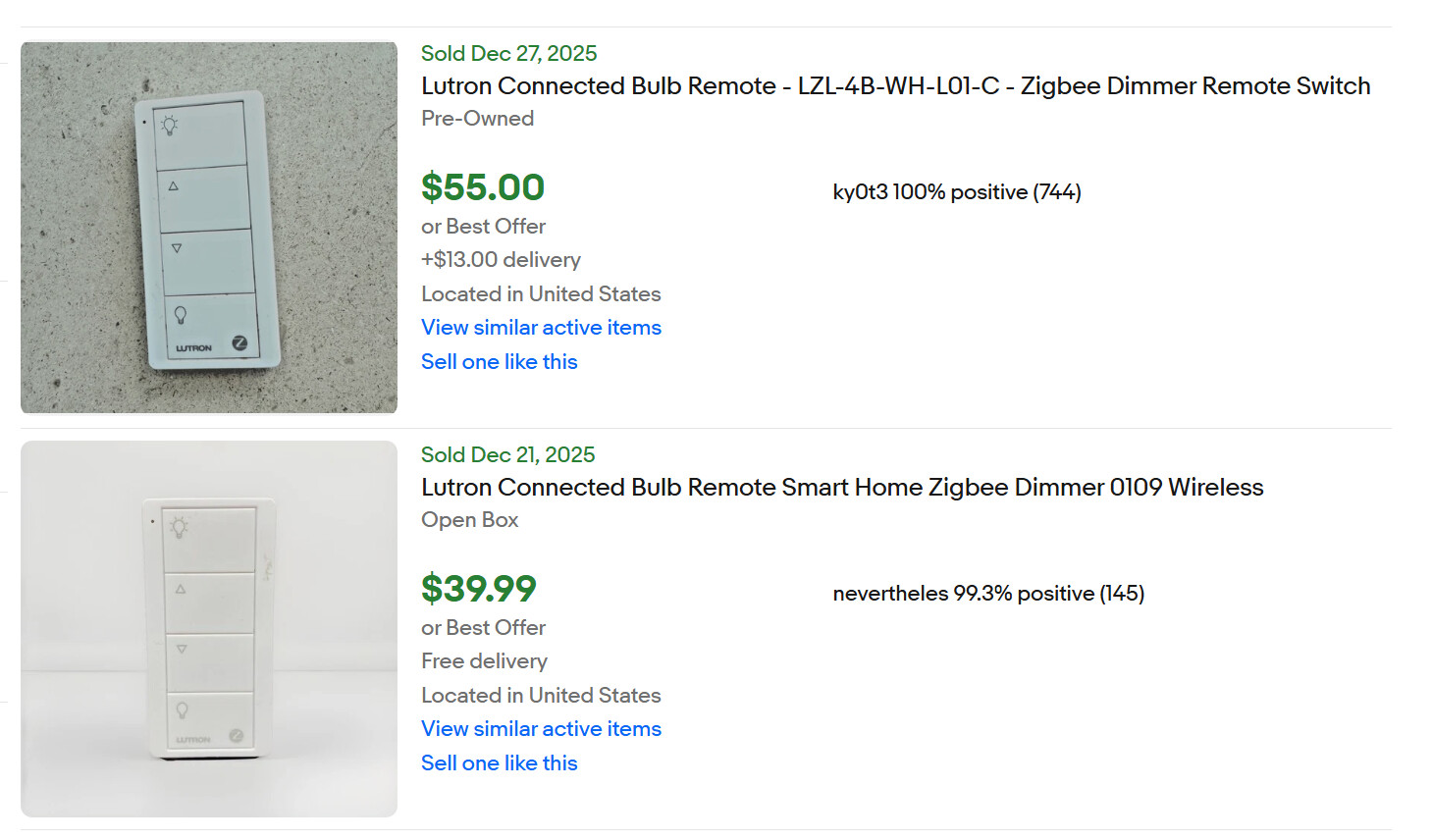
FYI, these are not Pico remotes. They are Lutron zigbee devices that rely on inbound zigbee group messaging. Hubitat doesn't support that. I would recommend replacing them with actual Pico remotes.
Thanks for the quick response @aaiyar . I have been able to connect a couple of my old Cree bulbs to hubitat. They seem to work ok when I mess with them on my laptop using the EZ Dashboard - on/off and dim. Why would I replace them if they seem to be working? What bulbs do you recommend?
Thank you @marktheknife - Checking this out! Do you have an idea about sequencing this transition? Would you focus on getting all of the bulbs registered in Hubitat, and then attemp the Lutron integration , and finally the Lutron swithes? What do you think?
I also transitioned form Wink several years ago now. I’ll second @aaiyar’s recommendation to phase them out if you can. They will cause you grief later on when you add more Zigbee devices.
The Lutron integration can be done at any time. It can be a bit of effort to figure out at first, but once it’s setup, it just works, which is great!
You’ll find that one of the Strengths of Hubitat is in its automations. I started buying motion and presence sensors after I transitioned, and now rarely use dashboards.
The IKEA ZigBee bulbs were pretty good, if you can still find them they're probably on clearance.
Hue is my go to for reliability/performance, but only when they're steeply discounted.
Edit: Just to add, even with Hue there are several generations that aren't the best. Make sure the ones you are buying are the ZigBee 3.0 with Bluetooth versions.
Thanks for the recommendation. I had no idea that Ikea sold zigbee bulbs - what? I'll look around on eBay and the like. And yes - Hue has been on my list forever. Just waiting on a winning lottery ticket.
Since the integration with the Lutron hub is over your LAN, and Lutron devices themselves use a proprietary wireless protocol called ClearConnect, it doesn’t really matter whether you integrate your Lutron devices first, or your zigbee devices.
The hub documentation does include some helpful info about how to pair zigbee devices to Hubitat to create a strong zigbee mesh.
I’m not sure I understand which Lutron switches you are using, though? You didn’t specify any in your OP and as @aaiyar mentioned, those Connect Bulb Remotes are not using Lutron’s Clear Connect protocol (as noted, they use zigbee but aren’t compatible with Hubitat).
If the Cree bulbs are your ONLY zigbee devices, go ahead and keep using them. It only becomes an issue if you add additional zigbee devices later on.
I replaced my zigbee bulbs several years ago with LIFX bulbs. These are WiFi bulbs that can be controlled locally by Hubitat. They work great, but are pricy. I would not recommend them today because there are cheaper options that work well.
For example, Philips Wiz bulbs are WiFi bulbs, which are also WiFi bulbs that can be controlled locally by Hubitat. From what I've seen of them, they work well.
Please tell us more about your Lutron devices. The majority of Lutron devices are ClearConnect, and those devices are supported by Lutron's Caseta Smart Bridge Pro. Such devices will integrate easily with Hubitat. As @marktheknife points out, Hubitat has a LAN integration with the Smart Bridge Pro, so there's no defined order of addition.
Now, the Connected Bulb Remote is not a ClearConnect device, so it isn't supported by the Caseta Smart Bridge Pro. It is also not a unicast zigbee device, and isn't supported by Hubitat. You will need a replacement for these remotes. I would recommend actual Lutron Pico remotes, which are ClearConnect devices.
Ge Link, Hue, Cree bulbs etc are ZLL bulbs. They should be kept on a separate hub mesh than zigbee devices such as sensors or what have you because ZLL make very bad repeaters. The exception to this are Sengled bulbs (they do not repeat) or Zigbee 3.0 bulbs. The solution in general is to move these ZLL bulbs to a Hue bridge or another Hubitat with just those on that hubs mesh. Hubitat can still control them.
You got some excellent information and suggestions above. I use most of them (Hue, LIFX and Sengled).
As you can see, Hubitat has a very active and helpful community, and it also includes the Hubitat staff, so keep asking questions, and connect if you run into issues.
Thanks @ogiewon - that IS decent money. So I need to replace all of my remotes - dang. I bought a Lutron Caseta Smart Bridge Pro hub in prep to make this switch away from Wink. Sounds like I don't need? Guess I could sell that and these switches and fund the new switches that work with Hubitat. Is there a switch you recommend?
In a generic sense, Hubitat calls wireless devices that don’t directly control the lighting load “button controllers.” Picos are an example of a button controller. You can use them to control zigbee bulbs as long as you keep the Lutron bridge.
If you have smart bulbs, you already bought the Lutron Smart Bridge Pro, and you’re willing to sell the Connect Remotes, just buy some Picos and that’ll probably be the best possible experience.
You need the Smart Bridge Pro to incorporate any current caseta device (switches dimmers, compatible pico remotes) For example, every Switch in my house is lutron (all dimmers except closets which are on/off switches, a couple of caseta fan controllers and umpteen pico controllers) Overall I have 66 devices on my caseta pro unit.