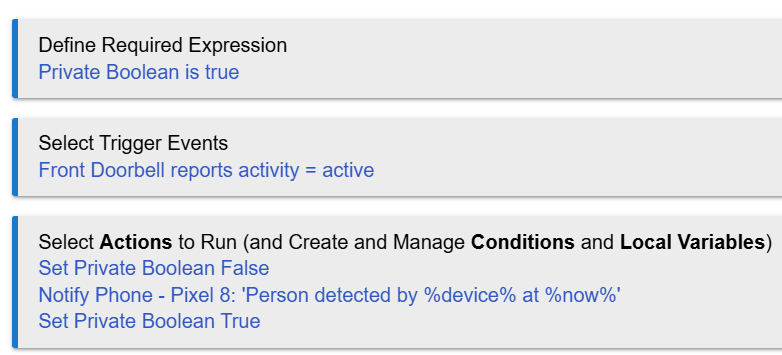
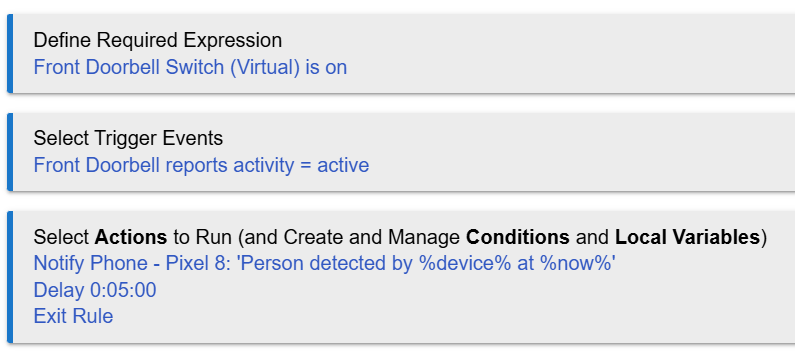
I added the Delay action below and set it for 5 minutes. However, I keep getting notifications on my phone in like 2 or 3 minutes. This checks for the Kasa doorbell person detection being active. Can someone explain to me why it's not at least 5 minutes before I receive a notification?
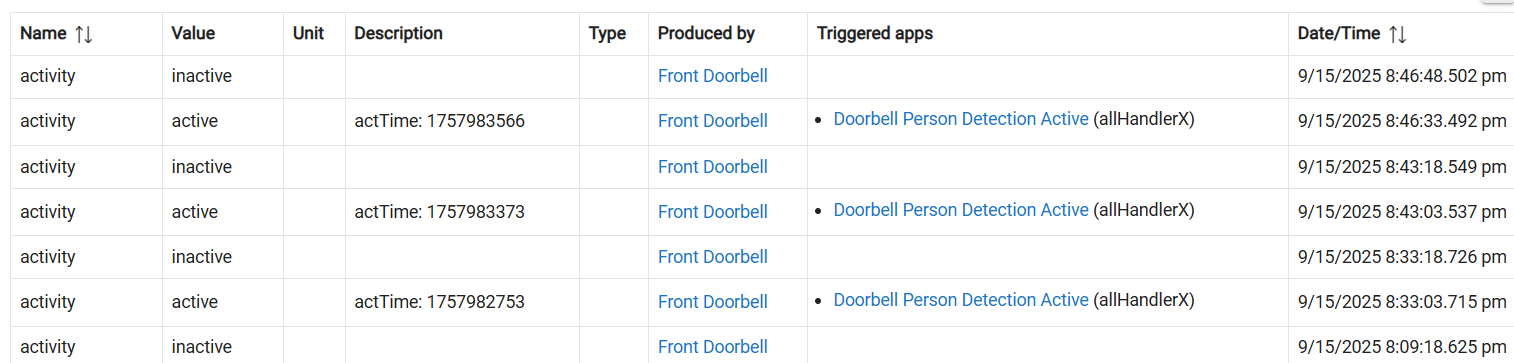
Have a look at the events log for device "Front Doorbell". Are there inactive-to-active transitions every 2-3 minutes? That would cause your rule to re-trigger within the five minute delay period. If that is the case, then all your delay is doing is setting up the rule to be instantiated multiple times.
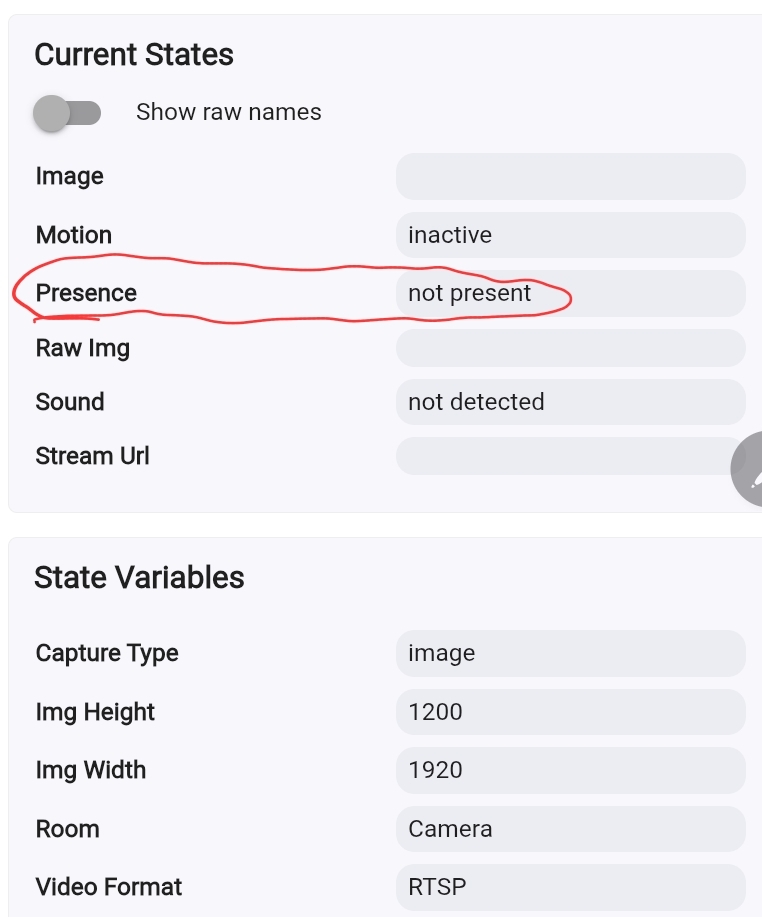
Just curious, is that how the Kasa integration works? I use a different camera and driver that also has person/face detection. That one uses "active" for generic motion and "present" for person detection. If you look at the device commands page, do you have a presence and a motion in the states portion on the right?
Screenshot of states with both motion and person detection
Could it be that it is just picking up motion (false positives) and notifying you for that?
Also, I do not use any delay for person detection at any of my cameras (If my camera detects a face at any of my cameras when I have them armed, I want to know right then, not 5 minutes later). If you are trying to limit repeats, then that sort of points to the fact that the "active" you are selecting is more for generic motion than face detection. I have never needed a delay since I started using the actual face detection as opposed to motion (which went off every time a leaf blew in front of the camer).
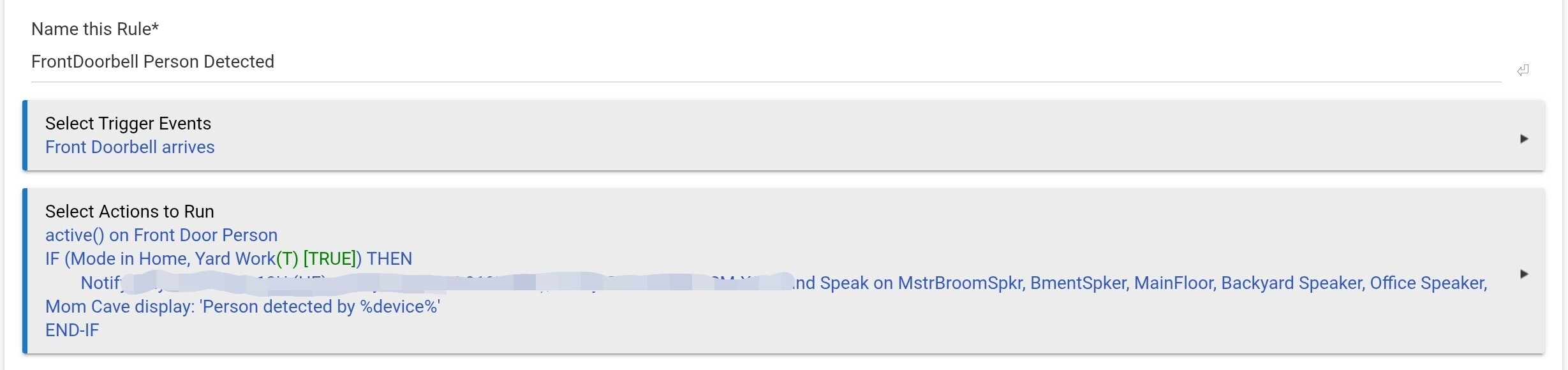
Here is my rule. I created a virtual motion sensor so that I could use it in Hubitat Safety Monitor. The virtual sensor has a 15 second timeout (it will reset back to inactive 15 seconds after no activity)
The trigger is face dected (Camera "arrives"). The first action sets the virtual presence to active.
If my current mode is "Home" or "Yard Work" then it notifies my and my wife's phones, and also plays a message on speakers throughout my house.
If we are not at home, or in our night mode, then Hubitat Safety Monitor will sense the activity on the virtual motion sensor and trigger an intrusion (which has more drastic notifications than the above).
I read that section. It says "...then resume with the next action when the time is up.". So, I added an "Exit Rule" action thinking that the delay would wait 5 minutes until it exited the rule. But the phone notification still occurred after only 3 minutes.
How can I add a 5 minute delay to this rule? It doesn't seem like it should be this difficult.
Is logging on for the rule? Show the logs from an occurence where the motion gets retriggered/active again at the 2-3 minute point (causing that <5' notification).
The logs should be revealing as to what's happening.
You told us (I guessed from your description of the issue)
Something to know about Rule Machine: multiple parallel executions of the same rule are possible. Every one of the motion active events will trigger your rule - as long as the required expression remains true. The delay does nothing to stop that from happening; on the contrary, you've run into this issue because the delay is longer than the time between active events.
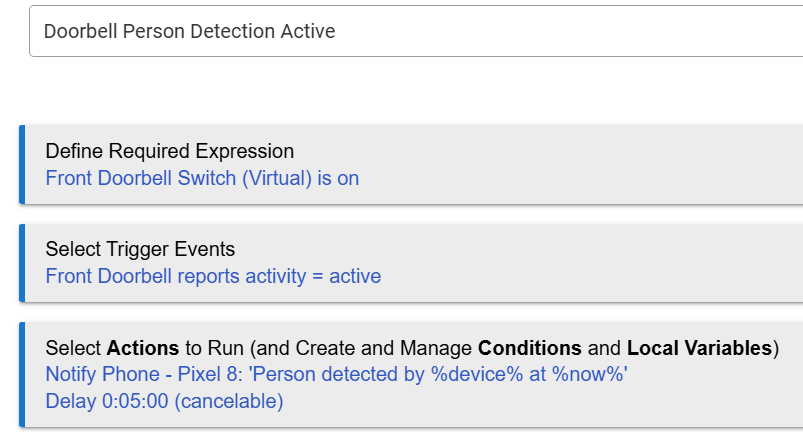
There are ways to prevent multiple executions, the most common is to use the rule's private boolean. In this case you would for example set private boolean to false as the first action, and set it back to true as the last action. Then add a condition "private boolean true" to your trigger.
Thanks, I've used the private Boolean in some of my other rules. But I thought this would be simple! I still don't understand -- Regardless of whether there are multiple executions, I would think a 5 minute delay would be 5 minute delay, regardless.
Because the first command your rule executes after being triggered by the front doorbell becoming active, is to send a notification to your phone. Then your rule waits for 5 minutes (doing nothing) before it stops running and terminates. In other words you should have zero delay, and not the 2-3 minutes you are describing.
What you don't seem to understand, is while this instance of the rule will continue running for 5 minutes (once again doing nothing), any additional changes in the doorbell status will create additional instances of the rule, with each of them running for 5 minutes.
If you want to prevent repeat notifications for a single person detection event, then add a delay while setting the PB to be true. Something like this:
 (I guessed from your description of the issue)