Thanks for helping out  with testing you didn't volunteer for
6 Likes
@csteele I just tried to update HPM today to the latest rev but now it hangs since quite a time in the shown status (please see screenshot).
Not sure what to do now. I have not tried to do anything. Any ideas if this is bad or what to do now?
Thanks for any help. To be honest I'm a bit scared........
Update: It just finished the update it took really long. But now it states v1.9.7 in the right top corner but also shows an available update in the list of apps.
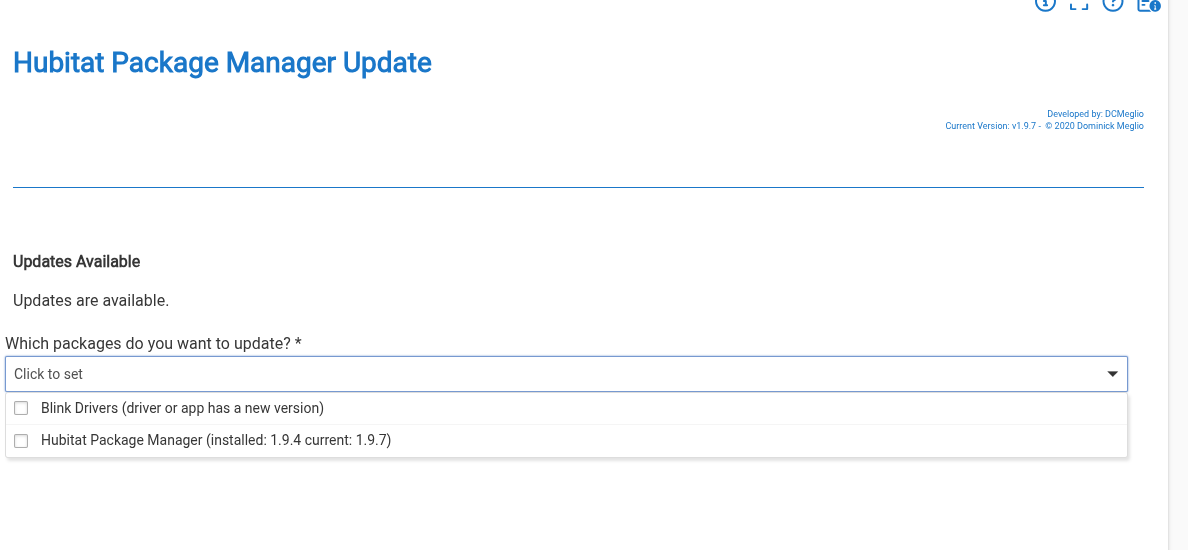
Update 2: I did a repair and now it looks god so far. Thanks
Yup
Maybe this needs to be in the instructions? Or could it be added to the release notes for the HPM update itself so everyone sees it when they go to update?
@csteele I had another random idea that would maybe fix this. What if the code that was doing the update for HPM itself was at the VERY TOP of the source code, such that the line number would never change???
4 Likes
v1.9.8 Fix issue with "shouldInstallBeta" and "getItemDownloadLocation" methods
- Added ability to install items with beta turned on. Update needed values accordingly
- Updated Release Notes for install to display proper release info based on selection of Beta flag during install
Thanks again to @mavrrick58 for the main improvement.
As noted above, updating HPM itself can result in the hub appearing to not complete the update. As explained, the upgrade works, causing the code to shift and throw an error as it tries to execute code that isn't in the same logical location after the upgrade. Simply click the Apps button in the left menu and start HPM again. You'll see the latest version in the upper right corner.
7 Likes
I did a repair instead of an update on HPM and it didn't generate any errors. I'm on 1.9.8 now.
3 Likes
Same risk I predict. Both Methods move with each significant upgrade. The return from pushing the upgrade code moves and an error gets thrown BUT the "intensity" of the error is another variable. Sometimes it's an error that can't be ignored and we all see that as a failed (never see "Complete") upgrade. Other times, the landing spot of the return is just going to cause a message to be misspelled and will carry on.
4 Likes
I'm on HPM v1.9.8 and I'm having problems uninstalling an app. HPM just hangs before completing the uninstall. I'm trying to uninstall Ecobee Suite. It is not in use.
Also I tried to install Matter Advanced Bridge. HPM said the install was successful, but the app doesn't show up in Add User App. I tried repairing it, and still no dice. Uninstalling hangs.
I tried restarting HPM and also repairing it, but that didn't help.
Not sure where I should go from here. Let me know if you need other info.
Not sure how many code files Ecobee has, but if its not a ton you can just go to the Apps/Devices code lists and delete the code manually. Then in HPM go to Settings and UnMatch the package.
Turn on debug logging in the HPM settings and post some logs from during any issues.
1 Like
FWIW,
My upgrade from 1.9.7 to 1.9.8 completed and presented the Done button. Didn't have to do a repair or anything else.
1 Like
With Ecobee Suite it appears to have deleted most files. I deleted the remaining few by hand and unmatched the package.
When I try to uninstall Advanced Matter Bridge, this is what the logs show:
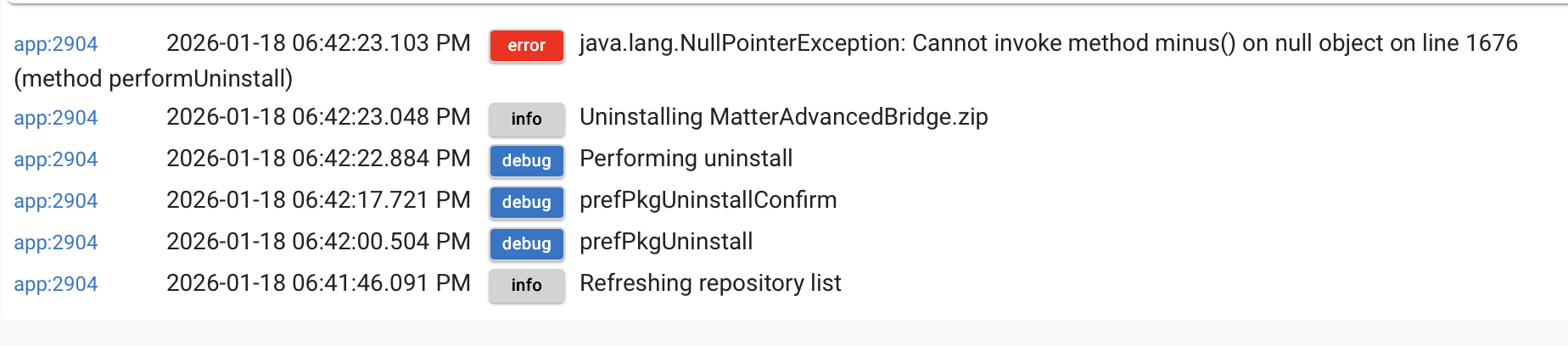
There's two problems I can see, first, the easy one the Package is a fist full of Drivers, no App. So there won't be an app showing in Add User App.

The second is more esoteric... the NAME of the Package is"
"name":"MatterAdvancedBridge.zip",
But Hubitat, when it installs Bundles, strips the ".zip" part and the name within the hub is:
"MatterAdvancedBridge" without the zip. The result is, when Uninstall runs, it cannot find a package named "MatterAdvancedBridge.zip" and so it does nothing.
This is a hurdle for @kkossev to tackle. He will probably want to change the Package Name in his .json file to drop the ".zip", because that is the easiest... make his actual Package Name match what Hubitat forces.
4 Likes
@kkossev did fix his json and during testing uncovered another bug. The same bug that @mavrrick58 detected literally 2 mins prior. I've updated the Github repo for HPM and a Repair of HPM will bring in the latest fix.
4 Likes
Sorry to bother everyone... I'm trying to figure out how to add beta versions to my installs and can't seem to find the setting.... Specifically trying to add @mavrrick58 's beta version of Govee V2...
I did a repair of HPM to make sure I'm on 1.9.8... Just don't see it anywhere... Probably something really simple and I'm going to face palm when I realize it.
Go into the hubitat package manager settings menu. From their flip the switch to install pre-release software when updating.
Once you click it on you should see a option to choose the App/packages to install select the Govee Integration for beta/early access code. Select Govee Integration v2 from that list and click done.
Next time you go into HPM and run update it should grab the beta code.
Ok, just saw that option for the first time... Don't think it was there before... glad I did the repair of HPM... Even though it showed 1.9.8, I don't think it was fully installed right...
Anyway, thank you!
Its been there for ages, no one used it, pretty much ever. Until some genius revived it from the dead  [BETA] Zooz Advanced Drivers BETA Updates
@mavrrick58 added the option to enabled it per package and have separate notes which is an awesome upgrade and makes it much more user friendly.
6 Likes
I think there may be a minor bug with that. The first time you go in and flip the slider the package drop down doesn't show up. If you exit the settings and then come back it's there.
I'm pretty sure I saw this. I guess I should have reported and maybe I'm wrong. I am pretty sure I saw this on two hubs.
Similar for me. Somehow, the toggle was already "On" in my copy of HPM (latest), without a drop-down visible. So I turned the toggle to "Off", exited with "Done", came back into HPM, toggled it "On" again, and after a few seconds, voilà!
There is something cause it took couple of tries to finally see it... But I am getting old, so that could be it also... 
1 Like
You may just need to be patient. It takes a few seconds after you toggle that switch for the dropdown to appear.
2 Likes

