Thanks, been there. Ecobee is a no show. I also tried disabling the Ecobee and Ecobee Suite integrations on my two hubs, no help there as well. I wish there was a way to discover the ecobee by IP address. The iPad Home app finds it almost instantly. Fortunately, I only use the Hubitat to set home, away and resume program on the Ecobee.
Fan attribute. Is there an attribute for furnace fan running on or off? I'm looking to put the furnace fan on a dashboard. I don't need to control it, just see if it is running or not. Fan speed shows what it is set for but not if it is operating.
'equipmentStatus' if it has fan in the string, the fan is on.
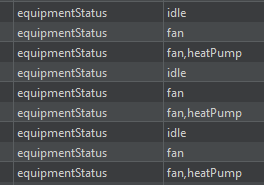
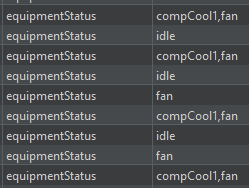
Thanks, I should be able to create a virtual device that is on or off for fan and idle.
FYI, this morning I tried pairing the Ecobee again via Homekit and several new available devices appeared including the Ecobee and its temp sensors. On Beta 2.4.3.173 Now to figure out if I can replicate the few settings I currently use on the Ecobee integration.
See HomeKit and Ecobee Thermostats for more information on this.
It might be because my weather station went offline, but I got this error in the smart mode helper:
app:102026-01-11 04:43:13.068 AMerrorgroovy.lang.MissingMethodException: No signature of method: java.lang.String.currentState() is applicable for argument types: (java.lang.String, java.lang.Boolean) values: [weatherTemperature, true] on line 670 (method updated)
app:102026-01-11 04:43:12.894 AMinfoEcobee Suite Smart Mode, Programs & Setpoints Helper, version 1.9.01 on Hubitat Initializing...
app:102026-01-11 04:43:12.823 AMtraceUpdated with settings [belowHeat:false, aboveCool:false, belowSetpoints:false, aboveSetpoints:false, notify:false, infoOff:false, aboveTemp:85.0, betweenMode:auto, minimize:false, insideAuto:false, aboveMode:cool, customTstat:(thermostat names), betweenSetpoints:false, tempDisable:false, belowTemp:55.0, belowMode:heat, debugOff:false, humidistat:OFFLINE - Weather Station on Hubitat_C5, thermometer:OFFLINE - Weather Station on Hubitat_C5, tempSource:ecobee, tstatTemp:EcobeeTherm: Seond Floor, thermostats:[EcobeeTherm: Seond Floor, EcobeeTherm: Ecobee First Floor, EcobeeTherm: Third Floor]]
This prompts me to also request an enhancement where there can be a backup weather source if the primary one is unavailable or invalid (or the program reverts to the default Ecobee weather source). Or perhaps even disables itself if the weather source is invalid.
Last night I woke up in the middle of the night in a hot sweat because of this, so a fallback or failsafe to handle this would be very nice!
Glad to see you've done so much with this smart mode helper!
Getting a hub load severe on my C8 Pro after installing ES. I have two ecobee therms with two remote sensors each. So two therms and four sensors.
The short history was had no issues with elevated or severe load for about two years on my C7. I installed ES and started getting elevated errors the same day. Then it went to load severe. I tried adjusting the polling and other settings but never could get it to work without errors. Finally after about a week of constant errors, I uninstalled and the errors stopped. I made some workarounds and decided with my setup and the lesser memory on the C7, I couldn't run it.
I upgraded about a month ago to the C8 Pro. It's been running pretty good for the last month. I installed ES and now I'm getting hub load severe errors every three days or so. Same device setup and same rules. I honestly thought with the expanded internals of the C8, I would have the extra umph I needed to run ES. Is it just my setup? I've adjusted the polling settings, but I can't get it to stop.
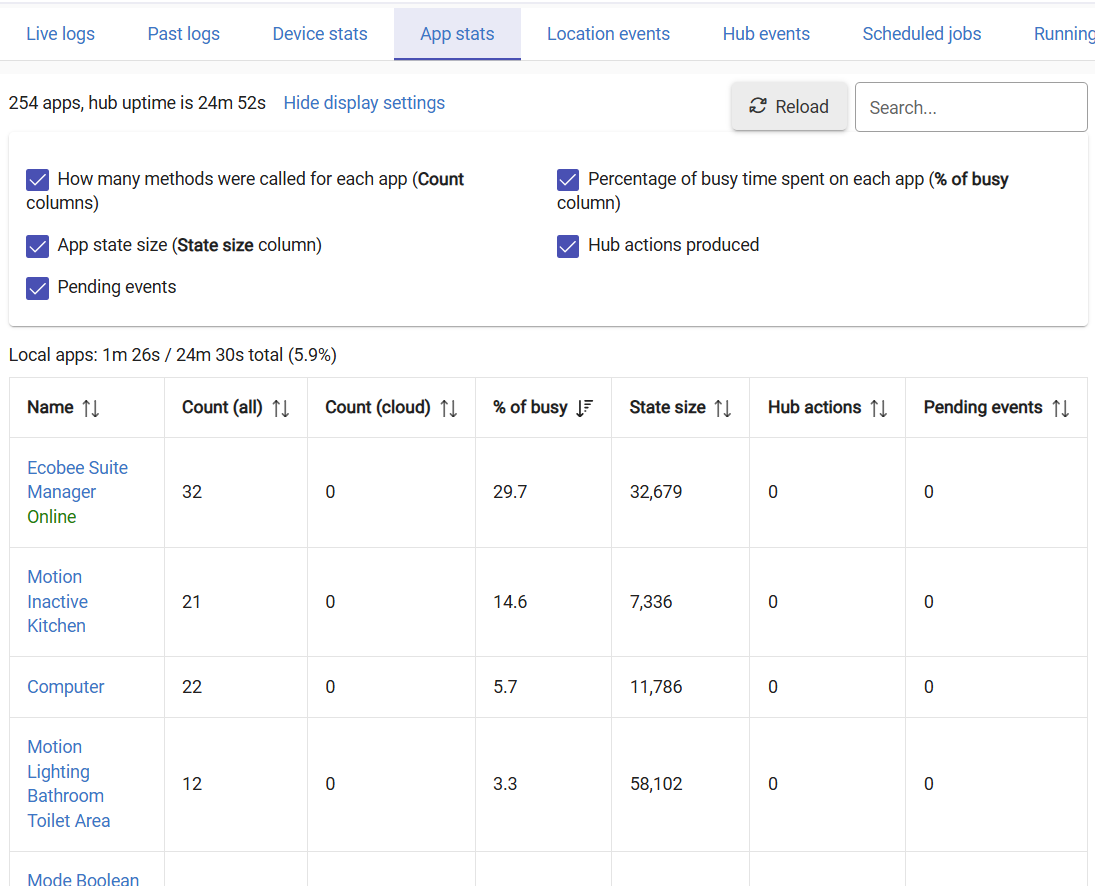
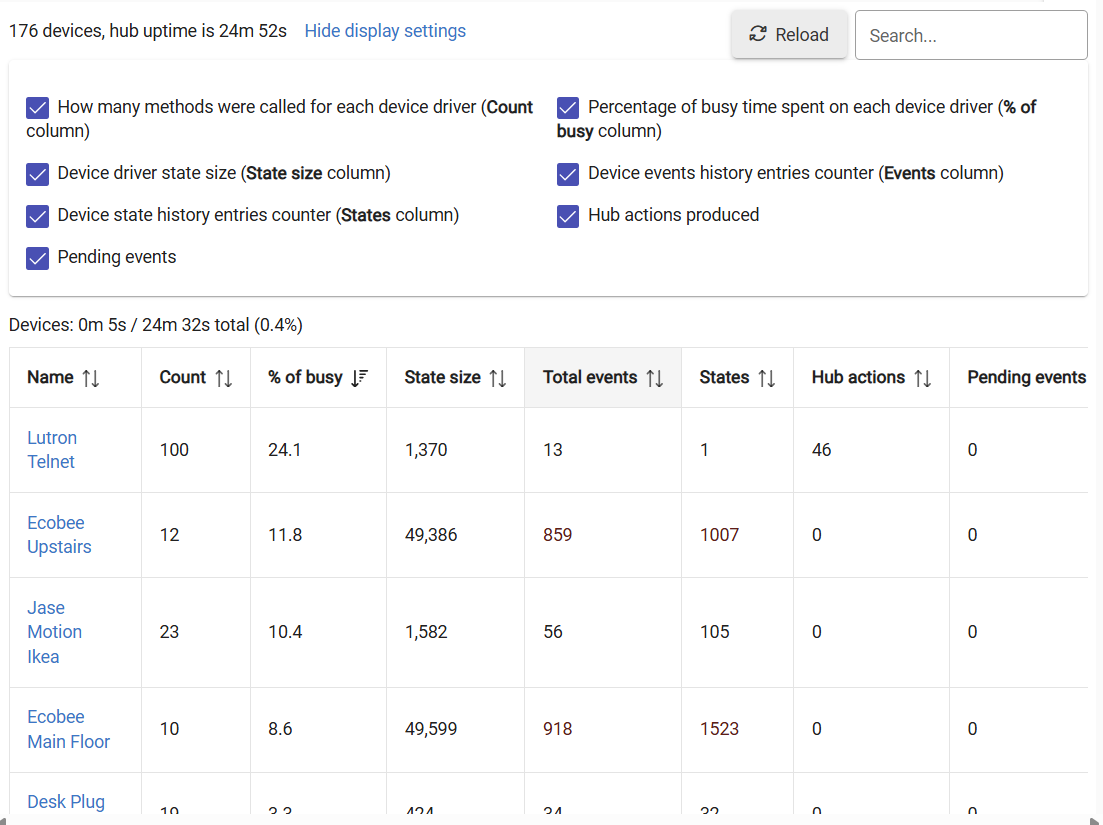
2 things...
-
Author recommends the faster polling cycle since there's SO much changed on each API call, when you make it longer it's actually more work. I see you've changed it to 1, so that's good.
-
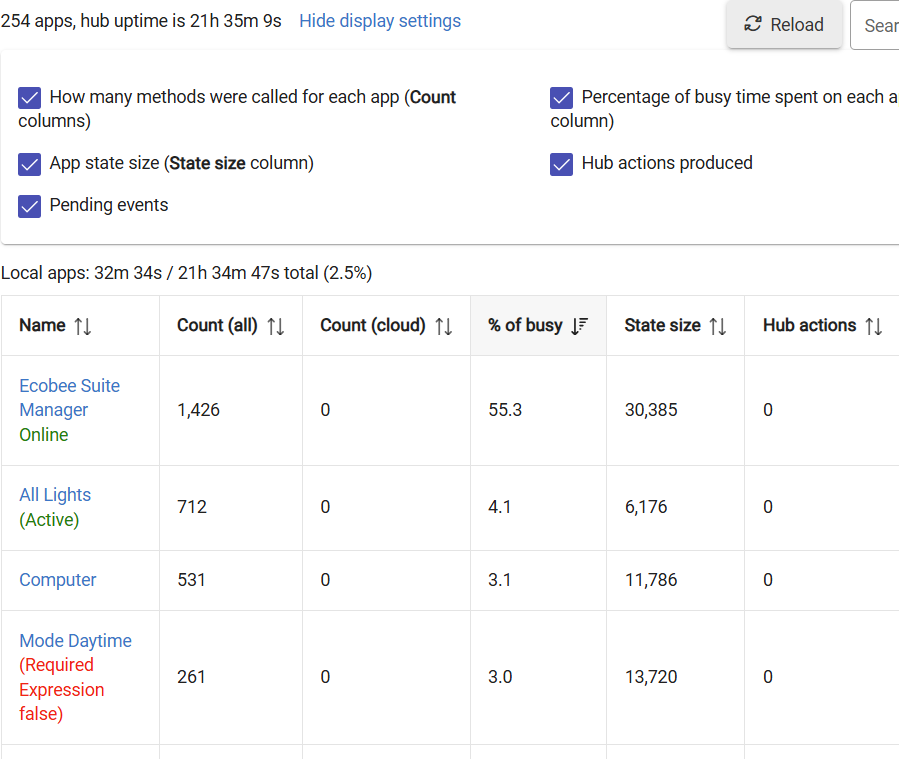
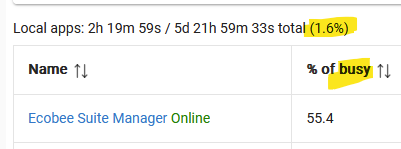
Your apps aren't the problem. You are looking at the numbers wrong. In your initial post, your apps load was 5.9% and in your second it has improved (by making polling faster) to 2.5%. The hub is reporting that ESM is 55.3% of that busy time (2.5%) so in reality it's using just over 1.25% of your hub's processing.
Here's my C7 for comparison:
Even with improvement, I still get load severe errors. As a test, I uninstalled ES about seven days ago. I have not had an error since and no zigbee/z wave radio issues.
I appreciate the explanation. I really want to use it, I just don't understand. Most everyone points to ES not being the issue and that the numbers aren't bad. But, 100% of the time (on two different hubs), when it's installed, I get severe errors and radio drop out. When it's not installed, I get nothing and everything works great. I just don't understand why it doesn't work for me or with my setup.
This is as of right now.
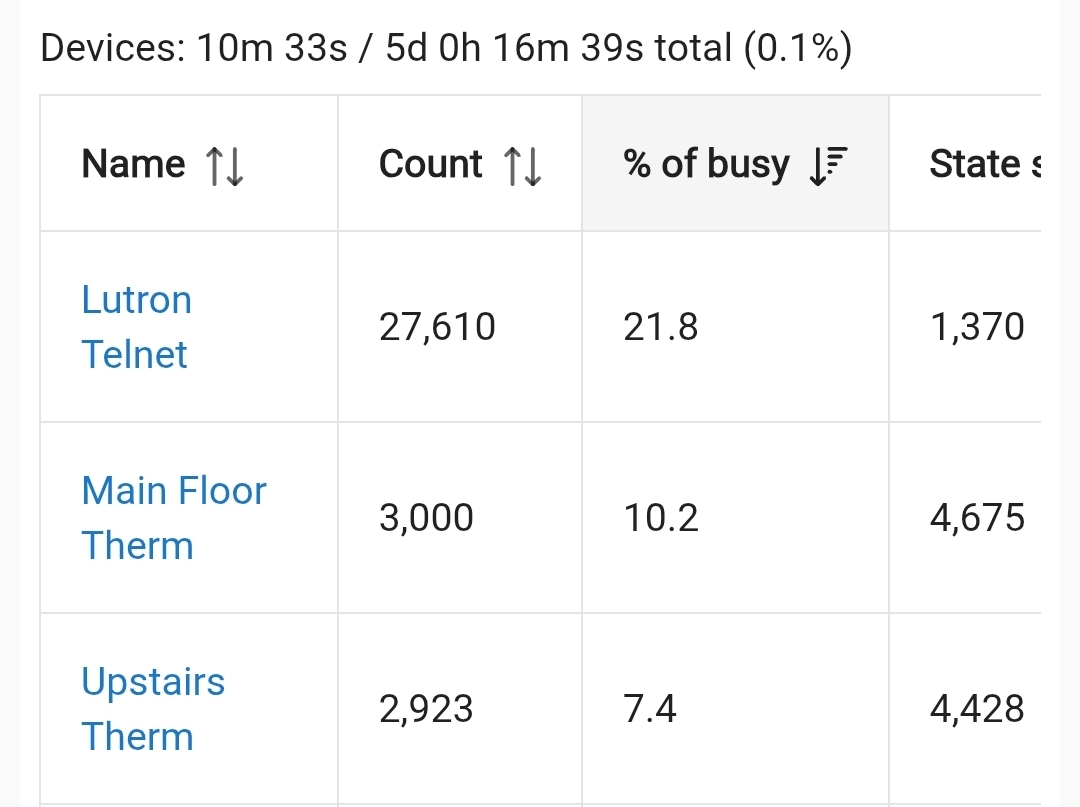
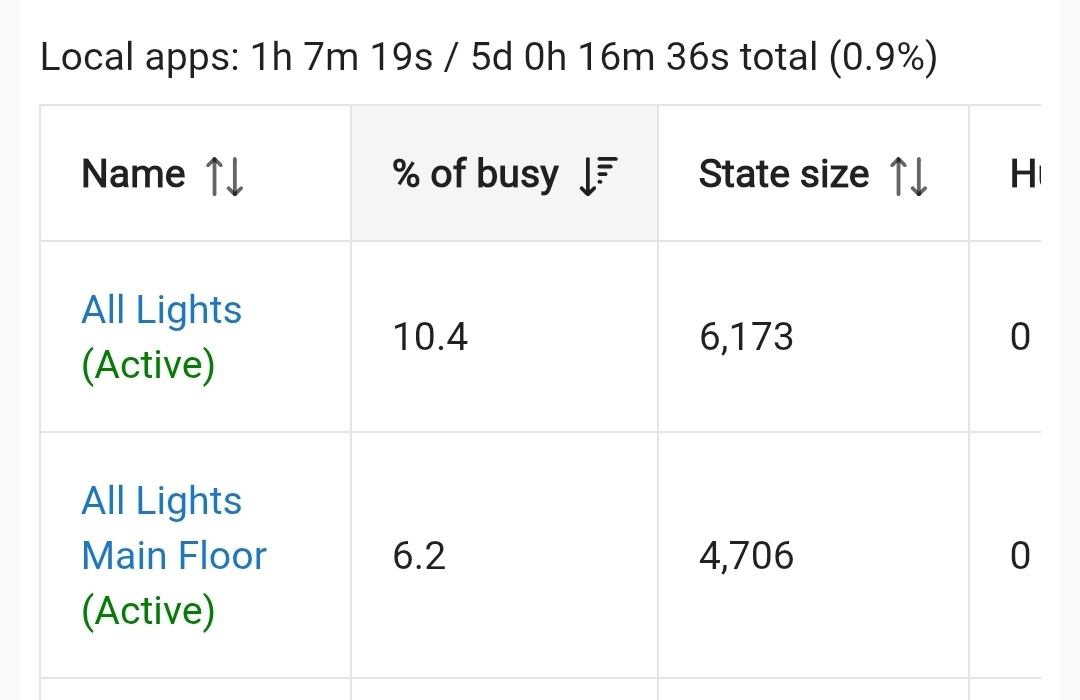
Both less than 1%. But even at 5.9% (I think) it shouldn't be an issue.
My recommendation: switch to the built-in app that uses HomeKit API to communicate locally with the Ecobees.
Ecobee Suite is nice, but it is heavy as it has lots of features that most people don't need. Even if you don't enable them, it seems that some resource usage happens anyway.
I have switched about 4 months ago and I couldn't be happier.
- No more cloud dependency. Ecobee cloud goes down more often than I'd expect.
- Way faster, local communication
- Much lighter on resources
My recommendation: switch to the built-in app that uses HomeKit API to communicate locally with the Ecobees.
does this allow switch programs (home, sleep, etc.)? With the basic integration, it does everything I want it to do except that. I want the functionality of ecobee only monitoring certain sensors during certain times (sleep mode only monitors the bedroom sensor, Home monitors all sensors). I tried to resume program under custom actions and add a string "sleep," but it doesn't work with the built in app. In Ecobee suite, it will adjust the program. I feel like it should be able to do it, but I haven't figured out how yet.
Just curious - why not just allow the Ecobee thermostat to automatically change its modes?
This is what I do. I have mine connected locally through Home Assistant. I have a Home, a Sleep, and an Away mode. I let the ecobee itself control home and sleep. I use my presence to kick it into away mode when we leave, and an automation that resumes the correct timed mode when one of us leaves our work radius. I also have a rule that sets and locks a setpoint depending on the day's highs and lows if they are too extreme so that the house doesn't have to struggle to overcome a significant delta.
Otherwise, the built in "smarts" of ecobee just aren't (hence the need for the ecobee suite and other home made integrations). Their "smart recovery" isn't effective at all and most of their default settings just don't work. Add to that the inaccuracies in their humidity sensors (which they will gaslight you and tell you it is because of the hole in the wall behind the stat - funny thing is, I 3D printed an inset cover just for this. My ecobees still report > 15% error as compared to 10 other CALIBRATED humidity sensors), they are a purchase that I regret making to be honest.
I'm not very advanced with automations, but that's what I'm trying to do. I'm trying to let the ecobee control its own modes but unless I'm missing something, that only works in time scheduling. I would like for it to change modes based on modes of the hub. We don't have a set schedule, so when the hub goes into night mode, it's based off of our routine. I want ecobee to change to sleep when the hub hits night mode.
We don't really use away mode just because we're not away for that long. Setting it to away based on presence makes sense, and I believe there is a "setaway" in the custom actions list, I just can't figure out how to change the other modes. I think it's labeled as program on ecobee suite, but the only option in the built-in app is resume program, which only takes it back to home mode and never enters sleep.
Hopefully all that made sense...
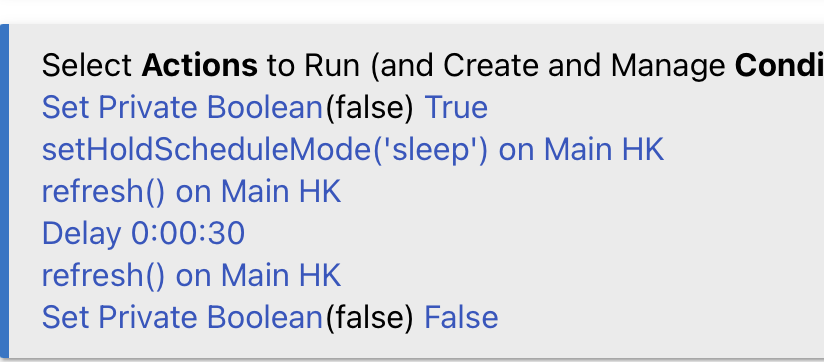
My thermostat rules are a rudimentary finite state machine that picks one of four modes based on current thermostat mode and changes in location mode, whether someone is home, and whether the "someone is working in the office" variable is set.
I believe the generic modes allow me to set based on a fixed schedule and occupancy ... not quite as nuanced or adaptive as desired. For instance, my morning location mode is set daily based on some combination of my phone alarm time and sunrise.
Resume mode takes it back to whatever mode would be effective at the time it resumes. If you don't have time based modes (comfort settings) set up, then it may just revert to home.
As far as I can tell, the local integration through home kit only allows the three built in modes: Home, Sleep, or Away. On home assistant, this would be "climate.set_preset_mode" and you choose Sleep, Away, or Home. Not sure how HE handles those commands.