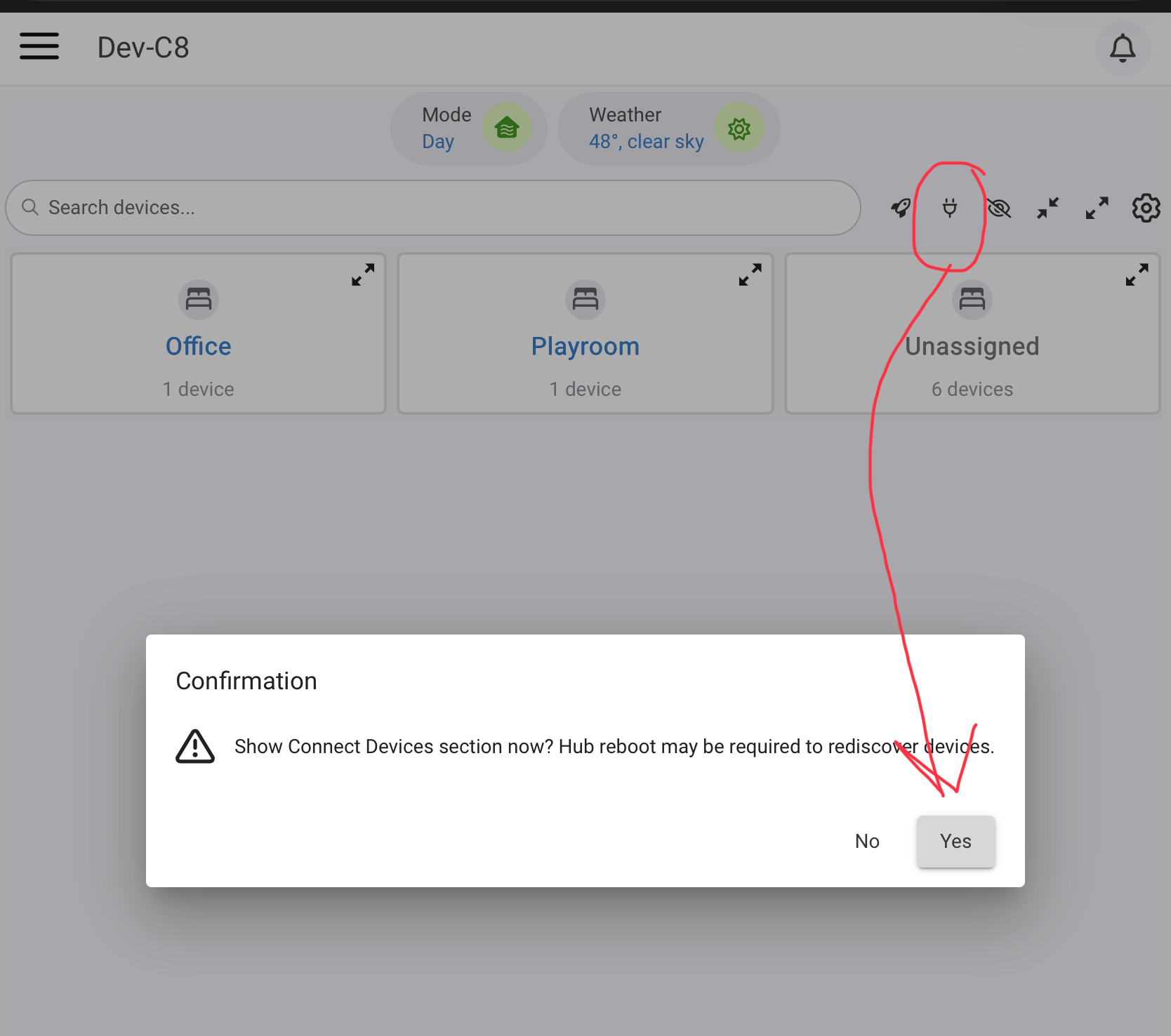
I just looked at the Smart Circulation Helper, if this is what you're referring to. It seems to be based on temperature differences bwtween two sensors, as opposed to just being time-based on every hour for X mins between two defined times... which is what my routine does.
Sounds like the Ecobee cloud API connection is getting dropped and by hitting DONE you are able to reconnect it - Just a hypothesis. 
It appears it has been a while since @storageanarchy has posted. His last post was back in April. He would probably be the best person to answer the question, if he is still actively supporting this integration? Looking at his GitHub repository, it appears this code hasn't had any changes for a few years.
I was coming to the same conclusion as you about API. I was also concidering switching to the newer Hubitat Ecobee integration, but noticed no Ecobee products show up in Device Swap... which is unfortunate. Too much work to try and switch... more with switching everything in Sharptools.
The thermostat has a simple feature to run fan for at least X minutes every hour. That is what I was referring to. If the AC or HEAT has already run for at least that many minutes during that particular hour, the fan is not run independently.
I am actually using the Ecobee Thermostat <-> HomeKit <-> Home Assistant <-> Home Assistant Device Bridge <-> Hubitat method of bringing in my two Ecobee 3 Lite thermostats into Hubitat. This is 100% local and has been very reliable for me. I have an Automation that turns on my HVAC FAN whenever my Primary Bathroom exhaust fan is turned on (i.e. when someone is showering) to help keep the humidity level in the bathroom down. Since doing this, no more fogged up bathroom mirrors after a shower. The bathroom exhaust fan is also automated via a motion sensor in the shower.
Of course, the integration I am using is nowhere near as feature complete as @storageanarchy's Ecobee Suite. Also, if you're running a C8-Pro hub, you can now directly pair an Ecobee thermostat via the new HomeKit Controller integration.
So, using either approach with HomeKit, you should be able to control the fan directly. You should be able to use both the Ecobee Suite and one of the HomeKit integrations concurrently - just don't get confused by having the same thermostat showing up on your hub twice! 
1 Like
As I was mentioning in my prior post, Ecobee devices via this integration dosen't show up in Device Swap, so switching will be a lengthy task. Maybe it'll be worth it in the end if I change to local via my C8 Pro.
Understood. But you don't have to switch everything over. You could use both the cloud and local integrations at the same time. For now, to solve the immediate issue of the fan not being responsive while in bed, you could use one of the local integrations. Leave everything else using the cloud integration for now. Just an idea... 
2 Likes
Thanks for the advice. One last thing though. I just installed the HomeKit Integration but my Ecobee devices are not automatically showing up and I don't have an IOS device. Any info on how to get the Ecobee device to integrate?
Have you gone to the physical thermostat and enabled the HomeKit feature? It is only supported on somewhat recent models (i.e. very early Ecobee models do not have HomeKit support.) There is no requirement to have any Apple devices whatsoever. Just make sure you're using the new Hubitat "HomeKit Controller" integration, not the "HomeKit Bridge" integration, which shares HE devices with Apple Home on an iOS device.)
1 Like
Oooo... just enabled as you suggested and Homekit Controller picked it up. It added the new device and is working! Thanks 
1 Like
I ran into an issue where setmode failed this morning. This then cascaded in a failure to setHeatingSetpoint. I posted details in GitHub:
I don't know if I have seen this before but it would be good to trap these things and try to resolve as it could mean frozen pipes.
I just spent quite a while trying to enable this. Ecobee 3, enabled HomeKit on the C8 Pro. Ecobee and Hubitat are on the same network. The ecobee is not appearing in the Hubitat Homekit app. Tried it several times with an iPad following the alternate instructions and still no go.
Did you enable HomeKit support directly on the Ecobee 3 thermostat? This has to be done physically on the thermostat, not via the Ecobee app on your phone.
Are the Ecobee 3 and the Hubitat Hub on the same LAN/VLAN?
Has the Ecobee 3 thermostat previously been connected to Apple Home via HomeKit? If so, it will need to be removed from Apple Home first.
I'm quite baffled.
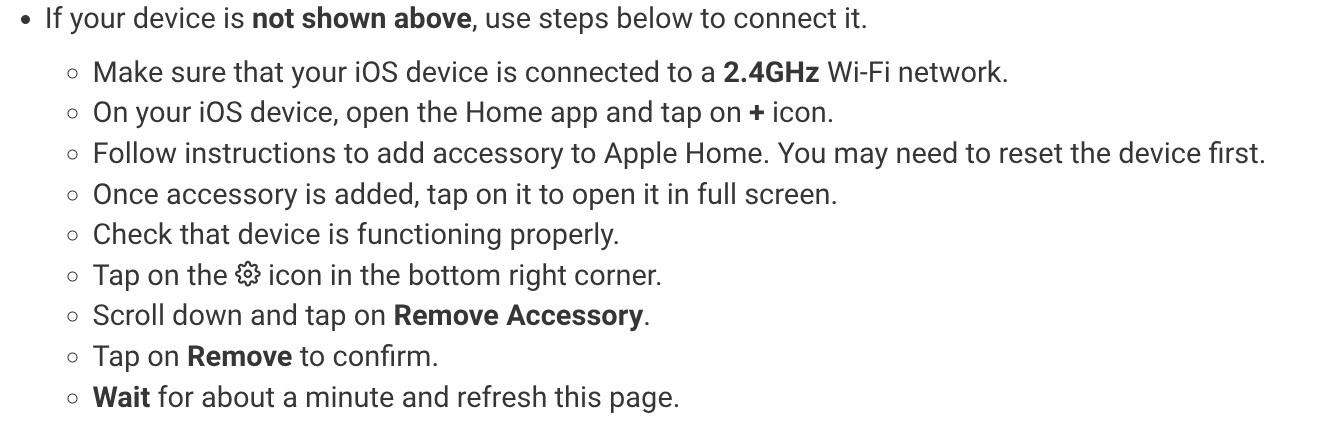
Since it was not discovered I am trying the alternate method, connected to an iPad first and then removed.
Just saw the embedded replies. Sorry…
1 Like
I believe I answered each of them in the context of the quote I pasted.
1 Yes, enabled on the Ecobee 3.
2 Same LAN SSID 2.5 Ghz
3 Since it was not discovered I am trying the alternate method, connected to an iPad first and then removed.
1 Like
No worries, I figured out that I should have quoted the questions separately after I replied. Thanks for looking into it.
Were you able to add the thermostat to your Apple Home instance using your iPad via HomeKit?
Have you tried pulling the thermostat off the wall to power cycle it?
Yes, paired immediately to the iPad via QR code. After deleting the iPad would then show nothing paired. Tried several iterations with the same result.
Thought about pulling off the wall / power cycling. I'm going to hold off until tomorrow on that.
1 Like
Power cycle this morning made no difference. It does not appear in the Homekit app.