I will try that if that fails I will buy the M2 hub and pair it with HE
Aqara M2 should work but haven't tested it I only have the Aqara G3 (not recomended) and M3 Hubs.
I am using this workaround when pairing Zigbee 3.0 devices.
2 Likes
I picked the M2 for $30 and using the bridge device and all seems to be working well thus far.
1 Like
I just ordered an FP1E. Thank you for the work on this!
Reading through all the posts, it looks like people have a lot of issues pairing it directly with Hubitat and the recommendation is to pair with an Aqara hub and then matter it over.
Has anyone tried pairing directly to Smartthings and matter it over from there? Do you get enough features that way? I'm curious if anyone knows which features you get with each method. I have a smartthings hub and would prefer not adding an Aqara hub unless it's significantly better. I'm sure, like everyone else, the ultimate preference is to pair directly to Hubitat.
Is it just me or anyone got it to work just as a motion sensor? I got FP1E paired directly to my C7 but "Rule Machine" and "Room Lighting" do not show the device as a presence sensor? If I use as motion sensor which still works but I lose the occupancy feature. Am I missing something?
"motion" is the correct attribute to use with mmW sensors.
For better or worse, the "presence" attribute always has (and likely always will) be used for geofencing home-vs-away sort of things, not mmW sensing.
The recent arrival of mmW sensors has unfortunately clouded the use of the term presense, but this is an issue bigger than Hubitat -- it's the same for all smarthome platforms AFAIK.
3 Likes
"Presence" in Hubitat terms is the "left the house" type of sensor (your mobile phone). Those are "motion sensors" for Hubitat, so "motion" is the correct attribute.
2 Likes
Thanks @hydro311 and @jbaruch for speedy respond. Do you guys have a work around to use the Room state "Unoccupied/Occopied" of the presence sensor instead of "active/inactive" of the motion sensor? My light keeps turning off when the FP1E detects people in the room but no motion.
I don't use any of these Aqara sensors, so I'm guessing that is a (device) driver-related issue - hopefully Krassimir or a fellow FP1E user can chime in.
I'm not sure that's the case, as the device still reports values for motion, room activity, and room state. The only issue is that Hubitat recognizes it as a motion sensor. Again, thank you!
Hi there!
I’ve recently picked up an FP1E and, having no luck with the recently-released system driver for it, have tried this one. I’ve successfully paired it with the Double Luck Voodoo approach, but am having some reliability issues with the occupancy state of the sensor, regardless of the sensitivity setting. It seems that the sensor sometimes sends this message:
received FP1E RTCZCGQ13LM unknown report: (cluster=0xFCC0 attrId=0x00DF value=0x2823040000002B21B9C62C28F82D2301000000)
If it does that, it won’t follow up with an occupancy change no matter what future motion events occur. The outcome is that the room gets stuck being occupied.
Reading through this thread, it looks like that’s a message for region detection on the sensor, which isn’t supported by this driver. I don’t have an Aqara hub to turn that off with and am unsure how to otherwise get that to stop.
Has anyone had any luck getting past this? (Or, alternately, getting the new built-in driver to work with an FP1E?)
Please post a screenshot of the Device Details section (on the Device Info tab). I need to compare the firmware (Application) version against what I have. Mine FP1E is rock solid in my environment.
FP1E does not feature regions detection. Only Aqara FP1 and FP2 have it.
Here ya go!

NB: last activity shown there is about half an hour ago, but even with sensitivity set to low, it still indicates room activity of small movement / room occupied.

1 Like
One possible reason for the motion attribute not resetting to inactive could be a miscalibration of the device. Or it may be a permanent interference of a nearby object ?
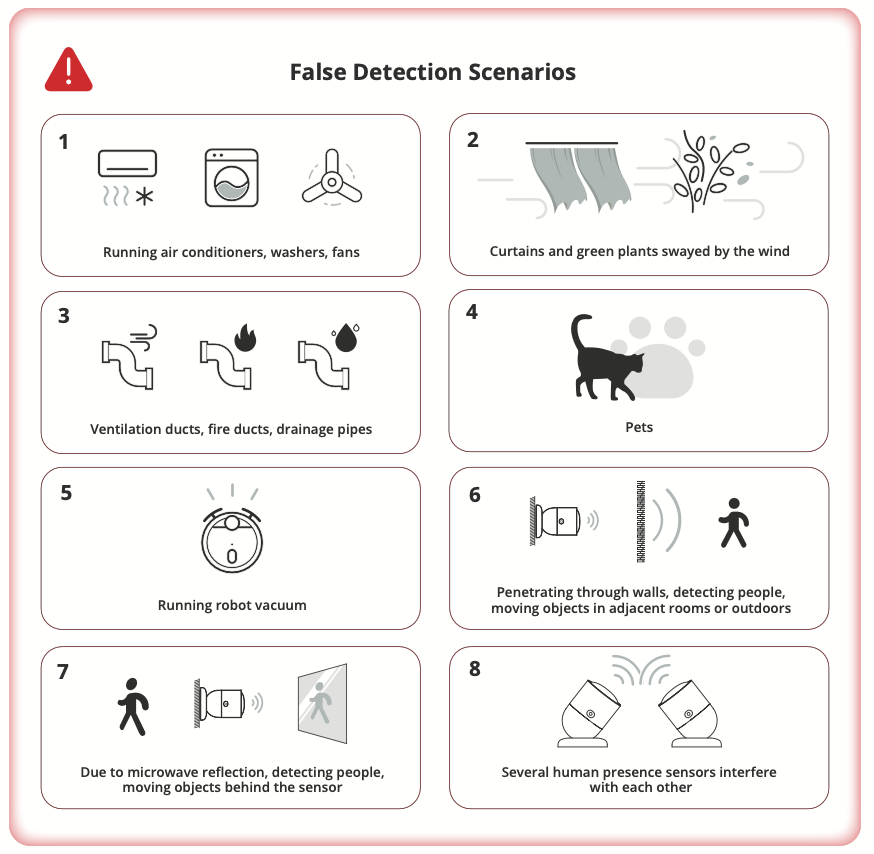
The Aqara FP1E comes with a feature called "Spatial Learning," which is an advanced auto-calibration system for the mmWave sensor that adapts to specific environmental conditions. While this feature is not yet implemented in the driver, I have found sufficient information on GitHub to assist with the implementation. So I can try add the Spatrial Learning to this driver in the coming weeks, after finishing the Tuya mmWave sensors driver refactoring.
P.S. My FP1E has the same application version, so the problem is not in the firmware. The message "cluster=0xFCC0 attrId=0x00DF" imay be important; unfortunately, I couldn't find any information about its meaning.
Please manually update the driver to the new version 1,8.0 "2025/09/28 9:45 AM"
I have added two new commands :
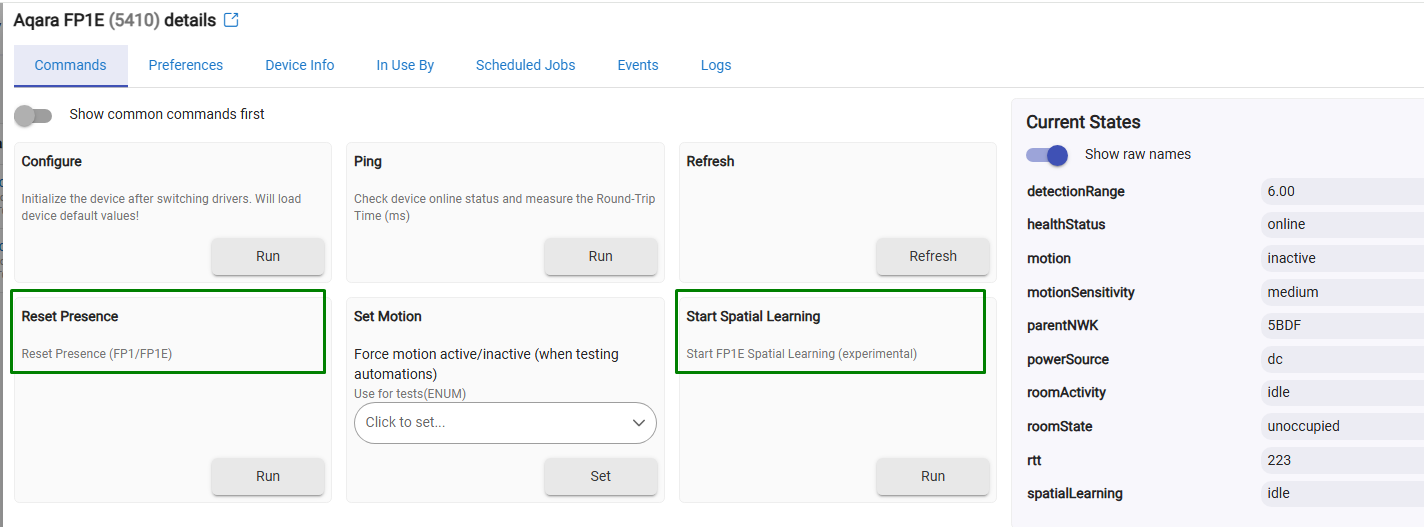
The 'Reset Presence' sends a command to Aqara FP1E (works with FP1 also) to reset the sensor's internal presence detection state. If the command is accepted, the device will respond back with motion inactive / idle state.
Start Spatial Learning triggers a special calibration mode in the Aqara FP1E sensor.
When activated, the sensor scans the empty room for about 30 seconds to learn the fixed layout of walls, furniture, and other objects.
This helps the FP1E:
- Filter out reflections from static objects like mirrors, fans, or AC vents.
- Reduce false presence detections caused by non-human movement.
- Improve overall accuracy of human detection and movement tracking.
Important: The room must be completely empty during this process for best results.
There is a new attribute 'spatialLearning' that will show 'started' and will switch to 'idle' after 35 seconds.
The Aqara FP1E sends back a simple acknowledgment when the 'start Spatial Learning' code is received, but does not send back any other confirmations when the learning period is over. So the 'idle' state is switched based on a 35 seconds softwaer timer.
It seems to me that 'Spatial Learning' has an effect because when it is triggered while I am in the room, the sensitivity of the sensor drops significantly. However, when I perform the calibration with no one present in the room, the normal sensitivity is restored.
Please let me know if you see any effects.
My device has the same firmware (application) version 1C.
Some of the Aqara devices are hard to pair to hubs different than Aqara's own hubs. This one is not an exception...
Try using this pairing workaround. An even better description of the process is here. Keep the debug logging enabled - anything in the live logs after two consecutive pairing attempts using this voodoo?
1 Like
This thing works better than I expected! It wasn’t hard to pair. I just put it near the hub, started pairing and plugged it in. On the first try it didn’t complete, so I reset it and started pairing with “avoid zigbee 3.0 repeaters”selected. Then came the real test; moving it out to the garage. It just took it a minute to reconnect, but is now working perfectly. So far, it seems to work much better than the Linptech ones that I have. I’m not seeing any false positives so far. Thanks for your excellent driver!
One more thing: when someone was in the room when initializing the sensor, it seemed to take a lot of movement to keep it active. Hitting “start spacial learning” while nobody was nearby, fixed this.
1 Like
How do i tie the driver to my FP1E?
I got the driver from package manager and the sensor is installed in hubitat c8 pro.
On the dashboard it show a ? mark, does this mean its not installed correctly?

See also my post above.

