C7 hub updated to the latest firmware 2.4.3.131.
2 iPhone 17 pro’s on iOS 26. Using them as presence sensors. Sometimes the presence works, sometimes it doesn’t, very inconsistent. I used to use Life360 but that got inconsistent.
Looking for recommendations on the best method to use the iPhones as presence to do some basic tasks, lock doors, etc
The HomeKit Controller integration requires 8 Pro, but the HomeKit Bridge integration doesn't.
You just need the HK Bridge integration for using HK presence (source: me - I use it [works great!], and I don't have the HK Controller integration installed).
What @hydro311 said. To reiterate, HomeKit Bridge will work on any Hubitat. And Apple Home works very well for presence. Both the other apps I suggested (Locative, Geofency) will also work on any Hubitat.
Here's something interesting:
The phone says 18.7.1 is available, as well as an upgrade to iOS26.
Suggestions? Upgrade to 26?
edit: This is what DuckDuckGo SearchAssist (whatever that is) says:
"It's recommended to wait before upgrading to iOS 26, especially if you rely on your iPhone for important tasks, as there have been reports of bugs and performance issues. If you're okay with potential problems, you can proceed, but many users suggest holding off until updates are available.
"
edit2: I upgraded to 18.7.1 and have automatic updates on, so we'll see I guess. Conservative approach, maybe.
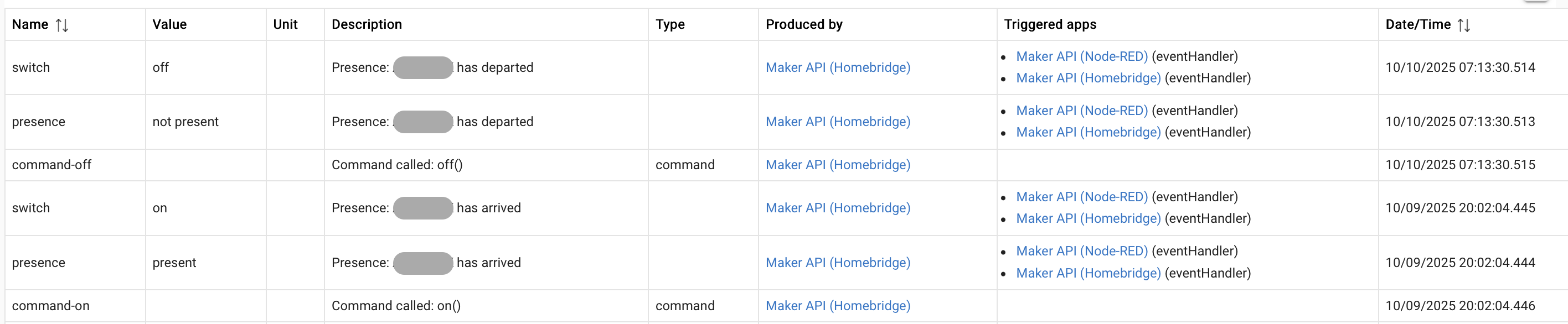
Locative works really well on my fiancée's phone. I use Geofency on my phone. And Apple Home on both. From the event logs shown below, it can be seen that the arrived/departed events from Locative and HomeKit are within a minute of each other.
I was just about to post about the same issue when I found this thread.
My iPhone so far shows my presence in and out of the geofence.
I just installed the Hubitat mobile app on my wife’s and daughter’s iPhones. Even though their iPhones show “out of the geofence” the tiles on the mobile app show “Present”.
Both phones set to show location “always”.
How do I get their phones to work with the geofence?
After I updated to iOS 26 the Apple Home location quit working. I created a shortcut that triggered a Maker virtual switch, then a shortcut automation that runs the shortcut based on location. Took 2 of each, 1 for leave and one for arrive. These have worked great on both my and my wife’s phone. Hopefully Apple will get the Home location fixed before long. A google search shows a lot of people having that issue.
I am just getting my feet wet with Hubitat.
I assume I download the Locative app….. does it have to be loaded on all three phones?
How do I then integrate it with the apps regarding in/out of the geofence?
Thanks for any help you can offer.
I don't use Locative myself, but I think this is the best overall thread about it... You can always search the community here for more too (upper right corner).
The app will have to be downloaded to all three iPhones.
@hydro311 posted the perfect link. @steve.maddigan has a detailed writeup on setting up Locative. Once setup, it would be used in Hubitat like any other Presence Sensor.
With all that said, the simplest way to get geofencing working on Hubitat is by using Apple Home, and Hubitat's built-in HomeKit integration. There is a link to a writeup from @csteele on how to set up geofencing using HomeKit a few posts above yours in this thread.