I have 3 ZEN72 dimmers, using this driver, and I have a rule in the Kitchen that if one is turned on physically it turns the others on as well. This rule has been working, so I looked into the logs to see if it showed correctly.
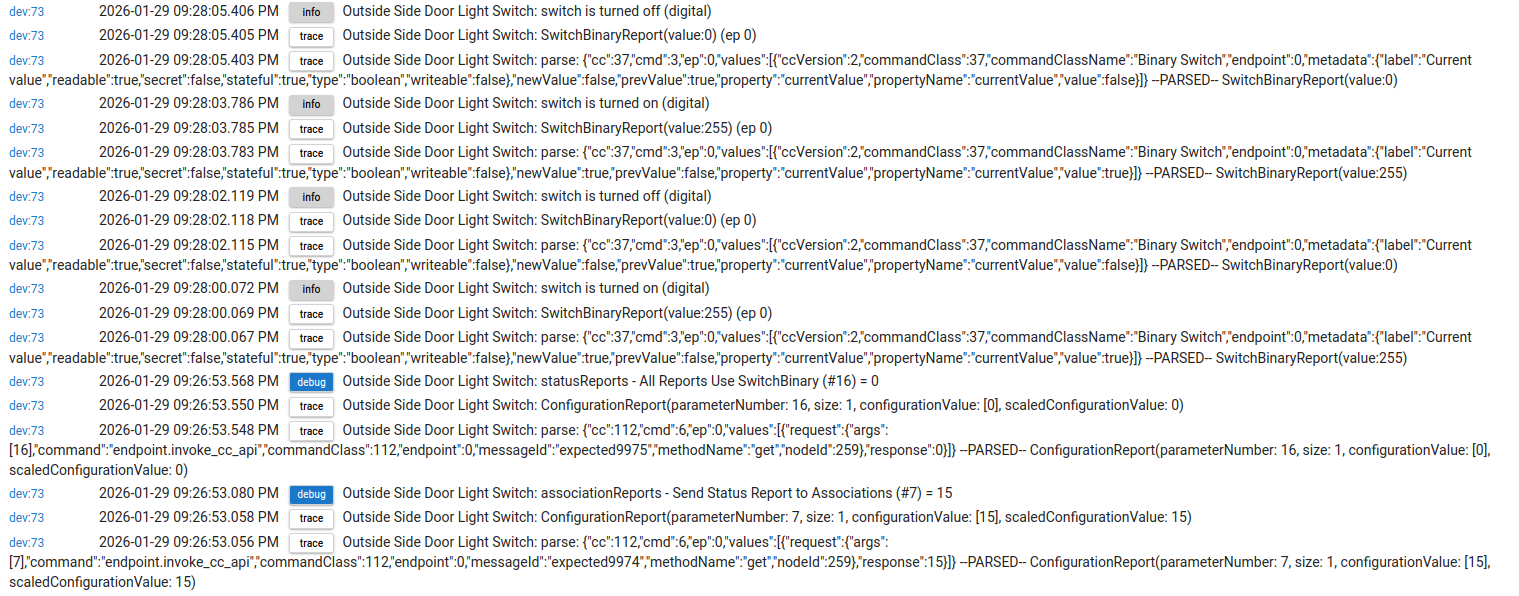
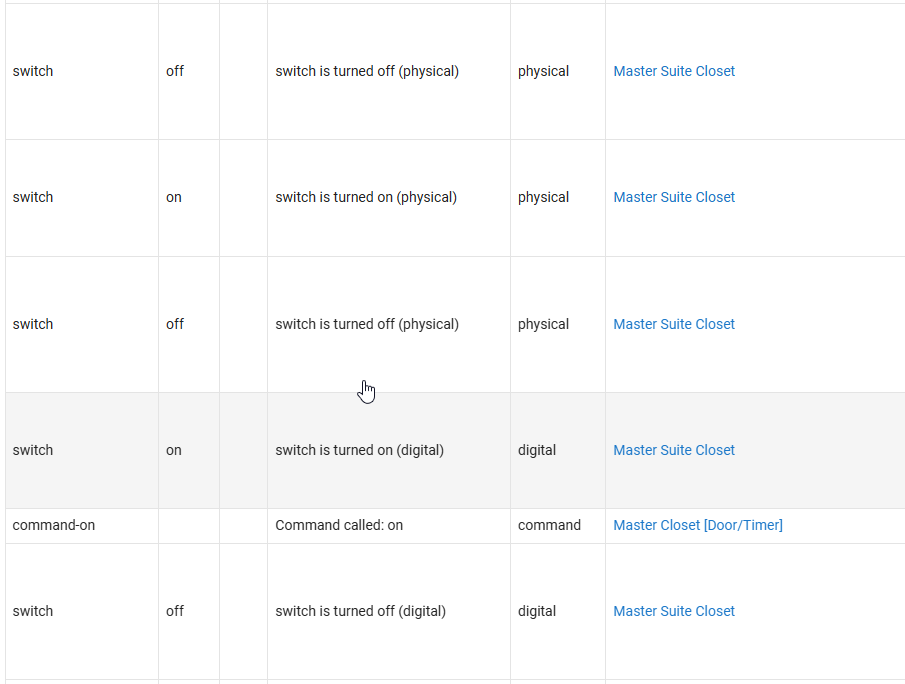
In the event log for the switch I turned on by pressing the switch at 7:13, it triggered my rule, When I look in the event log for the device, however, it says turned on digital,
I also just turned on the same switch from my dashboard and it did not trigger my rule and turn on the others. Although the event log shows the rule as triggered, but it was not triggered. It also shows it was tuned on(Digital). So it looks like maybe the logging is incorrect?
Well, I have a rule action conditioned on physical off, and it does not fire. the rule is triggered though (trigger is switch turns off
I deleted the extra group associations and Configured this switch again. now the they are gone.. but the switch still only reports digital on. events with trace enabled:
The events that are coming in are the Switch Binary events, which per that setting 16 set to 0, should only be for zwave activations, not physical. So two possible things going on.
I see you are running Zwave JS, possibly it is getting the Basic reports and then converting those to switchBinary (trying to be helpful, but its not).
Firmware bug on the switch itself, and setting 16 is not working.
I would lean more towards scenario #1. The only way to know for sure is for someone to test the same actions on both Zwave JS and ZIP. I have a spare ZEN71 v1 here I could test with, but pretty busy lately. Also got pretty tired of chasing down bugs related to Zwave JS.
I suppose it is probably time to just implement the "guessing" method in the driver. Basically I would set a state when a command is sent from the hub, when the device replies we know that was a digital event and you clear the flag. By default anything else when the flag is not set is considered physical.
For now I would seriously just turn on the scene events setting, and then use the button events for any rules. It will work nearly the same.
Thanks for the insights as always. I remember trying this a long while back and failing (getting physical to work) on these switches but admittedly I was new to Hubitat at the time so may have been operator-error.
No worries on testing, certainly wasn't expecting you to jump to that; I am curious (if you have any Physical on/off rules on your own Zens), if the logs show physical on... or as Terminal3 suggests, maybe at debug/info level or higher it reports 'digital on'.
I will look at the scenes/buttons next to implement that... thanks for the pointer to enable scenes (I was searching for the button config). I can give that a go.
I know your setup is far more complex and has exposed more ZwaveJS issues than mine.. my experience in ZIP has been dicey (and having lots of prior experience with ZIP), I was willing to give ZwaveJS a go... if this issue is truly ZwaveJS, its the first I've hit on my systerm.
Including/excluding (new) devices on ZIP has always been a nightmare for my system on ZIP. The (re-)interview functionality on ZwaveJS was a game changer for my system.
@terminal3,
Can you comment on which zwave stack you are running?
Can anyone else comment on physical on/off working on your running zwave stack and what the log reports? Do you see physical On for user pushed events? or digital on only as Terminal3 has observed.
@jtp10181 I have 2 zen30s located in the same room. Let calls them Z30A and Z30B.
I want the paddle of Z30A to turn on the relay for both Z30A & Z30B.
Z30A has a DNI of 29; Zen30B is 61. The child devices' DNIs are 29-1 and 61-1, respectively.
What is the correct syntax for addressing the relay in the Device Associations - Group 2 preference? So far I have tried 61-1, 61-2, 6101, 6102 and 61:01, 61:02 without success.
The logs and events will show physical, thats the only way the rules would work correctly. I do have one ZEN71 v2 in service, here are some of the events.
Do you want all three of these lighting circuits to track each other? i.e. if one goes to 20% they all go to 20%??.
If so direct association works pretty well. In your case instead of 1 switch with load, each switch has a different load but the programming/config should be the same as virtual 4 way.
My understanding is that "Swap device" does not work for Zen30s and Zen17s because they have child devices, and that they shouldn't show up in the list of source or target devices to swap. On my system, my Zen30s and Zen17s show up on both sides of the "swap device" list.
Is it now safe to use swap devices on Zen30s and Zen17s? If so, any recommendation on which virtual device type to use as the "holder" while doing the swap?
If not, is there another efficient way to do a device swap?
I know that I can go through the list of apps in the "in use by" list, but that will be a tedious process...
The Parent device shows up in Swap Apps, but since nothing is actually tied to the Parent, it's of no use WRT Swap. The Child devices do not show up in Swap Apps.
You might be able to swap the parent ZEN30 devices (which is the dimmer control), but take a backup first. Not sure if it will cause issues or not. The child devices cannot be swapped and should not show up.
I have everything connected to my C8-pro right now. I have z-wave devices in the house and the attached garage. No matter where I put the hub, either the house or the garage devices have weak signal. No amount of putting repeaters in various positions seems to help.
My plan is to deploy my old C7 hub in the garage and mesh them together and have all apps run on the C8-Pro.
The 2 Zen30s and the Zen17 located in the garage are used by a lot of apps. I am trying to find a way, if possible, to make the migration less tedious than moving each app to a transient virtual device and then back to the device that is now on the mesh.
I seem to recall some people using shortcuts like editing DNIs, but I don't know if that still or ever really worked well as I have never tried it myself.
I wonder if there is something in the fire-wall between the garage and house that is interfering. Foil backed insulation or something maybe. I was working with someone else where it was similar, the devices in the garage just would not work well unless the hub was out there. I have just a ZEN16 and tilt sensor in my garage and they have no issues, I am actually shocked at how reliable the tilt sensor has been.
I think if you were just re-pairing them on the same hub you could possibly do the DNI editing trick to basically swap the parent and child devices all together. However moving them to another hub and them bringing them back with hub mesh is another story. I think you will have to use the hub mesh created devices. Unless someone who knows more about how hub mesh works can comment.
I can save you from having to move stuff twice though. Before excluding anything, take a backup first just in case. Then you can edit the DNI of the parent device and just add something to it, like _SAVE. Then from the zwave details page do the exclusions, and it should clear it from the zwave table but keep the hub device. Then when you get the hub mesh device back onto tat hub you can work through all the apps and move from the old to the new. You could try editing and swapping the DNI, I honestly have no idea if that would work with a hub mesh device or not, I do not use hub mesh myself.
If they are in build in apps you can go into the cog of the app and clone it or extract it. Then once the new devices are added you import it and select those devices instead. It a very quick way of changing devices like this.
@jtp10181, thanks, only having to do it once is much easier. If I go down this path, I'll be sure to have a cloud backup first. Is this the right exclude procedure: Instead of using the "Remove" button, put the hub in exclusion mode and then tap the down paddle 3-times rapidly?
@BorrisTheCat, this sounds like a very clever idea. Is this the right sequence:
Export & delete all the apps used by the Zen30 and its child device.
Remove the Zen30 from the C8 / house hub.
Include it in the C7 / garage hub.
Share it with the C8 hub using Hubitat's hub mesh capability.
Import the rule and point each rule at the "new" device?