I reverted. I'll do some checking to make sure everything works, but....
01's came over. I disabled associations. Hit Configure. Checked preferences...good...stayed disabled. But, 3 pending changes wouldn't go away. I substituted "Device" for driver and cleared out the current states. 3 Pending Changes went away.
Now all I have to do is remember which ones I messed with.
edit: Syncing seems to go quicker and more reliably after hitting Configure in Zip, but it could just be confirmation bias on my part.
If they are paired as LR, then associations dont work on those at all for either gateway mode. Since LR does not talk to other devices in a mesh there is no way for it to work. Next version of the driver (posted as beta) eliminates those input boxes to avoid confusion.
To round this one out.
I was missing devices on the device page. Couldn't re-add device via SS. Don't know why, don't care.
Went back to ZWJS.
Turns out, rotating the z-wave antenna 90 degrees solved my problematic switch in the basement.
All the house devices work. We'll see about the gate/garage/mailbox/package bin tomorrow.
I'll probably be researching antennas...the subject of another thread.
I was fooling around with my ZEN74 dimmer.
Might have gotten this message after switching to Device driver, clearing states, and returning.
Can't get switch to work.
System ZEN74 S2 driver works.
Another ZWJS issue. Changing back and forth to Zip is not trivial.
Luckily, this switch doesn't have my status LED mod.
I'd be bereft if I couldn't change parameters on the fly.
Thanks.
Show a screenshot of Device Data from the device info tab. Device ID, Device Type, and Manufacturer are what the driver uses to ID the device.
Guessing somehow you cleared out that device data (on device info page). There is no way to clear that by accident using the "Device" driver, but it can be edited or erased via other drivers or apps.
My Universal Scanner driver, or the BETA Switch driver (2.0.3) will ask the device for that info when you run configure and put back what it can.
Switch should still work with driver in that state, you just wont have the settings available to change.
Yes that may cause an issue, if the parameter numbers do not match up exactly between the zen75 and zen71 with the same firmware version (they wont). You will either be missing some settings, or worse, you will try to set some settings but the setting numbers are different so you will actually change totally different parameters on the device itself.
If there are features you are missing from the dedicated Zooz drivers let me know (on that thread). I was actually just thinking about this over the weekend and I would like to migrate more towards the universal drivers because all the different settings Zooz has is getting to be a lot to manage. The Universal will scan the device and show you the exact settings it has available, so it will work with any future settings that get added or changed.
First of all, thanks for the great driver. Can't seem to get the triple tap to work. It works sporadically but not often. Some of the time, the button #5 (triple tap up) works, but the triple tap down (button #6) hardly ever works. When I say "works", I mean it appears in the logs/events.
This is a ZEN72 dimmer. Scene control even is set to "enabled" (Parameter #13, Selected: 0). "Double Tap Up Brightness" is disabled but double tap seems to work with no problem.
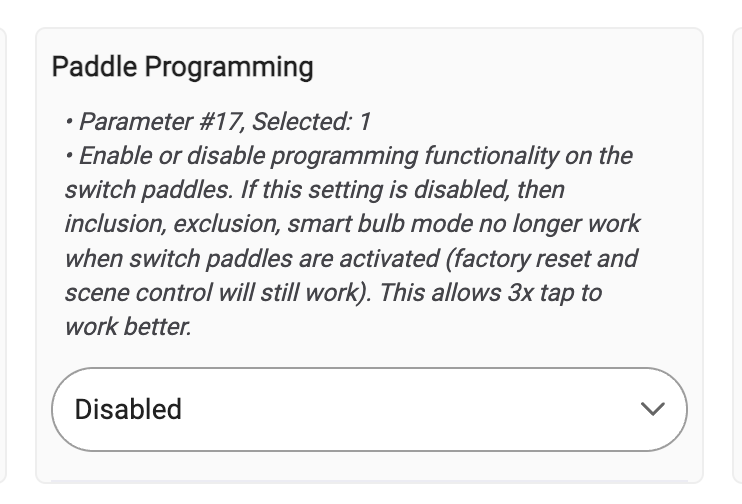
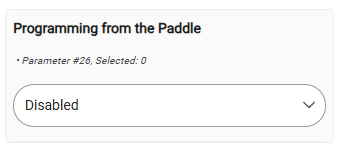
I don't have a 72, but looking at my 71, do you have a parameter option similar to this one in your 72's "Preferences" page? If so, make sure it's disabled like this (see the last sentence in its notes)...
That was the issue, thanks. Makes sense as the switch itself is programmed from the factory to do some things with the triple tap. On the ZEN72, there is no description for that parameter - perhaps could have figured it out on my own! Working correctly now
The full/complete parameter descriptions are always available for you to reference on Zooz's device-support sites.
Zooz has an "Advanced Settings" page for each of their devices, and that page should always be your source-of-truth for managing that device's parameters.
Triple taps and beyond don't pass the spousal/other family members test. Its already an uphill battle in my home with HA. Trying to explain to others if you triple tap button x, y will happen is a sure fire way to get rolled eyes and a brisk walk away.......
Very funny about the spousal/family comment... I told my wife about the triple/quad/5x taps. It was in one ear, out the other.
If I want to have a smart bulb (hue) attached to a ZEN72, I know there are some smart bulb options that will basically prohibit the switch from cutting power to the light. After that point, there is no where in the devices settings to associate the ZEN72 with the hue bulbs (zigbee), is that correct? So it is not possibly to mimic how a real dimmer would work (holding down the up or down paddle)?
If I am correct on that, what is the best option? You have to use the 2x/3x/4x/5x taps to set the dimming level? Even for simple on/off, am I coding all that as well?
There are held and released events. which you can use to start and stop dimming on the bulb.
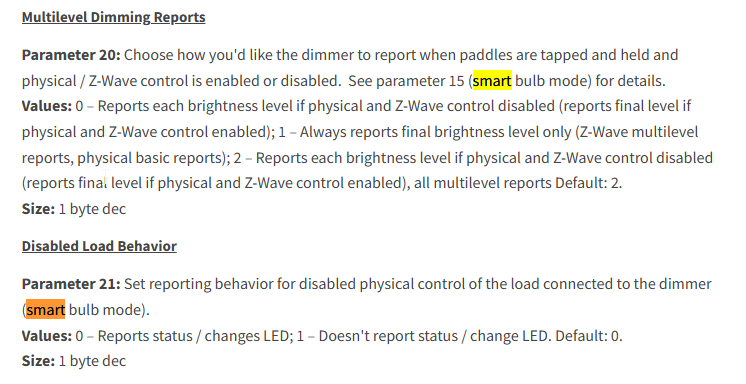
Also, instead, you can turn on smart bulb mode on the dimmer, Param 20 should be 2 by default, and 21 should be 0 (shown below). Then when you hold the button the dimmer will virtually dim (load will be unaffected) and report the brightness levels back to the hub.
Once that is working you could use the system built in mirror app to mirror the state of the dimmer to the bulb. There are more advanced thigs you can do but that is the most basic way to set it up I can think of.
Smart bulb mode - all that does is disable the paddle and zwave commands from directly changing the power to the bulbs, right? So they get powered 100% and then the switch is more like a dummy switch where you can still program taps, etc.
I guess the thing I am missing is how do you bind the bulbs to the switch? There is no way to do that at the switch level, correct? I need to use programming on top of that (webcore or rule machine? I have used both)
I have hue lights and I don't have the bridge, so I don't think I can "group" them in the app. So if they are in hubitat as individual devices, I am going to probably get the "popcorn" effect when manipulating them, right? I think if I get the bridge I can import them as a group and maybe lessen this effect.
Just trying to wrap my head around it. Been doing home automation for years and never liked how my system interacted with hue or similar bulbs. But things have come along in a few years and am going to try it again.