From what I saw in the description, there were ways for people with access to ANY dashboard have access to (at least effectively) the entire hub.
If you're the only one with access (or you and a limited number of people you trust fully), that's not likely an issue. It's like admin rights on your PC. If you trust everyone and given them admin rights anyway, it's not a huge issue.
However, if you create a dashboard for other, less trusted people, who you want to only have limited access, the security issue becomes relevant. They apparently could control everything on your hub by leveraging the security issue.
But is that a "real world" security risk? Why would you give dashboard access to someone you don't trust not to hack your smart home hub? Has anyone actually suffered a hack as a result of this issue? Seems like a "theoretical risk" rather than a "real world risk" that could be easily mitigated by not giving dashboard access to untrustworthy users, and the fix has removed the ability for "non technical" users easily navigate through the dashboards, severely impacting the user interface.
It's also worth remembering that all users can access all devices on the app (irrespective of the dashboard access) via the Devices menu anyway.
You might give someone a dashboard so they could monitor or perform limited tasks.
You give them a personal link, not full access to the hub or the full Hubitat app.
Any time someone who is supposed to have limited access can leverage that into complete control and it's shown to be possible, that's a REAL WORLD risk, not theoretical.
Given that home automation can control everything from door locks to alarms, it's also a substantial risk.
Your dismissal of the concern indicates you don't understand cyber security. Pretty every patch for Windows, Apple, or Android would be "theoretical" according to your thinking.
Where did I say I understand cyber security?!?!! I’m simply trying to understand why it’s necessary to remove critical functionality from the dashboards…… functionality that makes it easy to navigate between multiple screens of devices for all users in my home.
For my personal use case, the security risk seems to be near zero, as I don’t give dashboard access to anyone I don’t trust……which is probably the case for the majority of Hubitat users.
There will be a fix for now broken legacy dashboard links. Please roll back to 2.4.2.143 if it's causing usability issues, and if Allow logo click is not an acceptable workaround in the meantime.
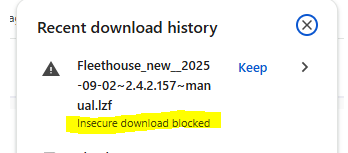
Shoot, same issue here and chrome blocked my backup, didn't notice it did that before upgrading, boo. My wall-mounted tablets are dead in the water for now. Note to self and others - beware of this alert when downloading backups:
EDIT: I literally had no idea until just now that the device self-performed backups, and I had one stored on the device. Sweet! I'm back up!
You should just be able to select "Keep" in that popup, and then you'll have the file. (Of course, this might depend on how long ago it was and whether you or it have done anything with the temporary file since...)
But in the context of this conversation, it sounds like you might be barking up the wrong tree. Your hub database backups do not include the platform version. You would need to use the Diagnostic Tool to revert to a previous version, as noted in the Settings > Backup and Restore page you probably used to get here. If restoring a regular hub backup helped with your problem, I suspect it related to one of the other solutions above (such as a full refresh of the page, or enabling one of the options).
Thank you! I was unaware that a restore didn't do the firmware, but now that you say it, it displays that warning right in front of my face I've had this thing for 5 or 6 years and never needed to do a restore, I'll take that as a good thing, this hub is great despite this little hiccup.
For the record, I never actually tested it when I confirmed it above, I just did the restore and assumed that fixed it as I'm not at home to test it yet. Just did the restore via chrome's remote desktop thing. But now I'm sure this diagnostics restore will do it.
I updated to 2.4.2.158 and the dashboard that I use on my tablets now takes so long to load, that my auto reload javascript causes my wall tablets to endlessly reload the dashboard. I tried to extend the allowable loading time, but its absurd waiting 4 seconds every time you walk up to the tablet for the dashboard to load. The reload is required because the dashboards stop updating (another long time bug). The auto reload script is also require because every so often dashboards get stuck on their loading screen. What a massive mess - and worsening with time. I have less than a dozen devices on the dashboard. It should not take that long to load. I reverted to 2.4.2.143. Hubitat, I love you guys, but I am so tired of these problems.
The latest version did not fix my issues with dashboards where all tails for switches/Outlets stoped working. Had to rollback to 2.4.2.143 Any clue? Im on C-7.
Also each new legacy dashboard I create has hardcoded pin - so not able to access new dashboards.
2.4.2.160 - same issues … hopeless … again revert to *.143
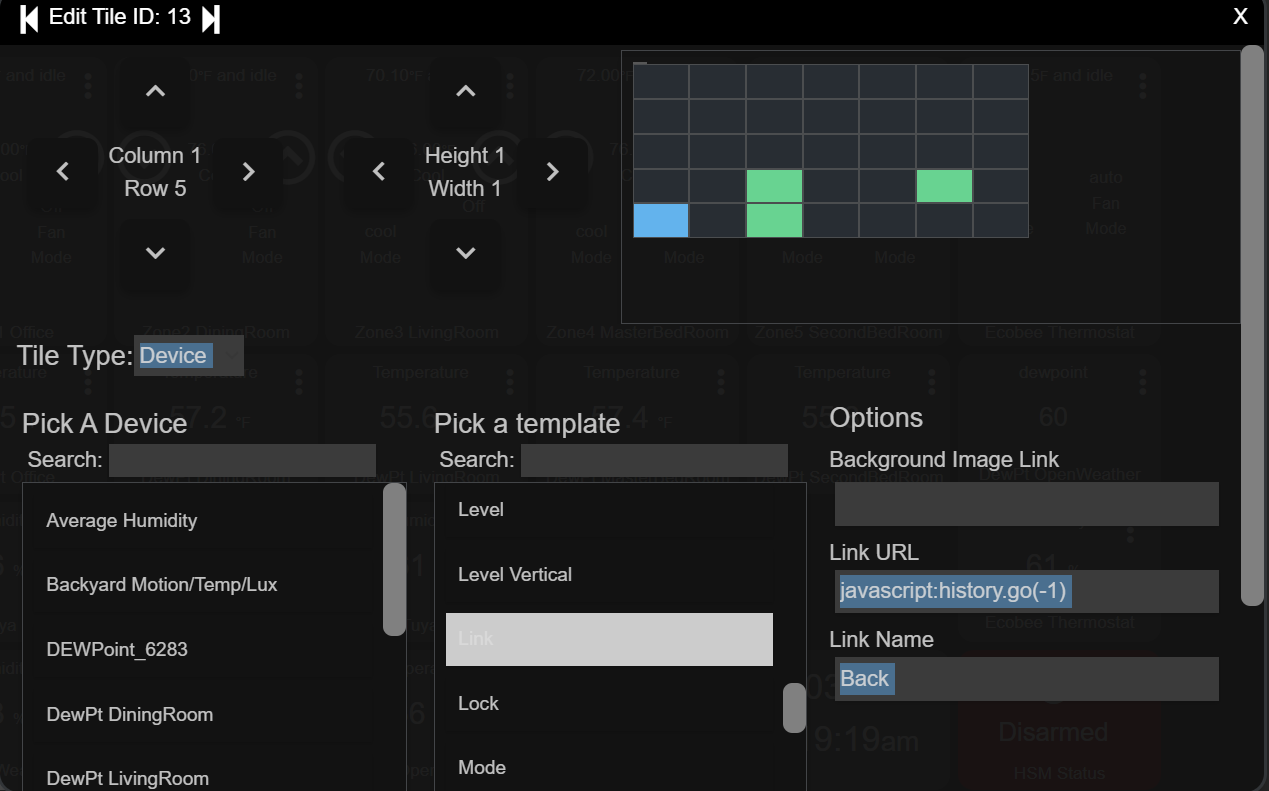
There is a quick redirect happening on the page that gets loaded first. Can you change javascript:history.go(-1) to javascript:history.go(-2) and see if that works?
Interestingly enough, javascript:history.go(-1) works for me in Chrome, FireFox, and Safari, on both cloud and local dashboards. I can see the quick page load and redirect happening.
Updated C4 to 2.4.2.159 from (reverted) 2.4.2.143.
The issue occurs using the Fully Kiosk Browser with Android and Kindle Fire devices. However, as reported by you, it also works for me with the Vivaldi browser and Windows 11.
Set the link to javascript:history.go(-2) and the Fully Kiosk Browser works as expected, but Vivaldi/Win11 fails going back to the page before the prior dashboard.
LMK if there is anything I can test for you, before I revert to 2.4.2.143.
Update: Tried this on my Android 16 Pixel 7A phone with Vivaldi and it works correctly. This seems to be occurring only with the Fully Kiosk Browser on builds after 2,4.2.143.
Update 2: My apologies, I never tried testing this issue on other platforms prior to initially reporting it.
 I've had this thing for 5 or 6 years and never needed to do a restore, I'll take that as a good thing, this hub is great despite this little hiccup.

 Any clue? Im on C-7.