I am experiencing multiple issues that seem to stem from my Z-wave switches. They are not responding, and when they do function, they don't accurately display their active states. There's also a significant delay of about a minute, and as a result, none of my routines are working. I have already attempted several troubleshooting steps, including reverting to an earlier version, rebooting, rebuilding the database, and rebuilding the Z-wave network.
Many Zwave anomalies have been resolved by shutting down the hub, pulling power at wall plug, wait ~30seconds, power back up.
This (removal of power) resets the Zwave hardware.
Definitely do the shut-down/reboot as @TArman suggests.
More data should be helpful...
- What hub do you have, C8, C7, C5?
- What platform version is your hub on?
- What brand/model Z-Wave switches are you having problems with?
Have you added any new Z-Wave devices during the time when your issues began to appear?
I haven't added anything new to my hub; it's been running with no issues. The issue started after the update, or maybe it's just a coincidence.
C-8 Pro
Currently running version: 2.4.3.133
| Kitchen | ||||
|---|---|---|---|---|
| Dinning room | Generic Z-Wave Dimmer | Kitchen | 10 | |
| (Generic Z-Wave Dimmer) | ||||
| Hallway | Generic Z-Wave Dimmer | hallway | 16 | |
| (Generic Z-Wave Dimmer) | ||||
| Pond | Generic Z-Wave Smart Switch | 0ut side | 13 | |
| (Generic Z-Wave Smart Switch) | ||||
| Rear deck | Generic Z-Wave Smart Switch | 0ut side | 0E | |
| (Generic Z-Wave Smart Switch) | ||||
| Rj'room | Generic Z-Wave Smart Switch | Bedroom | 6 | |
| (Generic Z-Wave Smart Switch) | ||||
| Christmas plug | Generic Z-Wave Switch | Living room | 17 | |
| (Generic Z-Wave Switch) | ||||
| Deck | Generic Z-Wave Switch | 0ut side | 11 | |
| (Generic Z-Wave Switch) | ||||
| Den | Generic Z-Wave Switch | hallway | 15 | |
| (Generic Z-Wave Switch) | ||||
| Outside front door | Generic Z-Wave Switch | 0ut side | 0A | |
| (Generic Z-Wave Switch) | ||||
| Yard light | Generic Z-Wave Switch | 0ut side | 0B | |
| (Generic Z-Wave Dimmer) | ||||
| Foyer | Leviton DZ6HD Z-Wave Dimmer | hallway | 9 | |
| (Leviton DZ6HD Z-Wave Dimmer) | ||||
| Living room | Leviton DZ6HD Z-Wave Dimmer | Living room | 14 | |
| (Leviton DZ6HD Z-Wave Dimmer) | ||||
| Master bedroom | Leviton DZ6HD Z-Wave Dimmer | master bedroom | 19 | |
| (Leviton DZ6HD Z-Wave Dimmer) | ||||
| Sa'nya room | Leviton DZ6HD Z-Wave Dimmer | Bedroom | 7 |
These are symptoms of one or more misbehaving devices.
You don't need to add new devices for existing ones to go bad. I would post a screenshot of the Z-Wave Details table, otherwise troubleshooting each device to make sure is working properly may be required.
Did you try the “power pull”?
One thing to check on C8 and more-so on C8-Pro, is to make sure that you're using the power supply that shipped w/the hub. Z-Wave issues like yours can arise when using POE or other power suppplies.
And as @TArman notes - the shut-down/pull power/wait 30s/restore power process can often resolve problems by restarting the Z-Wave and Zigbee radios.
yes
Yes, on the power pull
|
What you've posted is not useful for diagnosis. Please post a screenshot of your ENTIRE z-wave settings page.
0x0006 (6) PER: 0, RTT Avg: ms, LWR RSSI: 13dB
Neighbors: 9, Route Changes: 0 SPECIFIC_TYPE POWER_SWITCH_BINARY Rj'room None 01 -> 06 100kbps 7 10/14/2025 6:50:58 am
0x0007 (7) PER: 0, RTT Avg: ms, LWR RSSI: 20dB
Neighbors: 12, Route Changes: 0 SPECIFIC_TYPE POWER_SWITCH_MULTILEVEL Sa'nya room None 01 -> 07 100kbps 5 10/14/2025 6:53:58 am
0x0008 (8) PER: 0, RTT Avg: ms, LWR RSSI: N/A
Neighbors: 1, Route Changes: 0 SPECIFIC_TYPE POWER_SWITCH_MULTILEVEL None 01 -> 08 0
0x0009 (9) PER: 0, RTT Avg: ms, LWR RSSI: N/A
Neighbors: 14, Route Changes: 0 SPECIFIC_TYPE POWER_SWITCH_MULTILEVEL Foyer None 01 -> 09 2 10/14/2025 5:54:09 am
0x000a (10) PER: 0, RTT Avg: ms, LWR RSSI: 51dB
Neighbors: 3, Route Changes: 0 SPECIFIC_TYPE SCENE_SWITCH_BINARY Outside front door None 01 -> 0A 40kbps 35 10/14/2025 11:55:22 am
0x000b (11) PER: 0, RTT Avg: 279ms, LWR RSSI: 51dB
Neighbors: 12, Route Changes: 1 SPECIFIC_TYPE SCENE_SWITCH_BINARY Yard light None 01 -> 0B 40kbps 27 10/14/2025 12:53:31 pm
0x000c (12) PER: 0, RTT Avg: ms, LWR RSSI: 61dB
Neighbors: 17, Route Changes: 0 SPECIFIC_TYPE SECURE_KEYPAD_DOOR_LOCK Front door lock S0 01 -> 0C 4 10/14/2025 12:53:32 pm
0x000d (13) PER: 0, RTT Avg: ms, LWR RSSI: N/A
Neighbors: 15, Route Changes: 0 SPECIFIC_TYPE SECURE_KEYPAD_DOOR_LOCK Rear door lock S0 01 -> 0D 4 10/14/2025 12:30:52 pm
0x000e (14) PER: 0, RTT Avg: ms, LWR RSSI: N/A
Neighbors: 9, Route Changes: 0 SPECIFIC_TYPE POWER_SWITCH_BINARY Rear deck None 01 -> 0E 0
0x000f (15) PER: 0, RTT Avg: ms, LWR RSSI: N/A
Neighbors: 13, Route Changes: 0 SPECIFIC_TYPE POWER_SWITCH_MULTILEVEL Kitchen None 01 -> 0F 0
0x0010 (16) PER: 0, RTT Avg: ms, LWR RSSI: 42dB
Neighbors: 14, Route Changes: 0 SPECIFIC_TYPE SCENE_SWITCH_MULTILEVEL Dinning room None 01 -> 17 -> 10 40kbps 43 10/14/2025 12:15:11 pm
0x0011 (17) PER: 0, RTT Avg: ms, LWR RSSI: 51dB
Neighbors: 15, Route Changes: 0 SPECIFIC_TYPE SCENE_SWITCH_BINARY Deck None 01 -> 10 -> 11 40kbps 105 10/14/2025 1:09:24 pm
0x0012 (18) PER: 0, RTT Avg: ms, LWR RSSI: N/A
Neighbors: 1, Route Changes: 0 SPECIFIC_TYPE POWER_SWITCH_BINARY None 01 -> 12 0
0x0013 (19) PER: 0, RTT Avg: ms, LWR RSSI: 13dB
Neighbors: 4, Route Changes: 0 SPECIFIC_TYPE POWER_SWITCH_BINARY Pond None 01 -> 13 100kbps 1 10/14/2025 5:45:04 am
0x0014 (20) PER: 0, RTT Avg: ms, LWR RSSI: N/A
Neighbors: 13, Route Changes: 0 SPECIFIC_TYPE POWER_SWITCH_MULTILEVEL Living room None 01 -> 14 0
0x0015 (21) PER: 0, RTT Avg: ms, LWR RSSI: 40dB
Neighbors: 13, Route Changes: 0 SPECIFIC_TYPE SCENE_SWITCH_BINARY Den None 01 -> 15 40kbps 24 10/14/2025 12:55:31 pm
0x0016 (22) PER: 0, RTT Avg: ms, LWR RSSI: N/A
Neighbors: 16, Route Changes: 0 SPECIFIC_TYPE SCENE_SWITCH_MULTILEVEL Hallway None 01 -> 16 40kbps 28 10/14/2025 1:07:45 pm
0x0017 (23) PER: 0, RTT Avg: ms, LWR RSSI: 42dB
Neighbors: 12, Route Changes: 0 SPECIFIC_TYPE SCENE_SWITCH_BINARY Christmas plug None 01 -> 17 40kbps 44 10/14/2025 12:54:56 pm
0x0019 (25) PER: 0, RTT Avg: ms, LWR RSSI: N/A
Neighbors: 5, Route Changes: 0 SPECIFIC_TYPE POWER_SWITCH_MULTILEVEL Master bedroom None 01 -> 19 1 10/14/2025 7:16:59 am
None of this is useful to diagnose issues. Can you please post what @bobbyD requested? A screenshot of your entire z-wave settings page.
Do not copy/paste the text on that page. Post a screenshot.
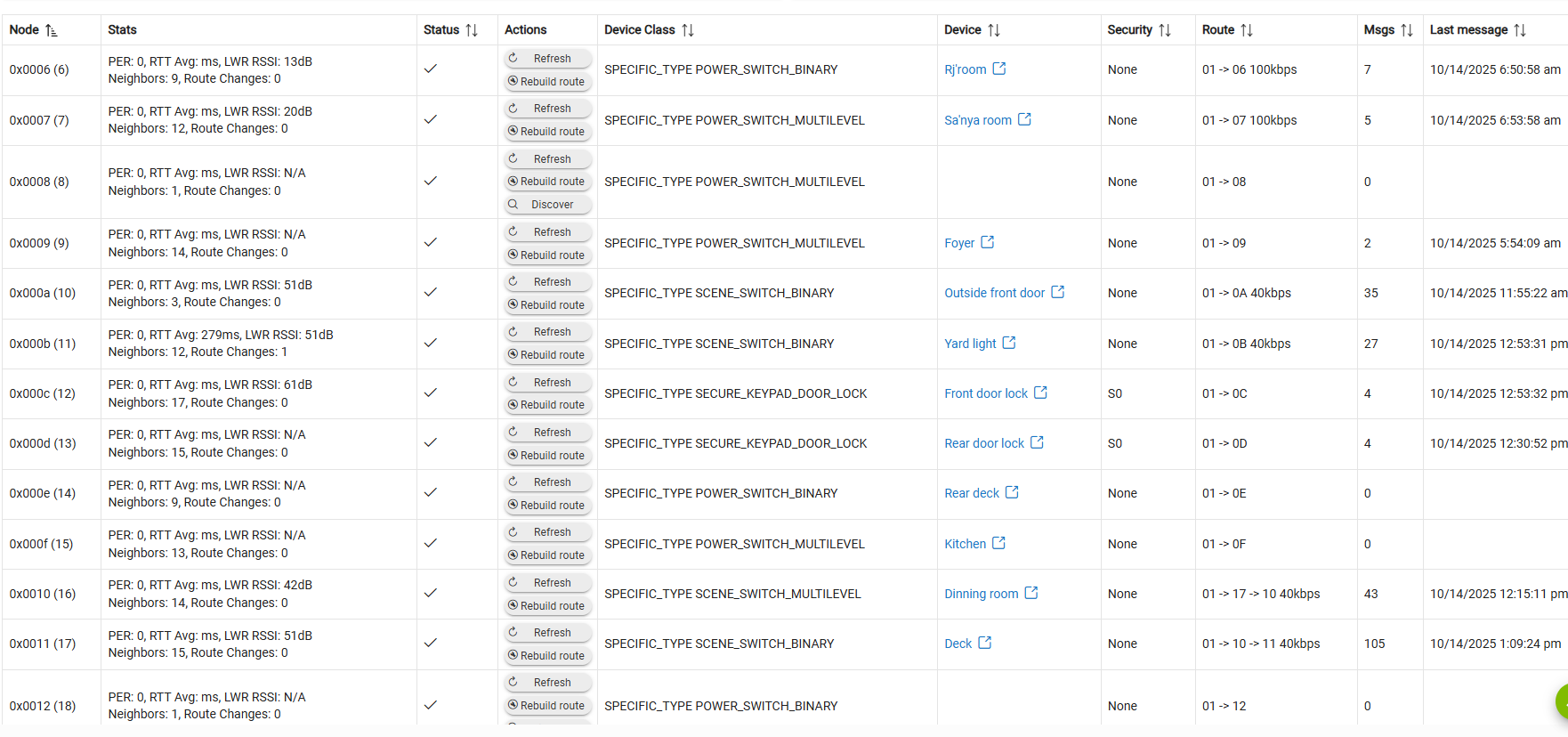

Your z-wave mesh has at least two z-wave ghosts that need to be removed. Nodes 0x0008 and 0x0012.
two z-wave ghosts have been removed
Could you please execute a Rebuild network on Z-Wave Details page and let us know if you get any failures.

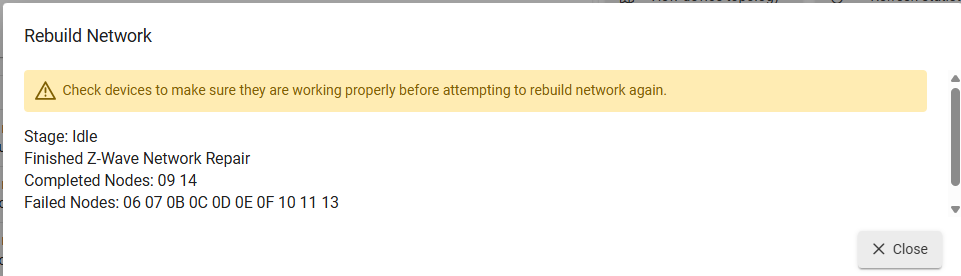
Looks like you will need to further investigate your physical devices to identify which ones are bad or misbehaving. Power cycling the devices and observing which ones may have gone bad is your only way out of this. After completing the physical walk through, go back and re-run the rebuild. You want all devices to complete without failure.