I also have been having Z-Wave issues, similar to those in that thread. To be honest, I've been having Z-Wave issues for years. They seemed to have gone away for a brief period right after I switched to ZW-JS on my C-8 pro, but came back after a couple of weeks.
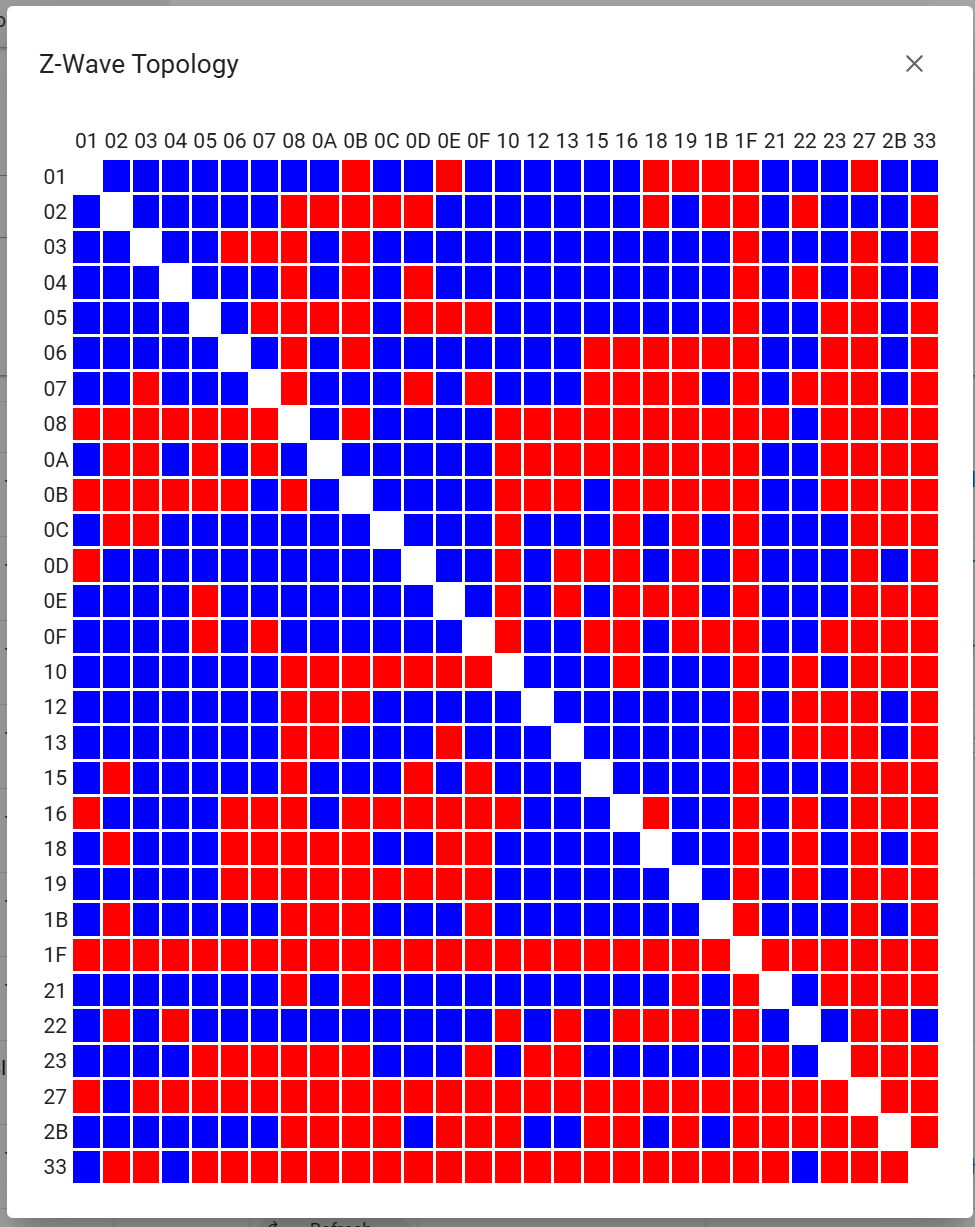
Anyway, in the thread linked above, I saw a Z-Wave topology map. I have absolutely no idea how to read these. Can anybody explain what this map is telling me and how to read it. Here is a picture of mine:
Node topology gives you an overview of the entire Z-Wave routing table. Blue dots are nodes that can see each other, and red are nodes that aren't neighbors.
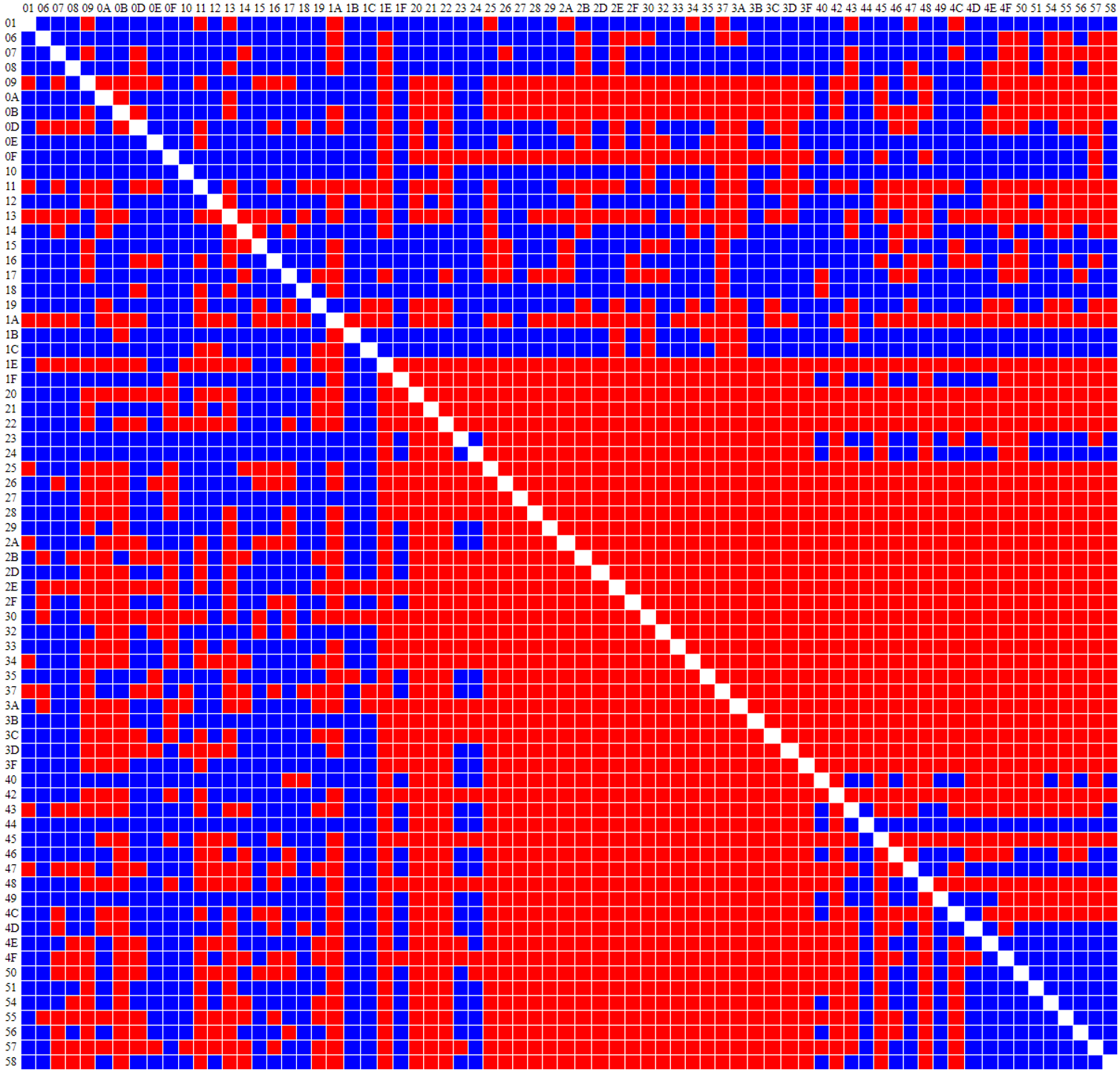
Seeing a bunch of red is not an indication of a bad network.. Especially where battery devices are concerned, because they don't update their neighbors..
The point of this is to give you a quick look at what nodes can "see" what other nodes.. Gives you an idea of how things can route.. It can also be a good tool to decide where to place repeaters.. But with no context of where these nodes are physically and what type of device they are, you can't make a judgment based on this graphic alone..
Here is mine.. You can clearly see the bulk of my battery devices:
Yeah, I was more specifically focusing on JUST the topology map.
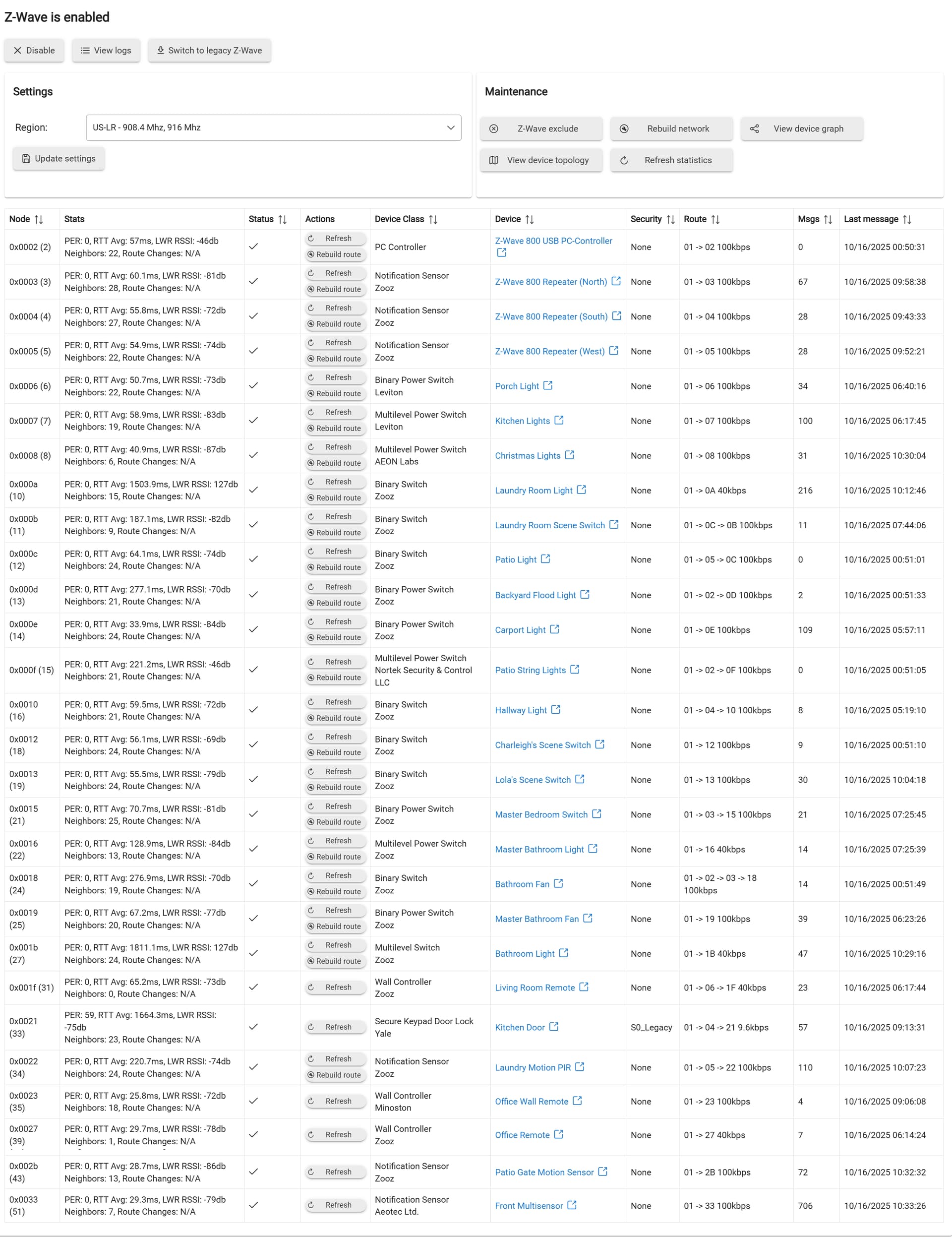
For example, based on the above posts, I would look at this topology map and immediately think I should be having problems with device 1F, as it appears to have no direct connections to any other device OR the hub. However this device works perfectly fine. It is a battery powered button controller that has never shown any signs of issues.
However, I have serious lag with devices 0A, 0B, and 0E, which appears to have plenty of connections to neighbors or the hub, if I'm reading this correctly. These devices are all Zooz light switches which are connected to various automations
Based on my limited time attempting to make sense of the topology map, yeah I agree it seems not very useful or accurate.
as far as things you may notice: node 21 has a very low data-rate but it seems to work reliably with no issues. node 33 has a ton of messages but its a motion/temp/illumination sensor (Aeotec Tri Sensor) and seems to work perfectly fine.
0A, 0B, and 0E are consistently lagging or entirely failing to react at all. I'd say it's about 50% of the time they work fine, 50% of the time they take several seconds to react or simply dont react when commanded.
Oddly enough, when I asked CoPilot to analyze the map and tell me where I might have problems, it told me EXACTLY THE OPPOSITE of the guidance I see here. It says specifically that RED cells are strong connections and that BLUE cells are weak or indirect connections. Which actually makes sense with many of the devices on my map. But now I'm also SUPER CONFUSED as well. Which is correct?
Check the devices with the higher RTT (other than the lock which is somewhat normal). The high RTT might be coming with retries and route changes, which all bogs down the mesh.
Also, how long was hub up since reboot? The 57 messages for the lock is a lot. Every time you action that lock from the hub it can stall the mesh for up to 60 seconds while the FLIRS beam is going out. Do you have automations setup for the lock?
Laundry Room light 0A has a high RTT and a lot of messages. I am guessing it is automated in some fashion, going on and off a lot.
About 45 hours ago when I updated to the latest official platform release.
Yes it is automated, and it's our main entryway in and out of the house, so it gets manually locked and unlocked quite often by hand which produces a status report each time as well. But I have an automation that automatically locks the door if it was left unlocked and nobody is home, or at night if it's unlocked for any longer than 6 minutes it will automatically lock then too.
Yes, the laundry room light turns on when the laundry room door is opened, and turns off after 5 minutes of no activity in the laundry room if it is left on. This automation in particular often shows the lag in the system. When I first set up the automation, the light was on instantly when the door cracked. It generally takes 10-30 seconds nowadays (about 50% of the time). The thing thats weird is the Laundry room is literally filed with Z-Wave repeaters. It has 6 mains powered devices scattered throughout the room.
Negative. I haven't ever bothered, it seems like it could cause more problems than it solves.
All the problematic devices are in the laundry room, which is relatively close to the hub compared to other devices at the far end of the house or in the yard that have no issues.
I'd say ignore Bryan (HE Z-Wave lead) at your own risk.
The AI suffers from GIGO.
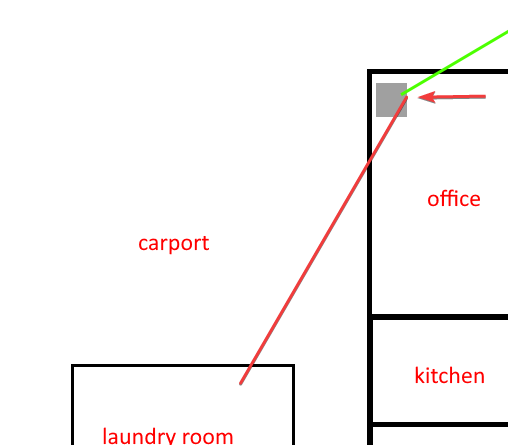
Does your layout above imply that the signal has to go through two external walls to get to the laundry room? House external/laundry room external? Looks like it also has to go through the rack to get to that area as well. Also, if cars are parked in the carport they also might affect signal transit...
Here's an actual picture to show the proximity between the office and the laundry room. The external wall of the house is block, the laundry room is just siding and framing, no drywall or anything. The block construction of the house doesn't seem to be a problem for other devices which are much farther away, with the entire house between the device and the hub.
Well, that's a debatable topic, but I don't mind trying them up and down to see if it helps anything. I'll give it a go.
It's a habit I got in back in the day from rock n roll touring days. When setting up RF mics, since the transmitter was always in some random orientation inside some guitar player or singers pocket or guitar strap, we could never count on the incoming waves to be always vertically polarized or horizontally polarized, usually it was always in motion. Putting the receiving antennas at 45° always guaranteed adequate reception regardless of the transmitters antennas orientation and thus wave polarization angle. (Nowadays we use helical antennas in pro RF and and they are basically agnostic to polarization angle)
Both my C5 and C8 Pro are using the supplied adapter and cable from Hubitat.
I personally am leaning towards a bad device in the vicinity of the laundry room. I have two older devices. One is an AeoTec Smart Dimmer 6 (plugin style dimmer) and the other is a GoControl dimmer (in wall style paddle switch/dimmer) and both are using older generation zwave chips (500 maybe?).
Of the three problematic devices I've mentioned, ALL of them are located IN the laundry room. Two are right next to the door in the same plastic switchbox, and the other is located in another switchbox on the back wall of the laundry room. Besides the three problematic devices, there's also the two old dimmers I mentioned, a zooz zen32 switch/scene controller, and 2 Zooz PIR motion sensors (battery powered during inclusion but now powered by 5V DC USB supply). So that's 6 mains powered Zwave devices and 2 non-repeating devices scattered about one small area. Of those, the three newer Zooz switches (700 series I think) are the ones having problems.
Power cycling devices fixes my home maybe 3 or 4 times a year (~130 Z-Wave devices I think). Based on behaviors observed over time, I believe I have an offending light switch and an often too chatty Z-Wave power meter that both respond well to cold boots. Symptoms of their misbehavior are wayyyyy slow responses on many other devices to normally immediate commands.
Something else to consider. I believe the hub is mounted on the side of that rack away from the laundry room. So If those devices are trying to direct connect to the hub it is basically going through the networking rack, which probably will not work very well. 0A and 0E are both attempting to direct connect. 0E is Carport which is in an even worse angle (depending on where the switch is). It is highly possible the problem devices keep trying to hop through 0A and 0E which is also slow so then they just bounce around trying to find a route.
I still stand by my suggestion of moving the hub.
Not sure exactly which other devices are in that laundry room exactly, but based on the names but I took some guesses, I think the other devices NOT having issues have settled on a route with a hop instead of direct. It may actually be that the older 500 series devices do not have the range to reach the hub for a direct connection attempt so they are forced to use a hop, which in the end works out much better.

 Get Help / Devices - Hubitat