General Information:
Platform Versions 2.4.3171 - 2.4.3.173 [Occurred Across These Upgrades]
Hardware Version C-8
What I do know:
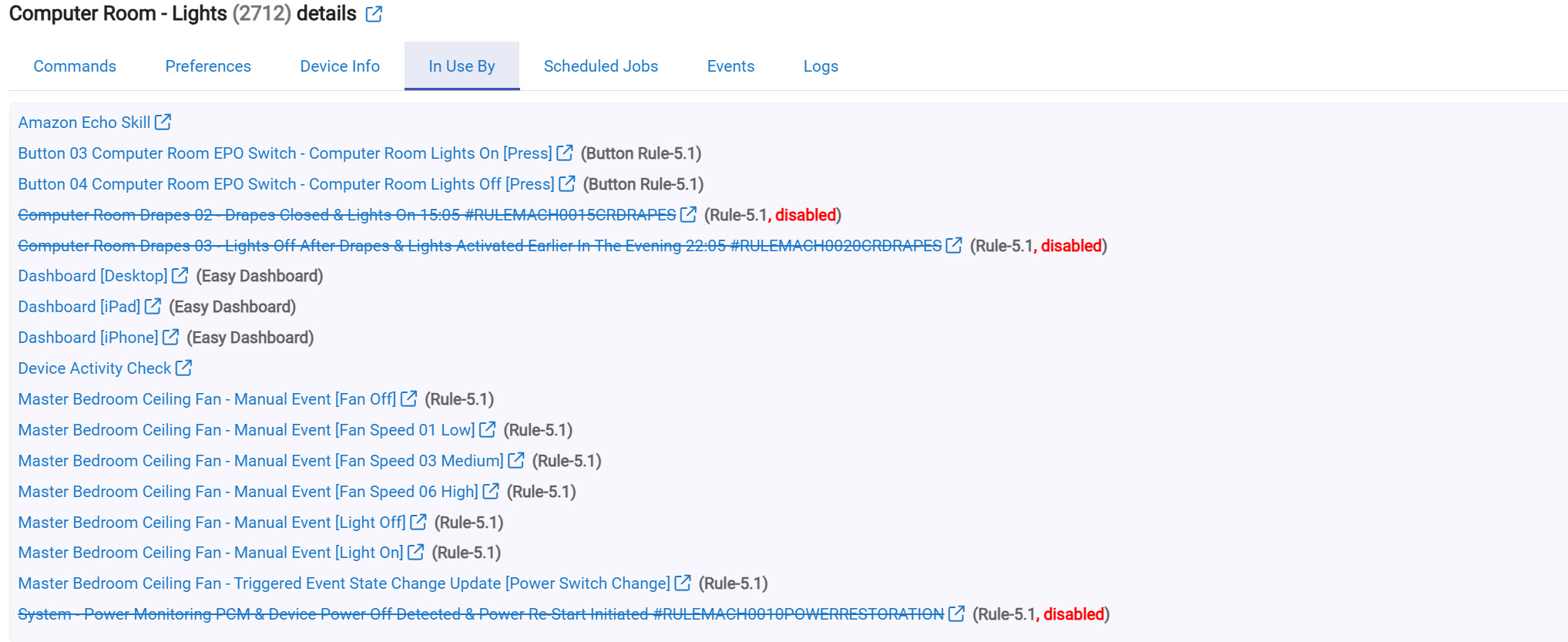
Issues only occurs when Amazon Echo Skill is enabled. The minute I disable the app, the random turning on and off the lights and activation of devices stop. This would sure make it look like it is the Alexa app....possibly If it were the devices they would continue to turn off and on while the Alexa app was disabled??
Occurs on different types of devices [Zooz ZEN32 800 Series lights switches, Lutron PD-6WCL-WH light switches, Zooz ZEN14 double plugs, and ZEN20 800LR Power Strips [child devices]. This confirms to me that it is not a particular device...possibly.
The system works perfectly other than Amazon being enabled during which randomly lights and devices operating.
What may have caused this:
Over the last two months I undertook a project to replace the majority off 700 series with 800 series that included:
Replaced 05 Zooz ZEN32 700 Series with 05 zoOZ - ZEN32 800 Light Switches
Replaced 10 v2 Zooz ZEN15 Double Plugs With 09 Zooz ZEN14 800 Series Double Plugs
Replaced 02 Aeotec Siren 6 With 02 Zooz ZSE50 800 Series Siren & Chime
Added 04 Zooz ZEN20 800LR Smart Power Strips
Added 01 Sonons Era 100 Speaker
Had to force remove one device but it came excluded ok (as best I can tell).
The ZWave tables look extremely well. See ZWave Table.
Renamed the wake word from Alexa to Computer
Due to the removal and re-addition of devices A LOT of dashboard changes for three different dashboards. Dashboard did "blow up" several times. I though there may be some sort of database corruption. Part of the reason for the soft reset.
The information in the logs and the devices is always the same. The information from two different devices are shown below.
At no point during the device upgraded this the issue seem to happen. As best as I can recall, it seem to "hit me" that it occurred soon after I changed the wake word to from Alexa to computer.
- What I have done:
Powered down the hub & waited 3 minutes
Reviewed Alexa activities in the Alexa app on my iPhone. Nothing related.
Turned off Alexa hunches
Performed a soft reset and database reload. Went without incident.
Changed the wake work back to Alexa. Still occurred. Waited one day then changed it back since issues were still occurring.
Removed all of the devices from the Alexa App and then re-added the devices. No help.
Removed the Alexa skill from my phone.
Watched all the devices be removed from Alexa on my phone
Confirmed the Alexa was removed from within Hubitat.
Re-added the skill on my iPhone. Confirmed the Alexa app was added back to Hubitat.
Added all he devices.
No help. Random devices returned.
Left Alexa disabled for two days. Not a single anomaly. System working exactly as expected but obviously without the ability to use verbal commands.
Did a lot of reading. Found a very useful link. Unfortunately did not seem to end in a resolution.
EVENT 02: Lutron ZEN32 Light Switch
The same comments from the 1st Zooz device apply to the this device for the like-to-like entries. I just did not retype them again.
Kitchen Room Lighting App:
It may have no relation to what is going on probably 80% [rough estimate] of the lights involved are setup in the room lighting app so I am providing a setup of one of those devices as well [Kitchen Light] Kitchen Light Configuration:
I am sure there are other things I have done but failed to include, or are obvious actions that I should taken but failed to. I apologize in advance but although I wrote my tests down, at this point I think I have worked myself into confusion and can't get myself out of it.
I really mis voice-control as part of the automation and hope the community can help me. I know I really goofed up and did too many things at the same time and now can't back them off. Not even with a re-store I always tout. (1) since the restore won't match the hardware that is in place, and (2) the backups are now outside of the retention of what I had even if I could restore the old hardware (which I can't). Got rid of most of it.
I hope I can get this resolve with your help. I literally have been at this for about a week and have tried everything I can including several lengthy processes of elimination and community research which is always the best!
There haven't been any changes to the Echo Skill App on Hubitat in several years, but this kind of issue is almost always related to Alexa Hunches. I see you said you disabled that, but it's worth doing two related steps:
Check that again (I've seen people claim it gets re-enabled), then:
Check for any "Routines" in Alexa that Hunches may have previously created for you and won't be removed just by disabling Hunches.
For troubleshooting any particular unexpected command, the best place to start is to dig into "Events" for that device and look for commands (not actually events, just entries with "command" in the "Type" column). This will show you which app sent the command, which is what you really want to know in your case. (Rarely, you might not see a command at all around the time of an event, meaning it just happened -- whether due to physical interaction, some on-device timer, another direct integration if it's the kind of device like a Hue Bridge that might have one, or something else). In your one screenshot, that was Alexa for sure, assuming it was the one at 13:42:
If there are other devices, I'd start there for them too before digging into your other data (quite a bit of which it looks like you provided, which is great but probably more work than you need to do before you rule this out -- which this screenshot suggests is likely the simple cause).
Since this seems to be happening from Alexa, the alexa logs might offer some insight:
In the Alexa APP (not Hubitat), go to Alexa Privacy, then Review Alexa History. That's the one place I can see what it's up to apart from Hubitat log entries.
(edit: after reading @bertabcd1234 's response, looks the most clear way to track this down. And thanks @bertabcd1234 , I learned something today!)
Thanks guys for getting back to me. Man I appreciate it.
I did double check for hunches. Both in the Alexa app on my iPhone and in any routines I have. I only have several routines and none there. It is disabled in the alexa app (see below).
There a six standard routines. They show "available" and therefor not active. There are some others and I went into several that deal with lights just to "spot check". They are in a state to be configured, see example below so it looks like none are setup. I have never set up any. To your point it doesn't mean Alexa didn't set some up. Best I can tell they have still never been configured.
I forgot to mention (I knew I did some things and would forget to mention them) but I did check the logs in the Alexa app on the phone under privacy as Emberwyn suggested. There was nothing there related to these symptoms.
That is what really has me stumped. The Amazon Echo Skill has worked for me for over 4 years now. I broke my own rule of too much change at once. Now I don't know what may have caused it is and I can't roll back. Dumb axx. Based on your comments Bertabcd1234 that the type=command and it was issued by the Amazon Echo Skill AND disabling it stops the problem it would seem it is definitely the sill.
There is no code in the hub side of the skill that will send a command other than one that was issued via Alexa. Did you ever use Alexa Guard or...whatever replaced that? It was pointed out to me that these features could also cause this kind of problem.
If you don't have anything set up on Alexa (e.g., routines that use Hubitat devices), you could remove and re-add the skill to see if that changes anything. It's likely to remove Hubitat devices from anything like the above if they happened to be inadvertently configured as part of something like that.
I would say you could also engage Amazon support to figure out what might be causing Alexa to act on the devices, but I can't imagine that would get you very far, so I'd try about anything else first, personally. D
I have not used Guard. I did read it replace Hunches in 2023.
I did remove and re-add Alexa by removing the skill from the iPhone. Are you suggesting removing it via Hubitat? No problem. Happy to do anything at this point. Just want to make sure I am understanding.
I doubt I would get any support from Amazon but I can give it a try. Do you know who is responsible for the Hubitat add-in skill?
Adding the Skill on Alexa adds the corresponding app to Hubitat. I don't think there should be any difference doing that on the hub or not (I really just meant removing -- or "disabling," as they call it -- the skill on Alexa), but both certainly couldn't hurt.
You're saying the problem returns even after removing and re-adding anything? Do you have any other smart devices of similar types connected to Alexa? Are any of them also affected?
Hubitat is responsible for the Hubitat skill. (I have been looking at this a lot recently and can assure you it does not send commands on its own.) Amazon, of course, is responsible for Alexa, and I think that's where the issue really is; Hubitat devices, from the Hubitat skill, just happen to be involved.
Oh. I did have another questions and please forgive my ignorance. Are you a member of the Hubitat support team? If not is there a way I can "add" them to this somehow and see if they can look into this as well? I ask only because I don't know if they have access to some other level of data or the database itself.
By selected and manually deleting each one from the Alexa mobile app? How did you add them back again? Did they have to all be put back into rooms/groups or did they drop back in where they were before?
I thought the devices usually stayed when you disable the skill (possibly just get hidden). So when you enable it again it is probably using the cached devices. This keeps them in the same rooms and settings as before.
I’m positive I never used Amazon guard or its predecessor hunches. That doesn’t mean that; as you and others have indicated, Amazon did not turn it on. The screenshots that I provided show that Hunches wasn’t on when I checked it earlier. I also saw on that thread your comments to just use the verbal command “hunches off“ which I got a response from Alexa “ OK hunches off”. I am going to review the Alexa form as you have suggested. I also noted the number for Alexa support in that thread and plan on calling them tomorrow. Thank you for that.
When I indicated I had selected them and deleted all of them from the Alexa app, I was speaking of the Alexa app, not the mobile app. I did this before disabling the Alexa skill just as a way to help. “clean up” the device list in habitat before disabling the skill and potentially just leaving the devices stranded behind in habitat.
Once I disabled the skill within the Alexa app, that’s when I observed all of the devices being removed from the Alexa app (all but one which I deleted) basically achieving all devices being deleted in habitat and in the Alexa side.
Once I reenable the Alexa skill, the Alexa app reappeared; as I am assure you are aware, between Alexa and habitat. At that point, I manually added the devices back in the Alexa skill within Hubitat which then re-added them back within the Alexa skill. Again, looking to achieve a more clean environment and one-to-one synchronized device list between habitat and the Alexa skill.
Absolutely nothing in the hunches lo a lot of luggage indicating on the tailgate g (literally blank) and of the entries in the privacy log none related to smart devices
I truly appreciate your help man. Everything looks so good except this having all this automation and no voice control is like pancakes with no syrup lol. That is, if pancakes on some days is your thing.
Hunches guesses by prior actions that you asked for (either voice or integration) that you may want a device turned on or off at a certain time.
Guard was Alexa listening for fire alarms, breaking glass, burglar alarms, and other specific noises and doing some action based upon what she heard. It also included a feature to automate things to make it appear you were home (away mode). It was a faux central alarm system.
Guard was at one point a free service that got renamed Emergency Assist and turned into a premium feature a couple years ago. Again from memory, there was some bad policy that when it turned from a free feature to a premium one, those features now sat behind a firewall of sorts where you couldn't see what devices were included (or IF any devices were included) in that new Emergency Assist service. So it is feasible that some device that was in the free tier suddenly is hidden so you can no longer see or edit it.
Ok, but did the devices drop back into the same rooms/groups you had them in before or did you have to reassign them all? Or maybe you never had them in groups to begin with?
If they were truly deleted from Alexa, then when added back they would not be in any groups.
Good morning,
Thank you I did read somewhere that Guard replaced the Hunches free service in 2023 but that is all I know about it. I never used any of the services though. Thanks for the follow up.
I am going to turn the Amazon Echo Skill back on, hoping maybe using the verbal hunches off command did something (just hoping) and will continue to let everyone know if anything changes.
Thank you and everyone for you help. Getting up in years and medical issues knocked me out last night at 8pm. Sorry to all for the delayed responses.
Removing any devices from the Alexa device list on my iPhone that showed via Hubitat.
-Note the majority went away when I deleted the Hubitat skill.
Re-added the Hubitat skill and selectively added 2 devices during the skill setup. The Amazon Echo app re-added itself back to Hubitat as expected with the 2 devices I selected .
I then added an additional 13 devices (all lights see below) in the the Hubitat Amazon Echo app so I can watch for any anomalies. I will keep you guys posted.
My thought would be to slowly add devices back in to see if one or more may be causing the problem. Also an approach would be to mute all the Echo devices to see; if some how, they may be picking up noise and issuing commands. I am desperate lol.
So let me be very clear. First, do you use groups/rooms in Alexa (configured on the Alexa mobile app)? If you do, when you add the devices back to Alexa are they going back into the same rooms within the Alexa mobile app? My point being is that if the device was fully removed from the Alexa ecosystem, when you add it back again it should not be assigned to any rooms or groups. If it goes back into the same room as before then it was not fully removed in the first place, just hidden.
You would see this in the smart home activity logs I pointed you to above if that was the case. There is also another spot where you can review the voice logs from Alexa and what actions it took on each voice command.
I do not use groups in Alexa. I am trying my very best to limit my automation to Hubitat. The only routines I have in Alexa are 5 that manage TVs. See below. I have also provided the activity log for Alexa as well.
When reviewing the Smarthome activity logs in Alexa there was no activity surrounding any of the related to these devices. There was some entries "was not intended for this device" but my interpretation of those is that is for the Echo device itself. I have seen these many times where reviewing these logs well before this issue.
So far no random lights but been running very long.
Not related to your problem but FYI groups in Alexa are not really for Automation. If you create a room, and then add one of the Alexa devices to it along with the lights in that room you can say things like "Alexa turn on the lights" while in that room and only the lights in that room will come on. You can also say "Alexa turn on the kitchen lights" or "Alexa set kitchen lights to 100" and only the lights in the room named "kitchen" come on (or are set to 100%).
IMO Alexa voice commands for lighting would be very frustrating without the rooms setup.




 and can't get myself out of it.
 (I've seen people claim it gets re-enabled), then:

 Do you have any other smart devices of similar types connected to Alexa? Are any of them also affected?



