Nah. They were all up to date. I think what I was trying to say was this was probably why my matter stuff was going crazy. I think it is just one of those days…
1 Like
I'm having one of those weeks.
Edit: Make that year.
2 Likes
Soon be over…
2 Likes
Well so far my experience with Ikea has been less than satisfactory. Now the motion detector quit working.
EDIT: Let me clarify that. It still works in Apple Home, just not in HE.
1 Like
I’ve run into similar frustrations myself. Fingers crossed that the next Hubitat platform major update brings better support for Matter stability, especially in handling exceptions.
I think I am the king of messing things up. I have a C5 that I use just to have a separate Homekit instance. Thought just for grins I would turn the Matter on on that one and pair the motion sensor. Paired right up and then it started working on both my hubs.
So decided to remove it from the C5. In Apple Home I hit remove. There was 2 Matter Test, which was to be expected. But no way to determine which is which. Ended up deleteing it from both then re-pairing to my C8. Working there for now.
Note to HE Staff, Give us a method to rename the Matter or something. For idiots like me....
Matter over Thread battery-powered devices experience much more frequent network errors and re-connections/re-configurations compared to mains-powered Matter devices.
Apple Home, SmartThings, Home Assistant, and many other Matter controllers handle these situations quickly and reliably.
Hubitat should be able to do the same.
4 Likes
Yeah I agree. The Ikea contact sensor quit also. So I think I will wait on the Thread devices till things get better.
I do have one other Thread motion device from Onvis that has been working perfect for several months. I can't pair it with HE as it doesn't allow me to generate a code. But I just use an Apple Automation to trigger a Virtual Switch in HE on motion.
Beginning to think IKEA is not quite ready for prime time.
Just to be clear, what is the "it" in this sentence - the Apple Home app?
It is an Onvis motion sensor. Thread device. I paired it with Apple Home. But there is no option for it to generate a pairing code to add to something else. Not sure why,
1 Like
It is probably a “HomeKit over Thread” device instead of a “Matter over Thread” device. Thus, no option to share non-Matter devices with other Matter controllers.
1 Like
Just when my feeble brain thinks it has figured things out, someone throws me a curve. So there is Homekit, Homekit over Thread, Matter, Thread over Matter, Matter over Tread, This over that, that over this..HELP... I'm getting too old for all this stuff...
Edit: Please realize this was made in jest
5 Likes
It appears that there is something not quite right about these IKEA devices. I have had nothing but issues with my Apple Home since I added a couple. I finally removed them and so far everything has settled down. Don't know if it is IKEA or just Thread stuff in general. So for the time being I will leave them in the drawer.
Since you said settled down, do you mean that you have other Matter over Thread devices that are working well now?
I've installed four MYGGSPRAY sensors and they seem to work well 90% of the time, not 100%. Admittedly, I still lack any mains-powered Matter over Thread devices besides the TBR itself. I'd like to buy several of the GRILLPLATS Smart Plug but those won't be released until "early 2026". Odd that they'd name a smart plug "BBQ area".
I don't have any other thread devices. I have quite a few Matter devices, but no thread.
What seems to happen when I paired an IKEA device that my Matter in general was flaky. Different devices started not responding, etc. Maybe it's unrelated, but when I removed the IKEA I have not had an issue since. Or maybe just lucky.
Interesting. I wouldn't have thought that was likely, but I'm also in the discovery phase of Matter over Thread. It does leave me scratching my head sometimes. Right now one of the IKEA sensors is down according to the Matter status, yet it is working quite well.
Thanks once again for great drivers. Just took KLIPPBOK and ALPSTUGA in use with your drivers.
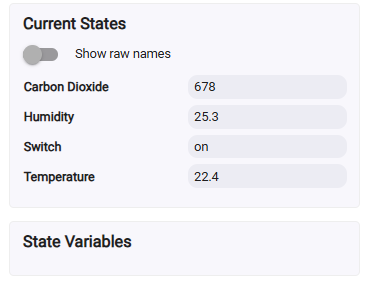
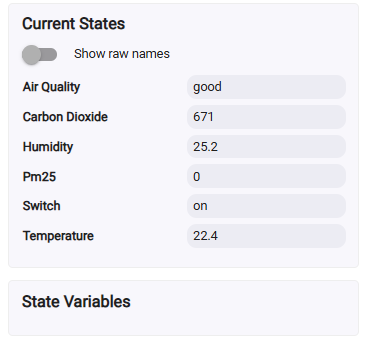
Not sure will this settle down next days, but I found following odd behaviour with ALPSTUGA's PM2.5 and Air Quality parameters.
Step 1 - Device details opened from Hubitat device list- PM2.5 and Air Quality missing:
Step 2 - Hit Refresh button - PM2.5 and Air Quality shows up:
Also noticed, that these are missing from Home Assistant side where I use Hubitat devices over the MAKER API. I did not yet able to get these two parameters visible at all on HA:
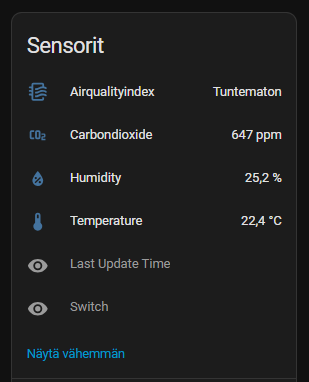
Is this only on me or some behaviour with others?
Thanks,
Mika
Okay, might be the device issue. I used Google Home for pairing the device and just look for while the device info screen in Google Home app and status of those two parameters dissaper from the Google Home app (status was "unknown"). So perhaps firmware update for ALPSTUGA could fix this.
Does anyone knows that is firmware update possible only with IKEA own hub, or is it possible even with Hubitat?
Hi @mika ,
The IKEA ALPSTUGA Matter driver was missing the explicit declaration of the airQuality and pm25 attributes - this was the reason they were visible on the device web page only after a 'Refresh' command. This is now fixed in the updated driver version, timeStamp '2026/01/03 10:24 AM'. Sadly, after trying to remove and re-include my ALPSTUGA sensor, I can no longer pair it with any Matter controller I have, despite multiple attempts… 
So I can’t test the driver changes myself — please let me know if everything works OK on your side.
On the OTA updates — I’ve read that IKEA supports them and that OTA updates should be possible even from other Matter controllers (like Apple Home or Home Assistant), but I can’t confirm that for sure.
1 Like
Hi @kkossev,
this update fixes the issue. Now all the parameters are right away available on device page. Also Home Assistant shows now these parameters as well.
Thanks,
Mika
1 Like

