WET-IT — Weather-Enhanced Time-Based Irrigation Tuning for Hubitat

I just pushed v.1.2.3.0 to git and HPM.

There is one minor bug fix. Now that things have warmed up, I found a persistent value issue with alertText. Why didn't I see it before? Because it's the first time in months we haven't had a freeze alert here. :wink:

The important update was finishing the nextProgram piece. Per @JimB's request. The driver now has a JSON available for the entire list of scheduled programs with their next occurrence.

I also added two commands to the app and child driver (runNextProgram and skipNextProgram) so you can use the attributes and JSON and take action.

Having a BBQ in the backyard or a party with a bounce house this weekend? :piñata: :tada:

Use skipNextProgram to skip over the next day or two so the grass isn't wet. The ET calculations will make up for the missed watering events.

As of now, if you skip a program, there's no going back. I am in the midst of finishing the code so you'll be able to 'undo' a skip. The core logic is easy; it's the UI I haven't fully decided upon.

I must be missing something here, or we're just not using the same terms.

There is one and only one controller (scheduler) involved... WET-IT itself. It only knows about the programs set up in the app. The app operates the valves and switches of your irrigation system.

I did, with the release of 1.2.3.0, add a JSON that has the next scheduled event for all internal programs. I think that may be what you are after.

I'm just confused :confused: when you refer to the next N programs across multiple controllers. There's no way for WET-IT to see programming from another controller.

I meant multiple irrigation controllers.
My bad anyway, I forgot that a program could activate multiple valves.

Got it! Glad we're on the same page now. :wink:

Yes, you can have up to 48 valves in total and can mix/match them into 16 various programs as you need.

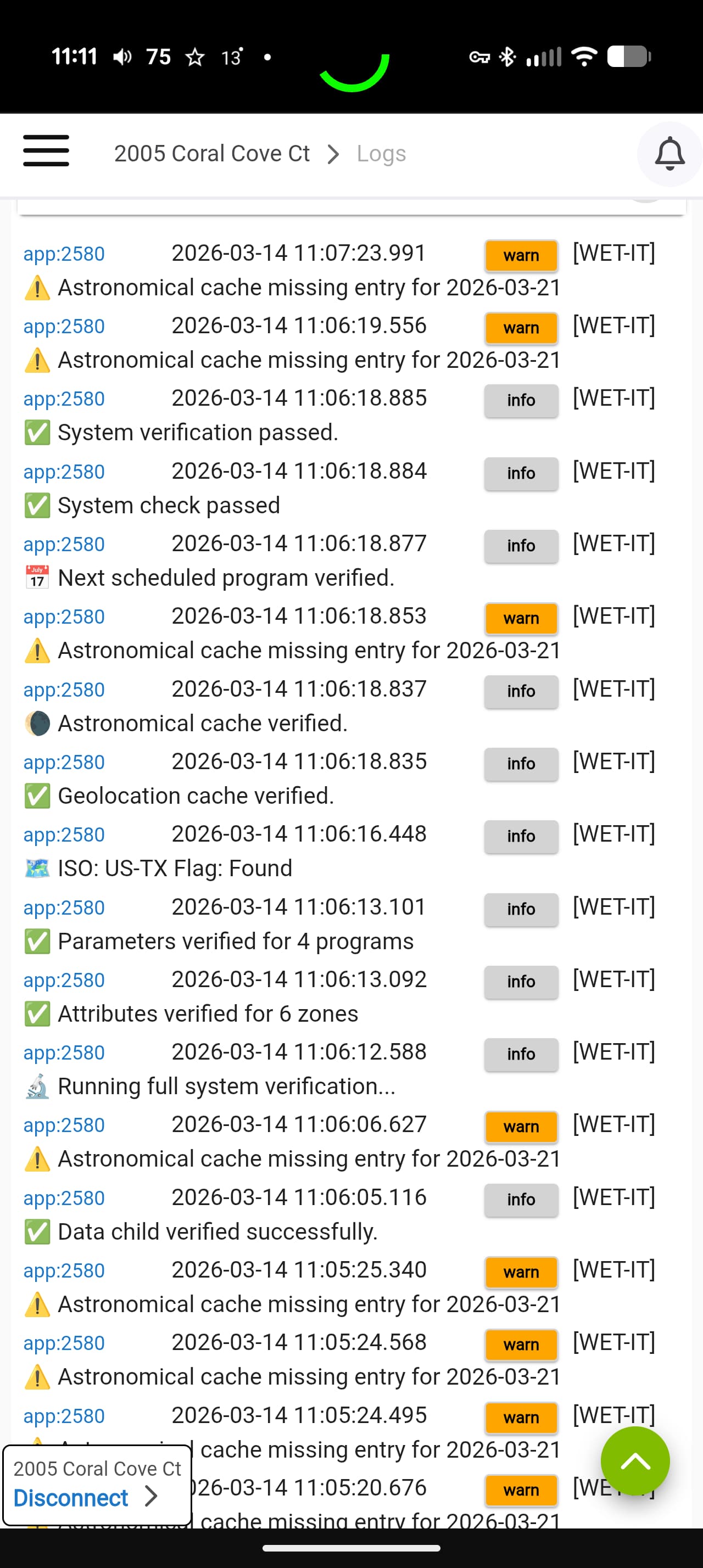
I had an issue with the Next Program setting. It was showing an error. One of the programs was active., but wasn't operating the valves. So I stopped it.
Then tried to recalculate the Next Program. It shows recalculating, but never finishes.
Ran the diagnostics successfully, but the Nex Program is still recalculating.
Attached is a screenshot of the logs.

Already fixed. :wink:

That's the cache used to determine the forecasted events for the next week. It doesn't affect the actual watering schedule, just the forecasting. As long as you get the "System verification passed" (which is there), the scheduled programs run like they always have.

I purposefully kept the forecasting separate from the actual work for reasons just like this.

That screenshot doesn't show which version you're running.

I'll have 1.3.0.0 out shortly, which has a more robust forecasting cache (fixes this issue) and also has the ability to restore skipped programs and a (finally) working notification system for alerts.

Great. Looking forward to the updates.

I'm using the latest version on package manager.

[Update: v1.3.0.0]

Version 1.3.0 is available in HPM and on Git.

This version has the complete skip/restore program logic and fixes the UI issue @JimB ran into which was a symptom of the incomplete restore piece.

Here's what else is new:

:light_bulb: Highlights

:new_button: What’s New in v1.3.0.0 :new_button:

  • Added the ability to restore skipped programs.

  • Fixed latent alert messages in the child driver attribute.

  • Completed work on the Astronomical cache. Events are now cached for a full week in advance. Astronomical based programs (dawn, dusk, etc) will continue to work even if the hub loses internet connectivity or the API is unavailable.

  • The notification system is finally complete! WET-IT now generates notification events for external delivery through the Hubitat Notifications app.

Notifications are not sent directly by WET-IT. Instead, the application publishes events that can be routed by the Notifications app to devices such as:

  • Mobile Push Notifications
  • Text Messages
  • Speech Devices
  • Voice Assistants

Notification Event Categories

WET-IT emits several types of notification events that can be subscribed to in the Notifications app.

Event Type Description
Weather Alerts Freeze, rain, wind, and forecast availability notifications
Program Lifecycle Program start and completion events
Zone Activity Zone activation and shutdown events

These event categories allow notification rules to be tailored to specific types of irrigation activity.

Example Notifications

Typical messages include:

  • Program Lawn Front now active
  • Zone 3 now active
  • Program Garden Beds complete
  • Weather alerts cleared
  • Forecast data restored

These event notifications mirror the Rain Bird, Rain Bird has detected a rain event and Rachio's Rain Sensor Activated.

WET-IT has always acted upon these events and reported it in the attributes and JSON. This update lets WET-IT send them directly to the Hubitat mobile app and/or an SMS message without having to create a rule or piston to monitor the alerts.

It also sends alerts when various internal items are degraded (e.g., multiple forecast skips, child driver version mismatches, failed API calls, etc.).

The documentation to how to set up the Notification app is here and the Logging & Tools section has a direct link to the doc.

As an aside...

I had a huge :grin: event yesterday during testing. I have one program set up to use the Echo. Once I had the notifications in place, I was able to tell the Echo to “Turn on the sprinkler,” which it did and then announced back with the following verbal progress updates:

  • Sprinkler now active. (Program Start)
    -- Zone 1 now active. (Zone Start)
    -- Zone 2 now active. (Next zone Start)
  • Sprinkler is complete. (Program End - Watering complete.)

All of that with no webhook/Lambda/cloud middleware dependency beyond the built-in Echo skill and Notification app.

I don't see me using the voice control often but this sure beats Rain Bird's Echo skill requirement and having to say, “Alexa, ask Rain Bird to begin watering sprinkler.”

HPM doesn't find the WET-IT update....

EDIT: the Repair function worked in HPM :smile:

Not getting any errors....

1 Like

Let me know what you think of the skip/restore. I am not sure how much it'll actually get used, but I can think of a few times I would use it.

The new notifications are really slick too. The weather here in DC is crazy. I had a freeze alert, a rain alert, and two wind alerts all come across along with the 'all clear' today alone. I never would've seen those if I didn't have them forwarded. :wink:

Tried to delete a program. The program was deleted just fine. But the app stayed at the program detail display instead of going to the program list display. The app wouldn't let me leave that page until I entered values in all rhe red outlined boxes. So I had to select the App icon to quit the WET-IT app.

The documentation also needs an update. Just inthe first few pages the zone and soil parameters in the documentation don't match the app.

Just realized that WET-IT assumes that there is only one controller so only one zone is run at a time in a program. Need to have the option to have two zones running at the same time so watering is completed earlier in the day.

Would also like to have the soak in delay different for the two zones, or to have both zones start when the first delay is over. We are on a cul-de-sac so the spray angle is different on the two sides of the lawn.

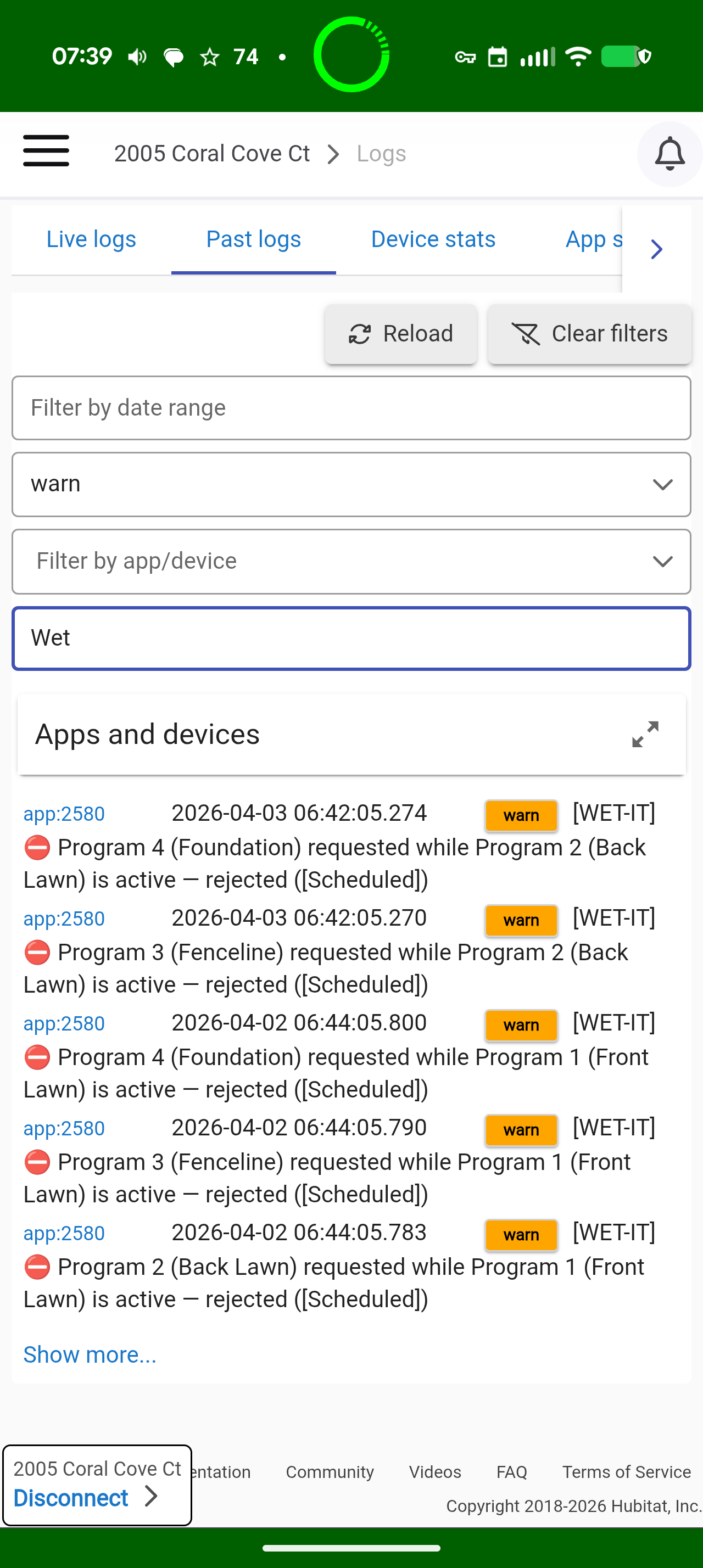
Just found these error messagea in the system log. Apparently WET-IT continues to try to run programs after a successful program start. Yesterday program 1 ran and there were errors for programs 2-4. Today program 2 ran and there were errorsfor programs 3 and 4.

If I select NOAA as primary weather and Open Meteo as backup, I get an active weather alert of "Rain: active - forecast 0.24 in". This is accurate. We are forecast for about 1/4" rain later today.

However, if I flip flop those and use Meteo as primary, I get no Active Weather Alerts.

I'm curious to hear what weather source combo folks have found most effective (and I'm not against getting a free API key if that is what is needed).

I live in Dallas Texas. Rain can be very patchy at times......half mile to my north could get an inch of rain and we get zero.

I would love to have the ability to use a generic forecast water prediction (forecast 1/4" of rain later today) but then also have an accurate per GPS coordinate log of what we actually got in rain quantity. From everything I gather, this is fully possible....I'm just not sure what weather sources I should use to best accomplish this.

Suggestions?

Overall, Open-Meteo is more comprehensive than NOAA. I would reverse the two.

There is a reason METOCs are referred to as “weather guessers.” :wink:

What do you have the Rain Skip Threshhold set to in the Weather Configuration (Advanced) section?

For example, if you have it set to 0.175 and NOAA says 0.24” and Open-Meteo predicts 0.170, NOAA will alert and Open-Meteo won't. That would explain the difference in behavior.

WX providers are definitely a YMMV item.

NOAA updates their forecasts “several times a day,” typically every 1-6 hours. Open-Meto updates the forecast once every 24 hours but updates their observations every hour. That makes them better for the “is it raining right now” check that runs at the beginning of every program run.

What you need to be careful of is trying to create some sort of “check them all” or hybrid model. That completely messes up the ET calculations. It'll ping-pong all over the place.

Open-Weather might be worth a try. Take a few days to see which works best for you and then stick with it.

Cool. Sounds good. I'll put Open Meteo as primary and NOAA as backup for now and leave it and see what happens.

Yes I did have my rain skip threshold to .125, and that logic does make sense. And FWIW, we didn't get any rain today, so the Open Meteo seemed to be better at forecasting todays rain.

I'm going to put my rain skip threshold to "no selection" for now as I see how this system works with reality.

With Open Meteo are their forecasts based on my GPS location or is it nearest airport or is it just the city/town. From what I saw on their website, it seems like they are using gps coordinates?

Forecast locations are another YMMV:

WET-IT seeds each of the wx sources with your lat/lon. City/Town or Zip Code is not reliable. For example, my personal Zip Code is for a different city, in a different county 12 miles away but... that's where my mail comes from. :person_shrugging:t3:

  • NOAA - "Forecast Office" - Typically closest major airport. I pass the lat/lon, and they determine which forecast office is closest. There are 122 forecast offices in the US. The Diagnostic section displays which office it's using for you, based on your lat/lon
  • Tempest - Your personal weather station. Exact lat/lon.
  • Tomorrow.io uses a 500m polygon based on your lat/lon.
  • Open-Meto uses a 1k to 12k polygon based on your lat/lon.
  • OpenWeatherMap claims to have 40,000 weather stations. The API bases the forecast on the seed of your lat/lon.
1 Like

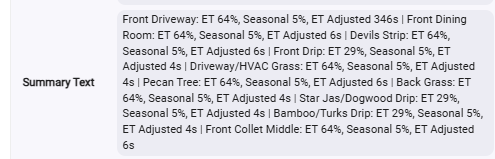
Trying to understand the data a little bit. The 6am weather was pulled today. My Summary text is as follows:
image
The ET and Seasonal %s are consistant.....the Sprinkler heads are 64/5 and my drip lines are 29/5.

All my sprinklers end up with a 6s adjustment and the dip lines get 4s adjustment.......EXCEPT for zone 1. My "Front Driveway" has an adjustment of 346s.

ALL my sprinkler zones are set up the same in the WET-IT app.....Exact same Base Runtime/Soil/Plant/Irrigation method. Why would zone 1 have such a higher adjustment than the others?

Well, first of all, stop watering the driveway! :rofl:

On a more serious note, double-check the Advanced Parameters for the zones. Make sure that is all the same. I don't think this is it, but its worth checking.

Do a manual Run Weather/ET Updates Now and see if it changes.
The important item is the ET%. That's what is used when the program actually runs, not the Adjusted seconds. That's just a reporting item.

It should match the rest if every param for the zones are identical.

Double-check your basetime for the driveway.

The calculation is simply: Integer etAdjustedTime=Math.round(baseTime*etBudget/100)