WET-IT — Weather-Enhanced Time-Based Irrigation Tuning for Hubitat

:seedling: [RELEASE] WET-IT 1.0.0.0 — Weather-Enhanced Time-Based Irrigation Tuning for Hubitat

After months of field testing and multiple pre-release builds, WET-IT 1.0.0.0 is now officially live on Hubitat Package Manager (HPM)

WET-IT provides local-first, hybrid evapotranspiration (ET) and seasonal water modeling for Hubitat. It brings Rachio/Orbit/Hydrawise-style intelligence entirely local — no cloud, no lag, no subscription, just physics-driven irrigation.


As a follow-up to my Rain Bird LNK/LNK2 device driver, I finished this Hubitat app which allows you to create an intelligent watering system and provides the “smarts” for that device driver and any other irrigation device.

Evapotranspiration (ET) is the combined water loss from soil evaporation and plant transpiration. It’s the foundation for precision irrigation, ensuring each zone receives just the water it needs.

Approach Basis Result
:mantelpiece_clock: Fixed Schedule Time + runtime Over/under watering
:date: Seasonal Adjust Calendar % Better, but weather-blind
:sun_behind_rain_cloud: ET-Based Control Real weather + soil data Adaptive precision

Although there is a lot to this, the main idea is that the integration determines the precise amount of evapotranspiration based on your location, soil type, plant type, and weather. In other words, the entire brain of a Rachio, Orbit, or a more advanced Rain Bird.

The big difference between those cloud based controllers and WET-IT is all of these calculations are local to your hub, rather than the cloud, and thus enshittification free. No subscriptions, no cloud outages. :wink:

While I can't say for sure that this is where the big guys are going, it's interesting that one Rain Bird LNK driver user found that updating the firmware on their Wi-Fi module took away local control and authentication and stopped him from using the driver. That firmware update made the module he purchased 100% cloud-based only. Can a subscription really be that far behind?


:sunny: What WET-IT Does

WET-IT provides the brains for your irrigation system — not the brawn.

It calculates exactly how much water each zone needs based on local evapotranspiration (ET), seasonal coefficients, and forecast data from your choice of three weather sources.

If ET is more than you think you need, the driver also calculates the seasonal adjustment the same way Rain Bird and the others do. It's your choice.

📊 Driver Attribute Reference
Attribute Type Description
appInfo string App version / metadata
datasetJson string Comprehensive JSON for all zones
driverInfo string Driver version / metadata
freezeAlert bool True when forecast below threshold
freezeLowTemp number Freeze warning threshold
rainAlert bool True when 24 hour rain forecast above threshold
rainForecast number 24 hour rain forecast
summaryText string Human-readable ET summary
summaryTimestamp string Last hybrid ET calculation
windAlert bool True when wind forecast above threshold
windSpeed number Forecasted wind speed
wxChecked string Forecast poll/check time
wxLocation string City/State/Forecast Office/Radar Station (US Only)
wxSource string Active weather provider
wxTimestamp string Forecast origin time
zone#Et number ET adjustment (%) per zone
zone#Name string Friendly name for each zone
zone#Seasonal number Seasonal adjustment (%) per zone

What it doesn’t do: directly control your valves or switches. This is intentional. The control side is left to Rule Machine, webCoRE, or Node-RED — whichever you prefer. I have examples in the documentation.

This keeps WET-IT compatible with any irrigation device or relay driver — from a Wi-Fi Rain Bird module to a $20 Zigbee outlet. More importantly, you can combine various controller types into a single, comprehensive system.

:thinking: Think of it as giving a $30 hose timer the smarts of a $250 Rachio — but better, because it’s all local.


:bulb: Background

Each day, WET-IT computes how much moisture was lost vs. gained (ET − precipitation).

If the balance is positive, it tells your automations how long to water to bring it back to zero.

If rainfall exceeded loss, it carries that surplus forward — just like nature does.


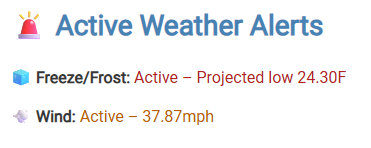
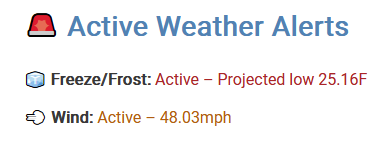
:ice_cube: :cloud_with_rain::dash: Active Weather Alerts

The Active Weather Alerts panel inside the app shows live risk conditions derived from your forecast data:

  • :ice_cube: Freeze/Frost — Projected low below threshold

  • :cloud_with_rain: Rain — Forecast precipitation above skip threshold

  • :dash: Wind — Forecast wind speed above skip limit

Your automations can easily reference these attributes to skip watering under unsafe or wasteful conditions.


:brain: Why This Matters

With WET-IT, even a $30 smart hose timer can act like a high-end Orbit or Rachio — and better yet, you can mix and match devices. Want to control your sprinklers, drip irrigation, and soaker hoses all at once? Now you can.

Zigbee, Z-Wave, Wi-Fi, custom relay boards — all unified under one local weather model.

:gear: Key Features

  • Hybrid ET + Seasonal runtime model

  • Three weather providers with intelligent fallback and unit normalization:

    Source Key Notes
    OpenWeather 3.0 :white_check_mark: Hourly and forecast-based ET₀
    Tomorrow.io :white_check_mark: High-resolution meteorological model
    NOAA NWS :x: Built-in fallback
  • :ice_cube::cloud_with_rain::dash: Active Weather Alerts (Freeze, Rain, Wind) All user configurable.

  • Soil Moisture Memory for per-zone depletion tracking

  • Deterministic bi-hour scheduler with Verify, Refresh, and Test diagnostics

  • Unified JSON publishing (datasetJson) and/or individual attribute-based outputs for dashboards/integrations

  • Discrete attribute publishing — If you prefer individual zone by zone and alert attributes, instead of parsing JSON, you get that as well... or both.

  • All-local execution — no vendor dependency, no subscriptions.


:mag: How It Works with Automations

WET-IT emits daily correction data for each zone.
Your automations use these values to drive actual watering.

Example flow:

  1. WET-IT calculates Zone 1 ET = 0.12 in and outputs a runtime multiplier.

  2. Your Rule Machine/webCoRE/Node-RED rule converts that into valve run-time.

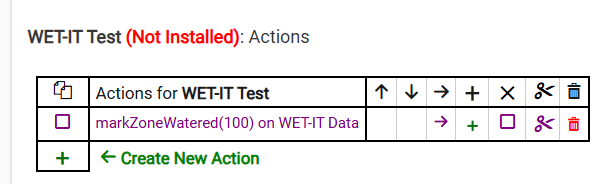
  3. When watering completes, the automation calls back to WET-IT (markZoneWatered) so soil memory resets.

It’s modular by design — allowing integration with any irrigation hardware and letting you build logic as advanced as you like.


:sun_behind_rain_cloud: Data Precision & Reliability

  • All data is localized to your longitude/latitude, including seasonal awareness.

  • ET and depletion data retain full precision for modeling accuracy

  • All alert states and weather data persist through hub reboots

  • Supports up to 48 individual zones.


:hammer_and_wrench: Installation

Option 1 — Hubitat Package Manager (Recommended)
Apps → Hubitat Package Manager → Search → “WET-IT”

Option 2 — Manual Import

Once installed, open the app, configure your weather source, define your zones, and run Verify System.

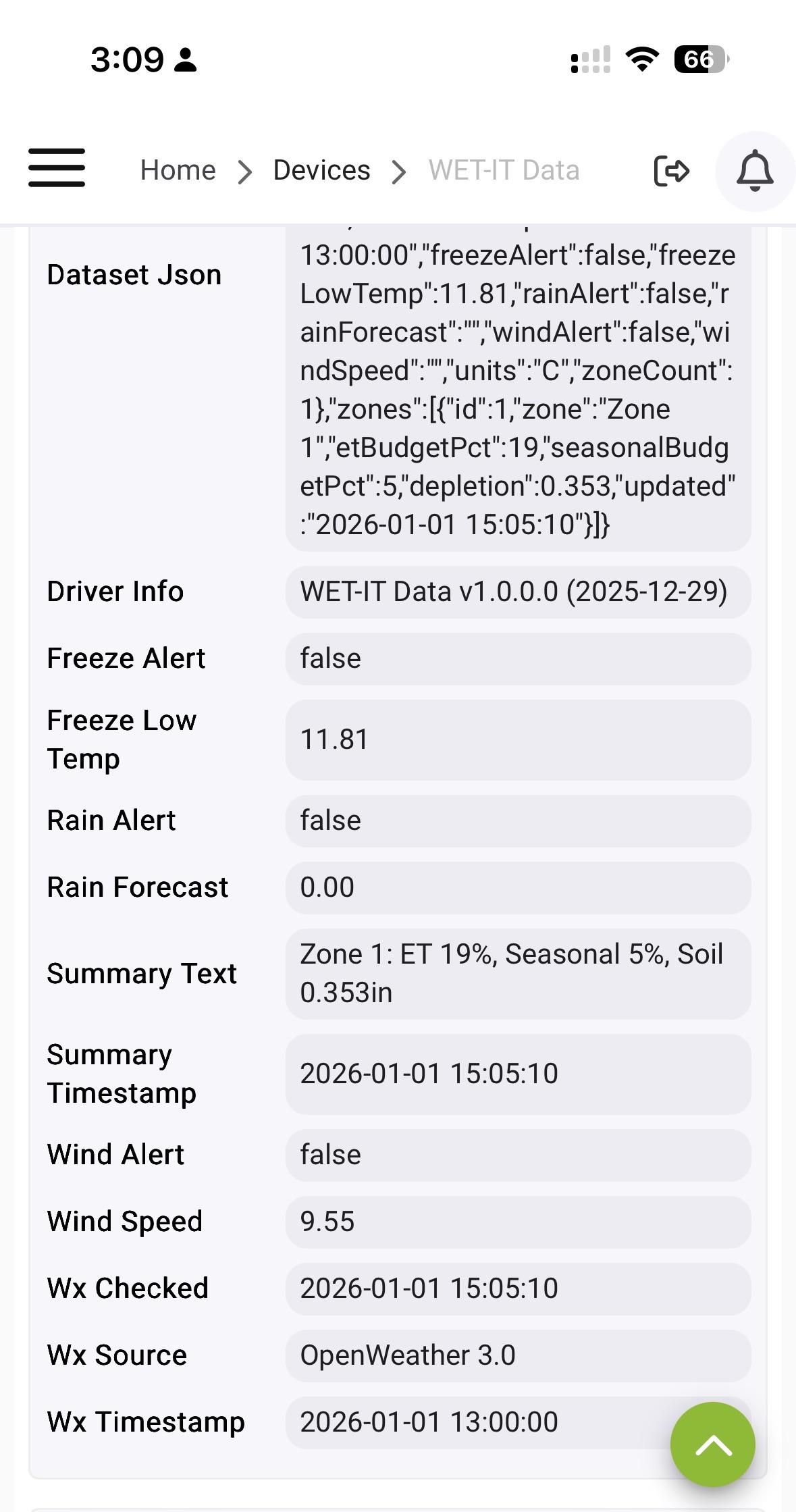
A child device (WET-IT Data) will appear after you run the app for the first time which houses all calculated attributes, zone information, and alerts. This is the data driver that powers your Rule Machine, webCoRE, and Node-RED scheduler.


:blue_book: Documentation

Full technical documentation, including equations, schema diagrams, and integration notes:

:page_facing_up:Readme

:page_facing_up:Full Documentation

:page_facing_up:GitHub repository


:receipt: Credits

Testing & Feedback: Hubitat community early adopters who fearlessly ignored instructions :stuck_out_tongue_winking_eye:


:sunflower: TL;DR

WET-IT 1.0.0.0 — a locally-computed, weather-smart irrigation model for Hubitat.
12 Likes

Looks fantastically over the top for my situation, but let's have some fun.

I have some raised planters out front that is mostly herbs and some annual wildflowers. It's all on one string of drip irrigation with a zigbee valve. I assume "Vegetables" is the plant type I should go with?

LOL wrong time of year to try this, but so far appears to work great.
image

2 Likes

Looks like you may be close to me: :rofl:

image

In your case, yes, use Vegetables as the plant type.

That category in WET-IT covers plants with shallow-to-moderate root depth and higher transpiration rates — things like herbs, greens, and most annuals.

The “Vegetables” coefficient (Kc value) assumes active growth, relatively thin foliage, and moderate water demand, which fits herbs and wildflowers perfectly.

You can fine-tune from there if you notice over- or under-watering:

  • If soil dries too fast → bump Plant Factor down slightly (less water).
  • If it stays soggy → bump it up a touch (more deficit before watering).

Pro tip: herbs and annual wildflowers typically have similar ET behavior to leafy vegetables in the model, so you’ll be right in range.

1 Like

As a follow-up to @dstutz's config question, I updated DOCUMENTATION.md with more details for items such as plant type, soil type, irrigation method, et al.

To save you from having to go through the entire document searching for the information, I have also included hyperlinks to the documentation for those items and the majority of the app's sections.

The update has been pushed to HPM as v1.0.0.2.

I'm going to give it a spin. BUT at the moment my garden is under several inches of snow.

1 Like

Have been using the smart watering of the Orbit B-Hyve system. They do something similar that is quite complicated to adjust (a multitude of factors with 4 user adjustable to adjust for soil and plant type).
My weather station is a Tempest. Could your weather inputs be adjusted to read the data? Would happy to work with you.

1 Like

Amazing app Sir! :pray:

My only question is, what should I be triggering my RM rule on to water the garden?

I'm still trying to completely figure it out myself....but I think the main thing is here:

 runtime = baseMinutes * (json.zones.zone1.etBudgetPct / 100)

Currently my "herb bed" has "etBudgetPct":11

So that means it should water for .11 minutes so like 6 seconds? (EDIT: Close, but not quite....11% of baseMinutes WET-IT — Weather-Enhanced Time-Based Irrigation Tuning for Hubitat - #12 by MHedish) (and don't forget to mark zones watered to reset the calculation) Which...since it's winter I guess is correct since it basically doesn't need water now.

It's funny, this app is so simple as it seems to boil down to just that one calculation I just posted (no offense meant to the very complex calculations going on behind the scenes to get the ET #), but it's also so complex as there are a bunch of variables and it's not super intuitive. I think over time as more people use it and questions get answered, docs tweaked, this is going to end up very polished and useful. I'm looking forward to getting back to growing season.

1 Like

Hi Mark, (@MHedish)
I've just come across this app and it looks great.
It's winter here but thought I'd have a play to see if this will fit my needs. (I'm sure it will).
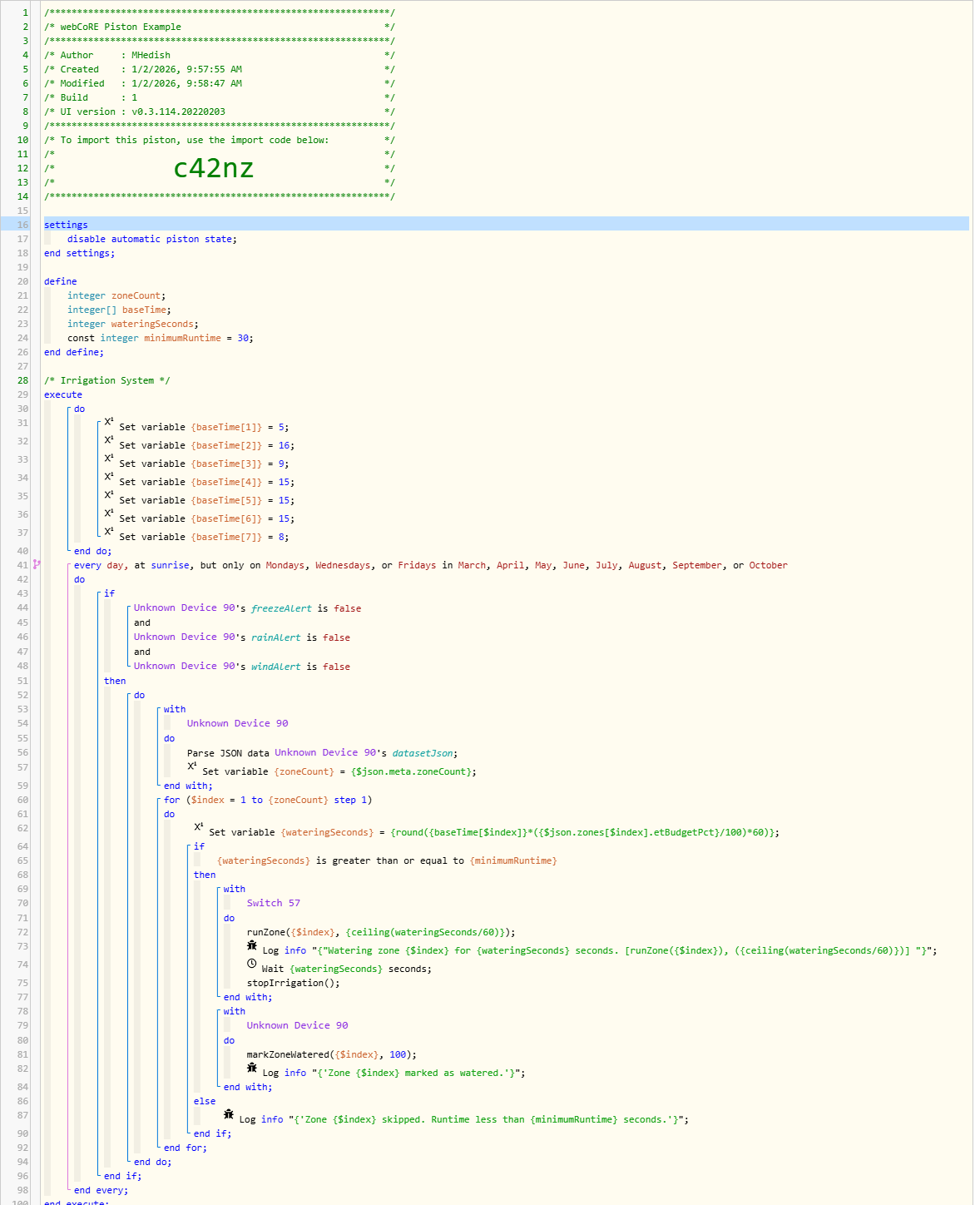
I use webCoRE for everything and I can see a piston that is defined in your documentation.
Is there any chance you can share the piston code so that I can import it and work from there. I've had a look and cannot seem to find it anywhere.
Thanks.

Possibly... :wink:

I took a look a the Tempest API docs. From my end, adding Tempest as another weather provider shouldn't be too difficult. Their API is well documented. It has both API key authentication and OAuth. I can do either. I'd probably stick with the API key method since that framework is already in place.

Their API primarily focuses on observations. That's a good thing for ET calculations since we can base it on actuals and not forecasts.

Access to the data is a double-edged sword. :wink: All of your personal station's data is available at a cloud-endpoint. That's the good news. The bad news is if they ever go out of business or choose to turn access to that into a subscription service, well... you know how that goes.

For now, the plus side is I would be able to test everything as you, if you allowed it, and wouldn't need VPN access to your LAN.

According to the docs, your station can provide a 10 day forecast specifically for your station. I could still fall back to NOAA for the forecast information. For example, knowing it's raining right now is helpful to not run an irrigation event. We also want to know that it is going to rain within the next 24 hours, so don't run today's irrigation event since we will get rain 5 hours after the scheduled irrigation, according to the weather guessers. So, we really need both observation and forecast.

They also have forecast information available for anywhere, but it requires a commercial license:


Forecast

Forecast information provided by the Tempest API is powered by our Nearcast Technology™. Our patented technology provides a fine-tuned forecast for later today and tomorrow - all with guaranteed accuracy for any point on Earth.

:construction: Forecast Access

Accessing forecast information for any Tempest station or for any location on Earth requires a commercial Tempest API licensing agreement.


Tempest does provide a listening method for events, which is great, but that would require a bit of rework on my side.

Using your hyperlocal observations to calculate ET would, obviously, be the most accurate we could get.

Footnote: When I was researching the ET formulas, I found this organization: https://etdata.org/ They provide actuals based on satellite imagery. It's great, but it's 5+ days behind and geared to large commercial usage, not really those of us trying to keep the grass green and the tomatoes watered. :wink:

I'm curious to know what the delta is between the observations for your station and the three forecast suppliers I built in. I wonder if the juice is worth the squeeze. :man_shrugging:t3:

All that being said, since I don't need to VPN to get to the data, I'm up for giving it a try. DM me and we can would through the next steps.

Of course: jvu2p

The app is production-ready. The piston... not so much. :wink: I'm still working on the tiles and events. It works, but it's not pretty yet. That's my homework for the next few days.

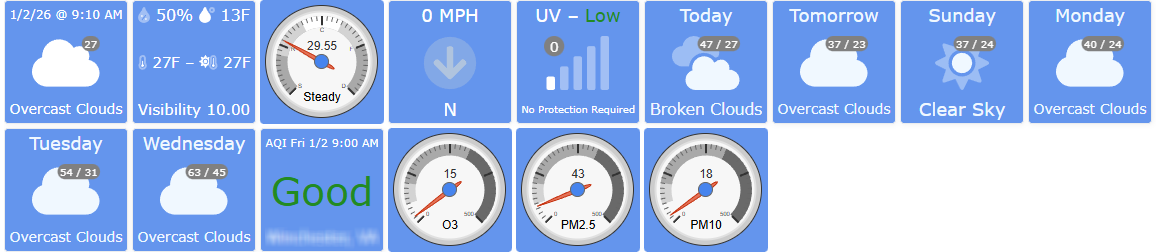
These are the weather tiles in my dashboard (piston import: p354):

I need to add a few tiles for the irrigation piston so it matches these and updates as the zones get watered and shows that it's not going to water because of one or more of the alerts.

I'll share an updated piston when I get it all pretty and it has the functions I'm after. I'm curious to see what you come up with as well.

1 Like

@dstutz

I'm still trying to completely figure it out myself....but I think the main thing is here:

 runtime = baseMinutes * (json.zones.zone1.etBudgetPct / 100)

Currently my "herb bed" has "etBudgetPct":11

So that means it should water for .11 minutes so like 6 seconds? (and don't forget to mark zones watered to reset the calculation) Which...since it's winter I guess is correct since it basically doesn't need water now.

Close...

Your calculation is correct. 11% of “normal” for that zone. It's not 11% of a minute; it's 11% of whatever you would normally water that zone.

For example, if your herb bed (zone 1) is normally watered for 8 minutes, you would water it for 11% of that, i.e., 52.8 seconds.

Remember, the app is just calculating the percentages. The percentage of what is up to you in the rule/piston you use to actually run the valves.

This may help:

The “baseTime” watering (in minutes) for each of my seven zones is defined as constants at the top.

The trigger is set to run every other day at sunrise as long as we don't have any alerts. The for loop then runs through all the zones using this formula:

It takes the baseTime and multiplies it by the percentage it should run (etBudgetPct), based on the ET budget in seconds. I moved to seconds since that provides better resolution, and we can actually control the valves to the second.

The next step in the piston is to check that we're not watering for less than the constant set at the top (30 seconds), and if that's good, it waters, logs it, and then marks the zone as watered.

For your example, you just need to define what your baseMinutes is for the herb bed.

1 Like

Thanks! In RM, you want to run through your zones and take whatever your current baseline is for each and multiply it by the etBudgetPct for each zone.

For example, if your baseline for zone 1 is 6 minutes, the data in your screenshot shows 19%. So... baseline * (etBudgetPct/100) would be 6*.19 = 1.14 minutes

Since we're trying to be much more accurate than just "water for xx minutes", I would move that calculation to seconds. You can control the valves to the second:

(baselineMinutes*60) * (etBudgetPct/100) or (6*60)*(19/100) = 68.4 seconds. You could also round that to 68 seconds if that makes more sense to you. You want to turn the valve on, delay for xx seconds, turn the valve off, and then mark that zone as watered.

1 Like

Great addition to the community. Impressive looking stuff.

I did have a momentary bit of confusion, as we use below at home and I wondered why a washcloth company was posting here. :thinking: Presumably they won't come after you for copyright (trademark as MHedish corrects me below) infringement... :wink:

2 Likes

:rofl:

That's funny. It wouldn't be copyright; I didn't take any text/pics from their site. Trademark? (I actually have experience here.) Nah, they're in a different class. I don't think anyone would confuse the app with, “Wiping cloths in the nature of a sponge for household purposes.”

I appreciate the kind words and looking out for the legalities.

3 Likes

Yeah I just noticed that myself when I started catching up here, then you called me out :slight_smile:.

1 Like

Started to implement Wet-It based on NWS data while waiting for the Tempest integration.
Based on your documentation I suspect that I am the first to use RM.
The RM example is definitely not RM, look more like Webcore.

:sunrise_over_mountains: Rule Machine Example (Dynamic Sunrise Trigger)
Trigger: Time occurs at Sunrise + 0 minutes
Action Sequence:

Set Variable wetitData = %device:WET-IT Data: datasetJson%
Parse JSON wetitData into json
For each zone:
runtime = baseMinutes * (json.zones.zone1.etBudgetPct / 100)
If freezeAlert == false:
Send command to controller: setZoneRuntime(zone1, runtime)
Wait until irrigation completes
wetit.markZoneWatered(zone1)

The alert variables (freeze, rain and wind) are Boolean so they can't be used directly in a conditional. RM doesn't permit variables to be set to a Device Attribute that is Boolean. So there variables are usable in RM.

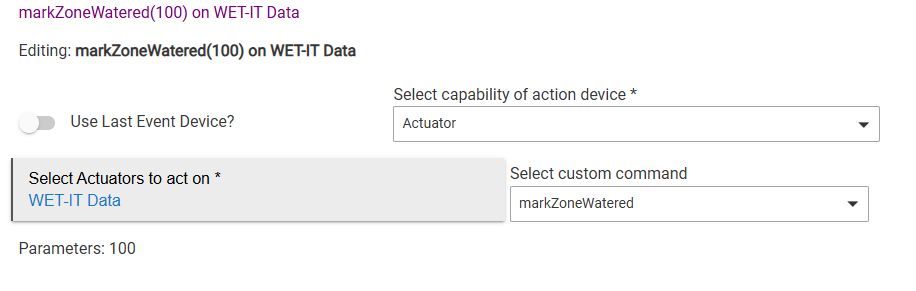
To execute the mark Zone Watered command, RM needs to reference Wet-It as an output device. Have not been able to find the proper output device type to address Wet-It. Usually a virtual device is set up as an Actuator.

That example isn't webCoRE, it's p-code for what should happen. I'm not an RM person and I'll admit I didn't test on RM.

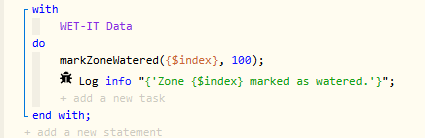
Here's what that part looks like in WC:
image

In WC I can run a custom command to mark it done. As they say in the NFL, "Upon further review..." I didn't realize RM won't let you run a custom action on a device unless that device has the required "capability."

This is an easy fix. Edit the WET-ID Data device and add in "Actuator" as a capability:

capability "Actuator"
capability "Sensor"
capability "Refresh"

With that, you'll be able to create the rule:

Mark Watered Action

I updated the driver and pushed it to Github.

No need for a virtual device. :wink: I just needed to update the existing device driver.

As for the alerts...

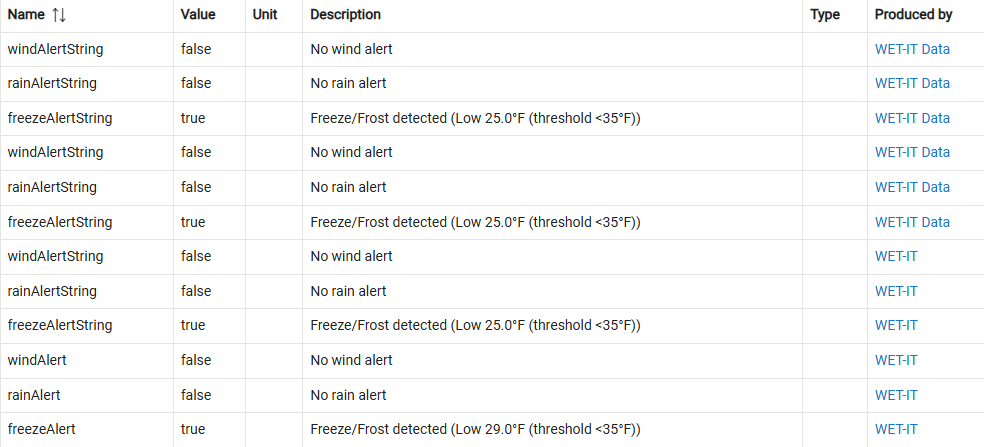
Yup. That's a RM gotcha I wasn't aware of until now. They’ll show up in the device attributes list, but RM treats them as non-comparable because internally, RM only allows String, Number, and DateTime attributes for variable binding and conditional comparisons.

So you can see freezeAlert: true in the device, but can’t do IF freezeAlert = true THEN…

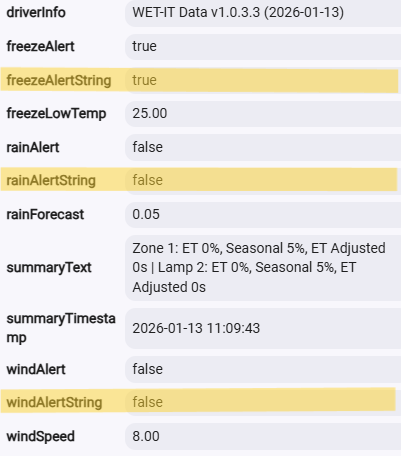
This is a simple fix as well, but one I need to build in to both the app and driver. I need to publish those as strings as well as booleans to the device. With that you'll be able to do a string comparison in RM.

I'm in the midst of a fairly large update to the app side (talk about a learning experience there as well). I'll add this to my task list and build it in.

THANKS for the feedback.

1 Like

I think you can use Boolean value in conditionals.

Never mind me… what I thought was Boolean was a String.
Excuse the interruption.

Coming soon... :wink:

Screenshot 2026-01-13 111023

It really was that simple. I still need to add it to the summary text and JSON.