 No interruption at all. Love the collab.
Collaborating again: 
Why do you need both the Boolean variable and the variable as a string?
Since nobody can compare against the Boolean [edit: in Rule Machine], then just make it a string and leave off the word “string”.
That’s what I see in other apps.
OR:
For “false” say “None”
For “true” put some informative text about the condition.
Then user could
if variable is not “None” then
Use variable in message, log, dashboard, etc
I absolutely can compare against a boolean in webCoRE. I do it all the time. You also just described the problem with string only comparisons. False vs FALSE vs false vs None vs null vs NULL. Booleans don't have these issues.
The real question is, “Why doesn't RM understand Boolean comparisons?” 
The app and driver are written with Boolean data types, so it's natural to export those variables as attributes. It was super easy to convert it to a string when publishing it to the driver as an attribute as well.
1 Like
Looks great, very future proof against the impending forced subscriptions. In case you need any further encouragement to develop a Tempest integration, I’m also eyeing Tempest as my weather source.
1 Like
I don't need any more encouragement to support Tempest, I just need the tools. They revoked their public API key March of last year.
Short of gifting me a WeatherFlow,  if someone would be willing to share their personal API key with me privately, I could use that to do the integration and testing.
I seem to be missing something.
Changed the number of zones in the app. Can't get the device to update to the new number of zones using either the Initialize or Reset buttons.
How can I make this update?
There's already two existing Tempest integrations:
Do you feel you need your own direct integration, or could you just add support for devices using either of those existing drivers?
I am indeed aware of those. I would rather not build anything that relies on an interstitial. It's always best to get the data directly from the source.
Besides, it's already done.  The scaffolding was already there. Took less than an hour.
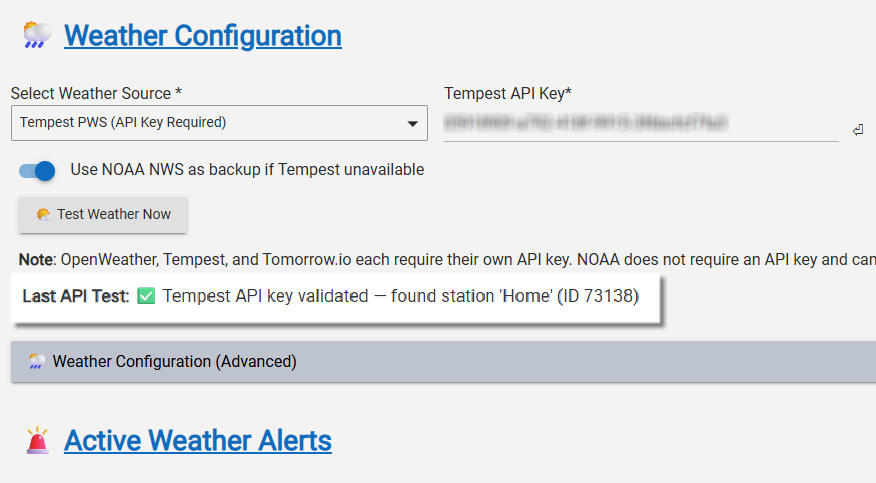
I still need to do some regression testing to make sure the data for ET is being populated correctly and a few other checks, but the good news is I'm already pulling in the data.
2 Likes
Wow.
Just helped someone install a Rachio and up til now I didn't appreciate the scope of what all it does.
Your presentation of WET-IT comes across as an even better option for those of us in HE-land.
Thanks for your effort and creativity.
This one could turn into one of the handful of "anchor attributes" of HE ownership.
2 Likes
[UPDATE] WET-IT 1.0.4.0 — Weather-Enhanced Time-Based Irrigation Tuning for Hubitat -- Scheduler Edition!
Yeah, I started off with the intent that this would just be a supplier of ET/seasonal data, and we could all write our own WC/RM schedulers, or you could use whatever scheduler you had already set up. Then...
Based on some feedback here, I decided  to add an attribute for each zone that calculated the runtime internally and published it to the data driver, rather than have everyone calculate the runtime in WC/RM. That became v1.0.1.0. Easy enough. That only took a few minutes.
Then I figured, if I went that far, it's easy enough to map to a valve/switch per zone, so I added that (v.1.0.2.0). Again, only a couple of hours of coding and testing... 
The next day... in for a dime, in for a dollar!
This update took two weeks of 

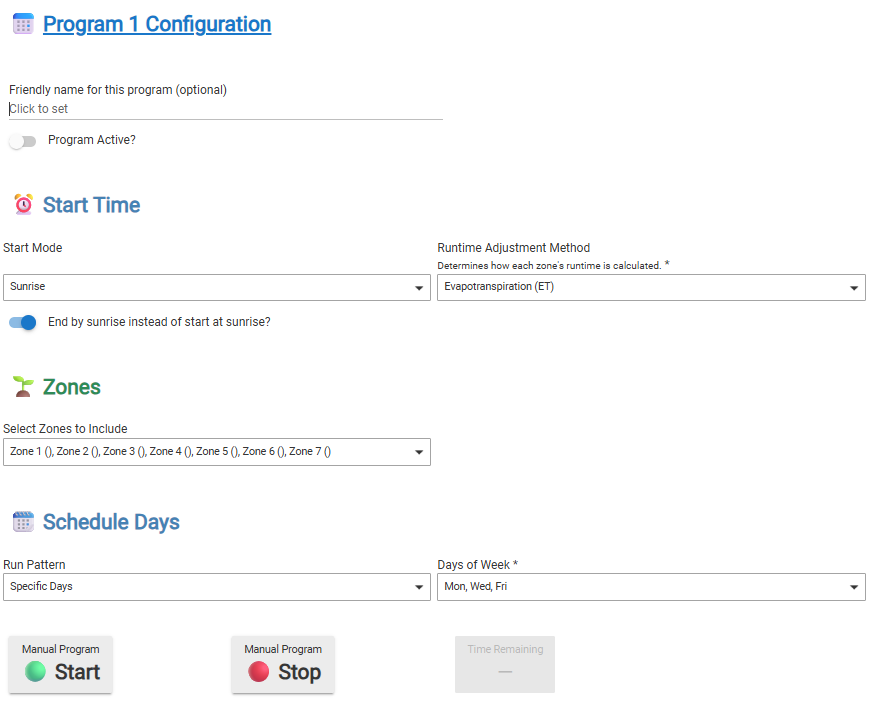
As of v1.0.4.0, it can now run your entire irrigation schedule directly from within WET-IT — no external logic required. 

 What’s New
 Full Native Scheduler
- Define up to 16 independent programs (zones, days, start modes, runtime methods).
- Choose between Fixed Start, Start at Sunrise, or End by Sunrise (new!).
- Each program supports per-zone ET, Seasonal, or Base-Only runtime logic.
- Built-in Freeze / Rain / Wind skip conditions.
- Integrates with water sensors to positively know if it's raining and not just in the forecast.
- Automatic conflict resolution between overlapping programs.
 “End by Sunrise” Smart Mode
- Dynamically back-calculates start time so watering finishes at sunrise.
- Adapts automatically as daylight changes through the season.
 Dual-Mode Operation
- Still works perfectly as a Data Provider for external automations.
- Or use it as a Full Scheduler —your choice.
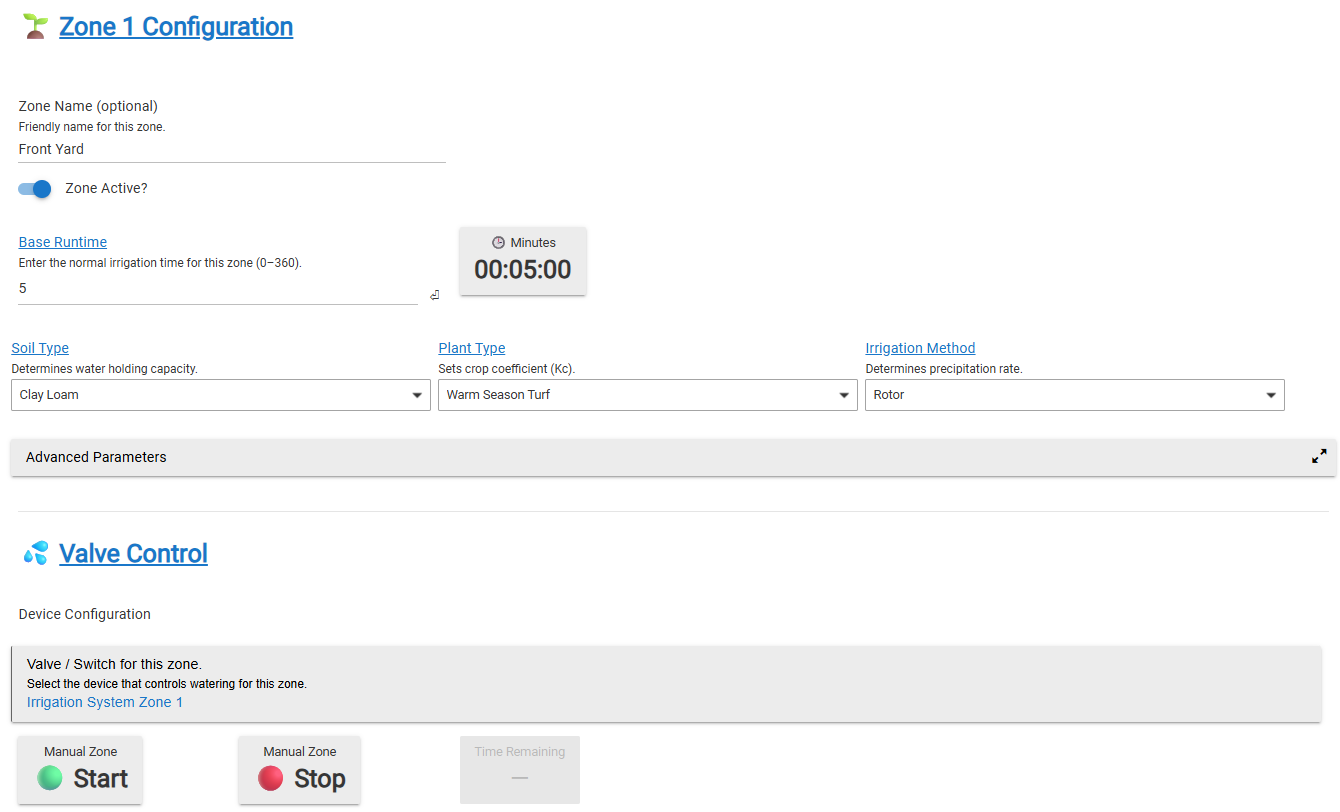
In the midst of all that, was the request to add Tempest as a weather provider, so, why not‽
Special thanks to @JimB and @aaiyar for allowing me to use their Tempest PWS for testing. Integrating Tempest was quick and easy. I was also able to integrate the Tempest haptic rain sensor data as a wet sensor.
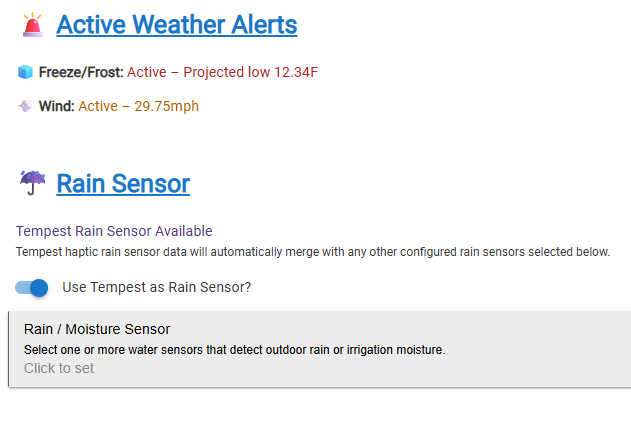
I also added some attributes for RM users. I'm a WC person, so if you need any other attributes published, just let me know.
The update is available in HPM and Git along with updated readme and documentation. 
You can use any switch as a valve. I used a lamp to substitute for my actual sprinklers for testing:
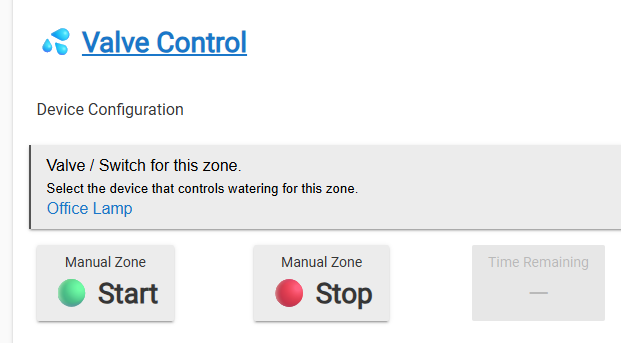
It was kind of fun watching the light go on and off in succession as the program went from “zone” to “zone.” Sure saved a lot of water this way. Set your programs up with “test” devices, and it's easy to just select the actual valves once you have it all worked out.
3 Likes
Nice one! I never got around to replacing my existing watering rule, now I have no excuse!
Btw, I have a couple of soil moisture sensors exposed to Hubitat, is there any point using them with your application?
That's an excellent question.
Currently, I have sensors set up as more of a “rain detector.” If the sensor is marked as “wet,” the controller will skip a scheduled run and make up the deficit later (if there is any based on the weather.)
This is precisely what Rachio is doing, according to this post:
Rachio does not recommend the use of 3rd party sensors unless required by local code . Rachio offers soil saturation management tools without the need for soil sensors by using Saturation Skip or Flex Daily Schedules to skip watering schedules BEFORE it rains based on estimated moisture levels.
So if you already have them exposed in HE and they are binary sensors (wet=true/false) adding them to the “Rain Sensor” will have them functioning as what's known as a “sensor interrupt.” If your sensor is reporting volumetric water content (VWC) I'd need to figure out how that affects the ET calculations already in the app.
2 Likes
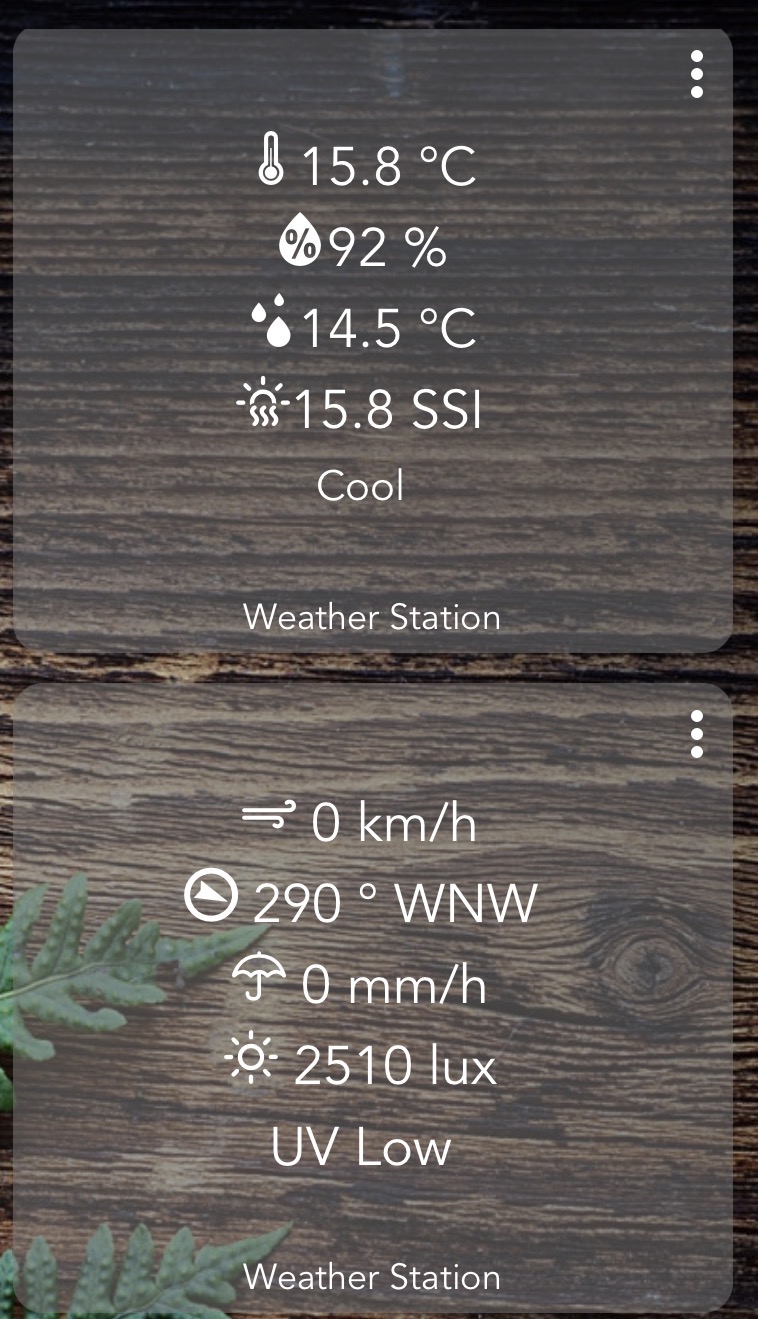
Mine look like humidity sensors to Hubitat.
![IMG_4101|690x346]
I do have a rain gauge in my PWS too.

1 Like
Which sensors are those?
I'm going to guess something like ecowitt soil moisture sensors.
Ecowitt soil sensors
1 Like
I took a look at the device documentation and the drivers for it. There really isn't any benefit or meaningful path to integrate these or any moisture meter for that matter.
Some background on why physical soil probes don’t play well with ET-based irrigation systems:
WET-IT manages watering using a modeled soil moisture balance for each zone — the same evapotranspiration (ET)–based method used by commercial systems and platforms like Rachio, RainMachine, Hydrawise, et al.
That model continuously estimates the available water in the root zone using:
- Local ET and weather data
- Rainfall and irrigation history
- Soil characteristics
- Depletion thresholds
This approach provides a consistent, zone-wide estimate of soil moisture — no physical probes required.
Devices like the Ecowitt WH51 measure soil resistance at a single point and depth, representing only a few cubic inches of soil.
They aren’t calibrated for soil type or volumetric water content (VWC), and their readings vary drastically with placement and conditions.
Mixing these sensors into an ET-based system causes several issues:
- They destabilize the model — overwriting the continuous ET moisture estimate with noisy, localized feedback.
- They can’t be calibrated — “60% moisture” means something different in every soil type.
In short: they provide data, but not control-quality data.
Early versions of Rachio, RainMachine, and Hydrawise experimented with soil probes — and every one of them dropped support. (See my previous post from Rachio's website.)
They all discovered the same thing: low-cost soil sensors don’t improve irrigation accuracy and tend to make scheduling less stable, not more.
Instead, these platforms, and WET-IT, rely on modeled soil moisture, driven by weather and ET data.
Since you already own these, you can use them and compare those readings to WET-IT’s calculated soil moisture. It could be an insightful comparison.
WET-IT’s ET-based system already manages soil moisture using weather data, soil parameters, and irrigation history.
Adding third-party soil sensors doesn’t make it more accurate — it usually makes it unstable.
That said, you could use WET-IT as a data provider using the JSON or data attributes and incorporate the ET/seasonal forecasting along with your moisture sensors into a rule or piston that you design. I'm curious to see what you come up with.
3 Likes
All good, I was just curious.
1 Like

Yeah, all good. I was trying to balance between overexplaining and making it sound like “I just don't wanna.”
I'm up for anything that makes this better... you know... a <dadJoke>better WET-ER !</dadJoke>
I think the request for Tempest integration was fantastic! I've taken a brief look at some other PWS integration possibilities. Haven't found another quite yet. If anyone has some suggestions, please let me know.
Another update is in the works. I've added:
- Soak & Cycle. When I was looking at how/if I could integrate the moisture meters, I found this on YouTube University. And this EPA Doc. Makes a lot of sense, especially when you have soil that's more clay than loam. So... I built it in:

- Automatic Soil Type Detection. Not sure where your soil lies between loam, clay, and everything in between. One button will do a lookup at the US Department of Agriculture for your lat/lon and let you know:
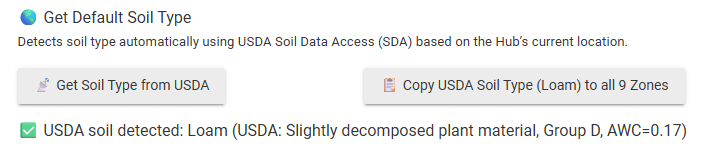
It doesn't force anything; it just adds a (USDA Default) for you as a recommendation.
2 Likes
Im in Straya, so that doesnt help me, but I think I have clay soil so all good.