I have a Third Reality Vibration Sensor that has been in use for almost 2 years. I use it for a notification when my dryer is finished. It appears that this device is causing problems with other zigbee devices when it is detecting vibration. This just started a couple weeks ago.
I have an issue where that when the vibration sensor is detecting vibration some bulbs and plugs that I have stop working. I can go into the device command tab on the plugs and bulbs and give the command to turn on or off but the device nor the device status will react to the command. I can click on the ON portion of the slider, get the notification that the command was sent, but the status never changes state and the device doesn't react. I can go turn the dryer off, wait about 10 seconds and then all the devices go back to normal. Start the dryer, wait about 10 seconds and the issue starts again. This is how I determined the vibration sensor was part of the problem. Again this only started a couple weeks ago. Everything worked fine for the almost two years before.
Also, when going into Zigbee Map App and running the map to show the connected devices if the dryer is running the hub won't respond to the interview to kick off the map but if the dryer is off then it will work fine.
I had been using the Generic Glass Break driver when the issue started. Today I switched the driver to Device and cleared everything out. Then switched the driver to Third Reality Vibration Sensor. Have the same problem.
I have watched the live logs having my wife turn the dryer on and off and there is nothing that comes up in the ogs other than vibration is detected or not detected. No spamming of messages or anything that I can tell.
Have any of you guys experienced anything like this and have any pointers?
I've had other misbehaving zigbee devices spam the mesh. The ones that have caused issues in my home have been line-powered.
Have you tried removing the vibration sensor, factory resetting it, and then adding it back? Also, if you haven't tried new batteries, I'd suggest trying that first.
No. I have a handful of these - dryer, piano, mouse traps.
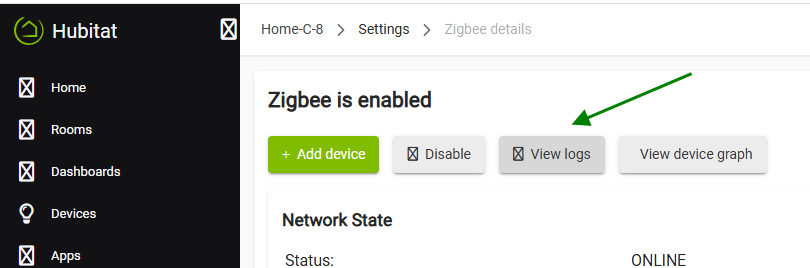
If you feel adventurous, open the zigbee logs (from zigbee details, in settings) and leave it open to capture the traffic while the dryer is running. Then copy and dump the contents into ChatGPT, Claude, Copilot or whatever, asking for an analysis. I've seen pretty insightful results sometimes.
I didn't completely remove it but I did rejoin it without removing. That did not help. I will try to completely remove it from the system and add it back and see if that makes a difference.
I changed the batteries with new ones just a little before all this started. I never thought about that being an issue. I could swap them too.
I changed the batteries and that did not make a difference.
I then completely removed the vibration sensor from HE. Added it back. It immediately fell into using the Third Reality Vibration Sensor Driver.
Since then, I have been letting the dryer run and it has had no negative impact to any of the devices that it was affecting.
I never imagined I would need to completely remove it and add it again. Looking back though this seemed to have started happening after the batteries had died in the device and I had to change them. Seems like something must have become corrupted after the device connected back from that battery change.
I am opening this thread back up. I thought removing the Third Reality Vibration Sensor and installing it again fixed the problem. After further evaluation it did not. I thought that maybe something was wrong with that sensor so I ordered a new one.
I installed the new sensor and at first it appeared to fix the issue. Then I realized that the sensor was stuck on active and would not go inactive telling me the sensor was not reporting to the hub. So basically, the same as if it was inactive. Then I rejoined the new sensor without removing it from HE and it started functioning correctly alternating between active and inactive as it should. When it started functioning correctly the issue came back with as long as the dryer was running and the sensor showing active the devices that was having issues, continued to have issues. As soon as I stopped the dryer, the sensor went inactive and the affected devices started working correctly.
Since I also run an instance of HA, I removed that sensor from HE and joined it via Z2M in HA. Then I brought the sensor back into HE via the HADB. I have ran the dryer for several minutes and shutting it on and off. The sensor does alternate between active and inactive as it should in the correct state. To this point the affected devices on the HE Zigbee mesh continue to work correctly with no issue.
I know that there is known instances of a mains powered devices causing problems with other devices but this is a battery power device causing problems with mains powered devices (bulbs and plugs). Also, it isn't all the devices on the HE Zigbee mesh, but it does appear to always be the same devices. The affected devices are scattered throughout the house, so it isn't an interference issue for proximity.
I did put the Zigbee logs in ChatGPT as suggested by @hubitrep, but the results I got back was everything looked great.
Any other ideas as to why this vibration sensor would cause these issues?
Did you check if perhaps your HE Zigbee mesh is marginal - good repeater near the vibration sensors? Check for possible interference with wifi? All Zigbee coordinators on different channels? etc.
Might be good to mention the hub model and fw version for reference.
My Hub is a C8 Pro. I noticed this issue running firmware 2.4.3.171 and 2.4.3.173.
I have 100 Zigbee devices on my HE mesh and 21 of those are repeating devices spaced all throughout my home. There is a Third Reality Smart Plug placed within 3 feet of this particular device, another Linptech MMWave Sensor placed approximately 10 feet away from the sensor and directly between it and the hub. The hub itself is only approximately 15 feet away from this sensor. Other than this one issue my Zigbee mesh has been rock solid. Also, don't know if this is noteworthy but I always join my battery devices in location of deployment and both of these sensors joined within maybe 5 seconds of resetting them. No issue there with them finding the network. Also, there is a Sonoff PIR motion sensor, two Zigbee bulbs, and the mentioned Third Reality Smart Plug in this room that works absolutely flawlessly even when this sensor is causing issues with the other devices.
I thought about Wifi interference as well. I have my Unifi UDR7 and two other access points set on channels 1, 6, 11. The UDR7 that is in the home is set on Channel 11. The other two are an outside AP and one at my detached buildings. Outside AP is on channel 6 and the buldings AP is on channel 1. I have three Zigbee meshes (HE, HA, Aqara M2). HE is set on channel 20 in my home with the UDR7 on 11. I know the C8 Pro gets the channel 20 weak message but like I said if this sensor is not in active state everything else works perfect without delay or hesitation for over the past year and a half. The Aqara is on channel 15. HA is on channel 11 but works perfectly fine as the small amount of overspread from my building AP on wifi channel 1 is not significant and doesn't interfere.
I have Zigbee Map App and Hub Information Driver V3 installed on my hub. I have reviewed the memory available and CPU usage on both of these with the sensor active and the devices not working correctly and neither show any memory or CPU usage issues during this time. I always wait and review after the 5-minute average is posted. I let the dryer run for 20 minutes or so to get three or four data sets. Free memory is over 1,300,000 and the CPU usage is normally under 0.4. I will see the occasional 0.7 spike, but it has never occurred during the timeframe of these issues.
I know I am overlooking something so please feel free bring up any other ideas or items to check. I have found what appears to be a successful work around but the engineer (not software engineer) in me would really like to get to root cause and understand the why make for the issue. Curse of the job. Lol.
I went there and while the dryer was running there was constant entries into the log, but it did not seem excessive to me, but I will admit I am not sure I would understand what excessive looks like if I saw it.
These logs are what I copied and put into ChatGPT and got the "everything looks good". "Messages are not excessive (sorry I know I am paraphrasing on this)". Several other things that it replied back but they were all good according to AI.
If the device was spamming the network to the point, it was causing the mesh to become unstable, would it affect all devices instead of the exact same ones every time? I thought about it being through a repeater and the repeater actually causing the issue, so I done a build of the Zigbee map in Zigbee Map App. Noted where the devices that were affected were located connected to which repeater per the map. I done a shutdown of the hub along with a shutdown of the entire electrical system of the home. Left it this way for approximately 20 minutes. I didn't want the battery on the UPS that services my UNIF NVR and cameras to go dead.
I powered the home back up along with the hub. Gave everything about 20 minutes to settle down. Built the Zigbee map again in Zigbee Map App. Several of the bulbs that are not repeaters had switched which repeater it was connected to when the system came back up according to the map. Now the smart plugs that it effects of course did not change positions in the map. I started the dryer and the same exact bulbs and plugs that had the issue still had the issue.
These device spam the hub with OTA firmware requests so they're always in my top 12 (along with TR plugs). However they do not cause the OP's issues here (with over 100 devices in the mesh).
I had a private exchange with ThirdReality support in late december. They acknowledged the OTA issue and promised a fix for affected devices, but I haven't see any new firmware since.
I have the power set on the default of 8. I didn't change any of the default settings when I set my hub up. Honestly, I have only been at this for going on two years so I am still learning so much. I did not want to mess with any of the defaults because I don't know. I agree the map is a snapshot and does not always appear to be the best for troubleshooting I just didn't know where else to turn.
1.00.55 is current. I don't know if that's what Hubitat has available too or not, but I can confirm there is still a very unusually high amount of message traffic generated with 55.
Although mine is rarely triggered (~once a day for a few minutes), it has almost 2x the message traffic as my next most active zigbee device (bathroom mmW switch).
I've not noticed any adverse affects to my mesh, but somethin' most definitely ain't right with whatever that device is doing.
HA just brought up in Z2M that I have the firmware update to 55. I am currently on 40. Appears that Hubitat did not have this update. I will most likely do the firmware update then move the sensor back to Hubitat and see if that makes a difference.
Based on @hydro311 comment it appears that these are very chatty devices. I don't know if it always caused this problem over the last year and a half and I have just noticed it or if something else has happened.
I updated the sensor to 1.00.55. I removed it from HA and reinstalled it to HE. Turned the dryer on and let it run for 15 minutes. The same problem as before when the sensor was connected directly to HE. The same devices failed to work properly. Shut off the dryer. Within 30 seconds everything was back to normal.
I went into the Zigbee settings and looked at the message count. There were 1003 messages I believe it was in that 15-minute time frame from this sensor if I was looking at it correctly and none of the count was a carryover from the last time it was connected to HE.
I know I don't know what is busy and what isn't but that seems really excessive for 15 minutes. Do you believe this could be some of the issue? If so, I probably had this problem all along and just had not recognized it.
Please take a screenshot of these Zigbee messages when the sensor is active. Not all messages are shown on the device logs page, even with Debug option turned on.