No, you haven't done anything wrong... it's me.... I'm reluctant to flood this topic with QandA re my driver.... I might post the answer on the topic for my driver....
I can find the font size in the inspect window for the tile i want, I can change it in the inspect window and it changes on the dashboard but of course the inspect window doesn't save the changes and I don't know how to properly write the code to change the font size on a single text tile.
Ok, maybe it's worth continuing the conversation here for now... Do you want to post the changes you made in the inspect window? Happy to post my own CSS from the driver I have developed... But it will need to be soon....
@sburke781
I'm not sure if i'm posting this screenshot correctly, hopefully you can see it. I have change the font size to 23 and you can see the worse basement font size has increased. I figured out how to change that text in all of the blue tiles which eventually i'll need to do. I'm also trying to figure out how to change them individually. this is the code is css that i used to change the font size in all of the blue tiles.
.text-tile div>div{
font-size :30px !important;
}
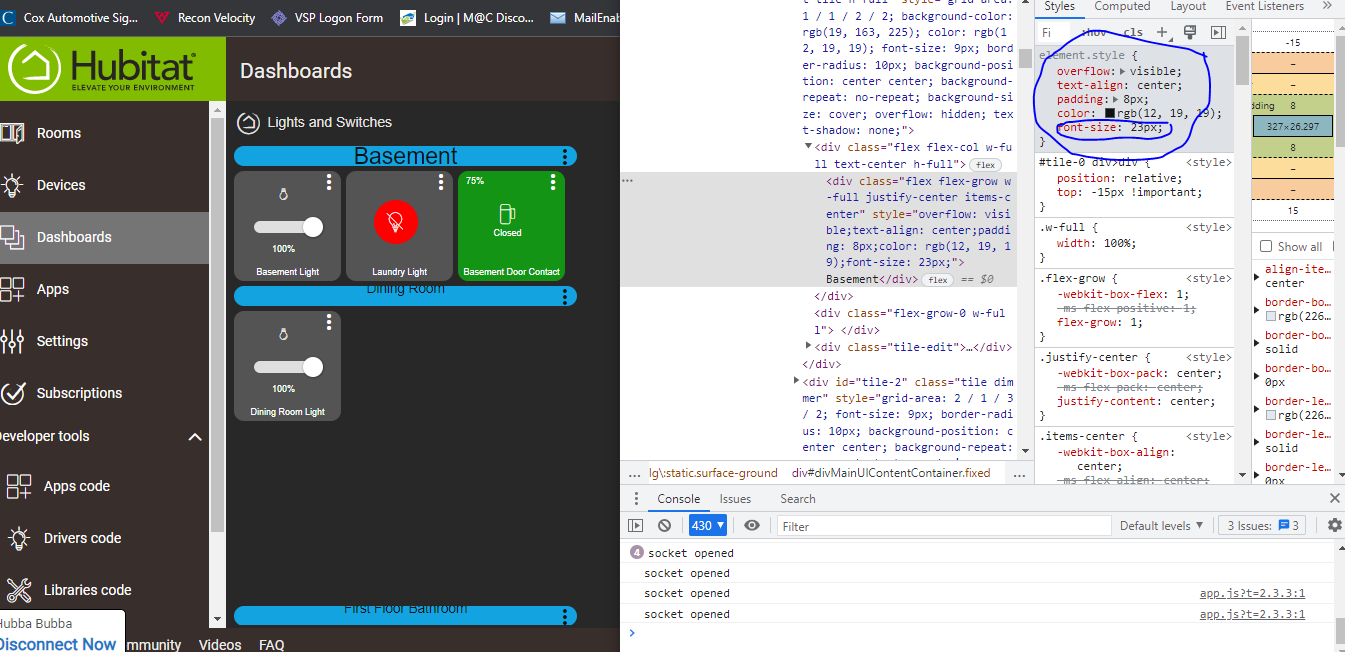
The screenshot is fine.... I just need to think through what you are wanting to achieve....
Thank you, Basically I want to be able to adjust the font size for all of the tiles on my dashboard individually. I don't know if there is a difference in adjusting font size for different types of tile (text, color bulb, swith etc..). Hubitat is still pretty new to me, I'm learning but having a real hard time with understanding CSS
Ok, I think I got it figured out for the text tiles
#tile-123 div>div{
font-size :30px !important;
}
that seems to work fine but when i use that code with a different tile, say a dimmer tile, it just adjusts the size of the dimmer percentage text, I would like to adjust the size of the text at the bottom of the tile that tells me the tile name.
Each tile type has a different "target". Use inspect to find which target changes the font and adjust the top line to hit it.
Think most types you want to target the "tile-title" line. #tile-123 .tile-title
Like @TechMedX mentioned.... different tile types (templates) will have different structures to adjust.... I have tried to account for this in the Simple CSS Editor, but there are some adjustments that I have not included. You can include these in the regular CSS for this post but would understand if you are not at that point...
Needless to say the time for me to provide a meaningful contribution is running out...
No worries, when I saw this question I was surprised this thread isn't closed 
I'm sorry, should I not be posting my questions in this topic?
I know, I would have thought all conversation would have reverted to my topic...
no no your fine! Just HE has been closing threads that are "outdate" and this is an oldie but IMO goodie.
No, No.... we're (I'm) just joking..... we welcome new-comers to ask questions...
Happy for anyone else to contribute... but I will most like have a chance to think about this in detail over the next 24-36 hours...
I really appreciate your help @sburke781 and @TechMedX
No guarantees, but try this
*, :after, :before, img {
    font-size: 20px;
}
Hi community.
I have the following use case. A new drive for Samsung Smartthing (thanks @djgutheinz) makes it possible now to control more functions of the air conditioner, such as wind speed, turn on or off the panel light, among others.
With these new features I added 4 tiles to control these new functions, but I have the following need, these tiles could only appear on the dashboard in case the air conditioning tile is on.
In the picture below I show the dashboard with all tiles, when air conditioner is on.
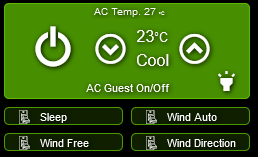
And in this image I would like it to look like if the air conditioner is turned off.
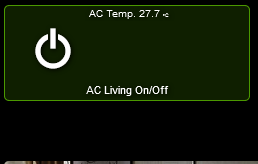
@chad.andrews and @sburke781 is it possible to make this link? That the status of a tile can define the status of another tile, as hidden or not?
Thanks
I believe the answer is yes, it is possible, but I would need to find the topic where the solution is documented. I feel like there is an existing topic where this has been discussed, I just need to find it....
I think you might be able to make the elements display:none using the trick I found for creating gradient fills when a switch is on:
You need to find something that changes in the tile when it's off, then update the CSS based on that. It might take a little investigation, but it might work.