Sunrise/Sunset light control works 95% of the time

I have a series of 9 various zooz light switches (72's, 77's, 32's) that control various lights outside. I have a Rule Machine rule so that 15 min before Sunset it turns each light on at a specific dim setting. The rule runs again at 5 min before sunset and then again as sunset itself.

I have the rule run 3 times because I've found that when running just once, there was, at a higher level of frequency, on or more lights wouldn't turn on. Doing this tripple run nipped that a lot. I do still every once and a while get a light that wont turn on. When one doesn't turn on, I can manually go into the hubitat app, and after about 5-6 on off cycles, the light "usually" will eventually turn on. Every once and a while, I can't get it to work, but, randomly starts working properly the next day with no other intervention.

The kicker is it isn't always the same lights when it does this. I feel like I have a pretty strong zwave mesh with all my switches installed non 800LR so that they can act as nodes for each other.

I'm going to guess there isn't much to be done and this is just a case that some of the switches get "stuck" sleeping and take multiple attempts to wake up to "hear" chatter on the network.

Any suggestions what I could do to make these fool proof and work "100%" of the time?
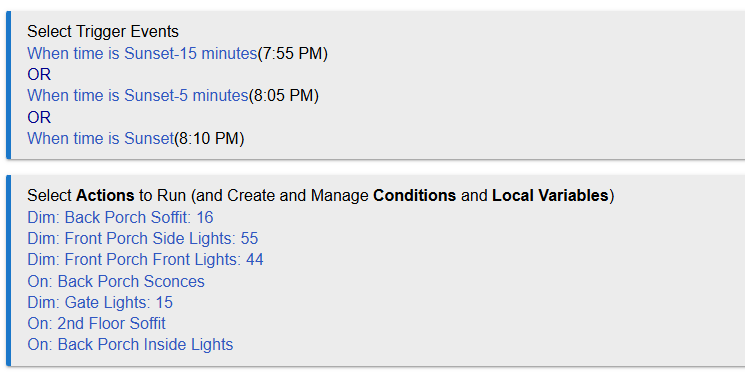
Please post a screenshot of your actual rule so that the community here can better evaluate possible problems and solutions.

And then a very similar one for lights off at sunrise. The rare issue sometimes with turning lights on and sometimes when turning the lights off.

Is “Enable command retry logic” enabled for each switch?

3 Likes

Posting mainly to 'mark' this thread, as I took a 180-degree opposite approach to a similar situation, so I'll be interested to see the responses. That said...

I don't quite understand why repeating the trigger is the first approach here. Perhaps I'm under-thinking this, but in my mind, the trigger should be set for what you want, then if you need to massage it some, use the actions.

I don't think it's neither a secret, nor a surprise, that Z-Wave (at least on Z/IP) can get overwhelmed by simultaneous commands. In my case, I spread the commands out, both in a single rule by adding delays between individual device commands, or for the case where multiple rules were running, offsetting the trigger times so that the rules, and thus the commands within, were spread out. (In my case, none of these were visible/noticeable, so perhaps intentionally adding a bit of popcorn effect to outdoor lighting may indeed need to be a consideration.) It looks like you could group your switches by location and just fire one or two at a time, add a second or two delay, then move on to the next. (Front porch, then back porch, then gate, then soffit, or something like that.)

Perhaps this is a bit hypocritical, but I had one case where I absolutely, positively had to ensure a command did indeed fire. In that case, rather than repeating a trigger, I added a new rule that triggered a few minutes later with a refresh and an if/then to check the status and fire the command again, if necessary. (I even added a third rule to check the status again and send a notification if it failed.) Alas, this was before the failed command repeats were added, and I no longer need that scenario, so I can't comment on how that function would have worked. (Which brings up a good point: Are you using the new failed command repeats? Again, I haven't knowingly used them, but it sounds like it may help here, if they are used how I assume they are.)

And, finally... (Probably should have been 'firstly.') Double-check that your Z-Wave mesh is in good shape. Even if single commands are working good, it may be teetering on the edge and multiple commands pushes it over the side.

2 Likes

Woah....I never even saw that little slider before. No, they were not. I'll turn those on now!

Love this idea.....slow it down with delays. Will implement that.

Probably a dumb question, but how does one tell if it is "in good shape"?

1 Like

There are plenty of others who are way more qualified to answer this, but assuming you're on Z/IP, make sure you don't have any ghosts, then analyze your mesh to see how those devices are 'connected' to the gateway and the rest of the network. I use the community 'Z-Wave Mesh Details' app to see what the mesh is doing. (Note that the Z-Wave mesh has a lot of voodoo sprinkled in, so you can make mostly assumptions, and never actually know why it's doing what it does.)

For the ghosts, there is a wonderful long thread here somewhere that shows you how to identify and eliminate them. I'll try to find it. (ETA: Here you go... How To Remove Ghosts using hub tools or a UZB Stick )

3 Likes

No ghosts. All devices have oodles of neighbors, and all of these lights switches are also "directly" connected to the hub (no doubt poor verbiage.....but the Device Topology shows all the light switches are "blue" with the hub along with numerous other devices).

I'll check out that App you mentioned. Thanks!

1 Like

I'll second the suggestion to stagger the commands. Devices (and people) have a hard time understanding a single command when 15 of them are shouted at the same time. Sunrise and sunset rules are the biggest offenders.

1 Like

It has been a month since first posting this issue.....since implementing the suggestions above, it has worked without issue so far.

