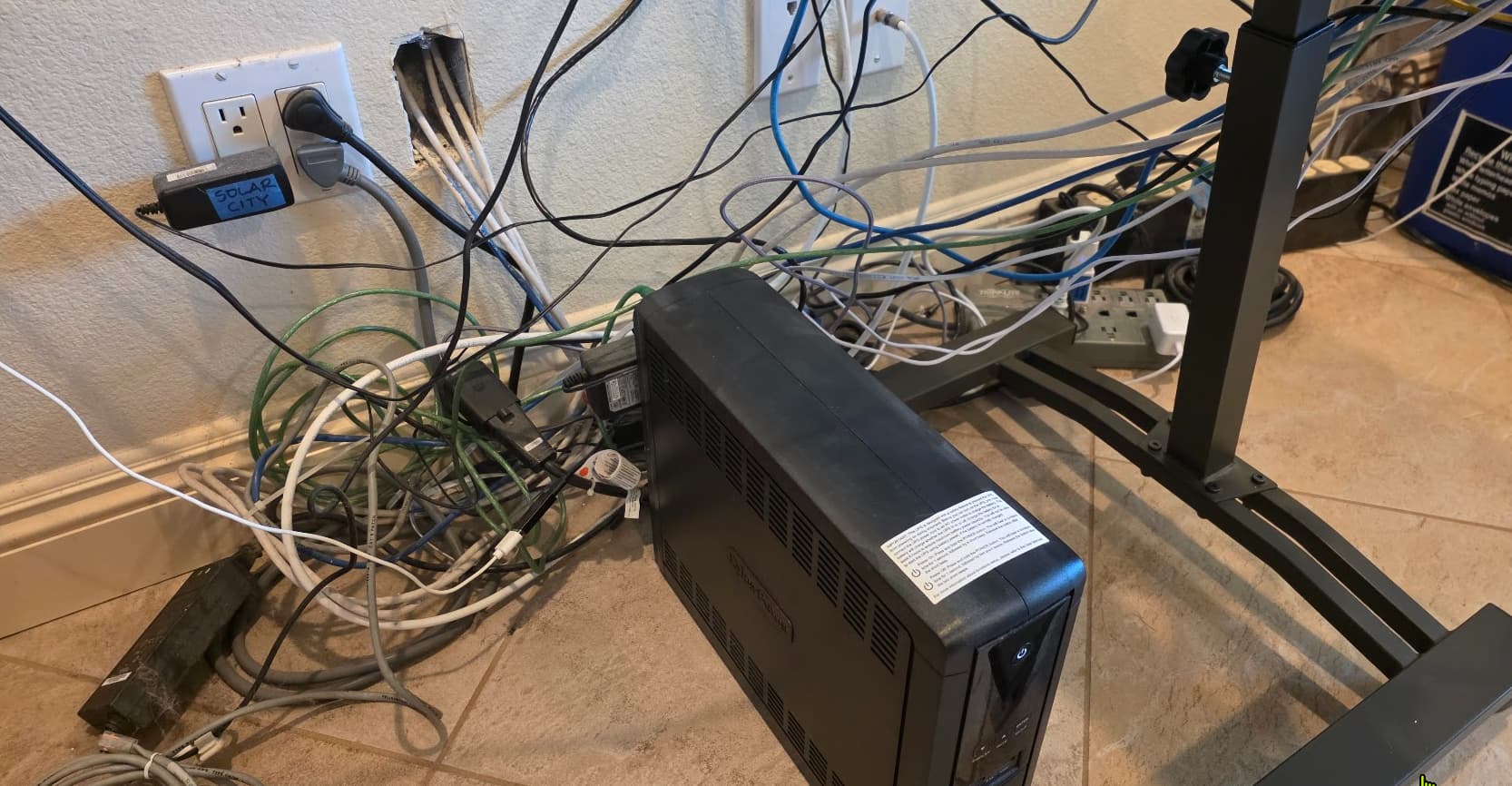
Moved a desk hiding a horrible mess built up over 25 years w/very limited access to the location of all my network/power wiring. Don't look if you have recently eaten.
The hubs and other equipment will be moving several feet to the left, sitting on new shelves or furniture. So want to run the wires on or near the ground about 3-4 feet to the left, then upwards along a corner of the room to the new location of the hubs and devices...area like below. Wires come out of the wall in the right and go along the floor to the corner on the left, then straight up. I'll be running both power and network cables.
Any favorite wire channels/wire management options that you have used in similar situations?
Worst part is that I'd like to re-run some of the network cables (many of them over 20 years old) and add a couple new lines, but access to that area via the attic is absolutely terrible/almost impossible due to combination of two skylights we have in our entry and living room - their "superstructure" in the attic is just huge/completely obstructing. Just don't want to face that again in my 60s. Even in my 40's it was a pretty horrible experience squeezing through tiny spaces at terrible angles, while trying not to step on the ceiling wallboard and end up down into the living room!
I can not offer any suggestions on how to clean up, but I would like to share that you made my day. I showed the photo of your "setup" to my wife. Now she knows I am not the only one.
If you have a large TV mounted somewhere nearby, it's possible to add cable ties to its wall bracket and coil accordingly. I even managed to ensconce my 16-port powered Ethernet switch directly between the bracket and the TV.
Other ways of reducing (vs. hiding) cables involved swapping over whatever USB-powered devices I could to a multi-port hub. That lowered the overall count of AC plugs in use. If you're somehow able to elevate your power strips so they're behind a TV or furniture (sight lines count against WAF!!), all the better.
Everything up off the floor, is my mantra, and allows for easier floor dusting generally. Plus, it gives our cat somewhere to walk now.
Interesting, I wouldn't have thought of that! I will have some USB powered stuff in the area, putting them on a single powered USB hub (which I might already have in my box of stuff) should definitely be a help. Hubs will stay on "Denny approved" POE splitters.
No TV in the area to run wires to or hide wires behind, but thanks for the ideas.
What do the wires coming out of the wall connect to.
-- Four Cat 5e cables coming out of the wall that connect to the local switch (Unifi Lite 8 POE) and feed other switches in the house.
What cat wire is that and are you opposed to terminating those wires to jacks instead of just running them out the wall.
-- Cat 5e. I've never terminated to jacks before, no idea how "twitchy" that is. I have four cables so looks pretty crowded. Would probably have to switch to a 4 gang box...not impossible but would want the change to be worth it.
Are the additional power strips needed along with the UPS
--At this point not 100% sure, as I haven't gotten down on my hands and knees to check the UPS outlet status. I currently only have one power strip attached and it only has two devices plugged into it. I have a 2-gang outlet nearby w/one free outlet, so I'm optimistic I'll be able to power everything via the UPS and the open plug on the 2-gang outlet.
What unifi gateway and switch are we talking about.
-- UCG Max, Unifi Lite 8 POE
Is there a reason for 3 NAS devices? Or is it just that it built to that as you needed more capacity.
-- Redundancy rather than capacity issue. First is my current "production" Synology NAS, second is my previous Synology NAS now serving as backup target, and then the third unit (Western Digital external USB drive, not really a NAS but I was being lazy typing) is used for additional limited/targeted backups of most critical "can never lose" files. When we're on vacations the third box goes to my neighbor's house for safekeeping. Idea being that if house burns down (we're in a fire zone) then he'd take my stuff with him when evacuating. Luckily haven't had to test this process yet...we've only evacuated once and we were home when that happened (and house didn't burn down). And yes, I'm a bit of a belt, suspendors, and anti-grav pants kinda guy when it comes to backups.
[Backs away slowly...he's not referring to bodies, is he?!]
Oh yes...we have Ikea wardrobe stuff in our house, wife absolutely loves it, would fill every closet/wall with them if she could. She wants other stuff in the office (where this is) so part of the wire runs will be obscured behind furniture, but some will be exposed along the floor and coming up the corner, so some cable "discretion" is still required.
Ah, better than I expected. Now I have to use my GoogleFu skills on ethernet jack terminating. Nice part of doing that is that the cables are very thick, and using slimmer cables from the wall jacks will make it easier to make turns and result in less crowded cable management "tunnels".
^^^ What @bbrannon said is what i was thinking and would do. They are not hard.
This would give you the option of using something like Unifi Cat 6 cables that are much smaller and more flexible. You can probabiy use some cable ties or cable wrap to combine them and they will be much smaller and easier to hide compared to the Cat5e you have now. It also means if you get to a point you dont need one you can just remove it. And can change the color if needed as well.
I also like the suggestion of using a powered hub for USB devices or moving thsm to POE if you have the power budget.
As far as the NAS's go, it sounds like you have a good arrangement for them with a 3-2-1 setup. I would probably move one of them to a seperate power circut just to remove that as a potential power hit that could impact both, but seems goood.
I would start with taking the ethernet cables coming out of the wall and terminate them to a plate to clean that up. Then I would go through the spaghetti of wires and find out what is really needed. While evaluating that to figure out if there are any alternate ways to power devices (PoE or USB Powered hub) to reduce cables and cable lenghts. Maybe plan to put what you can in a mini-rack on the shelf to help organize the gear you have. If you have acces to a 3d printer you could print out shelves and mounts to help organize it all in a mini rack.
As far as the power from your wall to the corner and then the shelf i would tey to find somthing like a nice cable wrap that just organizes it well to bring it all to the mini rack and the other gear.
Low voltage wires mostly don't need boxes coming out of a wall, just a mounting bracket.
If you remove the box for your cat cables you can stuff the excess in the wall and go with Keystone ends and plates.
Yes, thinking the same, much more flexibilty, and being able to use color to help differentiate will be nice as well. (Currently use a bunch of attached labels that can be hard to read...
Good point...used that in the kids bedroom runs years ago and had forgotten about that.
Oooo...yeah I was already getting out some female/female ethernet extension connectors that I had for other uses thinking they could work for this. Keystone ends and plates look nice and clean. The amount of cable coming out of the wall is only a few feet each so the "stuff it in the wall" approach could work very well.
Ah yes... I used to rock wiring nests of that sort.
So a while back I did a full redo of my office desks. I bought reclaimed wood/refinished tops from a local table maker, custom cut to my dimensions. I built leg/supports etc from iron blackpipe.
Since this leaves lots of exposed area underneath, I ran all power, connection wires etc in fiber mesh sleeves; they are self curling/closing but you can open them down the center and add news. The sleeves were routed up and down the pipe supports/chases, but since they are also black they melted right into the background. Sleeve lengths were all custom cut so they matched their route lengths. It was sweet and neat.
I'd love to show you how great it was... in looking for said pictures it looks like I had a failure somewhere in my picture workflows (and backups, and off NAS storage etc). the pics are gone.
Now why I can't I just take new pics ? Well, soon after have that sweet setup... I had to change a route or two.. or three. I had a power supply failure and had to chase through all that. Since everything was neatly cut to exact proportions... It became a real pita after a few changes to get things back.. or make future changes. It slowly starts to grow ugliness.
So a lot of those sleeves got pulled off, and while not like the nests of old.. I don't love the presentation. I've been hesitant to have back it it..but I want to.
I'll bet that without too much trouble you can find a friend or neighbor that has some experience with terminating networking cable. Easier than reinventing the wheel. Data speed wise Cat 5e will suffice for anything you are going to do in your home.
If all your low voltage wires are in the same wall void (no studs in the way) you can put a blank on the outlets furthest away then run everything out the opening closest to where you are trying to get to.
Another thought came to mind. You could position a flex 2.5 5 switch right next to those ports after being terminated run one wire from the new location to the new switch and short jumpers to that switch. It reduces the wires to the rest of the gear.