[RELEASE] TP-LINK TAPO Plug, Switch, Bulb, Hub and Robovac Integration

Thanks for the quick reply!
Basically, what I am trying to do is setup scene control for my home theater so that these sconces turn on with varying brightness by location (more on the outskirts and less close to the screen) and probably a few options for colors for the kids and combine this with turning on other lights in the room so that my wife and kids can hit a single button on a Zooz Scene Controller to set it up.
I have purposely not installed the Tapo app (one of main goals is avoiding a cluttering of apps that are device specific and using Hubitat for all automations and HomeKit for the wife friendly front end). Are there any bulb options I am missing without this integration?

Nate

From what you are saying, no.

I have one Tapo bulb I was playing with, and the integration worked fine.

I ended up putting the bulb in a drawer a month ago because I didn't actually need it at the time. Today I fired it up again, and the link seems to be broken. My network settings at home haven't changed.

I can certainly remove/relink it but I am curious if there are steps to fix the link short of that; if I do start using the bulb seriously it may become inconvenient to remove it from Hubitat.

Edit to add: After a little while of being powered on, Hubitat was able to control the bulb again. Wasn't keeping track of what I did, so I am not sure I made a helpful action. After another power cycle, Hubitat lost control and it hasn't come back yet. Logs are full of things like this: status:HTTP Failed, data:java.net.NoRouteToHostException: No route to host (Host unreachable)], respStatus:ERROR], status:ERROR

FWIW I can reach the device internal http server, so I know it's online.

Would it help to give the device a static IP?

Double Edit: I went to the device page and switched on Get Data for Developer, so I could re-save the device and maybe force a state update. After I did this, I had control back. I turned that setting off again, re-saved, still have control. I hard power cycled the device, and now it's working. :person_shrugging:

Anyway, if there are troubleshooting ideas, cool.

Static IP is strongly recommended (see install instructions). Otherwise, the IP changes and the driver / app have to try to redetermine the IP address. Best way to recover is open the app and run discovery. The app will then update the IP address.

If you remove the device for a significant period of time, not having a static IP address will most certainly cause your issues.

Got it, thank you!

I have 3 Tapo P100 WiFi smart plugs connected to Hubitat using the community Tapo driver. They appear to be working fine but recently all 3 started generating log errors

The comms error for each device turns true briefly then a few seconds later returns to false. I am running the latest Tapo firmware (1.2.1) and Hubitat version 2.3.8.139 on a C-7. I didn’t notice these log errors when on 2.3.7.x which I was running before upgrading to 2.3.8 two weeks ago. Not sure if these errors are related to current Hubitat firmware or maybe something in with Router WiFi comms, though nothing has changed on the router recently.

Is anyone else seeing similar log errors on Tapo smart switch devices?

I am currently working on an update addressing a similar issue. Best suggestion is to do a plug reboot using the Preference "reboot" in preferences.

Kasa Plugs, Bulbs, and Switches - Technical note on Kasa devices API transition.

TP-Link (the Kasa device manufacturer) is enhancing the security of NEW HARDWARE versions of their various products. When this occurs, the Hubitat-built-in Kasa integration will not work for the device.

User Action: If the device does not install using the Built-In App

Probable affected devices:

  • All Kasa Matter Devices
  • New HW Versions of other Kasa Devices (expanding list).

Has anyone managed to get a p300 working?

I'm getting a few errors, and get no child devices to control the plugs.

[dev:237]java.lang.NullPointerException: Cannot get property 'child_device_list' on null object on line 68 (method delayedUpdates)

[dev:237][method:klapSyncSend, cmdBody:[method:get_child_device_list], status:cryptoError, error:Error decrypting response, data:java.lang.ArrayIndexOutOfBoundsException: Negative array index [-1] too large for array size 0]

[dev:237]P300(AU)-2.3.7b: delayedUpdates: [common:[syncName:[syncName:none, status:Label Not Updated]], setLedRule:[method:setLed, ledRule:always, currentRule:always, status:NoChange]]

[dev:237]P300(AU)-2.3.7b: updated: [pollInterval:15 min, loginInterval:8 hrs, logEnable:false, method:deviceLogin, loginStatus:OK]

[dev:237]java.lang.NullPointerException: Cannot get property 'child_device_list' on null object on line 68 (method delayedUpdates)

Dave here. Getting the same error on my NEW TP25 - so something is amiss. I will update code within the next week.

1 Like

Updated driver code for entire Suite. Available as update in HPM or via manual download from GitHub. See top of post for more info.

Dave

1 Like

It works! Appreciate your time on this integration Dave

A bit of help?
I installed Tapo for a dimming switch - the device is about a year old, and is wifi - I installed Tapo and selected dimming_switch and Dimming bulb. during install.
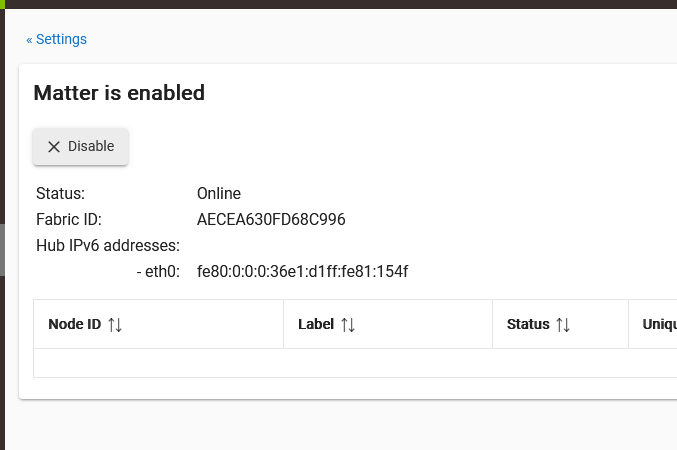
I triple checked all settings but never got any device to reflect. the count of available devices was always zero. I believe I can't have Matter devices (yes - I enabled Matter for this) as I don't do IPv6 - I disable on all my NIC's. While I'm not interested in debating my choice, I will add that what made me look was the IPV6 address being reported somewhere - I think in Tapo... I couldn't find any place in the HE to disable IPv6, and never did give it permission to enable it - fwiw.

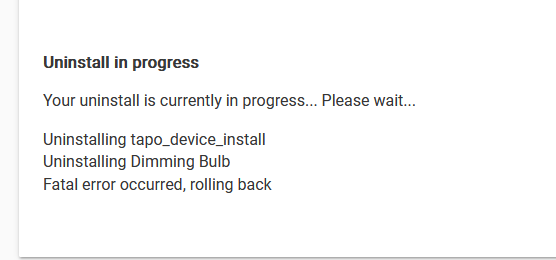
I went to pull TAPO out (I put it in off HPM) and got this error running HPM Uninstall:


I ripped all drivers, the app manually - I can't get it to unwedge itself. I manually added the drivers from your repo source and still no luck removing from HPM.

The error in HPM remains constant:
image

I did try modify's, repairs. etc. I sorta got a wedgie now... :slight_smile:

FYI - after I gave up on Tapo, I tried the deprecated Kasa ... device was instantly located... and functions nicely.
PS - I put the deprecated KASA on after TAPO, and have tried removing with KASA both installed and uninstalled - no change. Suggestions to get TAPO back off my unit?
EDIT - I just stumbled over the IPv6 that isn't documented in my hub _ I found this as I was about to turn Matter back off:
image

What is the device Model?

If the device installed using the Kasa integration, the device was not a TAPO device and that is why it would not install using TAPO. (Note there is also a built-in app for the Kasa devices.) Your device is apparently not Matter (this can be confirmed with Model number).

Getting Tapo code off system.
First try going to Package Manager settings. At bottom of that page, select Remove a Matched Package. If that fails, Uninstall HPM, remove the Tapo drivers/app, reinstall HPM, do a match-up in HPM. Current plugs the KP125M and EP40M (the M denotes Matter in the Kasa Brand).

1 Like

many thanks. I'm definitely not TAPO. I misunderstood I guess that Kasa integration had rolled up into Tapo.
I'll run the steps you suggest - they make perfect sense in hindsight.

1 Like

Hi. I've hesitated asking, here, as I expect I've just missed something... However, here goes:

I have several TP-Link KASA switches and Outlets. All worked fine, with Manual Hubitat control and rules, until recently. App is the default, built-in Kasa Hubitat Integration

I have the Hubitat Package Manager installed too, with automatic updates.

the rules stopped working a few weeks ago, but now it is both rules, and Manual control from Hubitat that no longer work.

these are the Kasa wifi models, NOT Matter... Newest one outdoor outlet was purchased, perhaps 6 months ago...

Do I scrap the Kasa Hubitat Integration... Manually uninstall and reinstall?

Check the plug IP addresses versus the addresses in you router.

Try running the Integration App again. This should update the IP addresses on the devices.

GREAT, thanks!!!

I am doing so and setting Static IPs for them. they have been great for a couple years... only recently having this issue.
Thanks !!!

2 Likes

I cannot seem to get the Kasa Matter Energy monitoring plug to be discovered. I have two of them in the app. one of the two I added to HE8 using the matter integration just to see if it would work, but it only works generic with no EM. I am trying this method instead. I also have 3 tapo cams and some older kasa switches that show up in my app, but I am not trying to add those here. I just want the EM plugs.

I get the following out of the log that shows error or warning. I can post the full if needed, but not sure if there is some information that should not be posted publicly. I;ve redacted some stuff here.

app:2912024-08-02 05:01:31.470 PMdebugtapo_device_install: [method:updateDevices]

app:2912024-08-02 05:01:20.184 PMerrorjava.lang.IllegalArgumentException: null on line 1059 (method getSmartLanData)

app:2912024-08-02 05:01:19.884 PMwarntapo_device_install: [method:getAllSmartDeviceData, status:respError, data:[error:credentialError, method:getAesDeviceData]]

app:2912024-08-02 05:01:19.882 PMwarntapo_device_install: [method:getAesDeviceData, baseUrl:http://192.168.1.XXX:80/app, respStatus:FAILED, reason:Check Credentials]

app:2912024-08-02 05:01:19.878 PMinfotapo_device_install: [method:aesLogin, handshakeData:[method:aesHandshake, rsaKeyNo:1, encKey:[-XX, -XXx, XXX, -86, 81, 32, 125, -86, -15, XXXXXXXXXXXXXX -86], encIv:[XXX, -103, -3, -86, 72, -XXXXXXXXX, -106, -3, -86], cookie: TP_SESSIONID=4XXXXXXXXXXXXX, respStatus:OK], tokenData:[protocol:aes, respStatus:ERROR, error_code:-1501, check:cryptoArray, credentials, data:[error_code:-1501]], status:ERROR]

app:2912024-08-02 05:01:19.875 PMwarntapo_device_install: [method:aesLoginDevice, tokenData:[protocol:aes, respStatus:ERROR, error_code:-1501, check:cryptoArray, credentials, data:[error_code:-1501]]]

app:2912024-08-02 05:01:19.683 PMdebugtapo_device_install: [method:getDiscData, type:SMART.KASAPLUG, model:KP125M(US), baseUrl:http://192.168.1.XXX:80/app, dni:98XXXXXXXXXX, devId:2e4f754abXXXXXXXXX, ip:192.168.1.XXX, port:80, protocol:KLAP, status:OK]

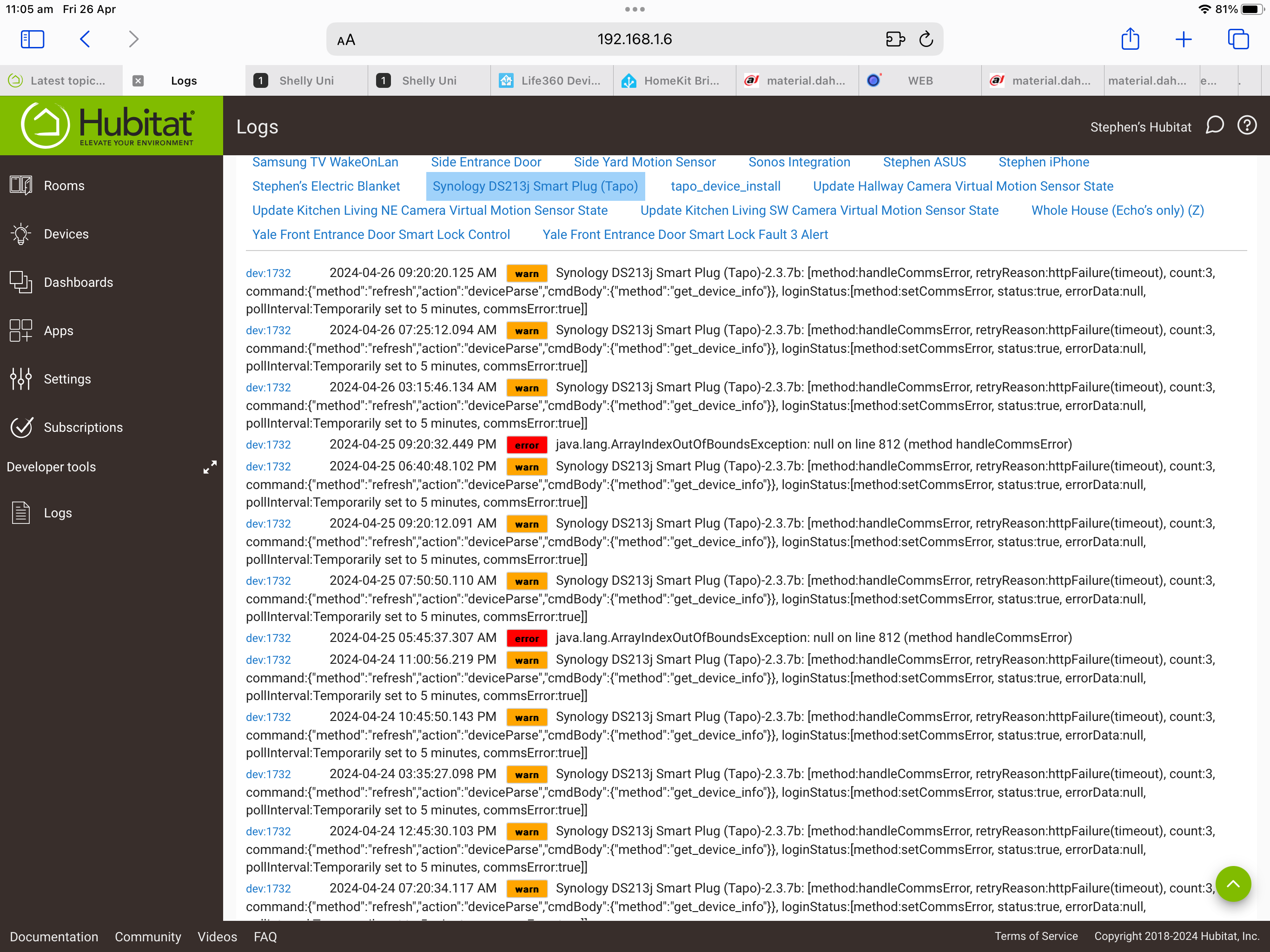
Check your username and password very carefully. Even the username is case sensitive in the Tapo device.