Hi, anyone having issue with KS240 switch?
My switch has stopped responding the logs show following error.
java.lang.IllegalArgumentException: null on line 161 (method parseUpdates)

My Hubitat version is 2.4.3.177
Hi, anyone having issue with KS240 switch?
My switch has stopped responding the logs show following error.
java.lang.IllegalArgumentException: null on line 161 (method parseUpdates)
My Hubitat version is 2.4.3.177
try running configure and wait a couple of minutes. If that fails, I need the firmware and hardware of the device.
I removed and added again, same issue, this was working about 10 days ago, nothing has changed except Hubitat update.
KS240
Device Hardware version is 1.0
Firmware version is 1.0.9 Build 241213 Rel. 154621
Device Data 2.4.2.a
Uninstall the device from the Tapo app. Do a factory reset. Reinstall the device to Tapo app. This recently happened to another user with the same HW version. The reset cleared it up.
From google: To factory reset the Kasa KS240 ceiling fan/dimmer switch and erase all custom settings, press and hold either the fan or light switch button for 10 seconds. The Wi-Fi LED indicator will blink amber and green (or blue) to confirm the reset, at which point it is ready to be reconfigured in the Kasa app
I have several Tapo camera's that I want to detect motion. If I tie those to the H100 Tapo hub will your app be able to get the motion detection from the hub?
My hub implementation does not currently support child cameras. A matter of fact, due to security issues, I only support the H100 currently. Note: even if implemented, the implementation is limited to about 4 second average delay from event to data in Hubitat.
Hey @djgutheinz — I’m thinking about switching from Blink cameras to Tapo cameras and using the H500 (later in the year). Would this work with your integration?
Thanks!
No. The H500 uses a special protocol and I can not afford one to be able to try to fix it. I have a h200 and it is also difficult. Other integration on GitHub do not yet support it.
I have 2 TAPO devices and 10 Kasa devices. If I have a Kasa device switch go on or off, I get a basic info line in the logs (bathroom fan switch is a Kasa device below):

If I have a Tapo device switch go on or off, I get no info in the log. The event is visible on the device screen but no entry into the log occurs.
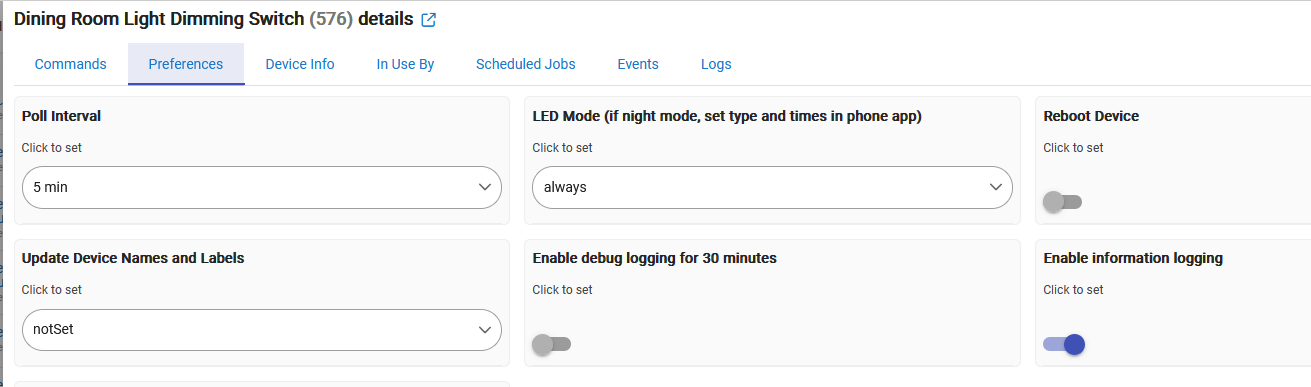
Here's my device Prefreences so you can see I have 'Enable information logging' enabled.
I use an activity monitor and this seems to be desired for trigger. Is this fixable?
Logs are just informative. Unless there is some special code they are not read to trigger other actions. So, if you look at the events tab, you will see all cases of switch state changes. From a user information purpose, there is no reason to log successful events.
You could try debug logging. A lot of logging.
okay - I guess. so why implement the switch in the driver? anyways. nm. thanks for responding.
Not sure if you followed what @djgutheinz said but if you want to use a switch event for your activity monitor app, you don’t need log entries.
Events are how the hub “sees” information sent from devices.
Logs are how humans see similar info, but the hub itself doesn’t know or care what’s in (or not in) the logs.
I read his response. thanks for explaining.
I like using logs as a method to watch execution flow. I don't want to open device pages and bang the refresh on a single device. I find it very useful watching the live log when I'm doing general rules work.
He also released his Kasa app - that registers a log entry like I expect, So it confuses me that one works as I expect and the other doesn't. It's only his Tapo that I was trying to give feedback on. I interpret his response for what it is.
Fair enough but that’s a little different than the stated reason for requesting the change to the Tapo driver code.
My name is David. However, logging a successful execution wastes log space and makes it had to determine a reason for a problem with the added logging. So, it was a design decision by me.
My father recently installed Kasa HS200 switches in several rooms. We decided to use my older C7 hub to setup some basic temp alerts (monitoring a second residence). I installed the TAPO app yesterday and everything works pretty well with the integration. I've noticed today that I'm getting a bunch of log entries that the switches are not responding. The switches respond instantly to on/off commands despite these errors in the log, so it's not that they aren't working. I did set the poll interval to 1 min so that we'd have an accurate view of what was on/off. The driver that it assigned to the HS200 switches is the TPLink Plug (which I assume is standard).
He has a eero mesh network, so I have not made IP reservations yet for each switch. Not sure if that's necessary, but read somewhere that it's a good idea. Any advice on how to keep from getting the failed to respond message? Thanks in advance for any help!!
Correct.
So, basic question: Is the hub generating the errors on the same network (router) as the devices giving the response? If so, that is not supported.
Info messages: These are caused by the hub not receiving a response from the device. Two possible causes:
Thank you David for the awesome work on this and the Kasa App! I searched this and the Kasa thread but didn't see the answer to this...
I have a HS107, a KP400, that use the built-in Kasa app. I have a matter plug TP123M using bulit-in Matter. Finally, I have two Tapo Cameras (C225's).
Is it possible to control the Privacy feature of the C225's using Hubitat and if so which App(s) should I use if I want to be able to control Privacy feature of the cameras and continue controlling the HS107 and KS400? Should I leave the HS107 and KP400 using the built-in Kasa app and install this TP-LINK TAPO app for the two cameras?
Thanks again!
Yes. You would install as a virtual device using one of the drivers at:
kasaCam_Hubitat/drivers at main · DaveGut/kasaCam_Hubitat · GitHub. I tested on a C200 and Kasa video Doorbell. The fixed was derived by not providing the Point, track and zoom functions. One of the commands is "privacy"; which turns off the camera while keeping on the detection functions.
It can also be done by using Hubitat Package Manager if you have that app installed.
The c7 is wired into the eero that is broadcasting the wireless network used for the switches. Their app is a little confusing to me. I would say it's the same network, but the hub is wired and isn't labeled under the network section, just shows "connected" to port 1.
I have not setup ip reservations so it's possible that the IP addresses could have changed. There hasn't beena restart though so they're probably still connected where they were. I'll work on the IP reservations today and see if that changes the frequency of the messages/logs. Thanks for the reply!