Hi Dave
Did anybody get anywhere with support for the Tapo DL100 Doorlock ?
It doesn't have Matter support, it is supposed to be supported by Smartthings.
I downloaded the new Tapo App to see if I could get Matter support, MAN does that stupid spinning dialog box get annoying quickly !!!
Thanks for all the Tapo and Kasa support. (I love WiFi)
Tapo RV20 and RV30 Robovac news.
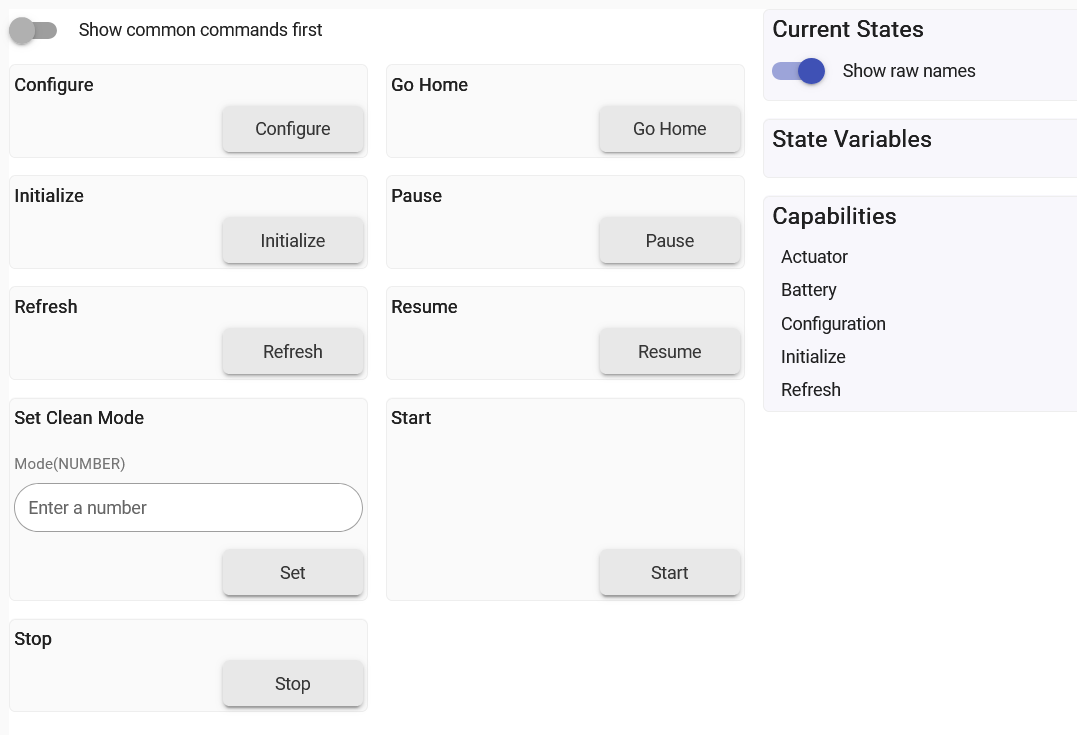
These devices are now Matter capable for basic control (cleaning mode, on/off/pause/home). The Matter instance does not support Map area selection for cleaning. Due to this, I have ceased trying to add the very complex TPAP protocol (these vacuums are the only users) to this code base.
Install is direct into Hubitat from the Tapo Phone App
Install Vacuum into Tapo Phone App
In setting, select the Matter Code section. This will display the code.
In Hubitat, select install mater and enter the code above.
It will install as a generic device. Change this to Generic RVC.
Hello - first, thanks for all the work on this! I'm getting the same error about credentials and have retried multiple times over several days. I have a KS240 and it's connected to my router on the 2.4GHZ network. Appreciate any help, as I have tried:
- removing and reinstalling the app in Hubitat
- hard resetting the actual device (holding down the buttons on the switch for 10 seconds)
- toggling third party compatibility
- using both the Kasa and Tapo phone apps
- changing my Tapo password to remove special characters - it's now just letters and numbers and I'm certain it's entered correctly.
Details: KS240, Firmware 1.0.9 Build 241213 Release 154621
Number of Characters:
- username: 16
- pass: 18
- encUsername: 54
- encPassword: 24
- encPasswordVac: 32
- encPasswordCam: 64
- localHash: 42
Logs:
[
app:151](http://192.168.0.103/logs#)2026-05-19 01:06:33.908 PM

debug

Tapo Integration-2.4.2a: [method:getAllTpLinkDeviceData, discData:1]

[app:151](http://192.168.0.103/logs#)2026-05-19 01:06:33.005 PM

warn

Tapo Integration-2.4.2a: [parseKlapHandshake:[devData:[udpPort:4e22, type:SMART.KASASWITCH, model:KS240(US), baseUrl:http://192.168.0.184:80/app, dni:ACA7F144AD09, ip:192.168.0.184, port:80, protocol:KLAP, status:OK], respStatus:ERROR: localAuthHash != serverHash, action:**Check credentials and try again**, hs1Success:false]]

[app:151](http://192.168.0.103/logs#)2026-05-19 01:06:32.898 PM

debug

Tapo Integration-2.4.2a: [udpPort:4e22, type:SMART.KASASWITCH, model:KS240(US), baseUrl:http://192.168.0.184:80/app, dni:ACA7F144AD09, ip:192.168.0.184, port:80, protocol:KLAP, status:OK]

[app:151](http://192.168.0.103/logs#)2026-05-19 01:06:32.854 PM

info

Tapo Integration-2.4.2a: [method:getTpLinkLanData, action:Completed LAN Discovery, smartDevicesFound:1]

[app:151](http://192.168.0.103/logs#)2026-05-19 01:06:19.623 PM

debug

Tapo Integration-2.4.2a: addDevicesPage
First, I have the same device with same firmware version. No issues. So, what can be wrong?
I have seen reports that the USERNAME can be case sensitive. That is a possible cause and it would affect what you are doing based on the localHash != userHash. That uses the username.
You can check this in your tapo app on the setting page (icon at top-left). While there, also recheck the Third-Party Services -> Third-Party Compatibility is on. After modifying, wait several minutes for the setting to get to the device itself (just in case).
Regards, Dave
My username is all lowercase in the phone app and in the Hubitat app. Maybe I'm misreading but the error says localAuthHash != serverHash and doesn't mention userHash. I tried changing variations of the username (all-caps, all-lowercase) within the Hubitat app multiple times - no luck.
I also tried changing the password to something simpler. Same issue. I disabled/enabled 3rd party compatibility multiple times.
I have the C-7 Hubitat hub with firmware v2.5.0.136.
one final thing to try. Two factor authentication must be OFF in the Tapo / Kasa app. it is set in the Tapo app under settings, "View Account" then Login Security-> Two-Step Verification.
Fixed! It wasn't two factor auth and it was indeed a case sensitive issue - however, there are more places you have to check and it's wild how inconsistent this is across both apps:
- Tapo App > Top Left Profile Icon > my email address listed there was all lowercase
- Tapo App > Top Left Profile Icon > About > Privacy Settings > Delete Account > Continue > my email address listed there was also all lowercase
- Kasa App > Bottom Left Me tab> my email address listed there was also all lowercase
- Kasa App > Bottom Left Me tab > About > Delete Account > Continue > my email address listed there was not all lowercase, it was @Gmail.com
Note when I fully logged out of the Kasa app and logged back in; number 3 above then listed my email address as @Gmail.com
All seems to be working now. Sorry I didn't dig deeper on the case sensitivity and appreciate your help / work on this thread.
You are not alone. When I review issues on other (Home Assistant) implementations, the same issues keep popping up. Thanks for the update. Someone else may see it. But I was unaware of the two-account/different password issue.
Notes on the future of Kasa and Tapo integrations.
Take Aways:
- I am in process of redeveloping both the community Tapo Integration and the built-in Kasa integration (needs Hubitat concurrence).
- This will hopefully be an integrated TP-Link integration; but, may be two as distributed.
- Reason: Kasa integration is currently incomplete. The major changes require integration of approximately 50% of the Tapo code into the Kasa integration. So, why not a unified baseline.
- Why now: I have verified how to implement the latest Kasa changes to the protocol.
- It is not a simple process. I am just beginning this process - so comments and screams are welcome.
See below on a more detailed discussion.
TP-Link has been going through a transition trying to obtain a unified security and web environment. These changes have created significant impacts to the built-in Kasa app and by extension the community Tapo integration.
a. The Kasa app no longer supports all new (and some legacy) Kasa devices
b. The Tapo app has add integration for some of these changes.
What is the TP-Link offering related to Hubitat now. No specific models:
- 1stGenKasa: [api: IOT, crypto: XOR, transport: UDP, handshake: none, sigDevType: IOT.SMARTxxx]
- 2ndGenKasa: [api: IOT, crypto: KLAP, transport: http, handshake: KLAP, sigDevType: IOT.SMARTxxx]
- cloneKasa: [api: SMART, crypto: KLAP, transport: http, handshake: KLAP, sigDevType: SMART.KASAxxx]
- tapoKlap: [api: SMART, crypto: KLAP, transport: http, handshake: KLAP, sigDevType: SMART.TAPOxxx]
- tapoAes: [api: SMART, crypto: AES, transport: http, handshake: AES, sigDevType: SMART.TAPOxxx] - never used for new devices.
- tapoCamera: Note - potentially in-transition. Current is a specific and used for cameras, some hubs, doorbells, doorlocks, etc.
- tapoRobovac: Notes - RV10 uses a simple HTTPS / AES interface. later models had transitioned to TPAP protocol (highly complex)
Which are your Kasa devices.
- 1stGen Kasa Devices: The early development devices. They may never transition (hardware issues, no longer support, or both). Typically no longer commercially available.
- 2ndGen Kasa Devices: Current devices (start date unknown). These currently use the 1stGenKasa implementation and the latest use (at the same time) the 2ndGenKasa implementation. (I think they are at risk of removing the 1stGenKasa).
- Clone Kasa Devices: These are the devices that never used the IOT API. They include new matter devices and some new smart devices (i.e., KS240, apple homekit compatible devices.
Development goals:
- Initially limited to plugs, switches, bulbs, and light strips; but may include H100 hub and connected children.
- Single driver architecture with plugSwitch, dimmer, ctBulb, colorBulb, and lightStrip drivers.
- Single unified app.
- If successful, the Tapo Integration will be deprecated in favor of the built-in. It will still work and still be maintained for code corrections; however, future installs will be disabled in the code.
1 Like
Hey Dave,
I'm building some automation based on this project, and ideally it would happen in as close to real-time as possible. While understanding that the load on the Hubitat increases significantly, would it be possible to add 1s and/or 500ms poll options to the list? Perhaps with appropriate warnings to the end user, and perhaps as ideal target times to hit rather than a guarantee (i.e. never blindly schedule a refresh until the last one completes).
For context, I need to trigger something when the wattage (‘power’) of a Tapo P110M increases significantly. To be clear, I’m not asking for help setting up that rule, but I do ideally need the power value updated as rapidly as possible. I could probably hack this in myself, but of course it would get nuked with every update.
Thanks for the consideration, and all the hard work you’ve put into this project!
The fastest you will get is to install the P110M device as a matter device. That will give you the least latency w/o hub overhead.
I do not support such a fast poll interval on my integration and I do not recommend it.
Dave
Understood. P110M as Matter currently only works as a switch and no useful values are reported, unfortunately.
TpLInk says it is Matter compliant (current firmware). Issue is not the plug, it is Hubitat may or may not have implemented the interface.
Exactly why are you concerned with a power demand surge. If it is to protect a circuit, the Tapo device can be set up in the app for power protection (shut down if draw is above a user-defined limit).
See below from firmware release notes:
1. Matter 1.3 is ready for you now, which allows real-time and historical power/energy usage tracking in Matter-enabled apps.
Note:
(1) Not all the Matter-enabled apps have fully implemented Matter 1.3 to support energy monitoring, risking inconsistent use experiences.
(2) SmartThings and Home Assistant are verified to offer functional Matter energy monitoring (though still evolving) for the time being.
2. Enhanced device security.
3. Optimized Wi-Fi connection performance.
From my device, the Matter codes: [[error_code:0, method:get_matter_setup_info, result:[setup_code:06035559363, setup_payload:MT:06JA18O614-CKS24220]]]
I do not know if the payload is device independent or not.
It's a bit of a headache that I'm trying to work around. Not interested in power protection or anything like that - I just need the power value in a timely manner (I don't even need the switch, per se) to drive powering on another (separate) device.
The long story: Samsung TVs (since roughly 2019) have an annoying bug indirectly related to HDMI-CEC (“AnyNet+”) where the TV defaults to internal TV Speaker audio output when the power-on command is received; which in turn annoyingly suppresses HDMI-CEC power-on for AV receivers by Yamaha, Denon, Sony, Harmon/Kardon, and Onkyo (and probably others as well). Power-off works as expected. There is no persistent configuration setting on the TV for this behavior to force the AV receiver as audio output (which would also implicitly kick the receiver on), and by design HDMI-CEC is an unconfigurable black box in and of itself that's supposed to “just work”. Unhelpfully, Samsung only seems interested in properly supporting their own soundbars. This issue is unrelated to ARC/eARC, cable specs, HDMI input port, device order, or power-on initiating device as well. For posterity, just in case anyone stumbles across this comment while searching about this issue, here is the primary related community support thread (there are various other threads as well): https://eu.community.samsung.com/t5/tv/the-receiver-does-not-turn-on-when-i-turn-on-the-tv/td-p/1898896
So the workaround is to monitor the TV's power draw in watts via an energy monitoring smart plug, and when it jumps from near-zero to something substantial (approximately 90W-100W for mine), send the AVR the power-on command externally via the network (or alternatively via an IR Blaster like BroadLink for receivers without APIs).
Unfortunately, Tapo P110M (nor P125M, which I happened to have lying around already and tried just to see, but even the Tapo app still doesnt expose energy/power for it) dpes not have functional power reporting via the Generic Matter Driver. Refresh doesn't help either, unfortunately. I'm debating getting a different manufacturer's plug, but I'm not sure which ones actually work properly (as far as energy/power monitoring) via Matter in Hubitat (if any).
My ideal goal is to replicate the intended behavior as closely as possible (near real-time), partially on principle but mostly because I'm finding that users get annoyed when things don't instantly work as expected.
Trying to be helpful.
I have a 2020 Samsung TV and have controlled several soundbars over HDMI-CEC. No issue unless the soundbar is not powered. But even then (supply power) it connects fairly quickly. However, that is irrelevant. What is happening to you is understood.
Alternative Solution: Samsung TV Driver in Hubitat
OK. So I wrote a several Samsung TV Drivers. They can be pretty complex (actually calling up installed apps using Hubitat, etc); however, the simplest implementation is the switch function (which would work in your case). It has two functions relative to the on/off state:
Send on-command from hubitat. This then sets the switch to ON. This could activate a rule (like the power on does). This is an unmodified function. You could link this to Alexa to turn on/turn off the TV.
Alternatively, I could modify it the driver the on-state with a refresh of 5 seconds (or less). It is a simple call and if there is a response, the tv is on.
Link to the current driver version.
https://raw.githubusercontent.com/DaveGut/HubitatActive/refs/heads/master/SamsungTvSwitch/SamsungTVSwitch.groovy
On installation, the tv should be on. You need only enter the IP address in preferences and then Save. The on the home page, select off. A pop-up will appear to accept the interface from Hubitat. Accept. If the on dies not work immediately, go to Preferences and select user alternate wake on lan. When testing, allow 30 or so seconds between on and off. When you turn it off, it is really awake for about 30 seconds. Trying on may work (but iffy).
1 Like
The IKEA GRILLPLATS ($7.99)
https://www.ikea.com/us/en/p/grillplats-plug-smart-70624740/
doesn't claim to have power monitoring but it does. @kkossev has provided a driver for it (https://raw.githubusercontent.com/kkossev/Hubitat/development/Drivers/Ikea%20Matter/IKEA%20GRILLPLATS%20Matter%20Plug.groovy). Note that power reporting from this plug is extremely chatty, but you can disable automatic reporting and still get them on demand with a refresh. See also What do I need at Ikea? - #298 by HAL9000 .
2 Likes
I currently have mine installed via the matter driver. i see a the beginning it says not to use the matter driver and this driver.
- if i install this drive will i need to re discover all the devices?
- if i use this driver will i be able to get power stats without needing a tapo app on my phone.
First off, you do not install both to avoid confusion.
2nd, the Tapo Matter implementation does not support the power/energy functions yet. They are concentrating on the label with minimum work on their part.
Yes, you can install vis the Community Tapo Integration. It has no real shortcut to not look for all of the devices. HOWEVER, it will only install devices you select.
Power and Energy are reported as attributes in the Hubitat instantiation. They are power, today’s energy (energy), last 7 days energy, and last 30 days energy.
Power updates as part of turning on/off the plug. Then it is updated in the poll/refresh cycle which you can set. Energy value update periodically.
@djgutheinz @HAL9000 Thanks guys, I managed to get the P110M working as expected, finally, over Matter - by setting @kkossev ‘s GRILLPLATS driver as the Device Type. Works the way you’d expect from the native driver. Appreciate the assistance!
1 Like
Trying to add two Tapo S200B buttons, child devices of a Tapo H110 hub, to a Hubitat C-8. I’m inexperienced with Hubitat, this is my first attempt to install a developers integration and I have been unable to completed the process. So far I have installed the App, Tapo integration, and the drivers TpLink Hub and TpLink Hub Button. I can’t figure out the next step required to add the buttons. I assumed the next step was to run a scan for devices through the Tapo integration at this stage, but that and doing a Rescan for additional devices after using the buttons has not succeeded in finding them.
Could a more experienced user please point out what I’m doing wrong?