That's great. Feel free to submit a pull request.
No worries, might be a week or two, or a day or two...or month or two  Will send through once I am happy with it.
Hi @funzie,
I've created a PR with the updated code. See what you think. I added a comment re the testing that will be needed for when a battery is not present in the Solar Edge setup, something that is hard for me to test, without tweaking the json returned from the API call.
Thanks,
Simon
@funzie Thank you for sharing.
Thanks for the driver. I engaged it yesterday on my SolarEdge PV system. I have no battery on my system.
With respect to this dashboard showing the solaredge-monitoring-device-driver tiles ...
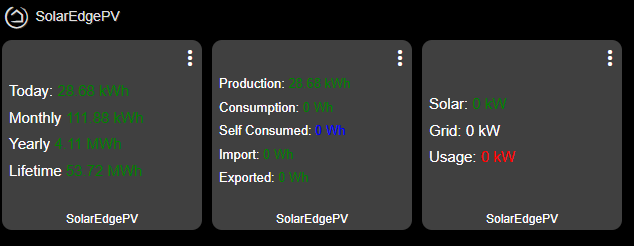
Should I be seeing numbers for Consumption, Self Consumed, Imported, Exported, Solar, Grid and Usage? If not what are these fields used for?
To get the remainder values to populate you'll need to have a WattNode or the equivalent for SolarEdge installed and configured on the inverter. I think there is a way in the settings to hide the tile, I forget right now and my Hubitat is all packed away in a moving box somewhere.
Thanks ... So I see. 
Funzie ... Thanks ... Ha! I see you are still "alive and kinkin'"... I appreciate the update. 
I suspected that I needed something else ...
Thanks for the app BTW. The driver loads using HPM ... which makes it pretty easy to get going.
No problem with the tiles being visible ... the picture above is my dashboard ... so I can delete them.
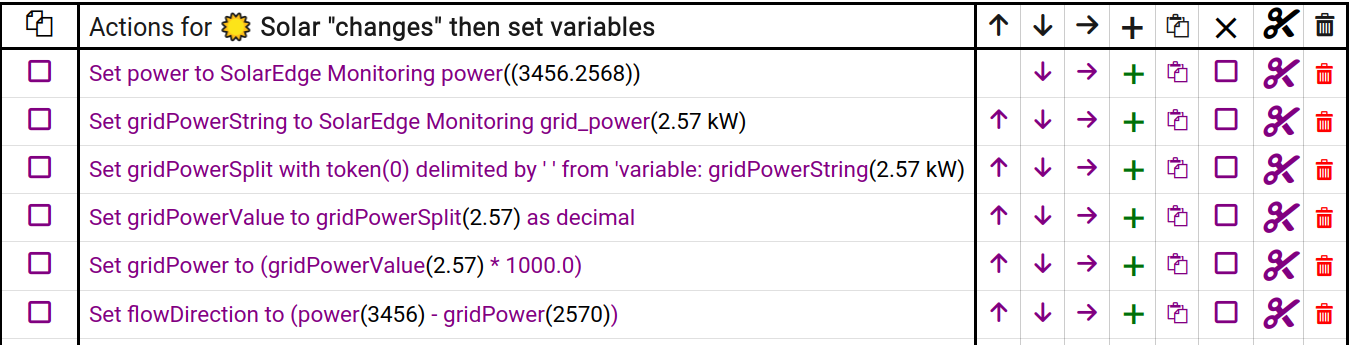
@funzie It looks like the 'pv_power' attribute is a text string and not a numerical value, like the 'power' attribute. This limit using numerical logic (<, >, =>, =<) to compare the attribute.
The intention is to setup a rule to alert me when home battery is near to fully charged and pv_power is still above the threshold for charging my EV.
Resolved converting string to decimal in Rule Machine.
Just popping myself in here to mention my SolarEdge is still working with my C7 from your work. Thanks.
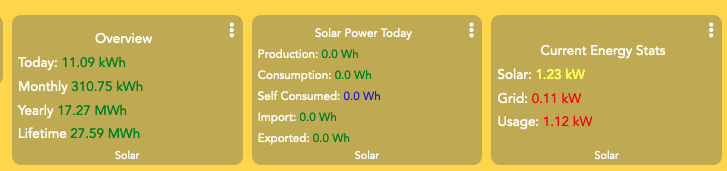
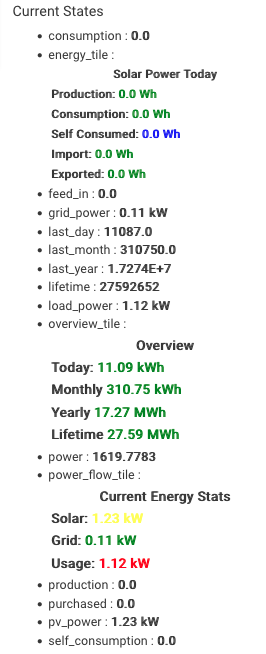
Never mind. Its back again today. Appears to have been a Solar Edge API glitch.
I wish we could connect directly with the inverter instead of having to do a round trip thought the vendor's computer....
That's one of the reasons I moved away from Hubitat.
Home Assistant's integration uses Modbus TCP, which allows you to query the inverter directly and get real time stats and even better graphs, interfaces, and historical data. Give it a try. If you have an old computer or even a VM, that's all you need to test drive it.
Yes you are right. However in order to do that you need to have modbus port enabled on your inverter. From what I understand this is a maintenance tech only setting and owners (if you can even call us that..) do not have access to those settings. I did quick check to see if the port was open and it seemed not.
I would be interested if there is any way to enable it that I am unaware of.
I did it all myself same week my installer told me I couldn't have access to installer settings to generate my own API token. They wouldn't even give me the site diagram.
Simple enough to do, setup a Solar Edge installer account(different than monitoring, you'll need a new email). Transfer the site over to yourself by submitting the form (https://www.solaredge.com/modules/custom/solaredge_site_ownership_transfer/docs/SolarEdge_Site_Ownership_Transition_Form.pdf). Then you have all the access you need. One year later it came in handy when my inverter died and I was able to RMA and install it myself, didn't have to call the original installer and saved myself whatever grief and money it would have cost me.
Your original installer will lose access to your site. But then again, why do they even need access to it in the first place. It's just a control/monopoly thing they do.
OK thats interesting. I did not know that was possible.
Not sure if I would take the plunge though as our solar warranty includes labor from the original installer. So it would probably mess that up if I took over the maintenance access.
Will likely just leave it alone for now, but if Solar Edge decides to enshitify the API access I might revisit this topic.
The solar inverter was really the only thing I was looking to HA to do for me. Need to find another reason to jump on the HA train. User dashboards seems like it might be one??
This is a great device driver. Thank you to everyone who has contributed.
I've got the driver working. I'd like to capture the energy (kWh) generated by each of my solar panels each day. Is there a way to get the energy data at the solar panel level?
Thanks
I have installed this driver/device. A couple of years ago I created some C# code and an application to download data related to my inverter. I obtained an API key - it was easy at that time - I just had to request it from my user login. I stopped using my application and apparently that caused my API key to expire?. Anyway I created a support case with SolarEdge to re-enable my key. Instead they gave me a new one. I've attempted to use it with your device driver and it's generating exceptions. It could be that the response to requests from your driver is not one the code expects. Here's some log data:
dev:842025-09-12 11:05:00.620 AM
error
groovy.lang.MissingMethodException: No signature of method: groovy.lang.GroovyRuntimeException.getStatusCode() is applicable for argument types: () values: on line 533 (method querySitePowerFlowEndpoint)
dev:842025-09-12 11:05:00.614 AM
error
Exceptiongroovy.lang.GroovyRuntimeException: Ambiguous method overloading for method java.math.BigDecimal#minus.
dev:842025-09-12 11:00:10.586 AM
error
groovy.lang.MissingMethodException: No signature of method: java.net.SocketTimeoutException.getStatusCode() is applicable for argument types: () values: on line 461 (method queryOverviewEndpoint)
UPDATE: If I view the commands page of the device I can see the data it's retrieving and it appears to be correct. Any idea what the errors in the log are about?
Also - how to have the readings show up in a dashboard.