Yes, it should work fine. The way this integration works is by reading the API endpoints of the data SolarEdge already has. Which is also a drawback as you can only query certain amount of times in a day and also SolarEdge only records a certain amount of data and need an internet connection.
Yes, I would suggest installing the energy meter. The inverter itself only measures the amount it generates, you'll need an external meter which interfaces with the inverter to measure export and consumption. That data is then sent to SolarEdge for reporting.
Now, if you want up to the best monitoring possible, you need to use something other than Hubitat. Reason being that you can directly query via TCP the inverter for information, so essentially monitoring will be real time and 100% local. Take a look at Home Assistant and their SolarEdge integration. Also since it's a much more robust home automation platform it will allow you to do more with the data from your inverter.
Was going to say I needed to get the installer to set this up, but that culminated in them providing me with the API key from memory.... Perhaps wait 24 hours?
Same. I would love to hear from someone who has this set up and it is still working to see what their settings are, or maybe what conversation they had with the installer/whoever when they got the API key.
I am going to see if I can get a new API key from the installer, and see if I get the same error.
On another note, you'll always get a 401 error on (https://monitoringapi.solaredge.com/ unless you are connecting to it with authentication. So you can't just browse to it, you need to send extra authentication headers. 401 is the correct response if you just put that address in your browser and go.
First off, great app. My use case why I was looking for SolarEdge integration is really for monitoring energy production.
I recently had an inverter die on me and didn't know until 5 days later when I opened the app and noticed output decreased. Because of this, I'm looking to monitor daily energy generation and if it varies by more than 10%, send me an alert. (Yes I am in a very sunny place that gets uninterrupted sun 350 days of the year). I think I can figure out a rule to do this using the last_day field.
But more specifically, could you add the data that is pulled from the site details API? It pulls a field called status where in my case was Inverter - Production issue detected so I could additionally monitor a change in status too.
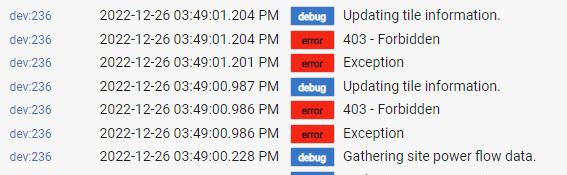
Hello... I finally got an API from my installer, but seems like either they did not provide the correct one (I don't know if there are multiple APIs that provide different info or levels of security)? This is the log, I also sent a ticket to see if there can provide some info, or maybe enable a entry point that does not require credentials.
PS. I was not able to see where to 'OAuth' the device driver. Is that what I'm missing?
I'm pretty sure that the API key or site id is incorrect. From what I remember SolarEdge only grants one API key per account owner. While there are several account access and user roles, I don't believe they can individually create API keys.
Not sure what you mean about OAuth, there isn't one with this integration just API key and site id combination.
Thanks. I'll see what Support Service answers with.
My OAuth comment was based on some previous post about providing some sort of authentication before gaining access to the API information. I'm still learning this stuff and probably will not quite understand it all.
Follow-up. I got a new API and am able to pull some data. I don't think I can pull all data that you have fields for (for example, my inverter is not wired up to measure usage by the house), so I only get the PV generated but getting the current reading (production Wattage) will be handy.
Also, I was able to use webCore to schedule a data pull every three minutes so I could maximize the number of pulls during daylight hours before I hit the 300 limit. Others could use a different cycle for your area depending on length of day.
Depending upon your installer, you might not have an Admin icon. In that case, contact the installer to generate the API key for you. This is what I had to do way back when.
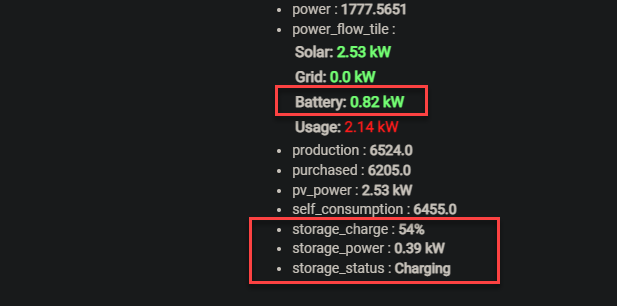
Been looking at the battery readings that come back for my setup and I have adjusted my copy of the driver to record the "storage" power flow results, such as battery power (flow), status (Charging, Discharging, Idle) and charge level. I can send through the updated code if you are interested.
Here's an example of the response from the power flow api call, see the STORAGE section at the end.
0.9 kWh going into the battery (charging) with the battery already 52% charged: