Maybe. I don't know anything about the Q7 models, but it was mentioned by the Homey developer as cloud only, along with the Q10 S5. Maybe there's a specific model he meant, but just wrote Q7. I'm was only focused on me, so I didn't bother to look back in the thread to see what specific model of Q7 he was referring to. 
Since they don't sell the Q7 Max+ on their site anymore, I assume the "new" Q7 series is something totally different. The Q7 Max+ naming always seemed odd to me at the time, since it seemed to be a one-off.
Edit: AI confirms, these are entirely new models with the new mapping software that is causing issues with the integration.
AI Overview
The new Roborock Q7 series (specifically newer models like the Q7 L5) features upgraded mapping software that builds maps up to 6 times faster and cleans 30% faster compared to the Q7 Max+, while offering advanced 3D mapping capabilities
While the Q7 Max+ is a powerful, older model, new Q-series software focuses on improved navigation efficiency and mapping data.
1 Like
Is there anyway to determine which room the vacuum is going to vacuum if started outside of HE.
I have a dashboard to select individual rooms but it's easier to just tell Alexa. I have some rooms that I need to make sure the door is open, and I wanted to stop it if we tell it to vacuum a room that is closed off. I generally have to check every room anyway because of my wife's cats, make sure there are no cat toys laying out. Still would like to verify with HE though.
Looked through the code and turned on debug logs hoping to see where it list a room number but I am not seeing anything. I guess it's not possible?
This may be robot dependent. What is the robot model. I see rooms listed in the device current states.
Can't you tell alexa what room to clean?Is it not returned in your testing?
I have a Q5 Max+. In state all it returns is Room clean. It does have a number after it, if you look in the logs, I thought this was the room number when I first started looking at it but it's always 18. From the code that is the value for Room clean.
I can tell Alexa which room to clean, but I see no way to pull into HE which room I asked to be cleaned.
Could I create a routine that uses the same phrasing as the Alexa roborock skill.? I haven't tried that but I was hoping to just pull it from the driver.
I just use appRoomClean command. Give it the number for the room based on the rooms attribute.
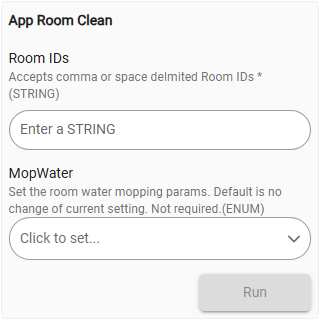

It seemed to work, but not reliably.
But then I realized this driver had the ability to tell the vac to run a saved routine (aka scene). This post describing the feature and this example rule got me on the right track.
So I turned off the schedules on the vacuum and just added rules like this to replace them:
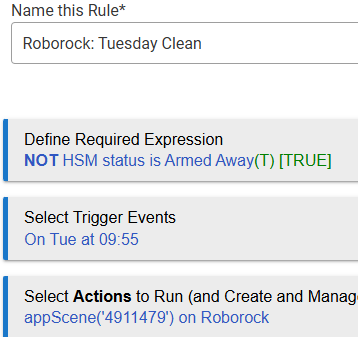
This works to start the vac even when the MQTT connection is disconnected (the problem from [RELEASE] Roborock Robot Vacuum - #290 by jlv that I am still having).
From original post:
Yes I know, that is how I do it now when I use my dashboard to start the vacuum. I want to know which room it is cleaning if it is started with the Alexa skill.
You can give a command to clean a room with the skill. That skill requires robo rock to be said as two words (a pause between them).
START
• Alexa, ask robo rock to clean
• Alexa, ask robo rock to clean with "*Bobby"
• Alexa, ask robo rock to start cleaning
• Alexa, ask robo rock to start cleaning with "Bobby"
• Alexa, ask robo rock to vacuum
• Alexa, ask robo rock to vacuum with "Bobby"
• Alexa, ask robo rock to start vacuuming
• Alexa, ask robo rock to start vacuuming with "Bobby"
• Alexa, ask robo rock to clean the "bedroom"
• Alexa, ask robo rock to start cleaning the "living room"
• Alexa, ask robo rock to start vacuuming in the "entrance"
If Alexa skill did not be invoked after using the above commands, retry with one of the following invoke works without saying any specific question or request first.
Alexa, launch robo rock.
Alexa, open robo rock.
Alexa, start robo rock.
Now the alexa skill is being invoked and you will hear the welcome message.
After this message or during this message is playing, say the second half part of original command aloud and your vacuum will take action accordingly.
For example: You say “Alexa, launch roborock” and then say “start cleaning the bedroom”.
The same way works also for any other operations such as pause, resume, etc.
STOP
• Alexa, ask robo rock to stop
• Alexa, ask robo rock to stop "Bobby"
• Alexa, ask robo rock to stop cleaning
• Alexa, ask robo rock to stop cleaning with "Bobby"
• Alexa, ask robo rock to stop vacuuming
• Alexa, ask robo rock to stop vacuuming with "Bobby"
PAUSE
• Alexa, ask robo rock to pause
• Alexa, ask robo rock to pause "Bobby"
• Alexa, ask robo rock to pause cleaning
• Alexa, ask robo rock to pause cleaning with "Bobby"
RESUME
• Alexa, ask robo rock to resume
• Alexa, ask robo rock to resume with "Bobby"
FIND ME
• Alexa, ask robo rock to say hi
• Alexa, ask robo rock to say hi with "Bobby"
• Alexa, ask robo rock to say hi for me
• Alexa, ask robo rock to say hi for me with "Bobby"
• Alexa, ask robo rock to say where is my "Bobby"
STATUS
• Alexa, ask robo rock to tell me what it's doing?
• Alexa, ask robo rock to tell me what is my vacuum doing
• Alexa, ask robo rock to give me an update
SEND BACK TO CHARGING STATION
• Alexa, ask robo rock to dock
• Alexa, ask robo rock to dock with "Bobby"
• Alexa, ask robo rock to send "Bobby" home
• Alexa, ask robo rock to recharge
• Alexa, ask robo rock to recharge with "Bobby"
CHANGE MODE
• Alexa, ask robo rock to change mode
• Alexa, ask robo rock to change to silent
• Alexa, ask robo rock to change to balanced
• Alexa, ask robo rock to change to turbo
• Alexa, ask robo rock to change to Max
This discussion was the last on a similar topic. I don’t think the API has changed to determine room or location.
1 Like
Thanks for taking the time to answer, but you really need to read my question again, as you again are not answering what I asked.
thanks @Bloodtick_Jones for the info.
My bad. It wasn't clear to me that you wanted to query what the robot was doing from Hubitat, it was the "starting outside of Hubitat" line that threw me.
1 Like
I'm using a Q5 Pro vacuum which works fine from the IOS Roborock app. Trying to add the ability to control it from Habitat with no luck. Here's what the Logs say:
ev:2812026-03-14 05:09:28.119 PMwarnQ5 Pro healthStatus set to offline
dev:2812026-03-14 05:09:18.711 PMinfoQ5 Pro state is authorization error (500)
dev:2812026-03-14 05:09:18.668 PMwarnQ5 Pro login failed with username:’xxxxxx@gmail.com' password:’xxxxxxxxx’ msg:username or password error
dev:2812026-03-14 05:09:18.648 PMwarnQ5 Pro driver only supports Roborock (not Xiaomi) integrations
dev:2812026-03-14 05:09:18.027 PMinfoQ5 Pro executing 'disconnect()'
dev:2812026-03-14 05:09:18.021 PMinfoQ5 Pro executing 'initialize()' allowLogin
Region is US
As I was playing with this, I got "mqtt message rate limit exceeded, sign in blocked" . I waited a week and am now back to getting the username or password error message.
I don't "think" I initially set it up with Mi Home, but since it works now with the IOS Roborock app, that shouldn't be an issue, right?
Any help would be appreciated!
-Jeff
LLMs have been super helpful. Using the foundation from @Bloodtick_Jones and several other talented developers, I've managed to create a Q10 S5+ driver for Hubitat (see link below). At the moment this is stand-alone. Please note what is working and what is not working from the list below, specifically Retrieving Room numbers, and cleaning Zones do not work right now.
Room IDs for the Q10 are embedded in the binary map payload. They live in
roomDataInfoinside the parsed map and cannot be queried separately. To get them would require decoding the binary map format to get the numeric IDs. Those would have to come from a third-party tool that can parse Roborock map data, or from watching clean history in the iOS app's debug mode. This driver cannot retireve room numbers, but that functionality is being actively worked toward by the HA developers and could possibly be added here at a later date.
- Automation is accomplished with Rule Machine using Run Custom Action > Actuator
- Recommend adding a delay to the next action following a map change, since the cloud round trip needs time before calling the next action.
Example:
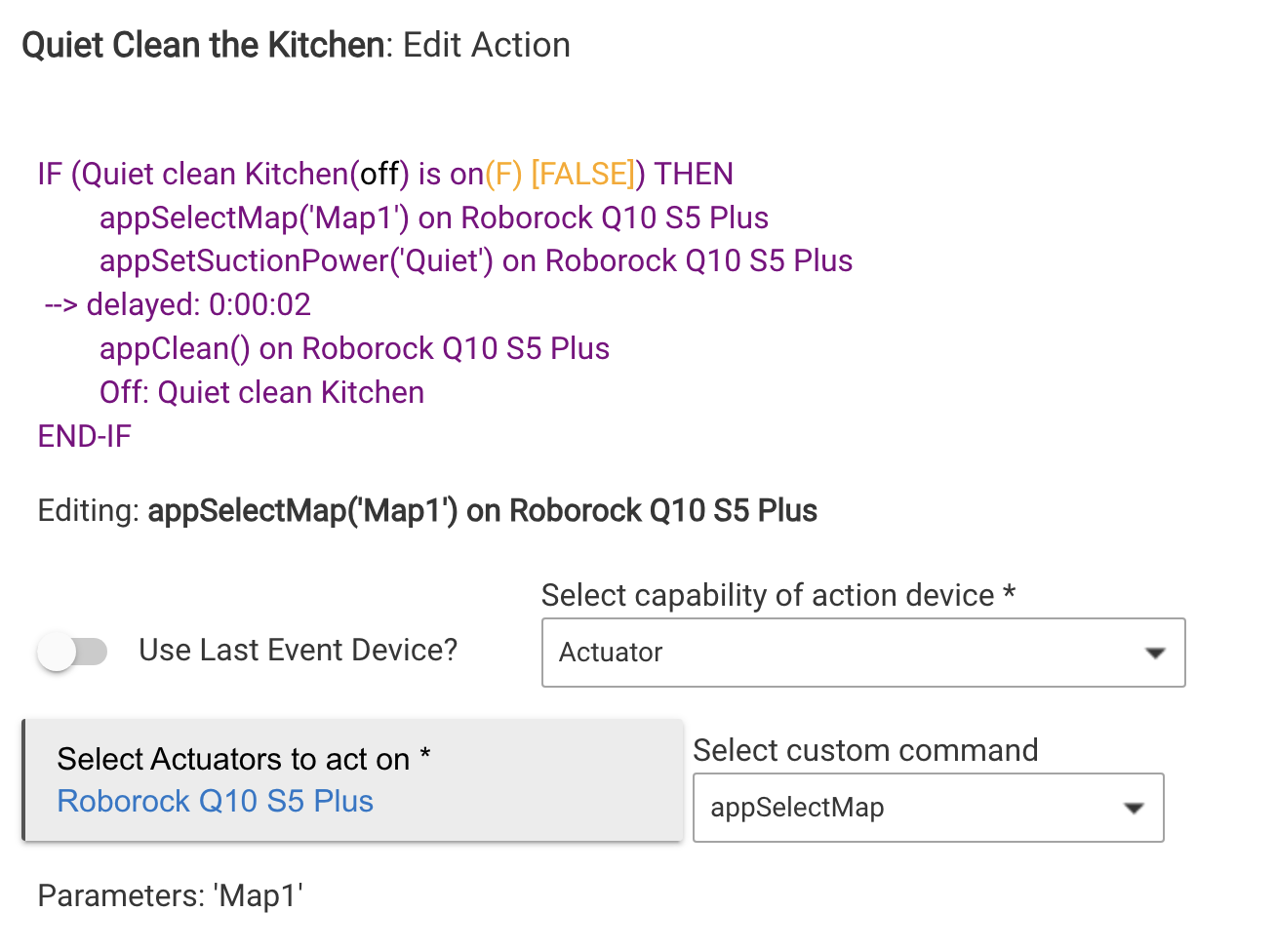
Working
-
Clean
-
Dock
-
Empty Dust
-
Pause
-
Resume
-
Maps
- App Get Maps command so you can retrieve the maps from the robot and then you can call them up by the same name saved in the mobile app or via the map ID number that shows up in the Hubitat driver Current States
-
Suction Power
- Quiet
- Balanced
- Turbo
- Max
- Max+
-
Water volume
- Low
- Medium
- High
-
Cleaning modes
- Vac & Mop
- Vacuum
- Mop
- Vac then Mop
Not working
- Retrieving Room numbers from the map
- Selective Room Cleaning does work, but you must retrieve the room number from the official Roborock app (Thanks @tsaaek for testing).
- Zones cannot be used at this time
2 Likes
After the last update, though not necessary because of it, I cannot get the appScene([scene_id]) to run the actual scene for my S8 Pro Ultra. It does accept the command without logging anything “interesting”.
The relevant log entry claims the appScene command was issued, but the S8 does not start running.
Do you still see the same scene numbers in the state? For example:

And can assume it does run the scene from the mobile application without issue?
Thanks for this. Now got my new Q10 S5 connected. No more sending commands via echo devices.
1 Like
I found that funny in that I setup a dashboard so I could do everything from HE instead of opening the Roborock app.
I had the Roborock skill setup but I never really used it, I just recently tried it and a simple Alexa vacuum the "room name here" and it takes off. It even excepts multiple room names at once. I found it much easier.
Ah I didn't know you could do that either. I'll give that a go. For me the echo/alexa method was my way of telling the vacuums to clean when we were out of the house.
We cant really do that. The cats leave their toys around the house and they cause the vacuum to get hung up. So we need to do a visual check of any room it's about to vacuum.
Even with using a Alexa command I can use the app to keep track of vacuum runtime and it alerts me when it's time to go clean the rollers again. So still a handy tool.

