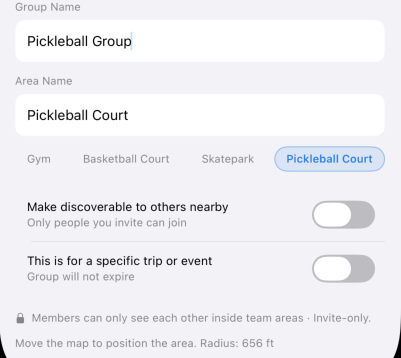
Fixed: the custom per-area privacy toggle that could get stuck (thanks to @SuperDupe for flagging this). I removed it rather than patch it — it was scaffolding for a feature that isn't fully finished yet, and it shouldn't have been in the app before the rest of it was ready."
More on what that feature is aiming at in the reply below.
Worth clarifying how sharing works today, since it comes up: Family is the one template that shares location always, everywhere. Team, Friends, Event, and Neighbors work differently — members are only visible to each other inside the group's tracked areas, not all the time. Team's suggested areas already include things like Gym, Pickleball Court, and Skatepark — that's the exact "is anyone at the court right now" use case.
For context on where I want to take that further: the idea is to let you be a counted member of an area without revealing you're the one there — you'd see "3 people at the court" and decide if it's worth going, without seeing who, even while you're there. Custom privacy was built for that anonymized layer, but it got ahead of the rest of the feature, so I pulled it for now. I'll bring it back when the rest is ready.
One thing I'm weighing for the Hubitat side specifically: exposing just an area count, not a device per member — so a pickleball court shows "3" without flooding your hub with individual presence devices. Let me know if that's something you'd use.
areaSince currently comes through as UTC (Zulu) from the API. Adding an option (or defaulting) to display it in the hub's local time makes total sense.
I'll add this as a GitHub issue and look at implementing it soon. Appreciate the feedback!
Another idea...
I'd like to have 2 areas centered on our home. A small one that shows we are really home and a larger one that shows we are in the neighborhood.
Tried that out and found that the switch from home to neighborhood was flawless. But the return home doesn't happen.
That seems to be an app issue.
Is it possible with the app to have two concentric areas?
Can I have two accounts with PisitionGuard on the same phone?
Added Note:
Could a separate device be created for each group that a person is a member? Then I could place the neighborhood area in a separate group and have events for two different devices
Alternate:
Add the group to the device so each event would have an area and group.
Not sure that either idea can work with PositionGuard
On accounts: it's one PositionGuard account per phone number, so no multi-account on one phone — but you can have multiple groups, each with its own areas, under that one account. So if the goal is separating what triggers what, that's likely doable through groups rather than accounts — more below.
On nested areas: I've used one area inside another myself (across different groups, and within the same group) but haven't pinned down a clean repro for the return-home issue you're describing — want to test that specific case (smaller area fully inside a larger one, in the same group) before guessing at a cause. Two things that'd help me reproduce it: which order you created the two areas in, and roughly how much smaller "home" is than "neighborhood"?
One more thing that'd help: what are you actually trying to trigger off this? E.g. one event for "entered the neighborhood" and a separate one for "made it all the way home," or something else? That'll tell me whether nested areas in one group is the right tool, or whether two areas in two separate groups (tied to your separate-device idea) gets you there more reliably today.
On multiple groups: good question, right now the integration is built around one group per install. What I don't know off the top of my head is whether installing it a second time, pointed at a different group's API key, already works today — I built this for a simpler use case and haven't tried that specific setup. Let me check and get back to you rather than guess. If it doesn't work today, it's a reasonable thing to think about for the roadmap, but I don't want to commit to a timeline before I understand what's actually involved.
Multiple groups: you don't need a second copy of the app — the group picker inside PositionGuard is multi-select, and one API key sees every group your PositionGuard account belongs to (keys are per-account, not per-group). Just open the app → Groups → select both; a member in several groups still gets a single device. A second install is deliberately blocked. The only case that wouldn't cover is a group belonging to a different PositionGuard account — if that's your situation, let me know and I'll look at supporting it properly.
v1.1.0 adds an areaSinceLocal attribute — the same instant as areaSince, rendered in your hub's local time zone for dashboards. Thanks @JimB
areaSince itself is unchanged (still ISO-8601 UTC) so existing rules keep working. To update: Apps → Hubitat Package Manager → Update, select PositionGuard. No reconfiguration needed. The new attribute fills in on each member's next update — or immediately if you tap Refresh on the device page.
Thanks for your reply. Got me thinking..
Can I set up my wife with a second account and then invite her into my grouo and have her invite me into her group?
If that can be done, can I set up a device for me in both accounts? And the same for her?
For both areas in the same account... I set up Home first then Neighborhood.
One account per person is the model — you and your wife would each sign up separately, then just invite each other into your groups (or she into yours). No need for either of you to have two accounts.
On the Home/Neighborhood setup: worth trying it as two separate groups (one with just Home, one with just Neighborhood) rather than one group with both nested — you can be the owner of both, so nothing extra needed there. Haven't confirmed yet whether that actually sidesteps the return-transition issue or not, still looking into the root cause — but it's a quick thing to try in the meantime.
Couple of things that'd help me narrow this down: what radius did you set for each area, and are they centred on roughly the same point?
Also — on the times it does go to Home, is there anything different about those? Like whether you're moving around outside for a bit after arriving versus going straight in.
Any chance the app could be tweaked so that the members are listed as “children” of a “parent” device or moving the user “nickname” to HE “device name” and allow “device label” editing? Having the users listed by solely their nickname is kind of annoying iMHO.
Thanks @halfrican.ak — you've found a real bug, not just an annoyance. If you rename one of those devices, the app reverts it on the next poll: it's putting the nickname in the device label and then re-asserting it every cycle, so your edit gets silently undone within a minute. That's my mistake — I learned the Hubitat convention is that the integration owns the device name and the user owns the label. I had it backwards.
Fix is exactly what you described: nickname goes in the device name, label is left alone for you to set however you like. Filed as an issue and I'll get it into the next release. Existing devices won't change how they display — renames will just start sticking.
On nesting them under a parent device: I think I'm going to leave that one. It'd mean new device network IDs and recreating every child device, which would break existing rules and dashboards for anyone already set up. I don't think it is worth it for what's mostly a grouping change in the device list. The parent app already groups them under Apps → PositionGuard. Open to feedback if the nesting matters more than I think it does.
I agree that “nesting” while cosmetically appealing when it comes to device list organization isn't critical. Having the “nickname” properly populated allowing modifications of the label would be sufficient and consistent with HE flow.
The app was overwriting the device Label with the PositionGuard nickname on every poll, so any rename you made got silently reverted within a minute. Thanks @halfrican.ak for catching it. It now follows the Hubitat convention: the integration keeps the device Name in sync with the PositionGuard nickname, and the Label is yours — set it and it won't be touched again. Clear the label if you'd rather see the nickname.
One note for devices that already existed before this update: the old behavior had already set their Label, so they'll keep displaying their current name and won't follow future nickname changes. Clear the label once if you want them tracking the nickname again. Newly created devices come with an empty Label, so nicknames show through by default.
To update: Apps → Hubitat Package Manager → Update, select PositionGuard. No reconfiguration needed.
Trade-off worth knowing: arrivals can take up to 90 seconds to register, since it’s confirming you’ve actually settled somewhere. If that’s too slow for an automation you’re running — unlocking a door on arrival, say — let me know and I’m happy to talk through options.
Our house is located in an area with poor cellular reception. Thus, as we approach the house in the car, the phone goes out of Internet access, and doesn't really connect to WiFi until we're on our driveway - and that happens just after the garage door gets opened automatically by the car. In order to get HSM to disarm in time before the garage door is opened, I'm running the Hubitat app with a large geofence of half a mile - so that presence can be reported before we drive into the cellular dead zone.
Would this delay (of up to 90 seconds) happen in this case?
Good question @jlv , and worth clarifying — the 90 second delay I mentioned in bobbles' reply is Android-specific. iOS doesn't have that delay.
If you're on iOS: arrivals register on boundary crossing, no dwell required.
If you're on Android: the 90 second delay applies, which would push your arrival notification later than you want for HSM automation.
Recent tuning is orthogonal to your use case — it holds classification steady when GPS accuracy overlaps the boundary, but for a half-mile geofence you'll be well inside confidence
bounds by the time you need HSM to disarm. Arrivals should fire at the outer edge of your geofence, roughly half a mile from center.
One thing worth noting: the phone doesn't need cellular to compute its position — GPS works fine in dead zones. The only issue is that the position needs to be reported before you lose
cellular. As long as your phone reports a position inside your half-mile geofence while it still has connectivity, HSM will get notified on Hubitat's next poll.
If you're on Android and the 90s delay is a problem for your HSM setup, let me know — we can look at the trade-offs.
Yes, the problem is getting the data reported before I lose coverage. And we only use Android.
I really dislike having such a big geo-location, but the dead zone is really a problem.
The best solution I've come up with is to have two different presence apps on the phone; one with the half mile radius to disarm HSM and another with a tight radius close to the house. I've prototyped this on my phone using the old Hubitat app. The minimum radius there is about 500 feet. It generally works.
But I don't want to put two Hubitat apps on each phone. Which is my interest in PositionGuard.