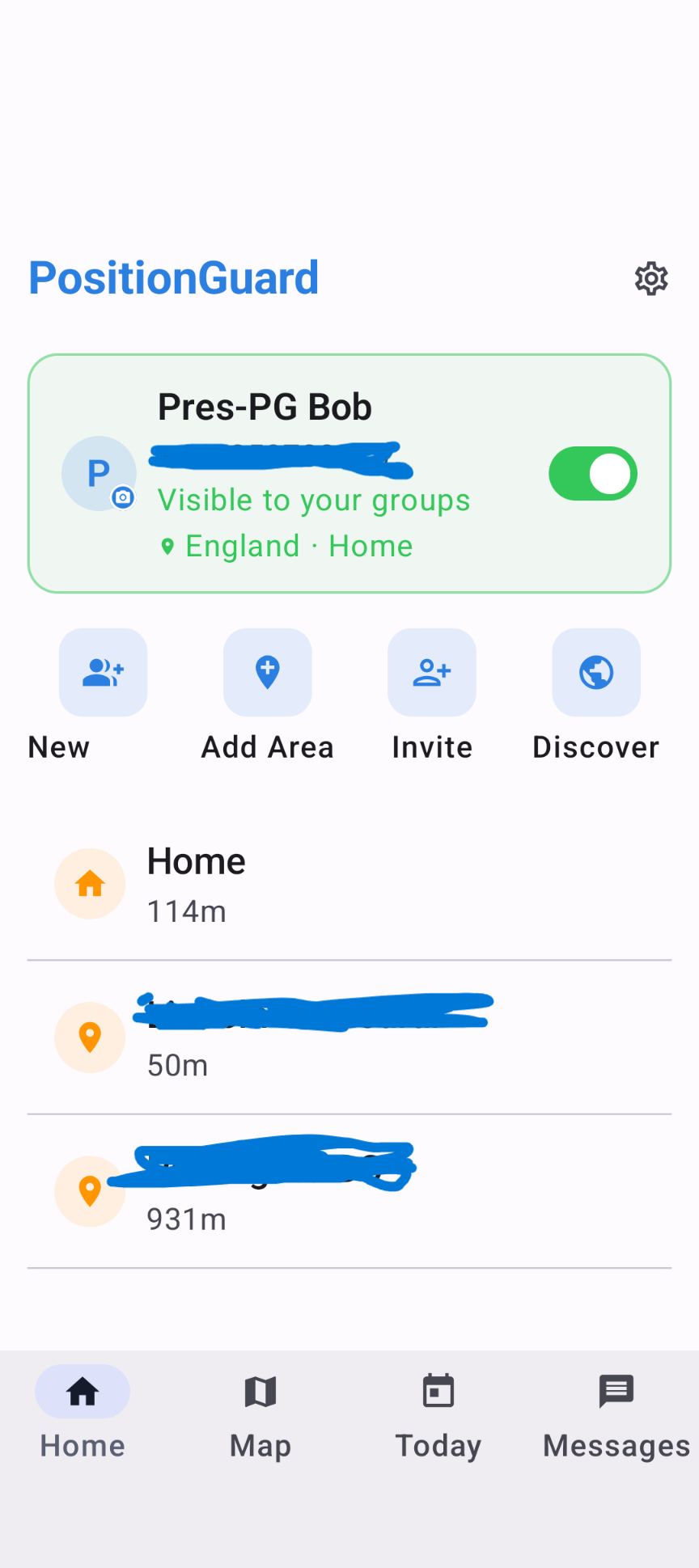
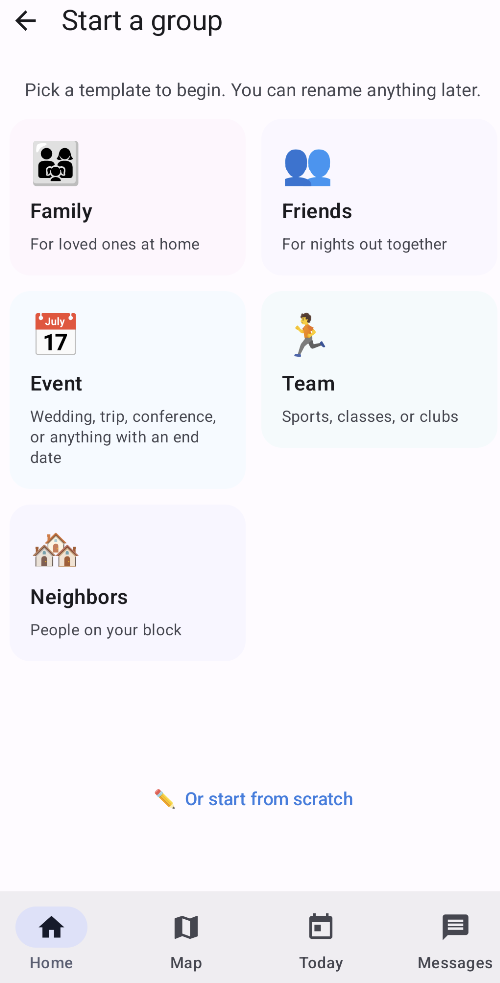
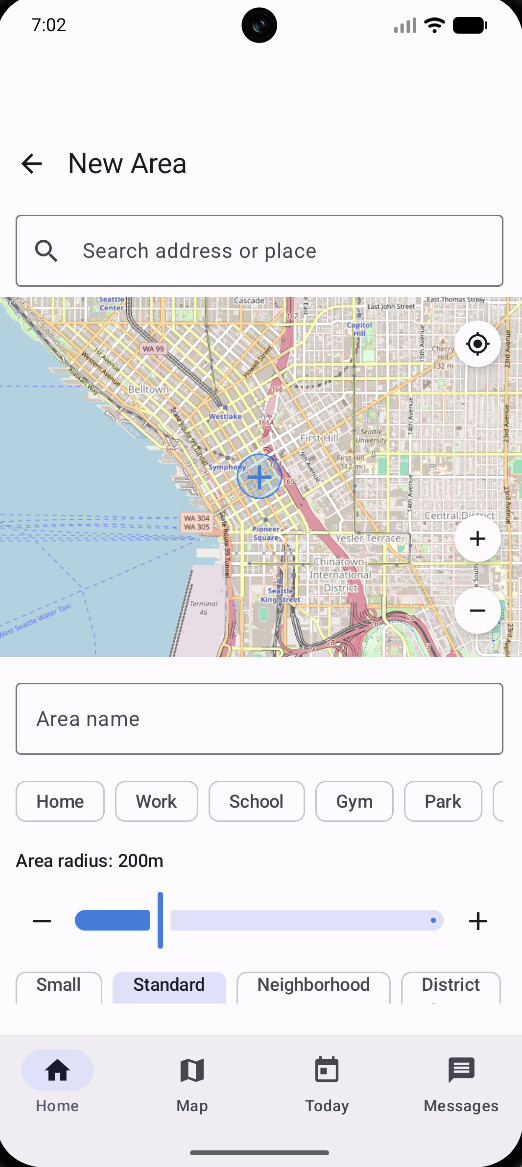
Thanks, and @jason12 has it exactly right — thanks for jumping in. The area is created; adding it from inside the group (or attaching it to the group after) makes it visible and working. That standalone flow creating something you can't see is a real bug — both of you hitting it independently within a day tells me everything about its priority, and it's logged for the next Android release. And jason12 — sounds like the UK beta found you successfully; glad you're in.
For anyone following along: this is Android-specific — just verified area creation on iOS works as expected.
Build 26 (0.7.3) is out for Android with fixes for two issues that came up in this thread:
Background location wasn't restarting after granting permission from Settings — it needed a reboot to kick back in. Fixed. Thanks to @bobbles for tracking this down.
Newly created areas weren't showing up in your area list. Fixed. @bobbles and @jason12 both ran into this from different angles — appreciate the reports.
Also fixed: a permission screen that could get cut off on some devices/font sizes.
Update should be rolling out on Google Play now — feel free to share any feedback.
Thanks for confirming, @bobbles — and thanks again for finding both of these in the first place. Reports like yours (with the reproduction steps) make fixes like this possible.
Today is the first day I’ve been away since I installed this.
It has worked great in that it changed my presence to not present and mycurrentarea to AWAY.
I then arrived at an area I had defined in the app.
Should the currentarea then update to show that I am in that area? It looks like it didn’t do that but I’m wondering if it shoild.
When I arrived home presence went back to present and currentarea showed as home.
Just some feedback for you and if this is correct, great.
Thanks for the report — and great to hear the away/home cycle worked on your first day out!
To your question: yes, currentArea is supposed to show the name of the area you're in. The full picture:
currentArea = the area's name while you're inside it, "away" when you're not in any defined area, "unknown" if sharing is paused.
presence maps to just one area — the "Presence area" preference on the member device (default "Home"). So at any other area, presence staying "not present" is correct; currentArea is the attribute that tracks every area, and you can trigger Rule Machine directly on it (e.g. currentArea = "School").
So everything you saw was by design except that currentArea should have shown the area's name at that stop. The most common reason it doesn't: the area isn't attached to the group the integration is watching. Areas are created on your own account first — to make one visible to the group (and therefore to Hubitat), open the group in the PositionGuard app and use Add Area to attach it. Hubitat only sees the group's own area list.
If the area is already in the group, a couple of other things to check:
Timing — the phone usually detects an area within a minute or two and the hub polls once a minute by default, so a short stop can slip through.
On the Hubitat device page → Events, see whether a currentArea event for that area ever appeared.
If you created that area after you'd already turned sharing on, toggle sharing off and back on once in the app — that forces a fresh geofence registration.
If it still shows "away" while you're standing in the area, let me know whether the PositionGuard app itself showed you in it, and I'll dig in. Thanks again — feedback from a real first day away is exactly what helps.
I didn’t realise this. I’m probably missing something but when I click on ‘Add Area’, I can only add an area and I cannot see an option to add it to a group.
If I click on an existing area I cannot see an option to add it to a group.
On the ‘Home’ page of the app I can see in green it shows ‘Visible to your groups’ - England - Home.
Here is a screenshot that shows what I’m trying to explain.
I’ve been using this for about a week now and it has been pretty solid. I did notice some movement in and out of my defined areas that was unusual, but I also have them set pretty tight at 164ft. Do you recommend opening them up a bit bigger? The little circle on the map looks plenty big, but it also might be bigger than exactly what 164ft is… Thoughts?
It doesn’t look like you’ve actually created a group yet. It should appear on that page. It’s the “New” next to “Add Area”. The word “Group” appears to be truncated on your screen. You would then go into the group and add the area there.
@CAZ nailed it — thanks for jumping in and helping out here.
@bobbles, here's exactly what that looks like (screenshots attached): tap "New" to start a group and pick a template — Family works well and sets you up with a "Home" area automatically. From there, open the group and use Add Area to attach any areas you've already created — they'll show up in that list ready to add. Once attached, the area's edit screen shows "In groups: [name]," confirming it's visible to Hubitat.
That "In groups" label just went live in the Android update (0.7.4) — should make this kind of check much easier going forward.
@SuperDupe Good to hear it's been solid for a week. On the radius question: at 164ft (the "Small" preset), you're close to typical GPS accuracy in a lot of conditions, especially indoors or in denser areas, so some enter/exit flicker at that size isn't unusual. I'd bump anywhere you don't need tight precision up to "Standard" (200m) — that alone should cut down most of what you're seeing. Keep Small only where the exact boundary really matters.
@CAZ@clundin1
Thanks to both of you for clarifying exactly what I should do.
It makes complete sense and I’m now up and running with a Family group and the areas that I have defined have been selected.
I guess where I was getting confused was in the area that is shaded green. Because the word ‘groups’ is in there I assumed it was defined. Reading the box again it just means that Groups is visible. Not necessarily defined.
Thanks again and I’m off out and about tomorrow and will see how it goes.
It does look promising though.
Good news — that's exactly right, "Groups" there is about visibility, not whether the area's actually assigned to one. A group's areas are exactly what Hubitat watches, so that's the piece that matters for you. Glad it's making sense now.
0.7.4 adds a line on each area's edit screen showing which group it's in, which should make that distinction clearer going forward.
Good luck out and about tomorrow — curious how it goes.
Looks like we had a bit of ‘bouncing’ going on.
We were walking and you can see it went not present - present - not present.
When we came back the opposite happened.
The Home area is set to 200m with our home in the centre of the radius.
Thanks for the detail — and that log is actually a good example of Hubitat doing exactly what it should here: polling once a minute and faithfully reporting whatever the app says, right down to the second. The bounce itself is happening upstream, at the phone/GPS level, not in the integration.
One thing I want to understand before saying more: when it bounced, were you walking near the edge of the 200m boundary (crossing in and out as you moved), or did it flip while you were clearly well outside the area? That distinction matters — right at the boundary, a bit of back-and-forth is expected, since GPS readings naturally wobble by tens of meters, and that's exactly the kind of jitter I'm working on smoothing out. If it happened well outside the 200m radius though, that's a different and more interesting case worth digging into further.
Either way, looks like it settled correctly once you were home.
We were actually walking away from our home, not parrallel which I agree could cause issues. It’s not a big deal as it ended up in the correct state. Just a ‘bounce’ not present/present/not present.
I was trying to test the ‘currentArea’ as well but unfortunately I picked the wrong church that we walk past to test it!!! DOH!!!
If you are happy for me to keep posting what I find, I’m more than happy to do it. I don’t want to keep bothering you with needless instances.
In general though, it does look to be doing what it should.
Thanks again.
EDIT: I’ve just thought of something which may improve the user experience.
When defining/editing an area, personally I feel it would be nice to have zoom in/zoom out buttons. When zooming in, at the moment it is easy to move the map and not keep the area I want to define in the center. Just a nice to have I suppose.
Ha, the wrong-church test is exactly the kind of real-world use that's actually useful — now we know the app correctly ignores an area that was never defined, which is its own small confirmation.
Good to know it was a straight walk away from home, not along the boundary — that's actually a useful correction. It means even a clean, direct departure can still catch a moment of GPS noise on the way out, not just walking near the edge. Good data point, thanks.
Please keep posting what you find — genuinely useful, not a bother. The bounce settling into the right state is the part that matters.
One more thing: you've earned a Contributor badge in the app. Between the background-permission bug, the orphaned-area bug, and now this, your reports have directly shaped what's shipped. Very much appreciated.
Since it's come up a couple of times now: some of what you're seeing is Android specifically needing more tuning around GPS drift. Most of the jitter-smoothing work so far has been iOS and backend-side, and it's not a trivial problem to get right — Android's geofencing works a bit differently under the hood, so it needs its own tweaks. Reports like yours are exactly what makes that tuning possible.
And the zoom in/out request is a good one — losing the center point while panning zoomed in is a real annoyance. Adding it to the list.
Android build 30 (0.7.7) is out — recommended update if you're on Android, and it should make what Hubitat sees more accurate.
What's in it:
Tuning to cut down on false "arrived"/"left" events from GPS jitter — thanks to everyone who reported the bouncing. One trade-off: arrivals may now take up to 90 seconds to register, since it's confirming you've actually settled somewhere rather than just crossed the boundary. If that's too slow for your automations, let me know.
Zoom in/out buttons on the area map — @bobbles suggested this one, and it's in.
Went for a walk into town this morning along the same route as the other day.
This time there was no ‘presence bouncing’ that we encountered earlier in the week.
Now that I had defined the area in town correctly, the currentArea changed from away to the area we had arrived at. The presence did bounce from away and the area we were in but that was because I had the area set to 100m and we were wandering around that specific area. Totally expected.
I use webCore for automations and I had a piston set up to tell me when we arrive/leave the areas I have set up.
 ).
).