Since Life360 shut off its API, there hasn't been a great answer for family presence on Hubitat: phone geofencing is flaky, WiFi presence broke when iOS and Android started randomizing MAC addresses, and most alternatives want every family member to fiddle with hub-side setup. I built PositionGuard because I wanted presence that survives a real family — mixed iPhone and Android, people who will absolutely not maintain an app for your automations' sake.
This is the native Hubitat integration: a parent app plus a child driver, one presence device per family member, installable through Hubitat Package Manager.
How it works
Your family members install the PositionGuard app (iOS or Android) and join your group — that's their entire involvement, ever. On the hub, the parent app polls the PositionGuard API with a key you mint, and creates one child device per member. Each device gives you:
-
presence — standard PresenceSensor capability, present / not present
-
currentArea — which named area they're in ("Home", "School", "Grandma's"), away if in none, unknown if they've paused sharing
-
areaSince and sharingStatus
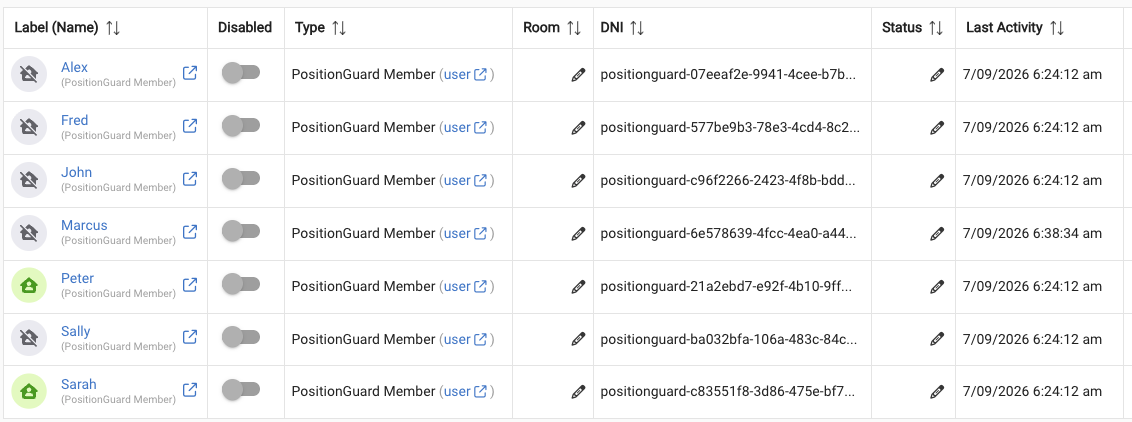
The one thing to understand before your first rule: presence and currentArea are deliberately different signals. presence is binary and maps to ONE designated area per member (default "Home", configurable per device) — that's what dashboard tiles, HomeKit/Alexa bridges, and presence-based apps see. currentArea is the full picture — use it in Rule Machine for anything multi-area ("if Mom is at Home OR the office"). Custom attribute triggers handle it fine; no extra devices needed.

Pausing never looks like leaving. If a family member pauses sharing, their presence freezes at its last value, currentArea goes to unknown, and sharingStatus tells you why. Nobody's "left home → arm the alarm" rule fires because a teenager toggled sharing off. False departures are the thing that makes people stop trusting presence automations, so the integration treats this as a hard guarantee.
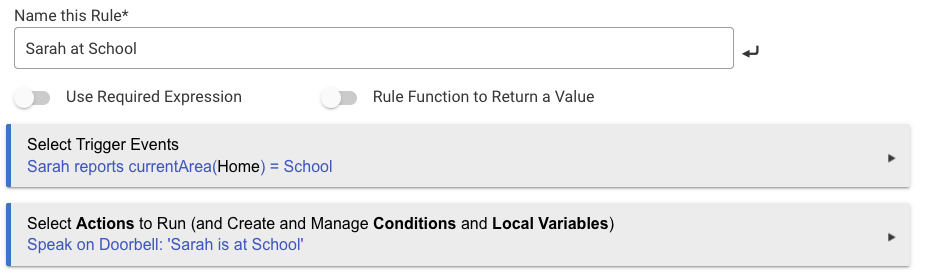
Privacy, concretely: the hub receives area names only. GPS coordinates never reach Hubitat — the app deliberately never calls the one API endpoint that contains them, raw responses are never logged, and there is no coordinate data in any attribute, event, log line, or state variable at any log level. Your hub knows "Sarah is at School," never where School is or the path she took. Members control their own sharing and can pause anytime.
It composes with everything downstream. Because members are plain native presence devices, they flow through anything Hubitat already bridges — Dashboards, Rule Machine, Echo Speaks, HomeKit — with zero extra setup. I run the Maker API → Home Assistant bridge myself and the same devices show up there too.
Example: have the house announce when your kid reaches school
Install
-
Family side: members install PositionGuard and join your group — iOS on the App Store (23 countries), Android on Google Play (open beta, US & Sweden so far). No hub involvement for them.
-
Mint an API key at dev.positionguardai.com.
-
Hub side: install via HPM (search for PositionGuard, or "From a URL" with the packageManifest link in the README), or manual paste — driver first, then app. Add the app, paste your key, pick your groups. Members appear on the next poll.
Full walkthrough, Rule Machine examples, and the attribute reference are in the README: GitHub - positionguard/positionguard-hubitat: Privacy-first family location for Hubitat — area-level presence, no exact coordinates. · GitHub
Status: v1.0.0, open source. My own family has run PositionGuard daily for a long while — across two continents, on both iOS and Android. The Hubitat integration is the newest surface and I'd genuinely like to hear what breaks, what confuses, and what presence automations you'd want that this doesn't enable yet. It does depend on the PositionGuard hosted service (presence syncs through the cloud — if local-only is a hard requirement, fair enough). Free for a typical household.
Support: GitHub Issues and Discussions on the repo — or right here, I'll be in the thread.
— Christer

