I've been back and forth with it several times with WAN IP or FQDN and it always fails unless using WAN IP.
1 Like
What I'm seeing as well.
Just to confirm I'm doing it right, I choose Web Site as the restriction type for geocode and then enter my DDNS info - [domain].duckdns.org. I've tried both http & https and both fail, and it won't allow me to enter the address w/out http or https.
Yeah guys, we all are doing it right but it just doesn't work. Tried to study google's instructions and didn't find anything new. I'm wondering if it needs https..are we missing so-called referer header..
1 Like
Some good news for all the Android users. The OwnTracks mobile app devs have agreed to add in the "address" field as part of the extended return data. I had put that in the forked version to use what the phone had, vs burning geocode credits in Hubitat to get what was typically already there.
Just working some logistics on submitting it, and then it would be part of the next release on the Play Store.
At that point, the only thing the forked would have different is preventing togging modes when you are on the OT mobile map.
9 Likes
Android 4ever.....
5 Likes
Quick question, no such thing. 
I moved my wife over from her Pixel 5 to a 7. Took the Gods to pry it out of her hand.
The migration of OT went great, remote filled in everything perfectly.
I have checked all the settings (yes battery optimization but I find her phone very slow in arriving home now. Her radius is about 75M like mine.
I don't rely on it near as much but I did notice the other day I was walking about .5 km from my house and it said I was home. I finally became away about 20 minutes later.
Congratulations on getting them to see the utility of your contribution (and for coming up with it in the first place).
LOL, indeed!
3 Likes
Just to confirm, it's set to "unrestricted battery" and locations are "allowed all the time"?
Seems to be a bit of an uphill battle sometimes. I had offered a couple up before, they got rejected, but like a "dog with a bone" I tried a couple more times and finally got acceptance for it. 
4 Likes
Definitely, that's a newb mistake. 
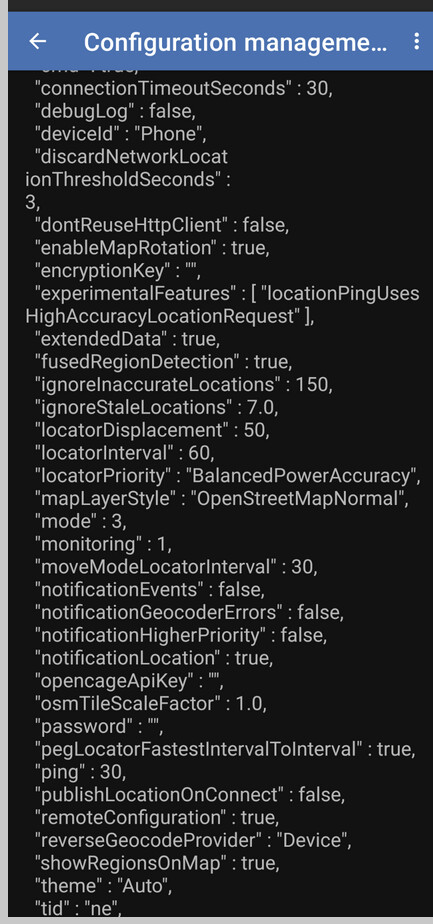
Battery Optimization Whitelisted in the OT app, Manage app if unused -> Off, Allow BG usage -> Unrestricted.
I modified my WIFI mesh to make my wife's phone only use the AP at the front of the house as well.
1 Like

Hmmm.. not sure then. Is it just when walking close to home? And the phone is running the latest updates? That smells like that location bug they introduced a while ago but "seemed" to be fixed in updates a couple months ago.
"OwnTracks extended metadata updates"
I've just finished replacing Geofency with OwnTracks--all the regions are setup and the necessary presence eventing is working well.
I had no real issues with Geofency but found the additional metadata offered by OwnTracks appealing hence the switch. My question relates to that additional metadata becoming stale in the event no movement/significant movement events are triggered. Is there a way to force an update on a given cycle, say every 90 mins or the like?
PS: @lpakula, I'll happily "buy you a coffee" once I've confirmed and got everything working--very nice work!
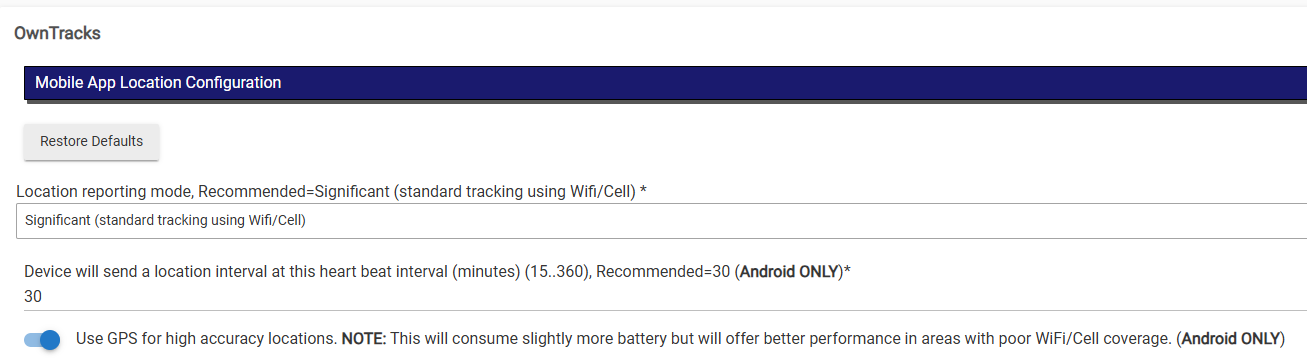
Just to clarify, do you mean what you see on the Hub side? Are you using Android or iOS? Android can send home health pings on an interval of your choosing to "refresh" those values in the hub.
Yes, on the hub side. Sidebar observation:
- It's usually slightly off even when a recent event has occurred (+/- say ~2)
- Currently, my phone reports 87%, the device instance reports 85 (likely not your doing I suspect)
... this is close enough for my use case if it remains ~up to date so feel free to disregard.
Sadly, no--an Apple household so iPhones throughout.
Where are you seeing that battery delta? Whatever the phone sends, is reflected in the hub app.
I cannot reach back to the phone app. The phone app needs to originate a location event for the hub to get new data (there isn't a perpetual link if you would). The "ping" on Android allows a "call home" though.
On the device instance, and understood. I called it out since it's just a bit odd but, right now for example, the phone hasn't been charged in hours, reads 91% but the OwnTracks device instance lists the available power as 89 (which, of course, the device hasn't gotten down to that level yet today).
Yup, understood on the directionality restrictions when using a connectionless/stateless transport--that's not where I was going. Given that Android has a polling capability, I'm wondering if the iPhone app does, too, but simply isn't exposed in the UX and, if so, whether or not that could be enabled whenever you push configuration to the device?
I guess the iPhone app is something of a second-class citizen when compared to its Android brethren--hey ho.
All-in-all, still a big step up from GeoFency. 
That is most likely the phone hasn't sent anything new to the hub for a while. If you opened the Owntracks Mobile app, and tapped the up arrow on the map, that would force a location update and then they would sync.
That doesn't exist on the iPhone version. Not sure why they never added it, and maybe it comes for "almost free" from Android. It's two different developers that do the different platforms. Typically they keep them "kind of the same", but if you check the documentation, there is a bunch of deltas though: JSON - OwnTracks Booklet
1 Like
One says tomato, other says tomahto.
2 Likes