@waterboysh Prior to the last release I was able to replicate this issue and in my tests fixed it, so I’m not sure what it could be at this point. I would play with your threshold settings. I looked back at your screenshot and your time off threshold is very small. I personally have mine set to 120 seconds.
I'll try changing it to a higher value. The dryer uses 300W just spinning the drum though, so if it drops below 50W that means it's done. But, increasing the time could prevent false positives from pausing it to throw something in real quick.
Could there be made an option for which devices you want to receive push notifications about instead of it being all devices? My wife only wants to get notifications about the wash and dishwasher because those require doing something. Clothes can be left in the dryer for a while before it becomes a problem.
The app provides support for washers, dryers, and dishwashers. However, that does not mean you have to use all of those functions. Initially, I only used washer notifications. Later I added a power monitoring plug for my gas dryer, so I now I use both washer and dryer notifications. I do not use the dishwasher notification as I do not have a power monitoring plug on the dishwasher; it is hard wired.
Just go into the settings for the Laundry Manager app and select the notifications your wife desires. The reason my wife wanted the dryer notification is that some clothes tend to wrinkle if they are left in the dryer too long after it completes the cycle.,
@augoisms this app is amazing - thanks so much for creating and sharing it! 
I just installed it and it works perfectly with the power monitoring plug on my washing machine.
The only thing I need some help with is how to assign different contact sensors to the corresponding machines within the app?
1 Like
@wmhashmi Glad it's working well for you. There isn't support for assigning contact sensors to individual machines. Any contact sensor that emits an event will reset any machine that is "finished."
@waterboysh That is a good idea. Someone else also mentioned not notifying about the washer being finished until the dryer was also finished.
I have been thinking about refactoring the app so that there is a child app per machine that way each can have it's own settings. I don't want to promise anything but when I eventually find some free time I will look into that.
1 Like
You can start with this or just improve it via a PR 
It's already got the parent child app going and either replace the functional bits with yours or integrate. It's already a bit of a collaboration already:
author: "Kevin Tierney, ChrisUthe, CSteele",
The obvious 3rd choice is to just grab the parent child pieces
1 Like
Any chance of adding the energy consumed by the appliance in the finish notification? I don't suppose it needs to be all that accurate, just track the energy at start and subtract that from the energy at end.
2 Likes
@rob That is an interesting idea. I will keep it in mind.
1 Like
I'm getting false trips for washer done ...it drops to 6w
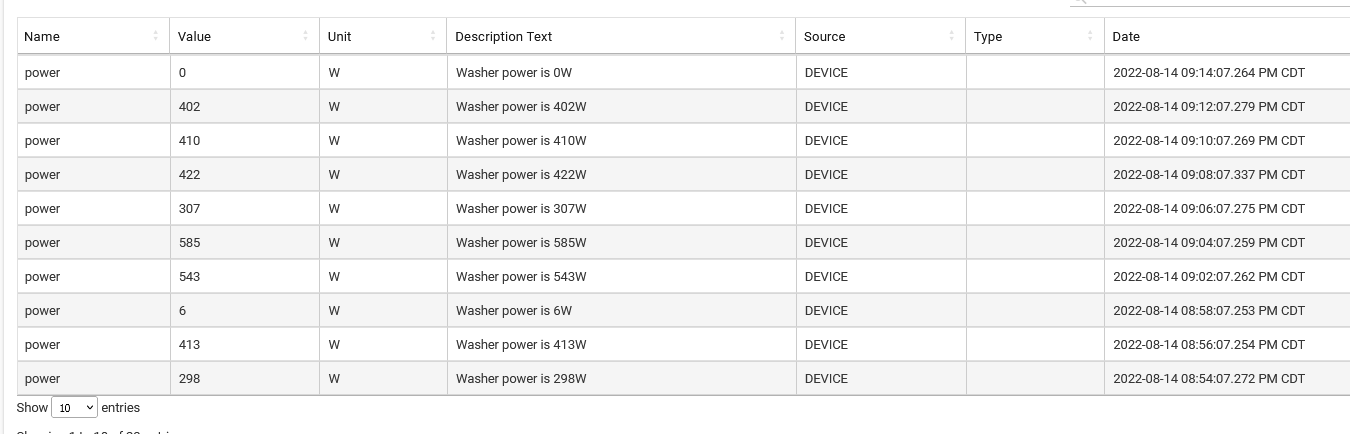
There appears to be no control by user to set threshold (which i think should be 0) or how long to wait before saying its done.....
also would they be an option to turn on a switch for each appliance when done..I'd like to set a virtual switch...
Also, I tried looking at the app code, and I can't figure out how "finished" is set ...I don't see that capability in the powerMeter at least all the documentation I could find. How does this work?
Thanks again
Tim
@tim.ocallag Those settings exist on the virtual device that is created for each machine. The device has a switch capability and turns on when the cycle is "finished"
The logic for the cycles is in the driver code. Cycles are not officially supported so they are published as an attribute.
https://github.com/augoisms/hubitat/blob/master/laundry-manager/laundry-machine.driver.groovy
that is a really cool design... its very cool that there is separate devices for dryer and washer so the settings can be different. Really nice job !
1 Like
I stated to use this plugin but there seems to be a bug in the repeating notifications. If I tell it to repeat every 20 minutes but stop after 60 minutes it never stops. If I look in the logs after every announcement it schedules the next repeat. Not sure why its doing this but can this be fixed?
@MrCaspan This is normal behavior. After each announcement the next one is scheduled if repeat is true, regardless of how much time has passed. The auto reset is scheduled separately. I don't normally use this feature, so I might have missed something here. I'll look into it.
Thanks as we really like this app!!
I just pushed an update that fixes the bug with the auto reset. When enabled, the auto reset is scheduled for each device individually. So if the auto reset on the washer is triggered, it will not reset the dryer or dishwasher.
Thank you to @MrCaspan for reporting the bug.
1 Like
I'll update and report back. I'm on vacation next week so might not have a chance to test for a week
Okay I did an update. one thing I've noticed right away in the GUI is that if you select repeat notification The timer doesn't show up below it. it won't show up below it until you turn on the feature for timed base auto reset. Even if I turn off repeat notifications the time underneath it doesn't disappear like it's supposed to. it seems to be toggled by the time-based auto reset.
I don't believe this used to happen before..
Not sure it's worth the thread bump, but I just wanted to thank you for making this app. I'm new to Hubitat and this works very well. I've taken some spousal approval hits as I'm learning Hubitat, and this app just greatly boosted the approval rating  I made a rule to turn all of the lights green and can be turned off by pressing the switch at the washing machine. Will likely save on the water bill too, as we no longer have to do second washes when wet clothes are forgotten in the machine. Cheers!
1 Like
@augoisms Any way to do a custom notification?

