Lock and Unlock use a different URL. I was thinking the same thing. Maybe the 2022s that didn't support climate seats all use the same URL. The new API was tested on a 2025 Ioniq, which supports the climate seats. I'll send you a PM with instructions to hack your copy of the app to use the original URL. It's an easy edit. That will be later. I have to go take care of the Trick or Treaters now. 
Hi everyone,
Figured I should probably introduce myself. I'm another Hubitat dev/tinkerer that recently bought a new 2025 Ioniq 5, and I am VERY interested in more automations in the car. WindowWasher has created an awesome app that allows for Bluelink control, so I've asked him if I could help update the app to support newer vehicles and their more advanced features.
We currently have a branch of the app and drivers where we're iterating on and testing some of the newer features and supports. I'd appreciate anyone who is willing to test this branch, and I am open to feedback on how to make it better or if something isn't working properly. Just grab the latest App and Drivers and install them, then go to your Vehicle and click the Refresh button so it can detect the newly supported features.
Some of the latest updates include:
- Start/Stop climate controls now work for EV.
- New EVBatteryPluggedIn attribute for EVs, to help detect when Climate Start will pull from the charger.
- Major climate control upgrades:
- Heated Steering can now be controlled separately from Heated Rear Window and Mirrors.
- Heated/Cooled seat controls.
- Climate profiles are now per-vehicle and auto-detect supported features for that vehicle.
My current favorite part of this upgrade that I'm using liberally is that I can now use Hubitat to schedule more times to automatically warm the car before trips (since my kids have different schedules each day of the week), since the car defaults to only two programs. The app upgrade also allows more fine-tuned climate controls than before, so you can fully configure your heated (or cooled) seats if your car supports it. And if your car does not support these features, the app auto-detects that and will not pollute your climate settings config with settings you cannot use.
Anyways, nice to meet you all.
Corinus
Yeah, like WindowWasher says, if Bluelink can't see it, we can't see it. If Bluelink CAN see it though, our app will see it. So can try the beta branch and see what it can see?
I completely agree and it's on my list to look at cleaning up. In the beta branch, I've already changed the storage of password and PIN to type "password" so it's not easily accessible to others on the hub. I'm thinking about adding a new option to allow for redaction of sensisitive information in logs. The issue though is that the logs are most valuable when they are untouched, and Bluelink is pretty bad about not separating that info out themselves. But I think I can do something to make the logs good enough to share. But this will need to wait until after the climate profile work is done.
Any chance you're the same person that reported this issue on github? For everyone else's context here, there was another issue reported where vehicleStatus was also failing to parse. In the main branch, if vehicleStatus doesn't successfully parse, EV detection fails, which means the wrong API will be used to issue to the Start command, which is probably what's causing the 502 error. This issue is now fixed in the climate-profile-work branch and I encourage you to try that version.
Yes, I also posted each of these issues to the GitHub in separate threads for sanity of tracking all of this
I just tried your branch, and I'm still getting Hyundai Bluelink App -- Start vehicle failed -- status code: 502: Status: 502 on my 2022 Ioniq 5.
This fixed my 502 error on remote start! I have a '26 gas limited. This changed the status of Engine status for me (before it was always Off) and Is EV (which reported True before, now it is false).
The remote lock and location worked fine. Now I can remote start, it behaves with the climate profile. I am testing the remote start for period of longer than 10 minutes now. The new UI allows up to 30 which hopefully works because in winter that is typically closer to what I need here in the Midwest.
THANK YOU!!
@kevinb What version of the beta are you using? We pushed a new version yesterday. Look at the App file, line 46 to see the App version. The latest is 1.0.7-beta.climate.4.
Glad it's working with a 2026 ICE vehicle. We hadn't had anyone with that flavor of car testing. What is your car, a Palisade?
I have my doubts as to setting a longer duration will work, but try it and let us know. I believe that Hyundai limits it for either safety or liability reasons. I usually do 2 remote starts in sequence to work around it, as my 2022 Palisade will not even be close to warm after 10 min.
My car is a 2026 Santa Fe. I set the climate duration to 30 and after 15 mins it was still running! The bluelink app only does 10, so this is great.
I am using 1.0.7-beta.climate.4 app code and 1.0.5-beta.climate.4 driver.
I am happy to help and provide any diagnostic info you need if it helps keep this project alive
I'm jealous! My 2022 is capped at 10 min. in both Bluelink and when using this app, so I guess Hyundai wised up and extended the time in later years.
Thanks for the offer to help. We will definitely keep you in mind for testing help. Keep an eye out for more beta drops. This project is definitely not dead. I'm going to get it into HPM after we wrap this beta up, so it will be easier to install and update.
Just to be clear - your Santa Fe is a gas engine, not a hybrid? Just wondering why the old version of the app isEV reported true. We did change the way it was detected in this beta.
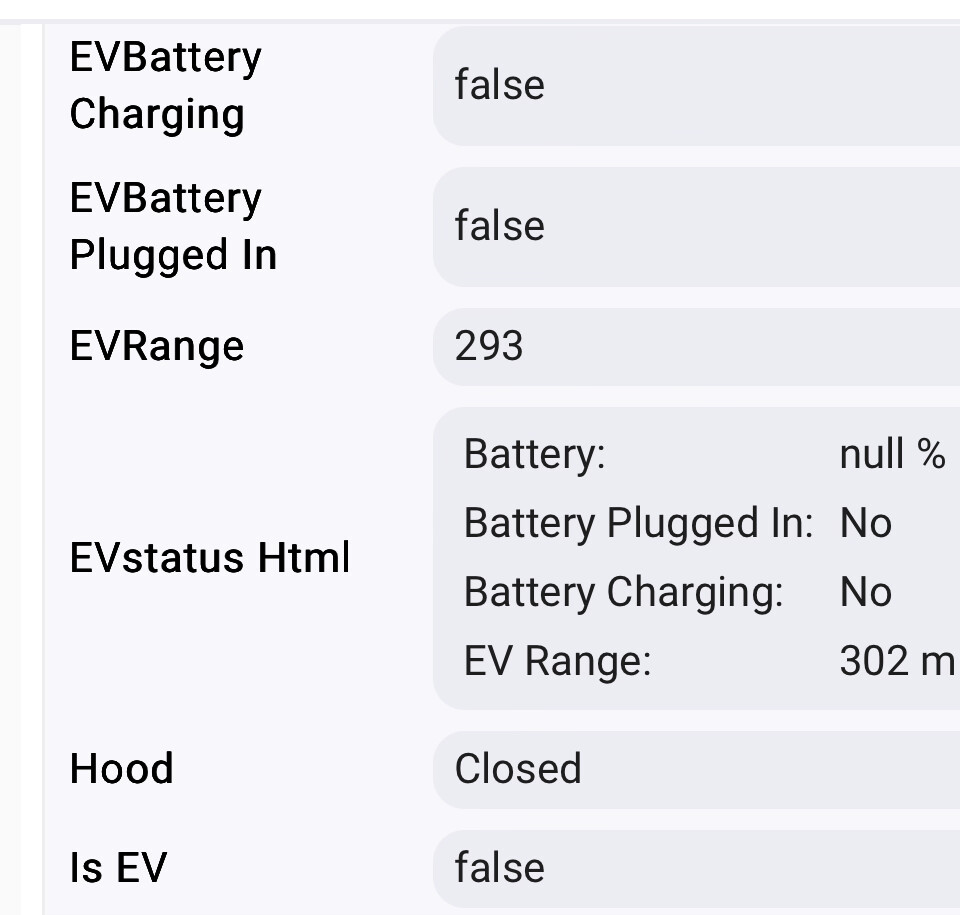
Thanks for confirming. It might be nice to get rid of some of the EV-specific stuff, especially EVstatus Html, which is totally bogus.
I suspect @kevinb 's vehicle status always reported a bogus "evStatus" in the vehicleStatus response from Bluelink. I noticed Bluelink does that for some values, which is annoying.  The new code explicitly checks the vehicle type in vehicleDetails (should be more reliable).
I've been a bit time-starved as of late due to work and little-kid-plague-season, so haven't been able to polish the climate work for a bit. But I have been able to confirm that we can hide those invalid attributes with a device.deleteCurrentState call. Will add it to my polish list for non-EVs.
I've got some time if you want to off-load some of the remaining profile work. We can take it offline to discuss.
It seems to be my estimated gas mileage —it is what the bluelink app is reporting as distance based in fuel level.
I am available for testing if needed.
I am looking for a power switch status to be able to connect with homekit and alexa—so I can turn it “on” and off also a lock status so I can tell if the vehicle is locked or not. I tried cirtual switches and rule machine but with RM its a read only thing.
The alexa bluelink skill is too compoicated—I was just looking for controls in RM to lock the car when securing the home or to link to Alexa or Homekit to tell them to start the car or ask if the vehicle is secure etc.
By design, the app doesn't regularly refresh with Bluelink to minimize pinging the car for updates, which can drain the 12V battery. So I don't know if you should ever trust the current status at any time without doing an explicit Refresh first. However, blind commanding Alexa to lock the car should just work, assuming you use a custom command to route to that. (I'm afraid I don't know too much about Alexa, but I'm able to do this with Google Home.)
For Rule Machine, my automations perform a Refresh followed by a 15 wait for the response to come back before deciding what to do. This has been working reliably for me. Could that work?
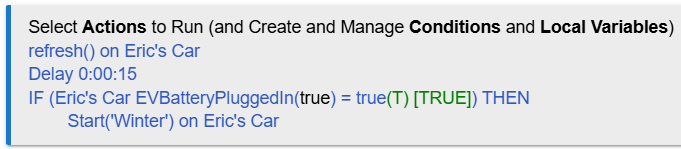
We did have another person also requesting Hubitat Lock and Switch compatibility, so it's being discussed. The problem with Lock is that to do it right, we need to change the command name slightly (different casing) to conform to Hubitat standards, which means this would be a breaking change, so we're discussing when best to do that. For Switch, there's some discussions as to how best to make this work with climate profiles, but it's also on the radar.
I noticed that the status needed a refresh to be accurate…I just went about things the wrong way.
I set up a virtual lock and used RM to refresh and then conditionally set the virtual switch to locked or unlocked and at the same time set a virtual switch to on or off.
I was attempting to write additional rules to send actions like lock, start but couldn’t find the custom command to issue.
I did just find actuator though, is that where I am supposed to be?

The capability field doesn't have anything to do with the action. It's just used by RM to filter the devices in the list immediately below it. A Hubitat "Actuator" is any device that can receive a command. Similarly, a Hubitat "Sensor" is anything that can produce data. Every Hubitat device does one of these things (often both), so they are good catch-alls to filter by if you're looking for your device.
Yes, "Lock" looks correct for the custom command. However, you don't want to specify a parameter. (If you clear that drop-down, you should have a button "Cancel parameter" to remove it.) You can tell there's no parameter required because you don't specify a parameter when using the Lock command from the device.
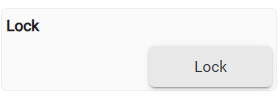
...as opposed to Start which does want a parameter...
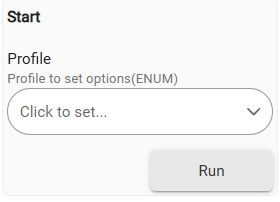
When the device does eventually support the Lock capability properly in a later update, this automation will break. But there will be migration instructions provided when that's done. In this case, you'd change your action to control locks rather than a custom action, so your action will eventually look like this:
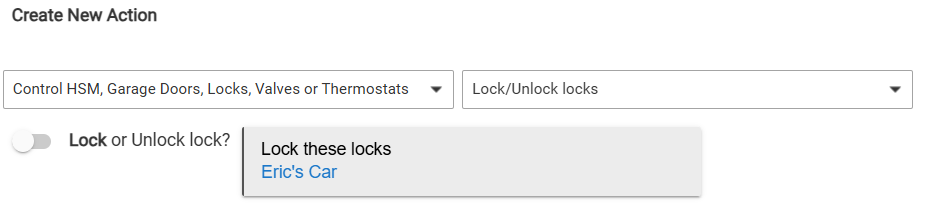
(This is just a stubbed device to demonstrate how it will look. Not yet implemented.)
Okay, thank you!
The Bluelink app will let me know when I leave the vehicle for a bit without locking it, but only once. The first thing I was trying to do was just lock the car if left unlock when my night-time HSM routine was securing the house. This is cool enough for me
There are also times I leave the house but not in my own car, and I have my location services working pretty reliably so I want to lock the car if I leave and am gone for a period of time. That was pretty much it. But with all of the data available my head is spinning with things I can do!!
Thanks again
Hi - this may be a naive question, but does this app communicate direct with the car or does it require involvment of the Hyundai/Kia cloud?
I'm asking because I own a 2022 Kia PHEV. For privacy reasons, I have never downloaded the Kia app or connected the car to the Kia EVO cloud. I'm also not inclinded to do anything that relys on the cloud, and I'm also never going to pay for access to the app.
I suspect the dealer connects the car when I goes in for warranty service and computer updates, so they may eventually get all my data anyway, negating my privacy concerns, but at least it is not in real time.
If this app somehow allows HE to communicate with the car locally, that would be quite useful. The two things I would like to do are:
- write a rule to lock the car at a certain time each night (on rare occaisions the last driver forgets to lock it).
- post the remaining EV range to a dashboard, as sometimes charging is forgotten and it is driven on gas when it could have been charged.
This is a Bluelink app, meaning it talks specifically to the US Hyundai Bluelink service. It does not have any direct communication with the vehicle.
To my knowledge, it's not possible to directly interact with these cars without additional hardware. The car talks directly to Bluelink via the on-board mobile network chip, and I have not yet found a way to get it to communicate via my home network. (I would love this, because cell signal is awful in my house.) The Hyundai enthusiasts I've seen use a wireless OBD2 dongle to get hidden information from the car, but I don't know how many of the car features you can control via this port. I'm also not aware of any OBD2 apps for Hubitat.
You should ask your dealer next time you take it in, but the service center usually talks to the car via a physical port (such as the OBD2 port) for diagnostics, and/or via the Bluelink service for general information (since, as you pointed out, it collects a LOT of information). My car is due for service in a couple weeks, so I'll see what info I can get from them too.
So unfortunately I don't think we can help you with this.