Just to add another point - I seem to remember filling out some form online to opt out of Hyundai collecting my personal information. Perhaps Kia has a way for you to opt out of collecting your info as well. They even wanted to share info with my insurance company, as I recall. No way I'm going to agree to that!
I've never signed up for the app, so never got to that form. Certainly not part of the purchase documents.
New Beta Drop Available
A new Beta drop is available for testing. This drop is feature complete for this release and will become the Release Candidate if there are no issues found. The highlights of this release were previously outlined by @corinuss (who is responsible for these enhancements) in a previous post:
Here is a screenshot of part of the profiles page from the app, showing the new seat settings:
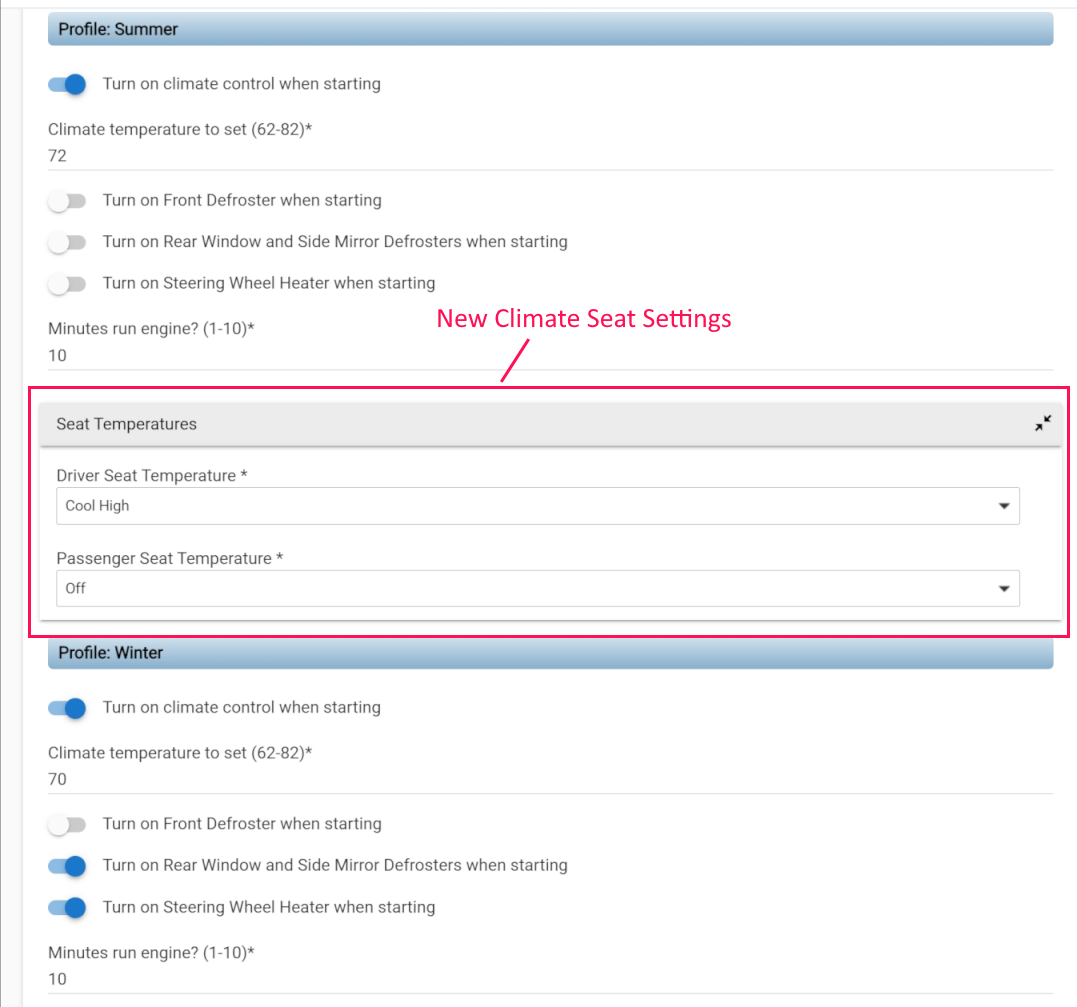
Here are the URLs for this Beta Drop:
Driver:
App:
raw.githubusercontent.com/tyuhl/Hyundai-Bluelink/refs/heads/climate-profile-work/BluelinkApp.groovy
If you have a previous installation of this driver/app, you can simply import the driver and app into their respective sources under Drivers code and Apps code, using the "Import" menu to the far right side of the source code panel (the 3 vertical dots). Paste the URL into that dialog and it will overwrite the current source with the Beta code.
If you don't have a current installation, please follow the instructions in the first post of this thread, using the above URLs.
Please report any problems, questions or bugs to us. It would also be helpful to know what your vehicle is, as we are trying to track what cars this software has been installed on
2 Likes
v1.1.0 of the Hyundai Bluelink Hubitat Integratation is now released and available.
Also, as of this release, Hubitat Package Manager can now be used for installing and maintaining the integration package. Please refer to the previous posts for details on the enhancements that this release has. I've also updated the README to include installation instructions for Package Manager:
I just got a 2026 Hyundai Tucson Hybrid. I installed the app and driver and it works great! Thank you!
Is it possible to control the Bluelink Integration using voice via the Google Home App? I made one attempt and the Google Home App logged several errors and then gave up.
Good stuff. You are the first user that I know of with a hybrid vehicle. Glad to hear that it is working for you.
As for controlling via Google Home - I haven't used Google Home, but it should work. I use Amazon Alexa for voice control. You should be able to set-up an automation (either Rule Machine or webCoRE) to do what you want. For example, I have a virtual switch that triggers a Rule Machine routine to start my Palisade. Alexa can turn on the switch and start the car. You should be able to do the same with Google Home.
You mention that Google Home logged errors. If you post them here or to me in a PM, I may be able to help.
I use Google Home. What exactly are you trying to control? 
Google is pretty limited on what it can support out of the box for Bluelink, as it needs to fit within one of their defined Device Types and/or Actions, which isn't really the case here. Also, Hubitat implements the bare minimum support for Google Home with their built-in App (mostly just lights and switches), but you should install the Google Home Community app to really unlock the power of Google Home on Hubitat, as it will let you customize your custom Google Home device to match what you want to control in Bluelink.
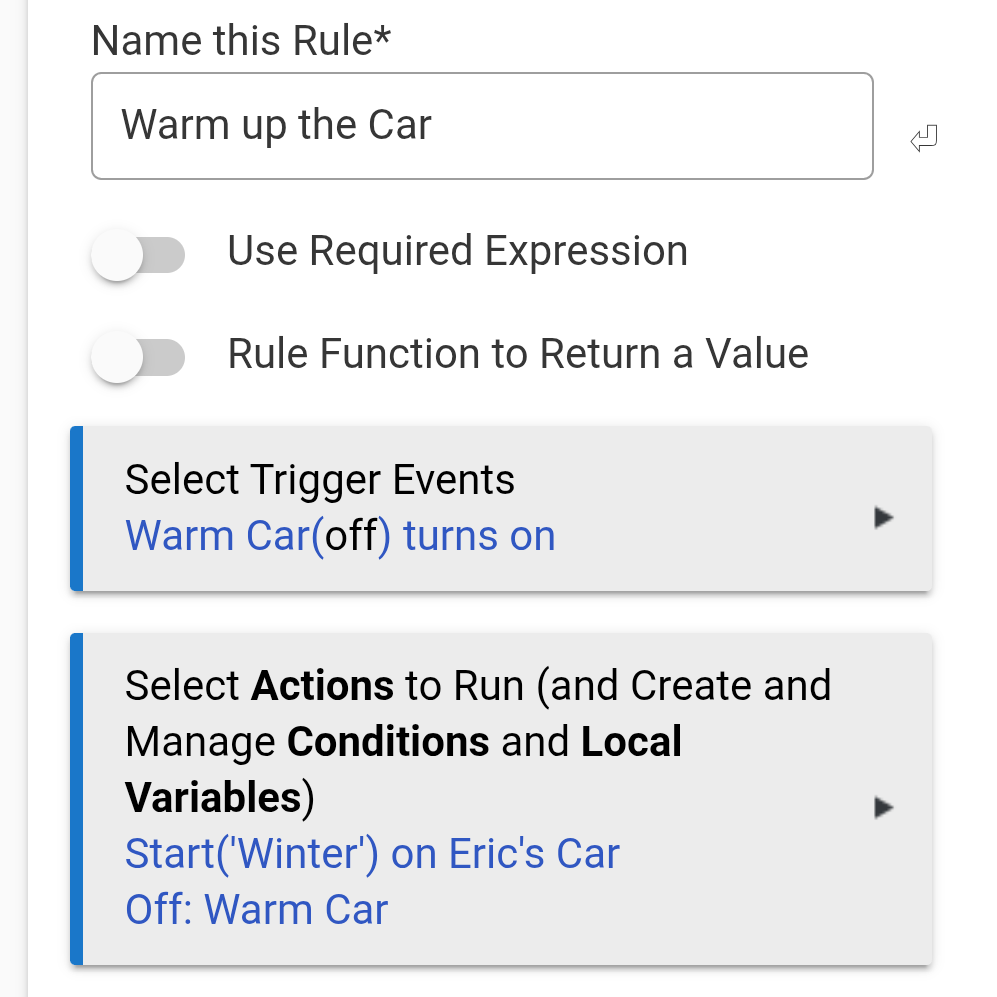
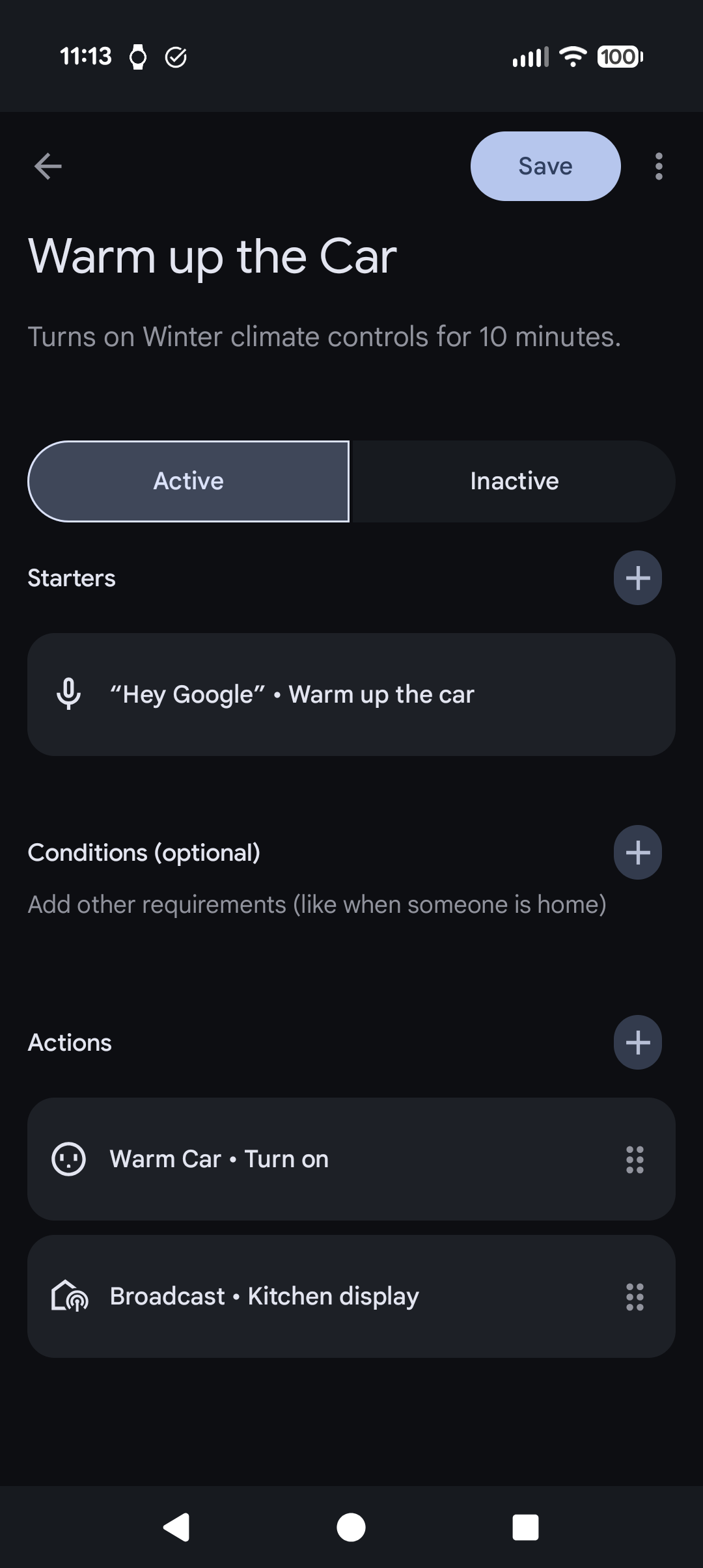
I've automated a command to warm up the car via voice via the following steps, which is simple enough to be done without the Community app if desired:
- Create a Virtual Switch device in Hubitat.
- Create a Hubitat Rule that does the following when the switch is turned on:
- Call the Start action with my desired profile as a parameter on the car device.
- Turn off the Switch (effectively making it a Momentary Switch).
- Expose the Switch in Hubitat's Google Home app.
- (Optional) In Google Home, create a custom action to turn on the switch when a phrase is uttered (such as "Warm up the car.").
- You could also just say "Turn on <name_of_switch>", but that isn't wife-approved in my house.
1 Like
That's awesome. I think that will do what I want. Mostly just want to be able to lock and unlock doors and start the car up.
Thank you!!!
I recommend the Google Home Community app for that then (and yes, you can use it alongside the built-in Hubitat app. Just don't put the same device in both apps.). The built-in app doesn't actually support locks, but the Community app does. So you can make Google think it's actually a lock rather than faking it with a bunch of buttons.
You can also add an OnOff (or StartStop) Google device trait to the same device to control starting the car, and you should be able to disable the Off/Start option (if you want) by linking it to an invalid command.
Super late seeing this post. I'm just nervous about making changes in case I break what has been working so well. You guys are kicking butt versus what has been happening on the HA integration. Losing featuers over there and gaining them back here.  Your integration has been reliable since day one and stayed that way! Thank you so much.
I've lost the 12v battery level on the HA integration and but it's here. 
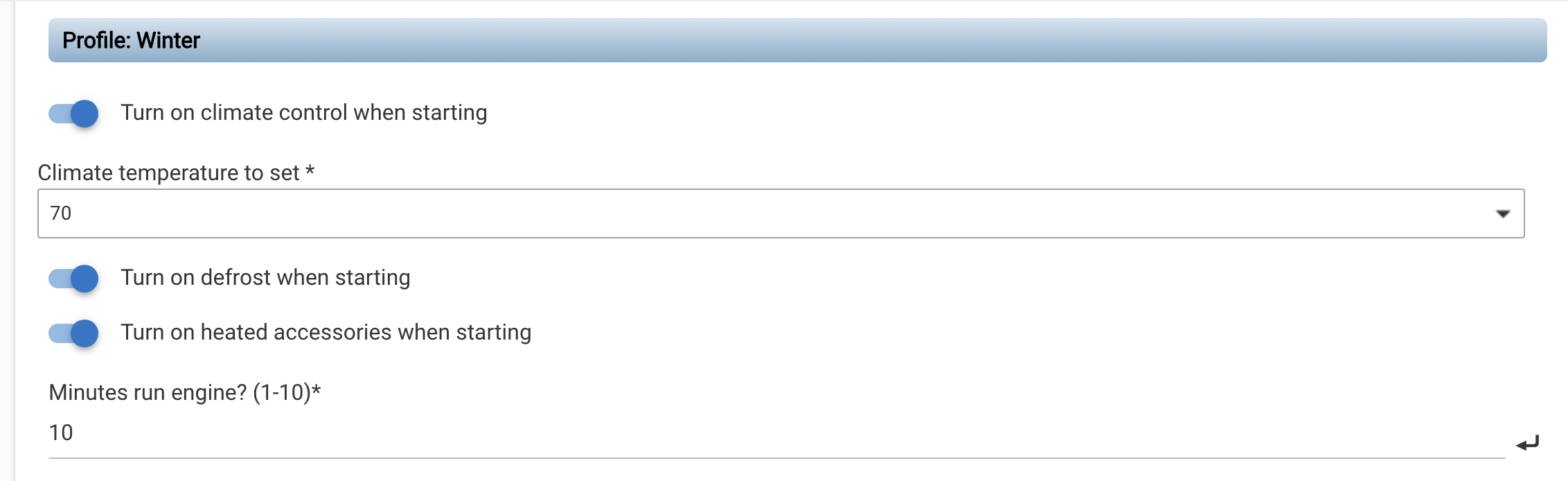
However, I don't see heated seats in the app for my (Canadian Bluelink - 2022 Ioniq 5). I'm running 1.28 currently. Something I need to do to get that happening, or is it not supported on my vehicle? The Hyundai Bluelink app doesn't have the option in profile settings.
At one point the seats were heating on my vehicle with the HA integration, but then another dev took over the project, changes were made to the HA app and it's never worked since.
Flagging @jbilodea who put out the Canadian version of this integration.
I don't believe that your 2022 Ioniq 5 supports climate seats. I know that my U.S. 2022 Palisade does not. If you don't see them in the Bluelink app then the integration won't have that support either. It was a dumb design decision that was corrected in later years.
2 Likes
Did a little bit of research after this report. Yeah, it looks like you can't control Ioniq 5 heated seats via Bluelink until MY25, at least in the US and Canada. 
The new seat temperature controls that were pushed out in 1.1.0 (for the US app) now reads what your car supports from your vehicle data reported by Bluelink and exposes those options to the climate page, so if Bluelink does ever add that support, this app will be ready. But until then, there's not anything we can do about it.
1 Like
Thanks for the reply. I guess there was a way around it previously. I was surprised when that worked for a short time in the HA app, but it was short lived. 
Can I ask a stupid question? I have set up a virtual lock and a rule to allow me to control the Santa Fe's door locks. That works fine. The problem I am having and I'm afraid I'm over-complicating things so thought I'd ask.
I want to synchronize the actual status of the DoorLocks actuator of the Hyundai device to the lock. But unlike a physical lock where I can determine if actions taken on the lock were physical or virtual, I can't with a virtual only device.
If I run a routine to only run when my presence sensor is "home", and then say every hour (until the crime rates go back up, then maybe every 30 mins ) and I refresh the Bluelink device and set the virtual lock to reflect the actual status, it triggers my Bluelink DoorLock routine.
Is there a more streamlined or better method I can't visualize? Thanks!
I don't quite understand what you're asking. Could you give an example of something that happened, and what you expected to happen?
If you set the virtual lock to reflect the actual status, and that actual status was different than the previous status (ie, changed), I would expect your DoorLock routine to be triggered. So I think I'm missing something from what you actually want to happen.
I'm a little confused (like @corinuss) about what you are asking. Are you asking if there is some way of determining how the car doors were locked (either via the Bluelink Integration or by a physical means)?
I think I know what you're asking. I've set up similar to control with Apple Home, but only to use as a backup in case I cannot get access from the Bluelink app.
The problem with syncing status of the door lock state to a virtual device is the time delay. What ends up hapening is you make a change, and if you don't wait or accidentally toggle the virtual lock before the Bluelink status has updated, you can get the locks doing the opposite of what you are expecting. That can have bad results, depending on the situation.
What you really need is a custom virtual button that has status from the door lock state, rather than having the lock control and status in a single device.
If I'm off base and not undestanding what you want, set me straight.
If it's the car's lock status you want in Rule Machine or an app, you can already have that. But again, it's the speed of cloud updates from the server you have to contend with.
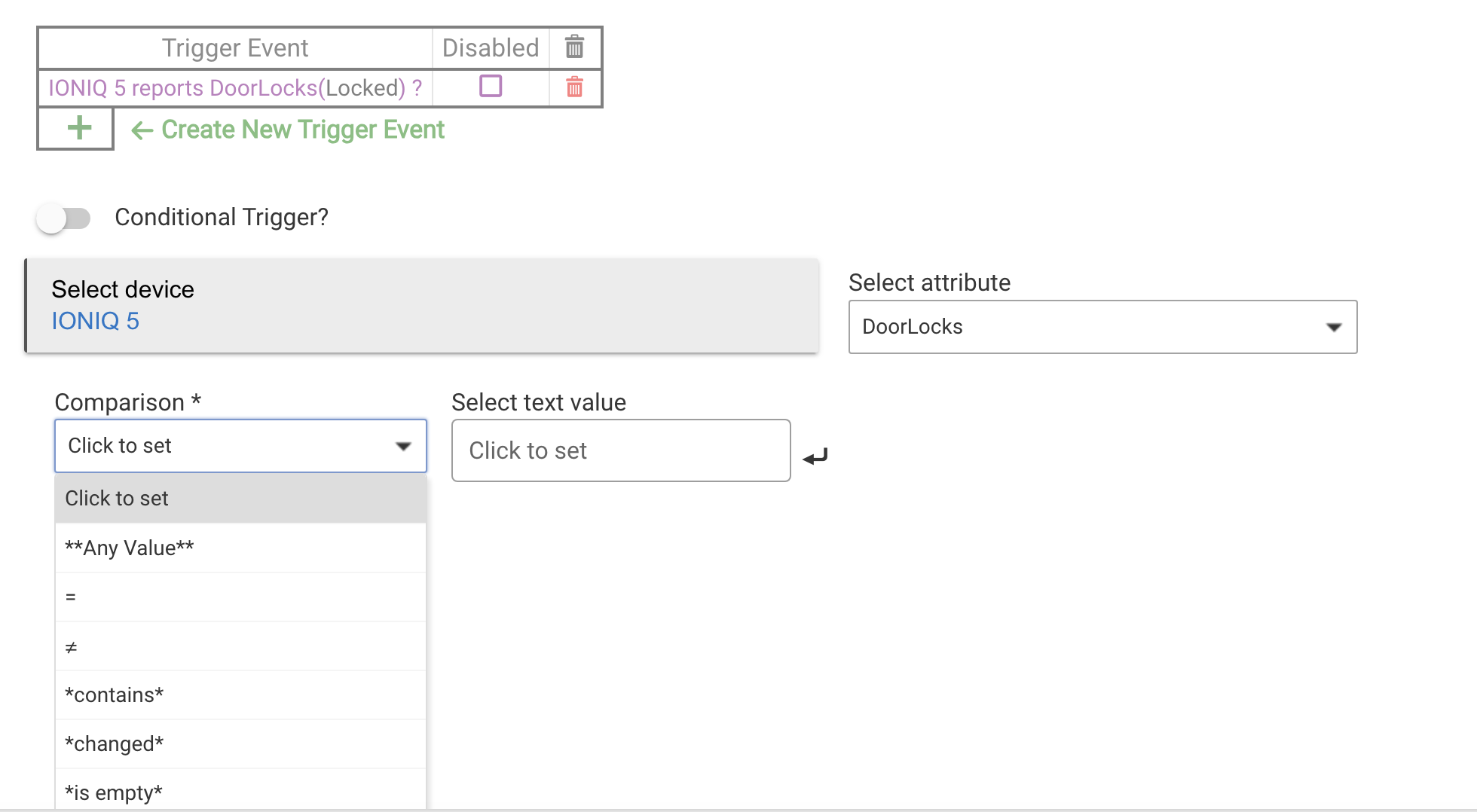
I figured I was overthinking things.
I have two rules. One rule to unlock/lock the car based on a virtual lock. Another rule that tries to keep the Virtual Lock device synchronized to the physical state of the car.
I have a virtual lock that has its own status--I am trying to mirror the status of the Bluelink connected car...so if the car says "Doors Locked" = "true" I want the virtual lock to show locked.
My rule uses the virtual lock--to detect when the lock status changes. So when changed, if locked, send the lock command to the car, etc.
The problem is that the virtual lock needs to be updated with the actual status of the car. I had a routine that would check every hour and if the Virtual Lock status wasn't correct, it would update it to reflect the actual car's status:
My rule simply ran every hour, sent a refresh to the Bluelink device, waited 15 seconds, then read the Doors Lock attribute and sets the Virtual Lock to that status. That way the Virtual Lock would--within time--be synchronized to the physical car.
The problem is that I now have a rule that detects when the virtual lock status changes (I tell Alexa to unlock the car). The virtual lock will change its status to unlocked after sending the unlock command through Bluelink. The car, however, if unattended for more than ten minutes will lock itself back (unless a door is opened, etc.). Then the Virtual Lock no longer reflects the actual status of the car. It is unlocked. But the car is now locked.
The synchronize rule is fine, but now when the rule runs and changes the lock status when updating, it causes my lock/unlock rule to trigger because of the changed status update.
With a physical lock, they stay in sync because I can detect if the changed status is triggered physically or virtually through a rule. A virtual lock device can only be changed "virtually".
I tried setting a boolean variable, then a global variable to be set when its the synchronization rule that caused the Virtual Lock to change so that my lock/unlock Bluelink rule would ignore the changed status altogether. That was the only way I could figure it out.
Generally I advise against controlling locks with voice assistants. My virtual lock in Apple Home doesn't stay in sync, and that's fine with me. It's only for backup. In fact I've been meaning to change it to a button that just unlocks. I can think of a scenario where my keys and phone could get locked in the car, and I want to avoid that ever happening.
1 Like

