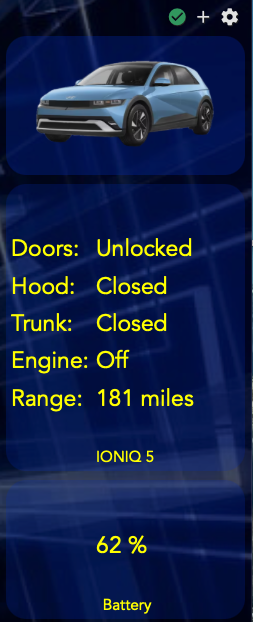
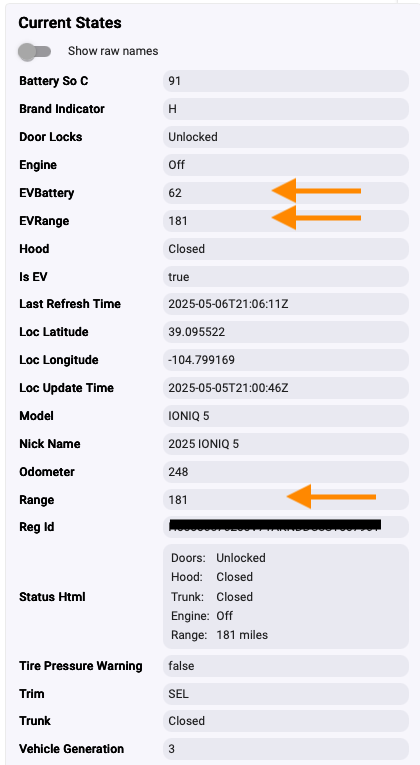
Kudos to WindowWasher for tweaking the code to make it more useful for Ioniq owners like me.
He also now picks up the tire pressure warning flag.
Here's how the Ioniq part of my dashboard now looks:
The 'Loc Altitude' attribute was seemingly accurate, expressed in meters. But, now it's gone from the driver (not that it really matters). I have an IONIQ 6, and don't see the battery % and Range is 'null'. Any ideas?
I found a code glitch that stopped it from returning the EV values, actually the normal Range value wasn't there and threw an error. Fixed, now it works. I had to comment out line 466 in the app.
I dropped Altitude because it was always 0 for lotusteve's ioniq 5. I saw what looks like the correct altitude in meters for my Palisade. There are certainly differences in what is returned for different models. The battery % and range are probably there, just in a different section of the returned JSON.
You can get a dump of what is returned by turning logging up to debug...or not, as I'm sure your a busy guy. 
As for line 466, it looks like another case of differences in what is returned by a particular model.
FYI - I just published a new release of both the driver and app to Github yesterday, 5/10/25.
A quick summary of recent changes:
Installation instructions remain the same, documented in the first post of this thread. Thanks go out to lotussteve for his feedback and testing help.
The HA Bluelink integration for Canada has not been working several weeks now. Would prefer it here on Hubitat, but I understand support is US only at this time. If I can help with required information or testing for that, please let me know.
Just to let you know that both, HA version and my HE version work for Canada. I made the same change that HA did on their side.
Awesome! Thank you. I’ll give it a try later today. The HA version has been having some real problems with changes to the cloudflare server in Canada. Managed to get it working last week with some modifications, but this week it’s unavailable again. Hopefully your integration will be unaffected.
I had the same problem but applied the same fix as HA. No idea how long it will work.
Apologies if I missed it in the very long thread... I searched for "Kia" and found several mentions of people suggesting it ought to be possible for this to work with Kia since they presumably use the same basic APIs (Bluelinky works with both, for example)... but I didn't see anything that looked like a confirmation.
So I thought I would ask: Has anyone attempted to use this with Kia Vehicles? I'm assuming you'd need to modify the API URL, client secret, etc? (That appears to be the only thing that changes between them in the Bluelinky code at first glance anyway...)
Right now HA version not working anymore but my HE version seems to work fine.
It works perfect Jean. Thank you so much!
The HA integration is still hooped and their fixes are not working for everyone. I couldn't get their latest patch to work. So glad to have it here on Hubitat instead.
First, I'm not really a developer, I used the US version and did my best to make it work for Canada. But I can try to help you.
Mine is still refreshing. I create a "kind of" dashboard with lot of information and on a click of a button it refreshes everything. It calls force refresh and it works fine for me.
Did you disabled the Stay logged in in the App ?
Thanks. It's enabled in my install of the app.
[Edit]
This was my issue. I needed to have the "Stay logged in" option in the app disabled. I thought that I had tested this, but I either made a mistake in my testing, or tried too many times and login failed, making me think it didn't work.
So to be clear for anyone else, if you turn off the "Stay logged in" option in the app, it will first authenticated again before a Force Refresh, just as stated in the app setup. If you do not do this, Force Refresh will not work.
I have a 2022 Ioniq 5. This app doesn't seem to fully work for me. Lock and unlock are working, location query works, but when I try sending climate start it fails and shows error. Stop also shows error in the status. I also don't see any of the recent EV attributes you show in the latest update. I'm running the latest code I saw in the first post. I'd love to get scheduled remote starts working on this. Also, we have two of these cars in the household, feature request to support more than one car and rename them please?
I have added separate Github tickets for each issue.
I checked the debug log, and I'm getting the following error when I try to remote start:
error
-- Hyundai Bluelink App -- Start vehicle failed -- status code: 502: Status: 502
I did a refresh, and I can see the raw JSON for battery level and everything. I see there's a LOT of personal data in these logs. I'm not a great programmer, but I'd be happy to work with someone 1:1 to show them my logs and see if we can fix this.
If you install the latest versions of the app and driver the climate start/stop bug should be fixed, courtesy of @corinuss. It turns out that EVs use a different URL in the API call than conventional engine vehicles.
Also, release is close for a major upgrade that includes support for climate seat heat/vent, again courtesy of @corinuss. If you would like to beta test it we can arrange that, and it would help us out to have another tester.
I'm not sure that we can do much about the logs having sensitive info in them. They are private to your HE and wouldn't normally be turned up to debug (the only time you would see them). Same for the current States, it's private to your HE, although we might be able to hide the info there.
Thx for the feedback.
I have both versions from 10/18/25 installed. I just imported the code today, so I'm guessing that's the latest? If so, the bug hasn't been fixed yet?
Do you perhaps have a different API URL I can try out for remote start?
Sure, would love to test that beta release. The native Blue link app actually doesn't extend heated seat options for the 2022 Ioniq 5, so I'm wondering if it can be done over API instead? As I mentioned above, the EV specific Blue link features/attributes from the 2025 model do not work for the 2022 model.
I mentioned the sensitive info only because I'd like to contribute to making these features work with the 2022 Ioniq 5, and I know posting these logs can be compromising, so I'd like to help where I can.
Those are the latest versions and have the fix in for EV Climate Start/Stop so it would seem that the bug fix isn't quite baked yet.  What are you seeing for the isEV flag under states? That flag is used to select which URL to use for start/stop. If it isn't true, which it should be for an Ioniq 5 that is the problem.
EDIT: I just looked at your debug dump over on github and the entry is there for detecting EV Status. If isEV is true, then maybe there is a genuine server issue on Hyundai's side.
Well, I'm afraid you are probably out of luck for the climate seats if they aren't supported in the native Bluelink app. I have a 2022 Palisade and have the same issue. Apparently Hyundai had a pressure switch on the seats (as I recall) that kept them from turning on if you weren't sitting on the seat. Bzzzzz! Bad design decision that made remote operation impossible. Very annoying.
What we can do is use PMs for posting logs instead of the general thread and you can also manually redact info.
502 is usually a bad gateway error, so I thought perhaps the server was having an issue, but lock/unlock commands are working just fine, just the EV Start/Stop commands arent.
You mentioned that you were trying to use a different API for start/stop for EVs. Perhaps the 2022 model requires the original API URL instead? If you can give me a test version to try out, I'll check it.