[RELEASE] Hyundai Bluelink Remote Start/Lock Support (Beta)

No, don't do that. Not the way it works at all.

Bluelink is communcated with via internet access. The car talks to the Bluelink cloud servers via its celular connection. You can access it from the Bluelink app (or via these unoffical Bluelink integrations for Hubitat and Home Assistant). Nothing gets loaded onto your car.

Home Assistant requires one (and only one) of the following to run. Pick one and follow the documentation. If you need more help, you can open a new post with the category "Lounge", since it's far off topic from Hubitat Elevation, but the Home Assistant forum is the most appropriate place for questions specific to Home Assistant installation and setup.

  • A preconfigured Home Assistant Green hub you buy
  • A Windows PC running a virtual disk image
  • A Macintosh computer running a virtual disk image
  • A Docker container (can be run on many different devices)
  • A Raspberry Pi 3 or newer

There are even more ways to run it, but they get very involved and technical. Not recommened for that reason. One of the above is easier.

Ok. Thanks for some guidance. At least i know a thing now))
But why you need a PC? You can use it with the pc only?

I have some fantasies how it should work.
Would it work by an app on the phone?

Or i should somehow make my app?
Why do i need the PC or a device?

Isn't there a possibility to just load an app and use it?

Why do you guys don't make such a ready to go app? Might be payable and earn some money i believe.

You do not need a PC, it's one of the many optional computers you can install it on.
As I wrote, pick one.

There's a so called "companion app" available for free, but this is not the Home Assistant core software. It is merely a mobile interface to connect to, program and control Home Assistant. You cannot run the core system on a phone.

Are you talking about Hubitat or Home Assistant now? I'm unsure. There are free apps for both systems to connect to the hubs. Hubitat's is more limited with that can be done, but you can just access the Hubitat hub from a Web browser on your phone if you want.

For Home Assistant, you can also connect to it by a web browser on your phone, but the Home Assistant developers made a stand-alone app that allows administration of the hub too. Different philosophies on how the systems should work, Neither is right nor wrong, just different.

This is getting quite off the topic of this thread now. I'd urg you to read the Home Assistant documentation and ask questions on their forum. Hubitat forum and this thread in particular isn't the appropriate place to ask questions specific to Home Assistant.

Ok. Thanks.
I just want to use the Moded Version that is spoken here on the thread. Downloaded some Home Assistance apps on the phone, but can't figure how to load all the code there. Sorry for being a newb. I will do my best to research more about it and understand it to be able to use it and give some feedback if it will help the community.
I was speaking about why not making a standalone app specific for this to use directly from the phone. I believe this would be possible in any case.
Have a great day!

I think you're misunderstanding my responses. In one of my posts above, I provided links to information on how to install Home Assistant and the Home Assistant forum, but you didn't click on them. Maybe you're new to forums too? Sorry, I don't want to sound disrespectful, but it seems you're guessing a lot about what can be done, when there's quite a bit of very good documentation that has been written to help you.

If you click this link :point_right: Home Assistant installation, the web page will guide you with exactly which hardware the Home Assistant Core software can be installed on. Think of Home Assistant Core as the hub itself. where you install it matters less, so long as it's supported.

I'm genuinely sorry, to mess up the thread and entering of topic as a newb.
I'm thankful for the informal provided.
Probably, was looking too much into an easy solution.
I will have to get more free time to figure it out through the documentation.
Thank you.

Is this app still working with Bluelink? Can I use this version from Europe as well? I got some errors in my log file during setup while trying to discover my cars from Bluelink account (one my own and one shared one)

Any ideas?

The app still works, but is for U.S.-based vehicles only. Canada and the EU use different servers than the U.S.

Thanks for your response. Is there a way to add the EU server as well? I would love to add my cars to hubitat.

I would be happy to help testing.....

Sorry, but I can't add support for the EU. It is very difficult to debug changes without a car and access to the servers. A developer from an EU country would be a better option to port this app. Someone from Canada has already ported the app to support Canadian cars.

Understood. Thanks for your response. As I saw there seems to be a solution for HA which also works with EU servers. I think about using HA to integrate my Hyundais and connect HA and HE via HADB.
Not sure if this could be a reasonable solution if there is no way to integrate directly into HE.

Hi, recently leased a Hyundai Ioniq 5 and on a whim searched to see if there was a Hubitat integration. Wow, indeed there is and I was delighted, so a big thank you to WindowWasher for writing this.
Installed the app and drivers without any issue, and threw a Statushtml tile in a dashboard without issue.
Created a virtual lock device and then a quick RM and sure enough I can lock/unlock the vehicle (which is really all I'm looking for from this).
Now, the issue...
If I lock or unlock the vehicle from the key fob the status change does not show up on the device page unless I hit refresh. So my idea of using RM to put up a warning on a dashboard if the car is left unlocked cannot be done. Is there any way to get around this or do I need to write a rule to periodically refresh the device?

(in case anyone is suggesting it I have no intention of trying to combine this with HA, that's one rabbit hole I have no intention of entering!)

Anyway, thanks for this work.

Steve

Thanks for your kind words. It was a deliberate design decision not to do a periodic refresh so as not to hit the Hyundai servers too much. FWIW, the Hyundai app on my phone starts nagging me about unlocked doors within about 10 minutes. Kind of annoying. :smiley:

Yeah, good point, maybe I'll just do a quick refresh at bedtime to check that the car is locked.

You could also tie the refresh to an event, such as a presence sensor returning from away.

Indeed. What I've done so far is write a rule that several times a day will refresh the data and then, if needed, changed the state of my virtual lock switch accordingly.
One gotcha I noticed (at least during testing) is that if I unlock the car from the virtual lock switch and do not open the door within 30 seconds it relocks automatically, but of course leaving my dashboard tile in the wrong state. So I added another trigger to the rule such that if I change the state of the virtual switch, it will wait for 1 minute before doing the refresh etc.
A bit academic really because why would I use a dashboard tile to unlock the car and wait for the servers to respond when I could get instant results with the key fob - lol!
But I think maybe adding the presence as another trigger may be a good idea.

A couple of related questions:

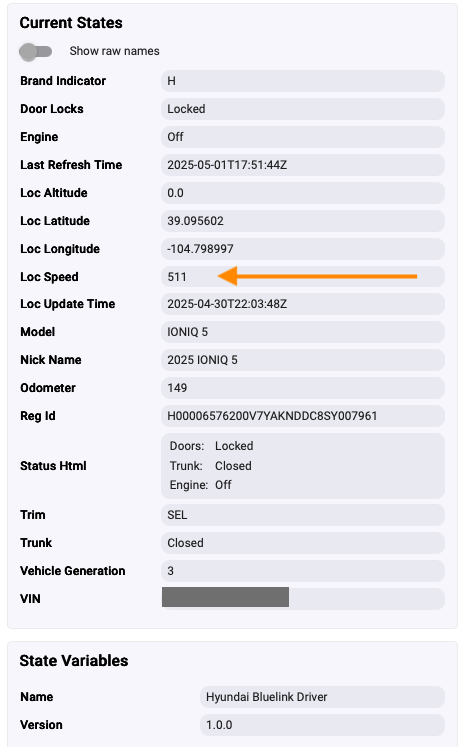
  1. On the device page what is "Loc speed", the car is parked outside and I'm pretty sure it's not doing 511mph!
  2. Elsewhere in this thread I saw battery and range information, is that something you get with the HA integration? (I'm still not going down that rabbit hole!). Would be nice to add that to my status tile, but not a big deal.

Overall, very happy with this, it does what I wanted, so thanks again.

Steve

I'm not sure what is going on there. I am just reading data returned by the web service call. For my car, Loc Speed is 0, which makes sense because the car is parked. The location information (latitude,longitude, altitude, speed) could be used by Hyundai to track a vehicle.

Hmm, I should go back and look at the data being returned by the web service call. They've probably updated it since I wrote this app/driver. Battery and Range information would be useful. I'll take a look at it.

1 Like

I completely forgot to add the screenshot on my previous post. Here it is showing Loc Speed and the parameters that are being reported.

Yes, that Loc Speed is clearly not right. Also, your Altitude doesn't seem right, unless you are at sea level.

You did tweak my interest. There is a "Batsol" value being returned. Back in 2021 mine was reporting a value of 82 and today it is at 65. I did a bit of googling and that value may be "battery state of life". Just a guess and I haven't the faintest idea of how to interpret it. I know the car keeps track of battery health, as it uses it to turn off the idle start/stop functionality. I did a navigation update yesterday and it wouldn't let me do the update with the car off because battery health. My car is a 2022 Palisade, so not electric like your Ioniq. Range probably is there for electric vehicles. I didn't see it on the JSON returned for my car.

FWIW, you can dump the raw data returned by turning on debug logging in the app and driver. It's not very pretty, but you can see what the web service is returning. I'm going to see if I can "pretty print" it so that it is more readable JSON. I've had a couple of requests to add support for electric vehicles, but that is difficult without owning one myself.

I'm at 7400 ft!

Here's a snippet from the logs:
Hyundai Bluelink App -- reJson: [hataTID:49ddebf6-26d6-11f0-abf7-5fbb1047161c, vehicleStatus:[acc:false, airConditionStatus:false, airCtrlOn:false, airTemp:[hvacTempType:1, unit:1, value:OFF], battery:[batSignalReferenceValue:[batWarning:65], batSoc:94, batState:0, powerAutoCutMode:2, sjbDeliveryMode:2], breakOilStatus:false, dateTime:2025-05-01T21:50:25Z, defrost:false, defrostStatus:false, doorLock:false, doorLockStatus:false, doorOpen:[backLeft:0, backRight:0, frontLeft:0, frontRight:0], dte:[unit:3, value:222], engine:false, evStatus:[batteryCharge:false, batteryDisCharge:false, batteryDisChargePlugin:0, batteryPlugin:0, batteryPrecondition:false, batteryStatus:73, chargePortDoorOpen:2, disChargeRemaintime:0, dischargingLimit:20, drvDistance:[[rangeByFuel:[evModeRange:[unit:3, value:222], totalAvailableRange:[unit:3, value:222]], type:0]], remainTime:[[unit:1, value:0]], remainTime2:[atc:[unit:1, value:0], etc1:[unit:1, value:44], etc2:[unit:1, value:1260], etc3:[unit:0, value:135]], reservChargeInfos:[ect:[end:[day:7, time:[time:19630, timeSection:1]], start:[day:7, time:[time:0000, timeSection:0]]], offpeakPowerInfo:[offPeakPowerFlag:0, offPeakPowerTime1:[endTime:[time:0000, timeSection:0], startTime:[time:0000, timeSection:0]]], reservChargeInfo:[dateTime:2025/05/01T14:50:57Z, reservChargeInfoDetail:[reservChargeSet:false, reservFatcSet:[airCtrl:0, airTemp:[unit:0, value:OFF], defrost:false], reservInfo:[day:[0, 1, 2, 3, 4, 5, 6], time:[time:0000, timeSection:0]]]], reservFlag:0, reserveChargeInfo2:[reservChargeInfoDetail:[reservChargeSet:false, reservFatcSet:[airCtrl:0, airTemp:null, defrost:false], reservInfo:[day:[0, 1, 2, 3, 4, 5, 6], time:[time:0000, timeSection:0]]]], targetSOClist:[[dte:[rangeByFuel:[evModeRange:[unit:2, value:505]], type:2], plugType:0, targetSOClevel:100], [dte:[rangeByFuel:[evModeRange:[unit:2, value:505]], type:2], plugType:1, targetSOClevel:100]]], timeDiff:0, v2G:false, valueDiff:0, wirelessCharging:false], fuelLevel:0, hazardStatus:0, hoodOpen:false, ign3:false, ignitionStatus:false, lampWireStatus:[headLamp:[headLampStatus:false, leftBifuncLamp:false, leftHighLamp:false, leftLowLamp:false, rightBifuncLamp:false, rightHighLamp:false, rightLowLamp:false], stopLamp:[leftLamp:false, rightLamp:false, stopLampStatus:false], turnSignalLamp:[leftFrontLamp:false, leftRearLamp:false, rightFrontLamp:false, rightRearLamp:false, turnSignalLampStatus:false]], lowFuelLight:false, odometer:164, seatHeaterVentInfo:[astSeatHeatState:2, drvSeatHeatState:2, rlSeatHeatState:2, rrSeatHeatState:2], sideBackWindowHeat:0, sleepModeCheck:true, smartKeyBatteryWarning:false, steerWheelHeat:0, tailLampStatus:0, tirePressureLamp:[tirePressureWarningLampAll:0, tirePressureWarningLampFrontLeft:0, tirePressureWarningLampFrontRight:0, tirePressureWarningLampRearLeft:0, tirePressureWarningLampRearRight:0], transCond:true, trunkOpen:false, trunkOpenStatus:false, vehicleLocation:[coord:[alt:-104.799022, lat:39.095588, lon:-104.799022, type:0.0]], washerFluidStatus:false, windowOpen:[backLeft:0, backRight:0, blOpenLevel:0, brOpenLevel:0, flOpenLevel:0, frOpenLevel:0, frontLeft:0, frontRight:0]]]

The range shown in the app is 222, for which I see a corresponding value in the log three times. I suspect total range or dte is what I'm looking for, guessing the others refer to hybrids perhaps?

batteryStatus:73 corresponds to the 73% number I see in the app.

Hope this helps.

Thank you,
Steve