I think its two different errors, @bobbles says the file is not found, which is absurd. @marktheknife says its being throttled for too many requests, which seems more reasonable but also scary if thats for real.

I think its two different errors, @bobbles says the file is not found, which is absurd. @marktheknife says its being throttled for too many requests, which seems more reasonable but also scary if thats for real.
Either way, something funny is afoot........
Add me to the list.....
I also tried a reboot with db rebuild with no success
When something fails that accesses resources out on the web, I suspect the "out on the web" portion of the world before my local infrastructure. I'd avoid doing a db rebuild for this.
Possibly something is/was amiss at github. The repositories file https://raw.githubusercontent.com/HubitatCommunity/hubitat-packagerepositories/master/repositories.json works for me in a browser right now. I can also get into HPM.
Maybe residual Cloudflare issues if their raw code pages are behind that?
Does anyone know if their API would be able to handle these kind of file transfers? 
Yes. It's working again.
I wonder if it was to do with the 'Cloudflare' issue that was going on today. 
It was a github problem. The time lines up with this incident.
What are you suggesting...  Surely that error should not be selective... (joking, btw, no serious response required)
Hi @csteele ,
I'm having some trouble trying to include an HTML file in an HPM package (my Simple CSS Editor), specifically one that has some code in it to store files on the HE hub. I have been able to include files in a HPM package before, and this HTML file is actually partially downloaded when installing the package through HPM, but it stops when it gets to a portion of the HTML file where I handle storing CSS and JSON files on the HE hub. This portion of the HTML file has a similar construct to HPMs code that handles uploading of files to the hub. Though weirdly the driver I wrote does essentially the same thing to be able to download the HTML file, so not sure why HPM is having an issue with it.
Would it be possible for you to take a look? Happy to help where I can.
Thanks for taking a look. Is the file complete in File Manager or does it end around the word data?
Looking at results on my hubs I expect it is truncated, based on the file size in your screenshot.
v1.9.4 released to use a new upload file method in the Platform.
v1.9.6 released to allow separate release notes for Stable and Beta Release
I just waited a few minutes and reopened it and it was 196.
Yes.... I did the same thing. However, the update seems to have a bug. It should reach "Complete" after finishing the update rather than just getting stuck with the phrase "Updating".
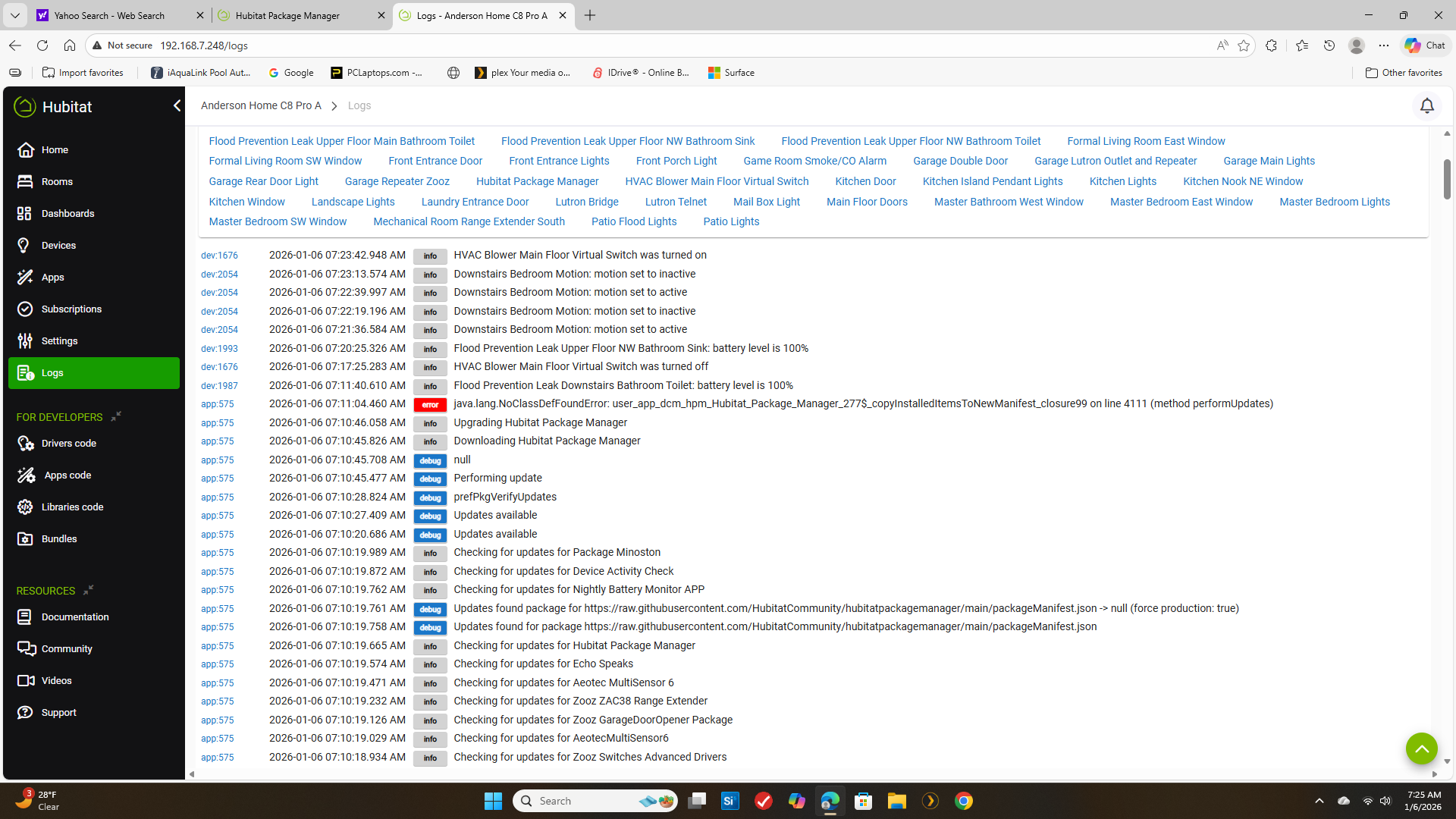
HPM updating itself means that the code for the return to Complete is NOT where it was. It does the return to Complete, trying to go back to where the code was in the old version. But the new version is bigger (or smaller) and thus the return goes to the wrong place and appears to hang. But an error is thrown and HPM quits. Simply open HPM again and notice the correct version in the upper right. To ease your mind, running a Repair on HPM will install the new version on top of the new version and it will Complete, without error 
app:2550 2026-01-06 07:19:39.795 AM error java.lang.NoClassDefFoundError: user_app_dcm_hpm_Hubitat_Package_Manager_1384$_copyInstalledItemsToNewManifest_closure99 on line 4097 (method performUpdates)
app:2550 2026-01-06 07:19:21.451 AM info  Upgrading Hubitat Package Manager
app:2550 2026-01-06 07:19:21.113 AM info  Downloading Hubitat Package Manager
Using the error shown as an example, the return to Complete WAS at line 4097 but in the new code it's well after line 4100. Your line numbers may vary
I've thought long and hard on how to solve this, but none of the easy ideas work. Anyone with an idea to solve this is welcome to discuss it.
You could use a helper/child app whose job it is to update HPM only, for an HPM update send the user to that other app which then starts the update right away. When done there could be a button to back to the main HPM?
Or possibly if you can somehow kick off the update and then close out of HPM and send people back to the apps list (with some sot of warning before hand) that also may solve the problem.
So if the Repair option works (and it does I tested), why not do a simple test and say something like:
if(self)
   repair()
else
   update()
Would need a way of defining self, but outside of that the real work is already done.
I don't think that works any differently... the "next line of code" is still going to move. A "helper" app can do it because the helper app itself is not moving. That's what HPM is doing for all other packages.. it lets the Platform do the work, but once it's done, the "next line of code" has to be where it was.