Thanks, that looks to be the correct value for you for the next few days. I’ll push that change up to the production branch for everyone in a little bit.
2 Likes
Thanks for the prompt response and fix. I feel really lost when my Hub Information dashboard is not updating, like I’m flying blind on what my hub is doing.
1 Like
I am seeing an error sometimes when backups run. Every night at 4:05am when local backup is running and for some manual backups when the hub load is high. Here is the error log

Any ideas for me to try or is this a driver issue?
408 says that the hub is busy - normally it resolves itself unless you have too many attributes trying to refresh at the same time (this is the reason each of the polls can/should have cycles that don’t intersect).
2 Likes
I'm not sure I got this question in the right place, but here goes.
I just installed Hub Information Driver V3, but I can't figure out how to look at the data. I then also installed Hub Detailed Information Display which I assumed would do the display work. But when I run the latter I get "Hub Detailed Information Display - Unexpected Error
- An unexpected error has occurred trying to load the app. Check Logs for more information.
Error: Cannot invoke method contains() on null object
I'm a bit stuck - can anyone help be get this working?
Example log segments:
dev:3132025-08-28 18:28:07.234
info
{"usingStaticIP":false,"staticIP":null,"staticGateway":null,"staticSubnetMask":null,"staticNameServers":,"dhcpNameServers":,"dnsServers":["172.16.0.1","1.0.0.1","1.1.1.1","8.8.4.4","8.8.8.8","9.9.9.9"],"useDNSFallover":true,"lanAddr":"172.16.0.48","wlanAddr":null,"wifiNetwork":null,"wifiMessage":"WiFi is detected.","ipMessage":"Hub's IP address is 172.16.0.48 (Ethernet) via DHCP.","lanAutoneg":"AUTONEG","hubVersion":8,"wifiDriversInstalled":true,"hasEthernet":true,"hasWiFi":false,"restartBonjourOnSchedule":true}
dev:3132025-08-28 18:28:07.153
debug
[uri:http://127.0.0.1:8080, path:/hub2/networkConfiguration, headers:[Connection-Timeout:600]]
dev:3132025-08-28 18:28:07.146
debug
[uri:http://127.0.0.1:8080, path:/hub/advanced/freeOSMemoryLast, headers:[Connection-Timeout:600]]
dev:3132025-08-28 18:27:07.225
info
{"usingStaticIP":false,"staticIP":null,"staticGateway":null,"staticSubnetMask":null,"staticNameServers":,"dhcpNameServers":,"dnsServers":["172.16.0.1","1.0.0.1","1.1.1.1","8.8.4.4","8.8.8.8","9.9.9.9"],"useDNSFallover":true,"lanAddr":"172.16.0.48","wlanAddr":null,"wifiNetwork":null,"wifiMessage":"WiFi is detected.","ipMessage":"Hub's IP address is 172.16.0.48 (Ethernet) via DHCP.","lanAutoneg":"AUTONEG","hubVersion":8,"wifiDriversInstalled":true,"hasEthernet":true,"hasWiFi":false,"restartBonjourOnSchedule":true}
dev:3132025-08-28 18:27:07.109
debug
[uri:http://127.0.0.1:8080, path:/hub2/networkConfiguration, headers:[Connection-Timeout:600]]
dev:3132025-08-28 18:27:07.104
debug
[uri:http://127.0.0.1:8080, path:/hub/advanced/freeOSMemoryLast, headers:[Connection-Timeout:600]]
dev:3132025-08-28 18:26:07.134
info
{"usingStaticIP":false,"staticIP":null,"staticGateway":null,"staticSubnetMask":null,"staticNameServers":,"dhcpNameServers":,"dnsServers":["172.16.0.1","1.0.0.1","1.1.1.1","8.8.4.4","8.8.8.8","9.9.9.9"],"useDNSFallover":true,"lanAddr":"172.16.0.48","wlanAddr":null,"wifiNetwork":null,"wifiMessage":"WiFi is detected.","ipMessage":"Hub's IP address is 172.16.0.48 (Ethernet) via DHCP.","lanAutoneg":"AUTONEG","hubVersion":8,"wifiDriversInstalled":true,"hasEthernet":true,"hasWiFi":false,"restartBonjourOnSchedule":true}
dev:3132025-08-28 18:26:07.077
debug
[uri:http://127.0.0.1:8080, path:/hub2/networkConfiguration, headers:[Connection-Timeout:600]]
dev:3132025-08-28 18:26:07.073
debug
[uri:http://127.0.0.1:8080, path:/hub/advanced/freeOSMemoryLast, headers:[Connection-Timeout:600]]
dev:3132025-08-28 18:25:07.099
info
{"usingStaticIP":false,"staticIP":null,"staticGateway":null,"staticSubnetMask":null,"staticNameServers":,"dhcpNameServers":,"dnsServers":["172.16.0.1","1.0.0.1","1.1.1.1","8.8.4.4","8.8.8.8","9.9.9.9"],"useDNSFallover":true,"lanAddr":"172.16.0.48","wlanAddr":null,"wifiNetwork":null,"wifiMessage":"WiFi is detected.","ipMessage":"Hub's IP address is 172.16.0.48 (Ethernet) via DHCP.","lanAutoneg":"AUTONEG","hubVersion":8,"wifiDriversInstalled":true,"hasEthernet":true,"hasWiFi":false,"restartBonjourOnSchedule":true}
dev:3132025-08-28 18:25:07.053
debug
[uri:http://127.0.0.1:8080, path:/hub2/networkConfiguration, headers:[Connection-Timeout:600]]
dev:3132025-08-28 18:25:07.051
debug
[uri:http://127.0.0.1:8080, path:/hub/advanced/freeOSMemoryLast, headers:[Connection-Timeout:600]]
dev:3132025-08-28 18:24:07.080
info
{"usingStaticIP":false,"staticIP":null,"staticGateway":null,"staticSubnetMask":null,"staticNameServers":,"dhcpNameServers":,"dnsServers":["172.16.0.1","1.0.0.1","1.1.1.1","8.8.4.4","8.8.8.8","9.9.9.9"],"useDNSFallover":true,"lanAddr":"172.16.0.48","wlanAddr":null,"wifiNetwork":null,"wifiMessage":"WiFi is detected.","ipMessage":"Hub's IP address is 172.16.0.48 (Ethernet) via DHCP.","lanAutoneg":"AUTONEG","hubVersion":8,"wifiDriversInstalled":true,"hasEthernet":true,"hasWiFi":false,"restartBonjourOnSchedule":true}
dev:3132025-08-28 18:24:07.031
debug
[uri:http://127.0.0.1:8080, path:/hub2/networkConfiguration, headers:[Connection-Timeout:600]]
dev:3132025-08-28 18:24:07.028
debug
[uri:http://127.0.0.1:8080, path:/hub/advanced/freeOSMemoryLast, headers:[Connection-Timeout:600]]
Hub Information Display:
app:3972025-08-28 18:27:16.477
error
java.lang.NullPointerException: Cannot invoke method contains() on null object on line 211 (method pageRender)
app:3972025-08-28 18:16:23.645
error
java.lang.NullPointerException: Cannot invoke method contains() on null object on line 211 (method pageRender)
app:3972025-08-28 18:15:49.206
error
java.lang.NullPointerException: Cannot invoke method contains() on null object on line 211 (method pageRender)
app:3972025-08-28 18:13:02.748
error
java.lang.NullPointerException: Cannot invoke method div() on null object on line 388 (method pageRender)
App isn’t required to look at the data as it will appear in the current states section of the device. That aside, it looks like the app is erroring out trying to build one of the charts at the top of the display.
Let’s start by looking at the Current States on the Commands tab and then the Preferences tab of the Hub Information device, then the Information tab from the Detailed Information app
Quick way to get to the app information:
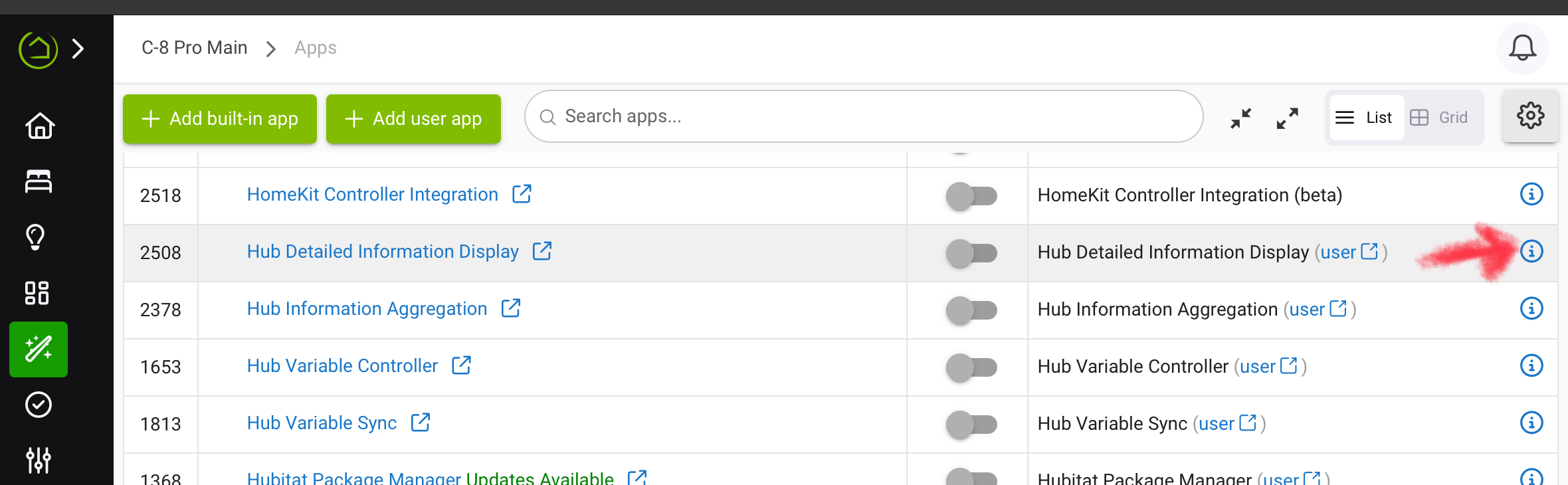
Great, and thanks. I have successfully removed the Hub Detailed Information Display and I'll try re-adding both that and the driver.
Thanks again.
Make sure the driver populates it’s first set of attributes before adding the app.
I just installed this. Great job with all the features!
3 Likes
Can anyone tell me what values are possible for
Zigbee Status
Zigbee Status2
I'm a bit confused with the enabled/disabled online/offline and what is indicating what. I'm looking to trigger when the radio actually goes offline from hubload or other. Not just when the hub reboots enabled/disabled.
Thanks
They date back to the original driver when deteremining the Zigbee status was more of an inference and probably should be removed. I'd recommend using the zbHealthy attribute instead.
1 Like
Bit of a new error in the logs pointing to hub info on latest beta.
Just a glitch or a change in HE?
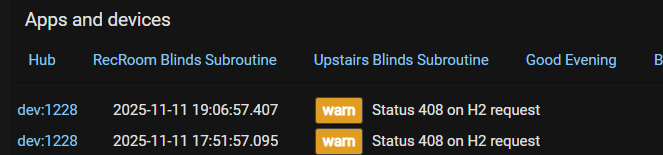
Just saying the hub was too busy to respond. Not an issue unless it never responds as the next poll will catch it up.
2 Likes
Maybe due to the lastest build?
I got 3 more at midnight.

Not sure how accurate the graph is but the hub was quiet all night.
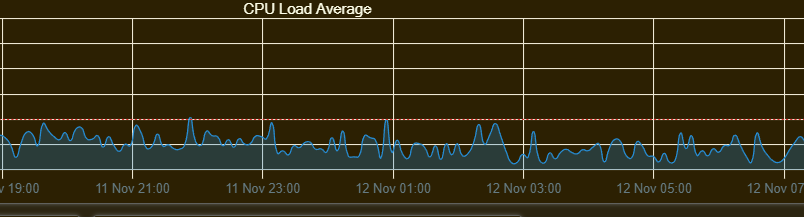
If your polling for the different queues is too frequent or you have overlapping intervals it can cause them to error out at times. Setting them to prime numbers will ensure they never run at the same time.
3 Likes
I haven't changed the Prefs since it was released.
I'm back on beta .153 and no more logs of this nature.
Keeping an eye.
I'm on the latest release again and back to this log error.
Didn't get it on .153 but always 154-155.
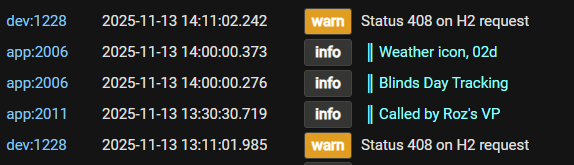
I am not seeing any errors on mine. It is likely that something on the hub platform has changed which is no longer agreeing with your settings. Show us your settings and poll intervals.

Try changing queue 2 to 61 minutes.
2 Likes

