The reset presence allows you to actually set the value. Not just find out what the values are. So, if you have a runaway PIR for example, you can force it to inactive. I believe it is the same for set motion.
Setting the value from the Hubitat side is not going to change what the sensor believes the state to be. Thus, the next time the sensor sends data, it will still be messed up, right? So, what's the value in forcing the Hubitat side to not match the FP300 side?
2 Likes
It worked for resetting my PIR sensor after swtiching it to mmWave only when it was stuck active.
I tried a test I had read to potentially get it working, (cycling through PIR only -> mmWave only -> Both). That did not work, but it left my PIR sensor active after switching back to mmWave only.
The only way I was able to reset was to factory reset -> switch to Matter -> switch back to Zigbee -> re-pair and IMMEDIATELY change to mmWave only while not in the room.
(tried a simple factory reset and re-pair, but for some reason had to force another firmware overwrite - it's definitely a bad device and waiting on a replacement.) Also adding, I covered the face of the sensor with heavy duty aluminum foil, left the room, and tried the refresh command for over 30 minutes at 5 minute intervals trying to get it to reset.
Understood. Let me think about that one... It definitely sounds like a hardware issue, and I now understand why this might be useful in this specific scenario. Although, if you switch the device to use mmWave only, then the "motion" attribute will only utilize the mmWave sensor (i.e. roomState) to set its state.
In general, I really believe users should only be using the "motion" attribute for all of their automations. I only left "pirDetection" and "roomState" as I felt they might be used already by some users in their automations. Now that "motion" is driven via the PresenceDetectionMode preference, instead of just the mmWave sensor in the other driver, it seems to me that a stuck pirDetection attribute really should not cause any harm.
Well, it just so happens that @hubitrep had already left me a kind note in my private messages with a solution to this request.
I have just published v1.0.10 with the change to provide firmware version.
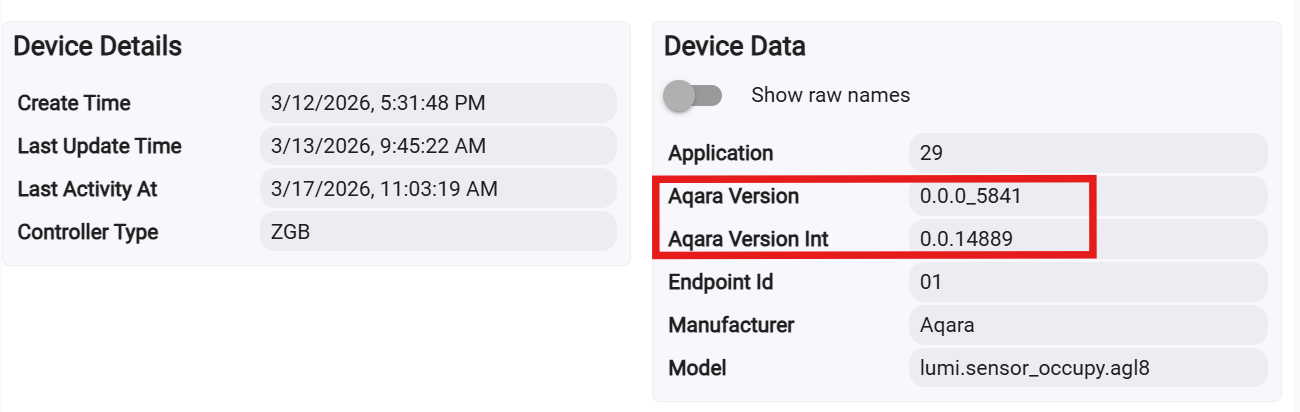
Thank you very much, @hubitrep!
In order to populate the additiona firmware version data, simply update the driver, and then press the button on the device. That's it. Make sure you refresh your browser to update the data for the FP300 device to see the new information.
6 Likes
This most definitely works. Don't ask me how I know. 
So that I understand correctly, REFRESH only updates Hubitat info from device status, NOT the other direction?
1 Like
That is how it worked for me. My device and hub got completely out of sink so no automations were working, the hub wasn't changing state when entering or leaving the room. A whole host of things. REFRESH grabbed the states that the device was showing and put the states on the hub to match and that resolved all my issues. Hub was zigging when the FP300 was zagging for a while.
1 Like
That’s correct.
If you click CONFIGURE or Save the user Preferences, settings are written to the device and a Refresh is performed.
1 Like
This is what led me down the my particular device must be bad path. Configure did nothing to reset PIR status back to inactive. (FWIW)
Correct. Nor should one expect to see running Configure to change the status of either the roomState or pirDetection attributes.
The only thing that I have seen to reliably reset both the mmWave and PIR sensors in the FP300 is running a "Start Spatial Learning" command (after waking the device up by pressing the button on it and vacating the room.) Each time that I have done this, I watch the Hubitat FP300 device's attributes via the Hubitat web page on my phone. After clicking Start Spatial Learning, I see both the roomState and pirDetection attributes get reset to unoccupied and inactive, respectively. I then wait the full 30s until the status attribute gives the all-clear, and then walk back into the room with the FP300. Doing so, when the DevicePresenceMode is set to "Both", results in the pirDetection attribute changing to 'active' followed by the roomState attribute changing to 'occupied' a fraction of a second later.
If you set the DetectionPresenceMode to 'mmWave only', do not expect to see the pirDetection attribute to change at all. After all, you've just told the sensor to disable the PIR sensor, and thus I believe it disables it to save battery life, and no longer sends Zigbee status updates for the pirDetection attribute.
However, if you set the DetectionPresenceMode to 'PIR only', then both the pirDetection and roomState attributes are updated simultaneously. I believe the sensor disables the mmWave sensor to save batteries, but still updates both Zigbee attributes. Why both? I do not know.
The above is what I have learned through my personal experimentation while developing this driver. I am not saying that the above is 100% how the sensor is supposed to work, as designed by Aqara. It is just what my personal observations have taught me over the past few weeks.
Yeah, tried that about 15 times (and a dozen other things including a weird dance) before trying configure, then factory resetting, switching to matter, then back to zigbee to force it to redo the firmware.
Demmit Jim, I'm an amatuer home automator... not a miracle worker.
2 Likes
@hubitrep was kind enough to point out that not all of the Device Data fields were being populated, in particular the Date Code field. Thus, I have released v1.0.11 this evening.
I have tweaked the refresh() command logic to make sure the FP300 sensor is not overwhelmed with requests from the hub. This seems to have resolved Date Code issue. I have also removed the "Aqara Version Int" field as it really does not help the user know which Aqara Firmware version the device is running.
Note: In order to get the Date Code field to populate, you will need to wake the device by pressing the button on it, and then clicking the REFRESH command.
6 Likes
My sensor is mounted fairly high up where it’s hard to get to to press the button.
Would it be possible for the driver to queue up the refresh command until the sensor wakes up on its own? [Which I assume it does every now and then.]
1 Like
I am not sure how the HE Hub and Zigbee radio handle the scenario where the hub tries to send a Zigbee message, but the Zigbee device does not consume the message and respond in a timely manner. It’s not really something the driver could do, as it does not know if the sensor is awake or not, except when the user presses the button on it to wake it up.
So, I am going to backtrack on my confidence that this was firmware related. I decided to get a replacement from doing an amazon return. I just received the new one today and the PIR is (so far and knock on wood) working as it should. So now, 5 out of 5 working correctly on the latest firmware.
I recommend returning and replacing the device. (luckily, I was able to use mine in mmWave only until the replacement got here. I was worried because I was not sure how long it would take to get here and the replacement window was not that long).
2 Likes
The thing I don’t understand, is PIR worked fine till I replaced the batteries. Then it stopped working.
You wouldn’t be using the batteries with the child resistant coating would you? I think they’re Duracell?
No, I’m using Panasonic batteries.
I’ve emailed Aqara’s Australian support asking for a replacement (I bought it direct).
1 Like
For mine, I am not sure it ever worked. I was using the old driver, which did not use the PIR for motion. So, I never noticed until I switched to this driver. I never had the need to check the logs. None of them were any faster or slower since they weren't using the PIR for motion. So, just thought they were slow.
After switching, this 1 out of 5 would never go inactive. This led me to first associate the issue with the driver, and then digging in, found all the discontent with the firmware in multiple forums. The thing is, that it was not 100% of the items. So, that led me to research it more.
I requested an Amazon replacement, and the new one worked instantly and has been all day now.
If you changed the batteries BEFORE you switched to this driver, it is all and well possible that yours was never working correctly and you just never caught it. If it was after you changed the batteries, I am not sure what would have caused that.
2 Likes