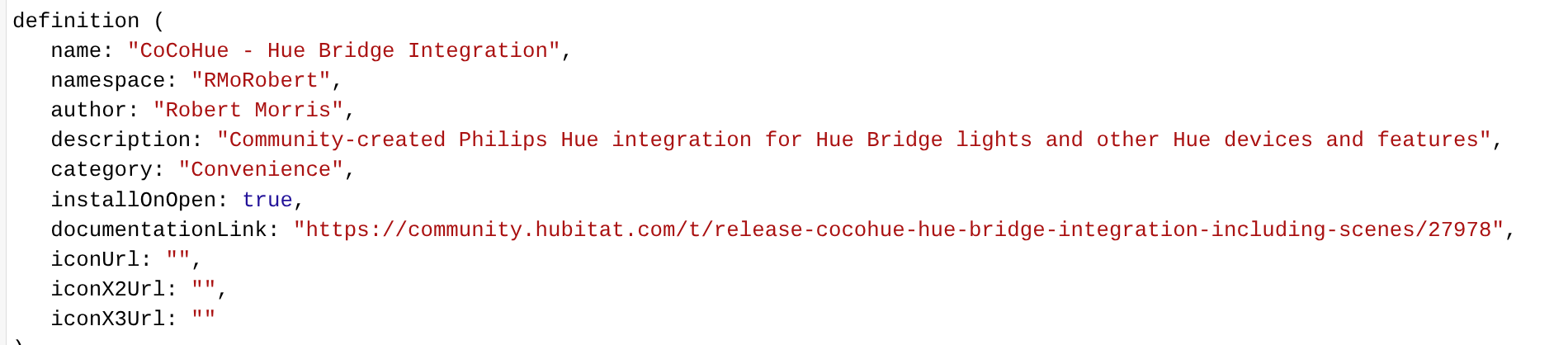
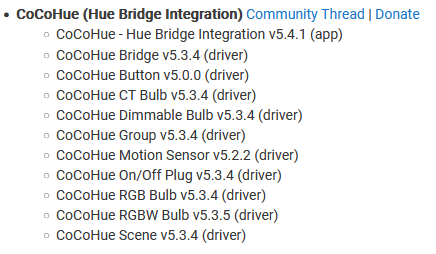
My CoCoHue is still at version 5.3.4
I did a repair on it via HPM, but it did not update.
How can I go about getting the most recent version?
My CoCoHue is still at version 5.3.4
I did a repair on it via HPM, but it did not update.
How can I go about getting the most recent version?
Where are you looking for the version? Each app and driver file has its own version; the "version" noted in the release notes is generally just the highest of these. An HPM repair should have caught everything new (unless you had any errors when updating, which should be visible in Logs if not in the UI). Comparing each to the ones on GitHub would be a sure way, although probably not necessary.
I see the version when I look at the source code.
Is there a way to trigger an update? Or would I just have to update the source code?
An HPM repair should download each file again, regardless of what it thinks. But if you wanted to try something else: you could copy/paste the app code (the app specifically, I mean) manually and either do that for the drivers too or click the "Import" menu item and re-import (should auto-fill the right URL, or you can use the importUrl in the driver definition; apps used to not work this way, so it's not there and why I called these out separately). All that code would be here: GitHub - HubitatCommunity/CoCoHue: Open-source community-created Hue Bridge integration for Hubitat · GitHub. You can also try the bundle ZIP.
HPM repair did nothing.
I will try the bundle. Will it simply update the existing install, or create a new instance?
EDIT: Tried to import the bundle, and nothing showed up anywhere
I guess I will try the app code update
EDIT2: I updated the app code. Looks like all of the drivers code is up to date.
Will I see the app now in the Integrations menu?
Yes, you should now (that was the only change).
I'm not seeing it in "Integrations," still in Apps. Am I looking at the correct app? Also tried a repair, even tried a reboot.
Exact same thing for me, even after a reboot
Sigh.  No idea how that happened, but you're right. I just edited the file manually on GitHub for now. An HPM repair should get it, or a manual copy of the app code -- or a simple edit for anyone who wants to do it themselves. Thanks!
No HPM version change, so you won't see it as "new" there, hence the repair, BTW. And again, no functional changes.
HPM repair did not do it for me.
I will try a manual copy of the app code to see if that works.
OK, I've just done a re-release as 5.4.2a, including the previous change (hopefully for real this time!) of:
It also caught some minor changes I had been working on, including

I also upped the version on all app and driver pieces in HPM, so it should force a re-download of everything in case something was missed previously. The bundle ZIP and "manual" code files are also updated if using those methods.
A reminder that, while I am obviously a fan of this, I'd recommend the built-in integration for new users at this point if anyone is just catching this thread now. There are more features there than before and even a few more than CoCoHue now!
Would you recommend CoCoHue users switch over at some point to the built in Hue integration?
What extra features does the built in Hue integration have over CoCoHue?
Interesting. I did not receive an update notification within HPM.
Also, after doing a repair, I find your app still at 5.4.2
Even did a repair of HPM to see if things would be better. Nope.
Out of ideas.
From your other posts, it sounds like you might be having general HPM problems. I'd try removing and reinstalling HPM. (This won't remove any any apps/driver you've installed, if you're worried -- it just helps install the code, the same way you'd do manually. But you'd need to do a Match Up afterwards to make it "see" what it could manage for you again, which I think is also the default after a new install.)
I generally don't recommend anyone change anything that's working.  But there's no reason you can't. It's a manual process, however.
Contact sensors, MotionAware/motion areas, Hue chime, and a lot faster to get the above-mentioned tweaks. That's what I can think of off the top of my head. I'm pretty sure it's close to comprehensive, but I might be missing a minor thing or two.
And, of course, not having to install/update the code yourself!
I agree with "if it ain't broke, don't fix it." Personal opinion. -> However, long term, I would recommend that you switch over.
What I did was to configure the native integration and ensure that the device names it creates are unique from your current CoCoHue device names, such as it automatically adding " - Native" to each device. You can have both integrations running at the same time. Then when you have a few minutes here and there, open up a CoCoHue device, go to "In Use By", and replace the CoCoHue device with the " - Native" device in everything listed. Once the list is empty, that device it done, and can be removed.
I did it very slowly over a few weeks for my 3 dozen devices and scenes and groups. It also gave me an opportunity to tune rules that were created years ago and even add them to newer apps that were overlooked, like battery management apps, Custom Notes, etc. Once all moved over, you can uninstall the CoCoHue app and code.
So, uninstalling and reinstalling HPM did not help with upgrading CoCoHue.
Update did not work; repair even failed.
Maybe it is time to try the built in integration again (though last time I did that, I ended up coming back to CoCoHue)
I think you'll find that the current version of the native integration looks remarkably similar to CoCoHue  And it works like a boss.
I’m having issues updating too
Error Occurred During Installation
An error occurred while installing the package: Failed to upgrade app https://raw.githubusercontent.com/HubitatCommunity/CoCoHue/master/apps/cocohue-app.groovy.

I have tried a repair but it doesn’t work. No other issues with HPM as I’ve just updated a couple of other apps fine
I’m currently on v5.4.1