Thanks! I’m going to try to migrate this weekend. I’ve been with Cocohue since I started with Hubitat! I’d be sad to switch.
Is there anything the built in hue integration doesn’t have? I use scenes as switches extensively for holidays
Thanks! I’m going to try to migrate this weekend. I’ve been with Cocohue since I started with Hubitat! I’d be sad to switch.
Is there anything the built in hue integration doesn’t have? I use scenes as switches extensively for holidays
No, I can't think of anything. There are actually more features, such as contact sensors and (as you know) MotionAware.
Couple of days ago I went from CocoHue to built in Hue app and I have to say that Motionaware works really well and is really useful for home automation needs on Hubitat. Anyway thanks @bertabcd1234 for all the support with Cocohue. 
How easy was it to switch? I envisage a traumatic few hours that results in nothing working anymore and my family banning me from the house 
What are the actual steps to migrate?
You can run both at the same time if you wish. So you can take all the time you need with the migration without causing problems to the wifey. I added bridge to built in app. Then went through all my webcore pistons and changed those to use bulbs from new integration. Then removed cocohue. Next day opened hubitat log to see if there is errors or missing devices in wc pistons. Everything was good.
Thanks. I took the plunge - chose a time when everyone was in bed, which was a risky move as there was always the chance that room lighting would randomly blast the lights on when updating something 
It took me nearly 3 hours, but I emerged unscathed. I think everything is switched over and still working - pray for me over the next few days 

I'm on the edge of migrating to the built-in app.Right now my hue bulbs have a device type CoCoHue CT or RGBW. Will I need to change that after I select them in the built-in app. I see that there is a hue bridgebulb.... device type. Or should I change to that before migrating to the built-in.?
You shouldn’t have to change any of the automatically selected device drivers. Of course they’re going to be different drivers from the ones you are currently using with CocoHue, since the drivers are for child devices of the built-in Hue integration. You can’t just change the CoCoHue drivers for the built-in and expect them to work. You will have to create all new Hue devices and then replace the old devices with the new ones from the built-in integration.
i'm having a hard time with the order of operations. i have 100 lights and each is tied to approximately 4 different automations. i really don't want to manually change 400 automations. am i screwed?
Should i combine the bridges into the pro hub first? Then do the built in integration, then the devices?
or switch to the built in integration first? then ill have two apps, one for each old hub?
What does this mean? Do you have other Hue devices added to Hubitat?
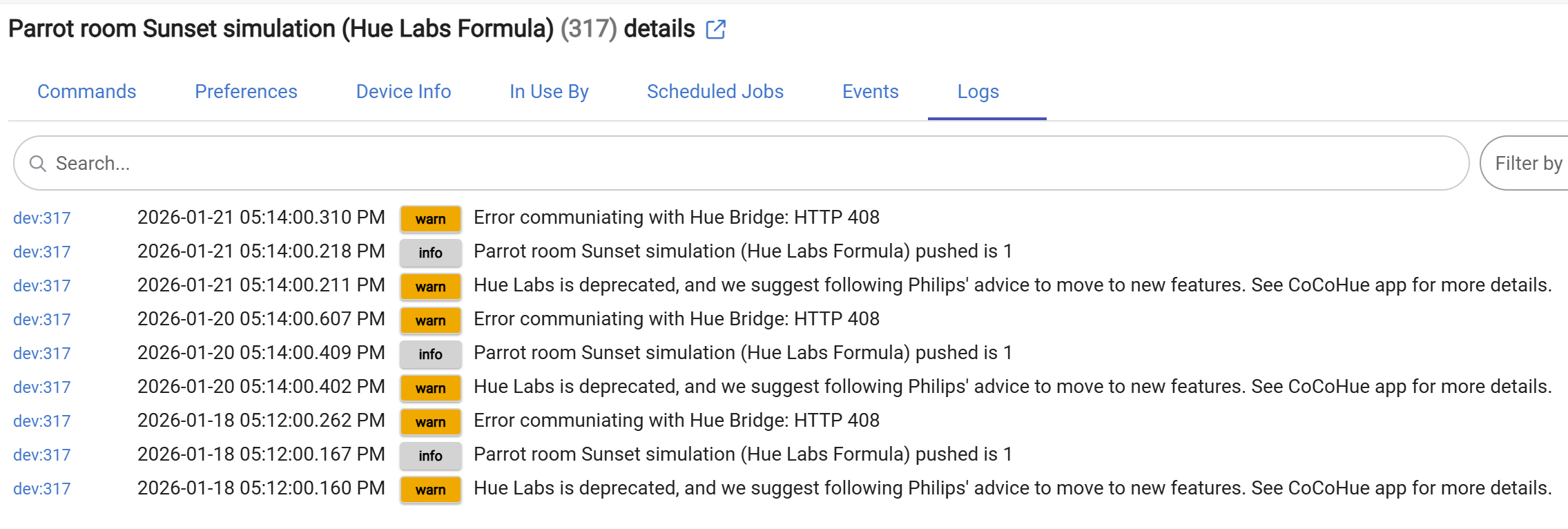
Given that the error is an HTTP 408, a timeout, my guess is that your Hue Bridge IP address changed, and Hubitat does not have the new address. If you have a static IP configured, you can configure CoCoHue to use that, otherwise, you could try running the discovery process again (even though you shouldn't need to and it should eventually catch up).
It's also possible this feature just stopped working (while it's deprecated, I don't think any existing setups should stop working since it's probably just scenes and rules and other features on the bridge that won't just go away), but I don' think that's the error you'd get in that case.
I have other Hue devices in Hubitat via the Hue Bridge. This group of lights is the only Hue device that has Hubitat doing anything fancy.
Where can I check/change the IP that CoCoHue has for my bridge?
"Edit Bridge IP, reauthorize, or rediscover" in the app. But if other devices are working fine, this probably isn't it.
Did you upgrade to a Bridge Pro? I could maybe see this not working after that.
Tried that. There wasn't an option to rediscover Labs or Formulas. IIRC I had to do something special way back when to add the Sunset Sim to CoCoHue. Hubitat can control the lights individually and as a CoCoHue Group, but the sunset simulation still fails. I haven't upgraded anything recently. Is it possible that the error is correct and this is related to shutting down Hue Labs? If I follow Phillips advice and create a Go to Sleep automation with Sunset style, can I activate that via CoCoHue?
If any Hue updates caused whatever Labs formulae used to disappear from the Bridge, that might cause this, although I'd expect a 404 or something rather than a 408 -- that's often just the fact that the Bridge couldn't be reached in the first place (which is why I thought it might be the IP address).
Right, the goal is to verify that your Bridge IP address is correct.
I don't know. How is this activated? If it's a dynamic scene (or regular scene, though I doubt that...), it should work. If it's some sort of schedule or rule or something else, there's no way to access these from CoCoHue at the moment.
I was under the impression that Hue shut down & disabled all the Labs stuff quite a while ago, so I'm surprised one of your was still working up until recently.
As far as I know, Hue Labs are gone for good.
Small update just released that moves this app to the "Integrations" menu introduced in platform 2.5.0.
@bertabcd1234, right after the minor release of CocoHue a few days ago, I noticed my CocoHue devices no longer properly update their switch state. On command turns on the device as expected; Off command turns off as expected. But the switch attribute remains ON no matter what. This creates havoc for other group logic and automations, as you can imagine. I don’t see similar behavior in the Hue native app.
It’s interesting that the device will actuate the ON command even when the switch attribute is already ON since (I thought) Hubitat ignores commands that would essentially re-execute the current state.
Can’t seem to track down what change might have caused this. Any theories or places I should look?
TIA…
The only change was the Integrations menu item, so that shouldn't be related:
That being said, I don't know what could be happening for you. What installation method did you use? You can always revert to a previous backup (or manually to a previous version of the code) if you suspect it was something here, though, just to really rule thing out.
I used HPM to install. Just trying rolling back CoCoHue and it didn't change the behavior, so that's not it. Will have to keep poking around. Very strange.