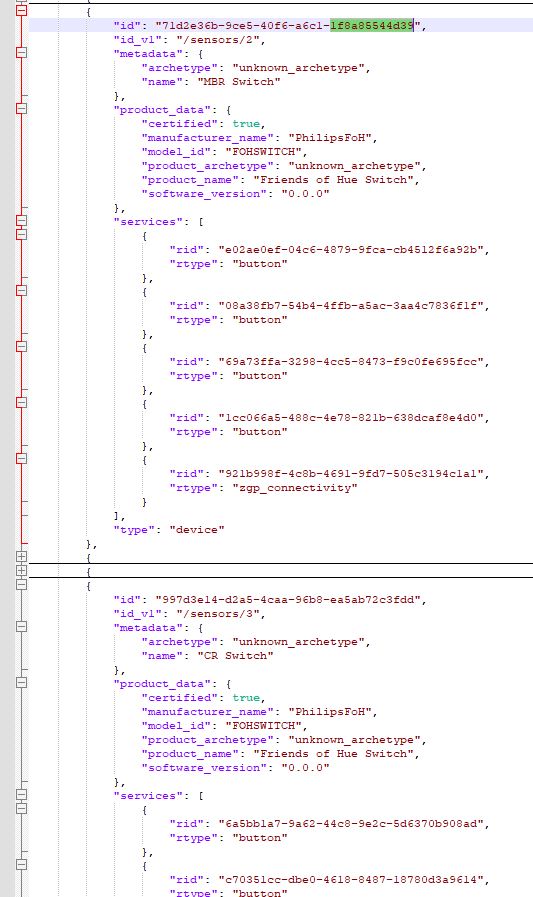
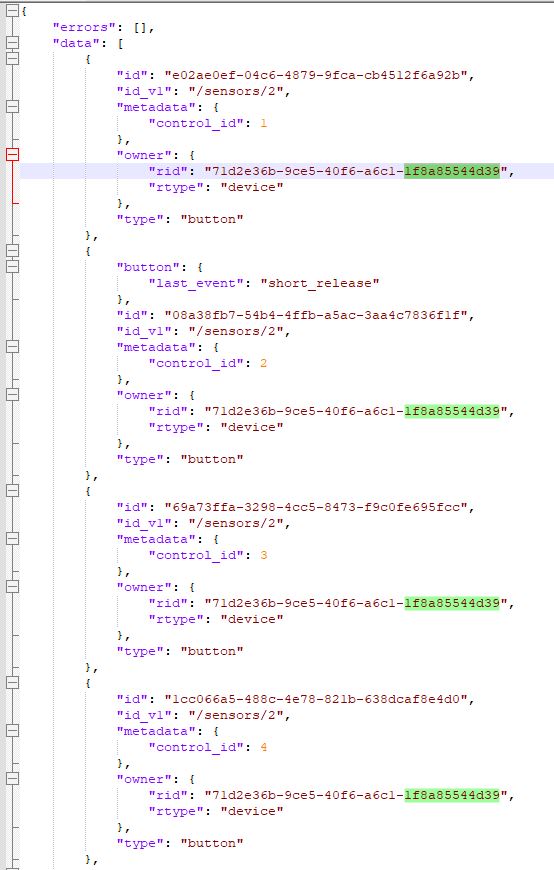
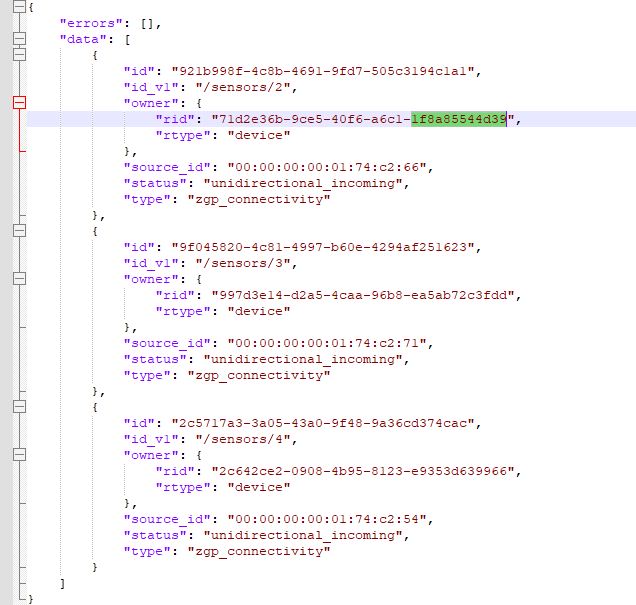
Is it those "source_id" values from zgp_connectivity you were missing? or the "id" values in zgp_connectivity? It seems to me like those could be the identifiers linking button events to relevant devices?
(note I have 3 switches, that all have 4 buttons on them each. I've called them "MBR Switch" and "CR Switch" and "LR Switch".)
EDIT:
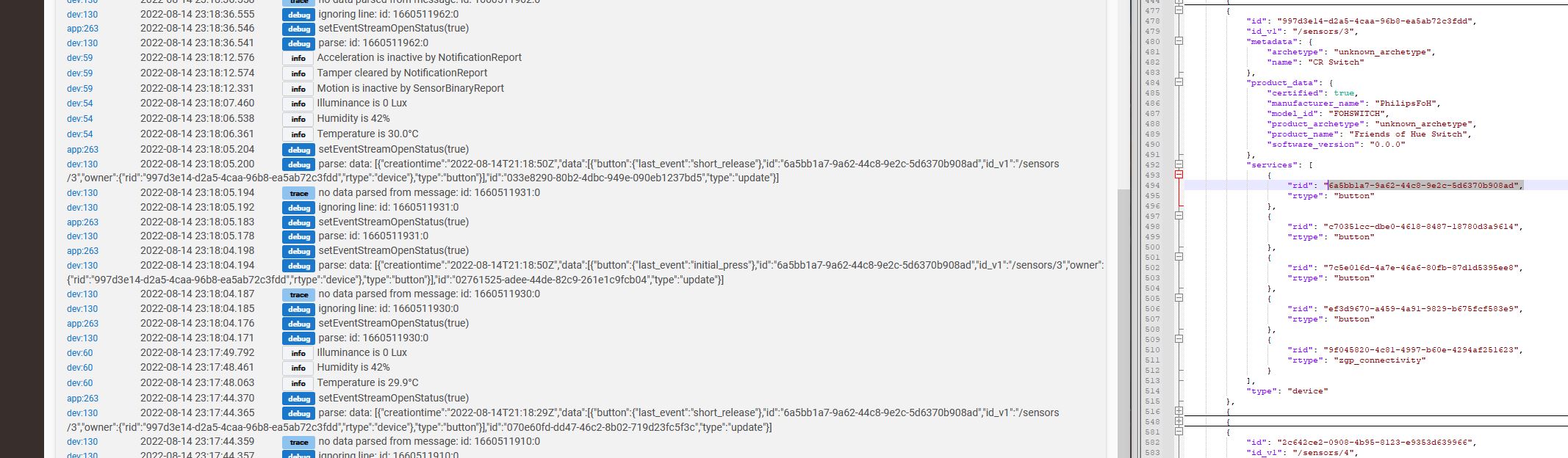
looks like pressing the buttons just sends events with the owner ID and the button ID.. (an "initial_press" and "short_release" event), so I don't think the values in resource/zgp_connectivity need to be considered at all?:
Alright.
I'm done writing the required driver and app code to extend CoCoHue to work with (my) FoH ZGP switches.
It's amateur, it's dirty, it's far from consistently coded.. but for a very first pass at java, groovy, the Hue API, and all of that shazz, I think I did decently. @bertabcd1234 no idea if you're interested in/willing to incorporate this into the main CoCoHue release. It could definitely use some touch-up and cleanup to be more in-line and consistent with the rest of your code base.
Alright, you inspired me to play around with button devices in the v2 API a bit more. I discovered some things that either weren't there or that I missed before with how to tie the button events together with the device they came from and possibly what button it actually was (I might assume the order listed in services for that device, but I don't know if anything is guaranteed? the docs don't have much information right now, either). Unlike the bulbs, supporting button devices will probably require CoCoHue to know specifically the vendor and model. I have Hue Tap and Hue Dimmer v1 devices, plus a Lutron Aurora. I don't know that I have anything else, including the model you seem to have, to test with--but adding others should be easy if knowledgeable users can verify the right information.
Thanks for this integration/App. I installed it via Package Manager.
I started playing with it today and experienced the 5 second refresh page bug. Eventually I was able to paste the manual IP address of my Raspberry Pi 4 running deCONZ/Phoscon on a docker container and have it authorized in your App.
It seems to work, but I can see a whole lot of messages like the excerpt below on my log. Is this expected and normal?
Does deCONZ support a Hue API v2-compatible eventstream? Last time I looked, it didn't, though it did have its own way of pushing updates (not supported in CoCoHue because it was never part of any Hue system, though I briefly experimented with a fork that used it). That was a couple years ago and may have changed by now. But otherwise, I'd suggest disabling that option.
Regarding the question specifically, I don't think it should be normal, but for some reason it is for many people. This is likely due to some oddity with Hue's eventstream implementation, the library Hubitat is using, or some interaction between the two. Nothing I try on the driver side seems to matter.
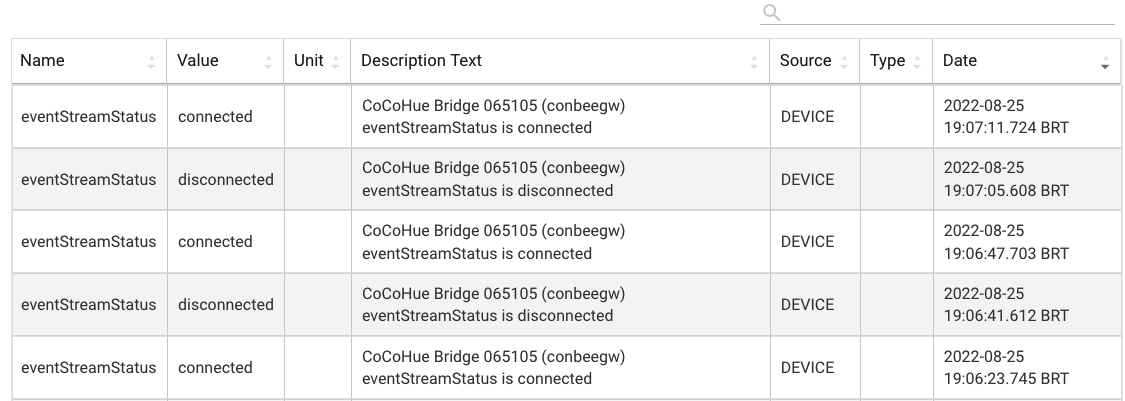
I was also having issues with the eventstream constantly getting disconnected and reconnecting.
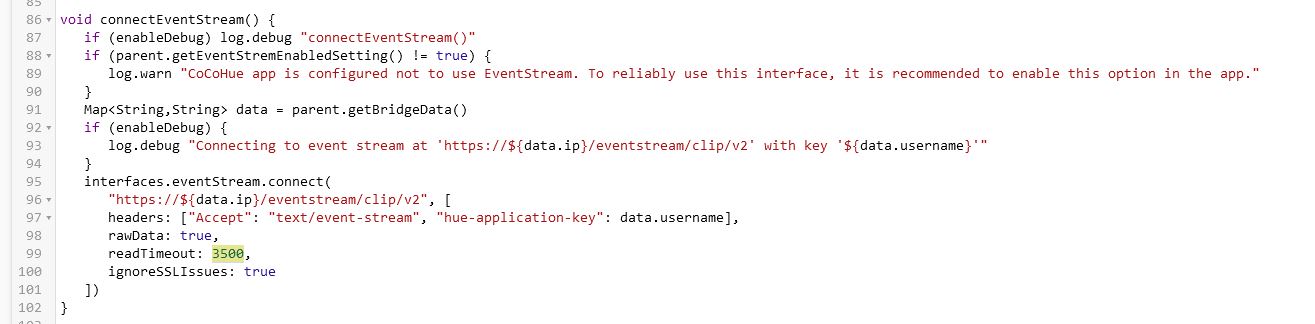
I eventually fixed it by setting the 'readTimeout' in the CoCoHue Bridge driver to a larger value.
By default it's set to 60 seconds, which for some reason resulted in a disconnect/reconnect every minute or so. Setting it to 10 minutes resolved MOST disconnect/reconnects but now I just set it to roughly an hour.. and I don't have to worry about it anymore:
Yes my personal ZGP switches (Senic Gira) aren't listed by specific vendor name in Hue.
It seems Hue itself just has a list of all FoH devices that you have to select your specific switch from so I guess Hue internally also isn't able to recognize one ZGP switch from another, and relies on user identification.
In my particular case, for a double rocker switch (so 4 'buttons' total) the order for all 3 of my switches was consistent in how they got registered by Hue... which makes sense, given that Hue itself most likely relies on some sort of consistency as in the Hue app it DOES show an image of the physical switch and allows you to configure them like that.
From top to bottom in the v2 device's services list they were:
top left button
bottom left button
top right button
bottom right button
I'd hazard a guess probably most/all ZGP switches that work with Hue are setup the same way..
I'm glad to see you're looking into it (again), and I hope some of my code helps.
I've released CoCoHue 4.1 with the following changes:
Experimental support for button devices, per the above (requires v2 Bridge and v2 API/push option enabled in CoCoHue)
Eventstream tweak that may help with disconnect messages
I've tested the button devices with the Hue Tap and Hue Dimmer v1, but it should let you add nearly any button device and will hopefully get most/all events from them too if they work similarly to the others. I can test with a Lutron Aurora but haven't yet. Those are all the devices I have at the moment. I might need to add some device-specific code, if needed, and should be able to help someone figure out what I'd need to make that work if needed.
The eventstream changes didn't help with me and may have also been in an earlier, silent update of the code, but some users report that it did help them.
Thanks for looking at this! I didn't use any of your code, but it was good to know that it was possible to associate the buttons and events, which looked nearly impossible when I looked at the API the first time!
@bertabcd1234. Loving the integrated hue labs formulas! Hoping someone can help me figure out how to get around this issue.
The Ask
Is there an easy way to make the other "Cocohue - Generic status devices" turn off when another is turned on?
What I'm trying to do
would like to cycle through a few of these HL formulae - one at a time - when (something) happens but I can't seem to accomplish this without manually (or with a rule) turning the other switch off first, at which point the automation principle is pretty much lost.
my setup
I'm running a button rule, when pushed, sets a variable to random number (constant=4),
then a series of if-then's that "pushes button 1" for each of the 4 hue labs formulae based on the returned random number variable driver for this device=Generic Status Device
result: is random variable number changes > then presses button 1 on the corresponding scene.
the problem:
after I press the button a second time, the previously activated "generic status device" doesn't turn off.
AND after I press the button >4 times, all of the devices still report as "on," causing no physical change to the associated lights since all switches are still on.
failed solutions
Tried using the "switch on" instead of "button 1 pressed" - getting same result
I did have additional actions for each if-then that turns all other "generic status devices" before turning the next one on. This seemed to work okay - but wasn't quite right.
I don't make much use of Hue Labs activators myself, but any on/off status reports should just be whatever the Hue v1 API (as of now; this will change to v2 if there is still a way to do it, which I assume there is but have not looked for these there yet) reports. Since it's the v1 API, this will depend on a poll (you may have this configured already) or a refresh() on the Bridge device itself, effectively the same. I'm not sure what comes in on the v2/push/SSE API if you have that option enabled — or if Hue even ever reports these as "off" by its own will or if that only happens when you do it yourself.
Turning any previous activators off before you turn a new one on is probably best, but if Hue automatically turns them off in the background, CoCoHue should catch up after a poll. But again, I'm not sure if this is something Hue reports on its own or if it's something you'd need to do yourself regardless. All the activator device on Hubitat does is tell Hue to activate (technically by setting status to 1), regardless of whether you use on() or push(). What the Hue system does with that command based on what it thinks the state of the device is is another story, but that's not something CoCoHue checks first.
Not sure if any of this is helpful...just what I know.
My ZGP buttons don't send 'held' or 'long_release' events.
They only ever send 'initial_press' and 'short_release'.
I assume this has to do because it generates power from the physical pressing/depressing of the button and thus only sends 2 pulses (press & depress).
The Hue app itself does correctly parse it as a 'hold' if you hold the button for a few seconds.. I assume it starts running a timer once the initial_press event is received and if it doesn't receive a short_release event fast enough it'll interpolate that you're holding the button and thus fires the rule(s) you might have associated with that.
Your current button driver doesn't handle 'short_release' so for my switches it would interpret both the initial_press and the short_release events as 'pushed'.. which might not be ideal for automation purposes.
Hmm. I can make it ignore short_release, which could help with one issue (assuming all devices send initial_press). I could also add an option, or perhaps a different driver, that looks for some kind of release and then sends either a push or hold on Hubitat, depending the length. (This seems less desirable in general, but if there is a specific need...then maybe?)
I'm not sure what other devices are out there or what they might look like via the Hue API. My initial attempt seems to working for what I have, so this is good to know for others.
To address the above, I've released CoCoHue 4.1.1, which contains minor improvements for button event parsing (and should eliminate duplicate "pushed" events for some devices). Available via HPM or manual installation via app/driver code or bundle ZIP, as usual. See first post for more details.
On a button-related note, I tried out my Lutron Aurora and made sure it worked for a center button tap, hold, and release. I see events I could use for turning it left or right, but I don't want to commit to parsing those events yet until I see how a Hue Tap Dial, which I know uses similar events, handles this, too. So, for now, turns are ignored. I can think of an easy way to make it work for the Aurora without a lot of extra work, and possibly the Tap Dial too if it works the same way, but something tells me I should do it the hard and possibly "right" way in case more devices support this feature in the future and use it differently. (Could something even have more than one dial or two directions? I don't know...)
Still new to all of this, but I'm not sure the procedure to add lights using this app? I've already connected my bridge to the app. I had my hue lights connected to my hubitat and it couldn't find them when I opened the app and used the select lights option. So I tried switching the device type to the CocoHue RGBW and it still couldn't find them. Should they already be connected to the hubitat or do they need to be disconnected so the app can find them, or am I missing something else entirely?
This app creates an integration between HE and devices paired to a Hue hub. Devices are paired to the Hue hub via the Hue app (I use the Hue iPhone app). Once they are on the Hue hub this app will see them and create the appropriate (selected) devices on HE.
I've released another minor update, CoCoHue version 4.1.2 with the following change:
added support for "relative rotary" devices as part of button device support (e.g., Hue Tap Dial and Lutron Aurora)
If there are other devices out there, it should work with them, too, but these are the only two I know of. The counter-clockwise and clockwise turns of the dial are added as two additional button numbers. For example, with the Hue Tap Dial, button 5 is a counter-clockwise turn and button 6 is a clockwise turn. You'll get "pushed" on a single turn and "held" for "repeated"/large turns (there is no native "released" event sent from these and I'm not inclined to fake it in the driver with a timer or similar, but there are different ways this information could be parsed if anyone really has a need...).
Installation available as usual: with HPM, or manually via individual files or ZIP bundle, as described in first post.