Currently, clicking "off" on a CoCoHue scene activator for a scene that is already off turns off the lights. Perhaps this is intentional behavior, but would it be possible to have an option to do nothing in that scenario?
The reason I'm asking is for the use of capture/restore in rule machine. If I capture the states of the various scene activators for light(s) and then restore, the lights end up turning off rather than going back to the original scene, since the "off" command gets sent when restoring the inactive scene activators.
I tried capturing the light states, but I'm using Philips Hue Gradient lights, and Hubitat isn't able to capture them (multiple colors and dynamic scenes).
Hi, thanks for making this integration! I'm still learning HE, and have been iterating on a rule using the integration that would be great to get input on. I can't seem to get it updating the state of devices properly so the rule isn't triggering right.
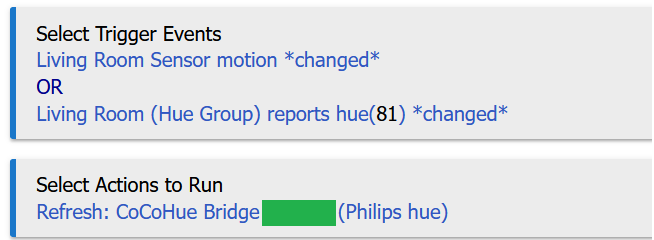
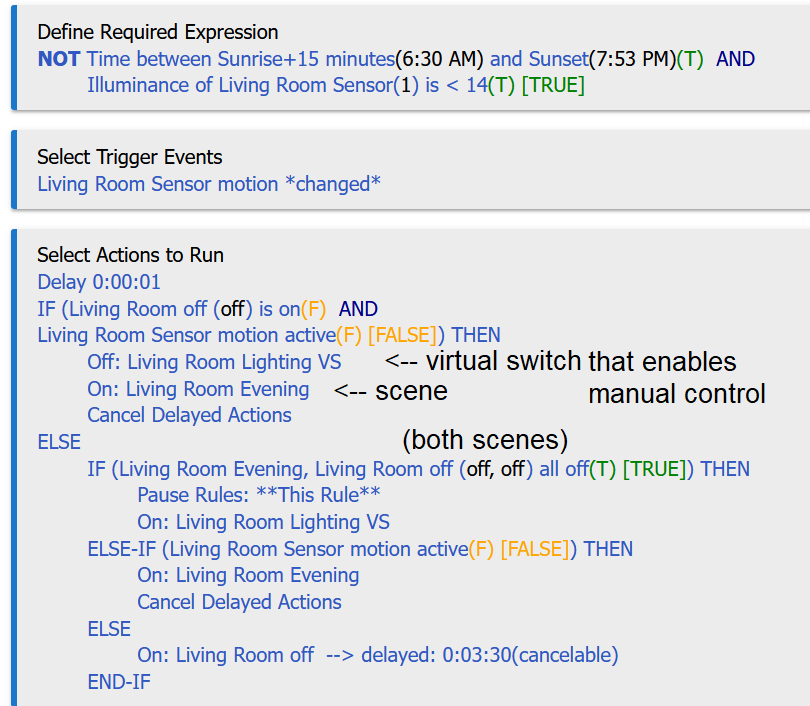
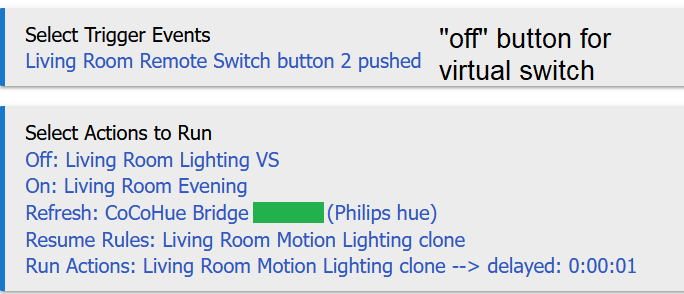
I want to have my "Living Room evening" scene turn on when my living room motion sensor is active, and turn off automatically after a certain time of inactivity. This is no problem. But what I also want to do is to be able to override this by the hue app or voice through siri to change the lighting in the living room. To stop the Living Room evening scene coming back on when the motion sensor is active, I have motion activity trigger the motion sensor to refresh the bridge, and if the lighting scene is not "Living Room evening" or "Living Room off" (when all lights are off), it should pause the rule and allowing manual control of the lighting. The problem I'm having is that the states of the scenes/bulbs don't seem to respond to refreshing the CoCo Hue Bridge so the rule isn't pausing properly until the next polling. I've created a Living Room virtual switch (VS) so I can also pause/unpause the rule using a remote switch which works well, but would like to replicate this without the switch too. Some screenshots of some of the rules below. Is there something I'm missing with the integration?
Hue scenes do not have states (at least not in the v1 API that CoCoHue currently uses for this; not sure if that changed in v2, which this will be moving to in the future). You should not rely on the on/off state of a scene. They should be treated as momentary devices that can be turned "on" only. (Have I mentioned before that I regret not making these simple button devices instead? )
Could that explain your problem?
If not, the state of lights and groups should update fine, either with a refresh, the regular polling interval, or the new "event stream"/push model on a v2 Bridge with newer firmware and this option enabled). If that's not working, I'd need debug logging enabled in the app, Bridge, and affected lights/groups to diagnose--and those logs.
Thanks for the advice! I've tried including the refresh action for the CoCoHue bridge, the bulbs and the groups, but they don't seem to update instantaneously to allow conditional rules to reliably trigger. I have the v2 hue Bridge, firmware is updated, and the event stream is enabled. The bulbs will also switch from RGB to CT on their own which also makes the rules a bit buggy. Still trying to work things out but can send logs when I get a chance to work on it.
Greetings! I've released a minor update and accidentally re-used version 4.0.2 for it (oops--shouldn't cause problems for HPM users since different files were changed and they're all individually versioned, and, of course, it doesn't matter for anything if you're doing things manually). The only change:
avoid sending "transition time" with off() command when not specified (and it usually isn't--this seems to cause some oddities in both the v1 and v2 APIs if it is)
As usual, available via HPM, manual install, or manual bundle ZIP--see first post for more.
I’m not entirely sure what is going on, but I’m seeing behavior, that when toggling off the event stream functionality, it doesn’t seem to apply immediately. For some period of time, that I didn’t measure, events are still being pushed to the hub.
I determined this by watching logs and controlling a light via the Hue app. The change appears immediately on the hub, outside a polling window.
Eventually it does revert back to the old method, within a couple of minutes, but it wasn’t immediate.
You're right, there's nothing that automatically disconencts the eventstream when that option is un-selected (just one that connects it immediately if it is selected). I'll add something to catch this in a future version. In the meantime, you can manually disconnect by running the disconnectEventStream() custom command on the Hue Bridge device. Otherwise, it automatically closes on its own eventually, it seems...an oddity of the v2 API or perhaps Hubitat's eventstream interface, since it shouldn't, but that's another story.
I'm noticing that turning off a group isn't properly updating all the scenes for that group. The scene that was last on, still shows as on. I think this might be a change since I enabled the event stream option.
That is probably true. If event stream is enabled, it should just wait for on/off from groups to flow in naturally. I'm not sure I've always seen that happen, though. Maybe something for me to look into...
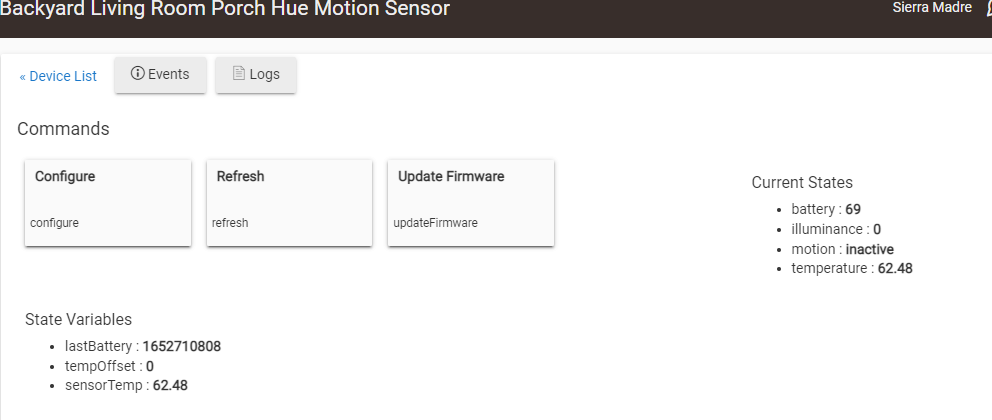
I'm having trouble getting the battery level to show on the motion sensors. After installing Beta 3, I get illuminance, motion and temperature but no Battery level.
As @Ken_Fraleigh noted, the last beta was maybe November of last year, so it sounds like you're on old code. If you're using HPM, I'd use the latest version without the beta option enabled (I'm really not sure how it decides what to install...), repairing to get the latest version if needed, or just manually install from the app and driver code or bundle ZIP in the first post to be sure. If you're manually installing, be sure you're using the HubitatCommunity repo and not my own (where, as it notes, test/beta code lives).
I was originally on 4.02, but battery level didn't show. So I went with beta 3.0. I manually updated the app/driver from HubitatCommunity v4.02, still doesn't show battery level. Feels like i'm missing a step here.
I also have two outdoor motion sensors and they show the battery level, but not the indoor motion sensors.
I'm not sure what could be going on and only have an outdoor motion sensor to test with right now (I have an indoor one somewhere...will just need to find batteries and pair it), but I figured they'd be nearly the same. Do you have polling enabled? I'd expect battery data to be in that (otherwise you may need to wait for something to come in on the eventstream, and that would be a difference between 3.x and 4.x), and if it is, debug logging on the bridge and sensor device might give me the information I need, as well as scanning the logs for any errors you might see if it's not working.
Hey @bertabcd1234 I've got a few Friends Of Hue switches (Zigbee Green Power) connected to my Hue Bridge, but they don't show up as available devices in CoCoHue.
Do you think you'd be able to implement them as available button devices to add to Hubitat via CoCoHue? I'm LOVING the Enable "push" updates option it provides and it works great for me, but currently in order for those switches to 'integrate' with my hubitat automations I'm having them toggle lights directly in Hue and then slap a Rule Machine rule onto the physical light being changed to 'know' that the button was pressed. If the buttonpress event could be captured by CoCoHue directly and slapped onto a button device within hubitat that would open up whole new worlds as far as automation goes, without having to rely on indirectly perceiving button presses via state changes of Hue lights.
From what I've managed to scrape off of the API it seems like it should be possible? (so long as either button events are stored/pushable?)
I can live without it.. but it'd be awesome to have. It's however not something I'd want to implement by myself as I'd have to start from scratch (I have programming experience, but I've never written a Hubitat driver nor worked with the Hue API). Do you think this is something you could look into? Or at least maybe point me in the right direction? Or work on it together?
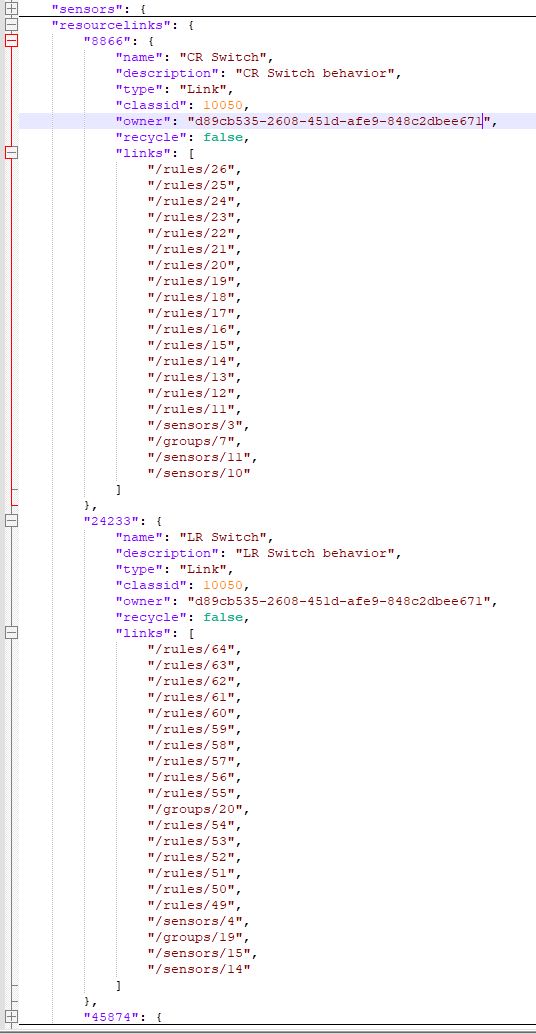
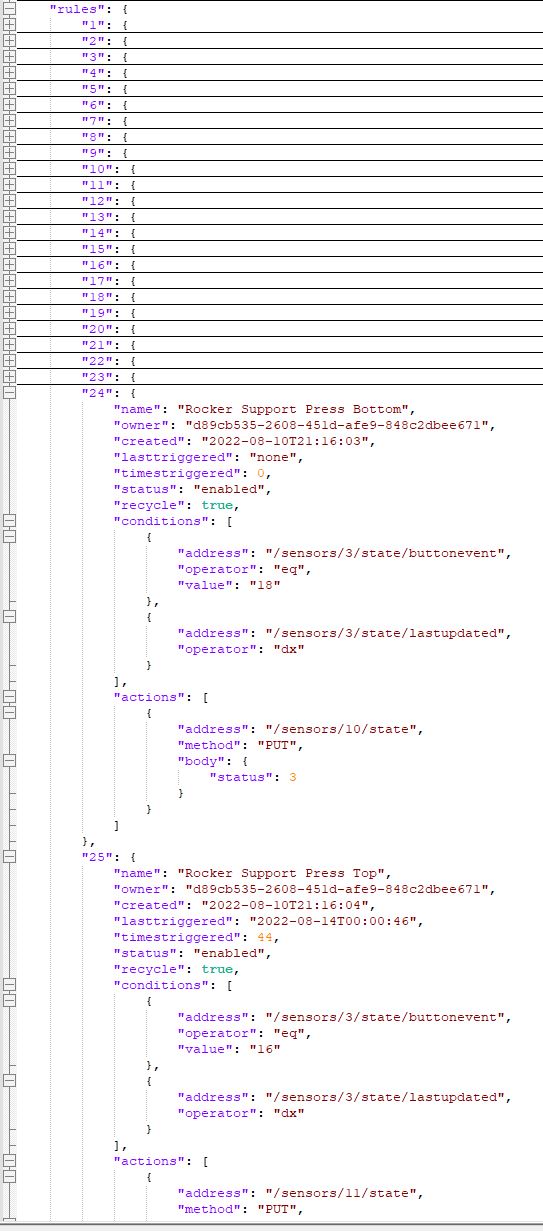
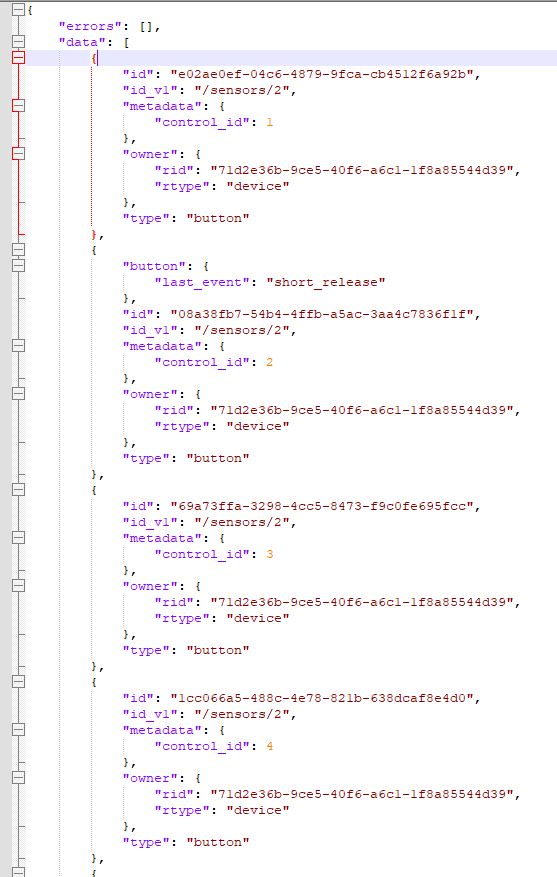
I've figured out how to make sense of the buttons in the v1 API, but I wasn't able to using only the v2 API last time I checked (unless I matched some data from v1, which I was hesitant to rely on since that is supposed to be going away--nevermind the fact that I'd rather not need both for one thing). Maybe that has changed recently. I haven't checked. I can't quite tell from your last screenshot, which does seem to be v2...
Yes, the last screenshot is from the v2 API, the first 2 are from v1.
Is this something you might be willing to look into? If it helps that I do some more preliminary API investigation to figure out how these buttons work I'm more than happy to dive into that.
My issue is that in the v2 API, I don't see any way to "know" that the button events are from the same button. They seem to have arbitrary IDs, and the only connection is id_v1, which is something I'm hesitant to rely on for the reasons above. (It's possible the method of getting the "all devices" list in the v2 API would tie these together somehow, but I haven't looked at that lately--and am still using v1 in CoCoHue for that because v2 wasn't complete enough last time I tried.)

 )
)