Thanks Mike — and no rush at all on the Suite. Honestly, I didn't want to give it up either; the Suite's memory footprint is exactly what pushed me down this whole rabbit hole in the first place, and I ended up rebuilding the companion apps I actually used from it (vent control, open-contact pause, humidifier) so I could stand on my own. Running both side by side is totally fine — that's how I did it for a while too. And to be upfront about the trade: I went into this knowing I'd give up a few of the cloud-side niceties, and for me the massive gain of full local control is well worth losing some of that fidelity. Everyone's math is different, but that's where I landed.
Battery: I'm with you — all-sensors-at-100% is suspect, and I don't fully trust what we're getting either. I pulled a dump on my own thermostat and every one of my sensors also reports 100% / not-low, same as yours, so it's consistent across both setups — which makes me think ecobee's battery over HomeKit may just be decorative. I'm going to force the issue: I'll drop a spent battery into one of mine and watch whether the HomeKit battery / low-battery value ever actually moves. If yours does anything when you swap the Kitchen one, I'd love to hear it — let's compare notes.
Thermostat-sensor temperature: My dump also revealed that he thermostat exposes only one temperature over HomeKit — its CurrentTemperature — with no separate individual built-in-sensor channel like each remote sensor has. So the "Thermostat Sensor" child can only show that value, which is the ecobee's controlling temperature. On mine it reads 26.7 while my remotes read 23.5–26.5, so it's clearly not a plain average of everything — it's the controlling temp per whatever sensor participation you've got set. Either way, the app's per-sensor "just the thermostat" number isn't on the HAP interface, so I can't split it out — it's a HAP limitation, not a driver bug. (It'll also match the parent thermostat's temperature, since they're literally the same characteristic — that child mainly exists to surface the thermostat's built-in motion/occupancy separately.)
Thanks again — your reports and dumps are genuinely driving this forward.
@ramset, I may have misunderstood your previous comments regarding refresh and the comfort profile and what you changed with Core HAP library.
I have been updating just with HPM, but just confirmed that what I have installed now is
hapCore v0.9.1
Ecobee HAP Thermostat v0.16.0
Ecobee HAP Remote Sensor v0.10.0
I am getting updates for setpoints, temperature, and humidity (which are the most important), but changes to the Comfort Profile, On Hold, Hold Ends At, do not seem to update until I hit refresh unless I am just not waiting long enough. At the moment, I am seeing those updates on the Suite device before I see them on the HAP device.
Is that as expected based on how the HAP behaves or was that what you referred to as the issue introduced when you seprate the hapCore library? If so do I need to change, the way I have installed this. I have the correct versions I believe, but maybe there is something else I need to do?
You’ve got the right versions, nothing’s misconfigured, and you don’t need to change your install.
What you’re seeing is expected, and it comes down to two kinds of characteristic on the ecobee’s HomeKit interface:
• Temperature, setpoints, humidity, fan — these push events, so they update instantly. That’s why they’re snappy.
• Comfort Profile, On Hold, Hold Ends At — these are read-only with no event push over HAP. The ecobee never announces changes to them, so the only way to see one is to read it.
The driver does that automatically on a timer — that’s what my 0.15.2 fix restored.
So they do update on their own, just with a lag rather than instantly.
The Suite beats it because it talks to the ecobee cloud, which reflects those near-instantly; local HAP just doesn’t offer a push for them, so periodic polling is the best I can do locally.
To your direct question: the bug I introduced when I split out the library was that these stopped auto-updating at all (manual Refresh only, forever).
That’s fixed in what you’re running — so what’s left is just the polling lag, not the bug.
And I just pushed 0.16.1 that turns that lag into a setting: the driver now has a “Background refresh interval” preference (30 seconds up to 30 minutes, default 5).
If you want Comfort Profile / On Hold / Hold Ends At to catch up faster, update to 0.16.1 and set it to 30 seconds or 1–2 minutes. Faster means a bit more local traffic, but the ecobee handles it fine — dial it to whatever feels right, and back off if you ever see the session get flaky.
Thanks for adding the preference. For some reason, mine is still not updating the Profile. At 7:00am my Ecobee switches from Sleep to Home. It is 7:40am and my HAP device still shows Sleep. I set the preference for 2 mins last night to test it, but even your default of 5 is probably good enough for my needs also.
Is there something else I should try since this problem seems to be unique for me or is it my Ecobee model? I have not kept up with their models, but I purchased this one in 2021 and I think it is the model they released with voice after the Ecobee 4 I beleive. I had an Ecobee 3 in my previous home and 2 of the 3 sensors are from that model and the other came with this one.
**Error Occurred During Installation**

An error occurred while installing the package: Failed to install driver https://raw.githubusercontent.com/RamSet/hubitat/main/drivers/ecobee-hap-thermostat/ecobee-hap-thermostat.groovy.
Please notify the package developer..
Be sure the package is not in use with devices.
I tried a manual install using the links in the first post. The library went fine (I removed the one HPM added and re-imported it, even though it looked identical). Installing the Thermostat Driver gives this error while doing Save:
The method public int pollSecs() { ... } duplicates another method of the same signature . At [536:1] @ line 536 (library RamSet.hapCore, line 96), column 1.
Looking at the driver and the library, they both contain a pollSecs() methods that are similar but different.
Confirmed, fixed, and verified on my own thermostat — and it wasn’t your model. Thanks for staying on it; your details are what pinned it down.
What was actually wrong: the background auto-refresh never got created on custom intervals. The scheduler call I used for the 30-second/2-minute options threw an error at save time, so no poll was ever registered — which is exactly why your manual Refresh worked but the automatic update never happened. The default 5-minute option used a different scheduling path that happened to work, so this looked model-specific when it wasn’t.
Two fixes are in 0.16.4:
• The background refresh now uses a dependable self-rescheduling timer (works at any interval, including 30s/2m).
• holdEndsAt now clears to none when you resume the schedule, instead of leaving the old hold-end date showing.
To get it working, one important step after updating:
1. Update to 0.16.4 in HPM.
2. Open the Ecobee HAP Thermostat device and click “Save Preferences” once. This matters: Hubitat doesn’t re-run a driver’s setup when HPM updates it, so the background poll only arms after a Save. (This is likely why it never kicked in for you before — the schedule was never created.)
3. Set your Background refresh interval to whatever you like (5 minutes is plenty; 30s–2m if you want comfort/hold to catch up faster).
After that, Comfort Profile / On Hold / Hold Ends At update on their own within your interval — no manual Refresh. I tested the full cycle here (flip to a hold, then resume) and it tracked correctly both ways.
I just installed 16.4, followed your instructions and confirmed your test results on my setup also. The background refresh is working now for me too.
Now I just need to start working on the rule migration process. This is some really great work you have done here and glad I could help with the testing. I don't have the skills to develop so it feels good to attempt to help where I can.
It’s technically yhe temperature that the thermostat is shooting for, with one foot note …
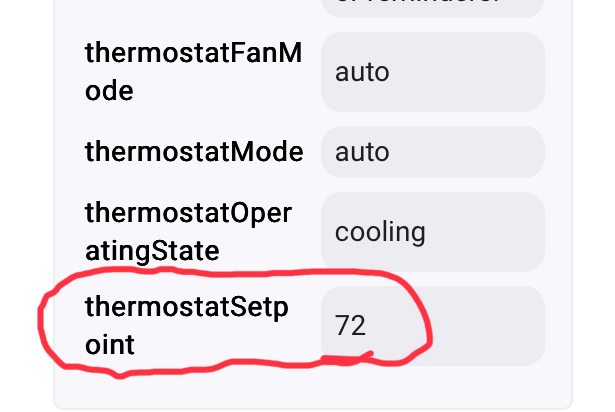
thermostatSetpoint = HAP TargetTemperature (iid20) — the one temperature the thermostat is actively driving to.
Heat mode: that's the heat target (and the driver mirrors it into heatingSetpoint).
Cool mode: that's the cool target (mirrored into coolingSetpoint).
Auto (dual-setpoint) mode: there is no single target — the ecobee runs between two thresholds, so coolingSetpoint (iid22) and heatingSetpoint (iid23) are the meaningful values. thermostatSetpoint still carries iid20, but it isn't what's driving the system in auto, so don't rely on it there.
So: in heat/cool, yes — thermostatSetpoint is "the temperature it's trying to hit." In auto, use the heating/cooling setpoints instead. If you're writing a rule that should work in any mode, key off the mode first, or use heatingSetpoint/coolingSetpoint rather than thermostatSetpoint.
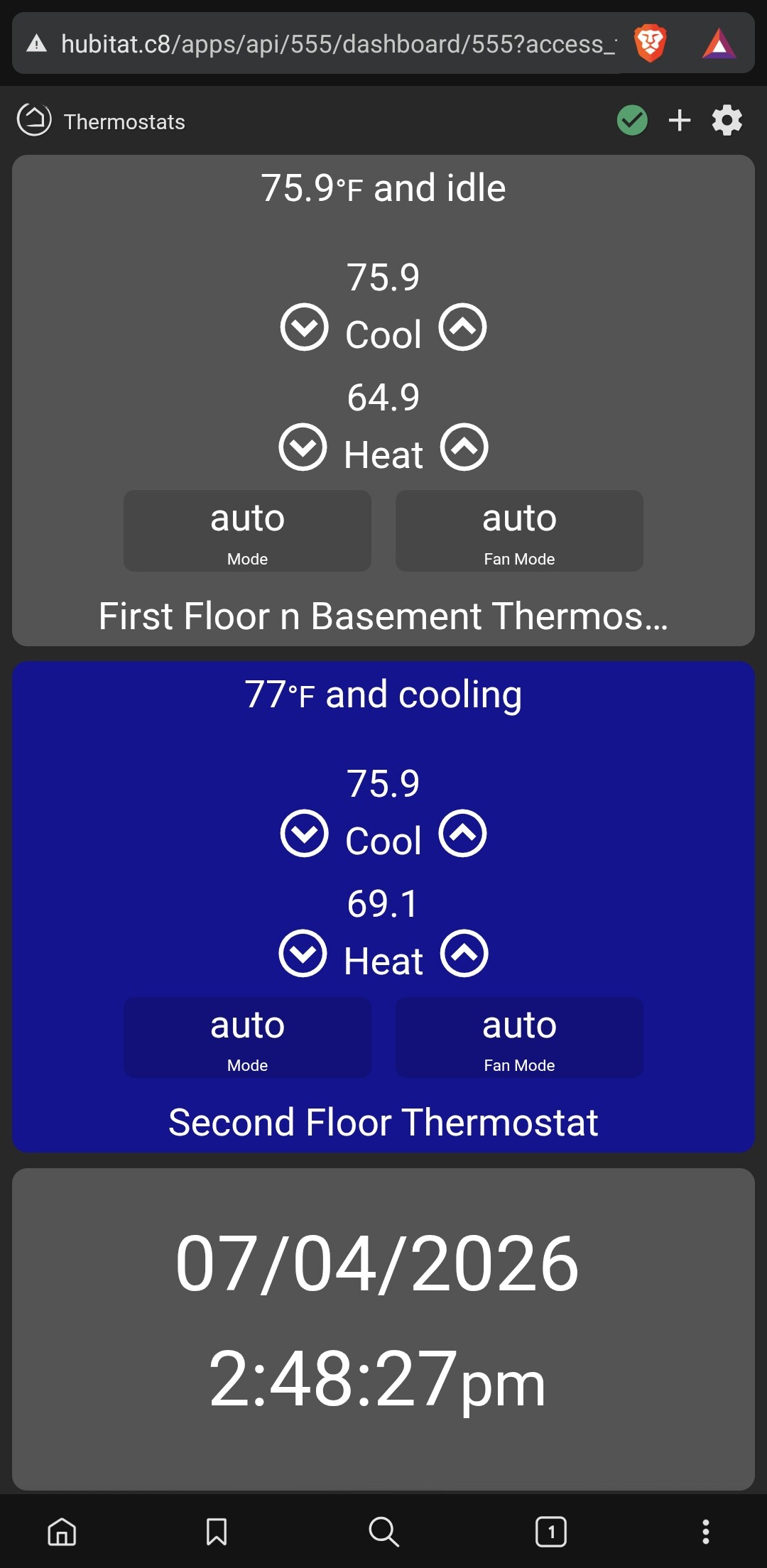
in auto, HomeKit only exposes a single TargetTemperature (iid20), and the ecobee fills it with the midpoint of the two thresholds — so 72 = (cool + heat)/2, a number that appears nowhere on the thermostat. That's exactly why thermostatSetpoint is junk in auto.
I updated it where it follow the active threshold — cooling → coolingSetpoint, heating → heatingSetpoint — so it always shows the temp actually being regulated instead of the midpoint.
One edge case is when the system is idle in auto — neither heating nor cooling — so there's no single active target. There it falls back to whichever threshold is nearest the current temperature (the one it'll defend next). I also added a setpointDetail attribute that spells out what thermostatSetpoint is reflecting at any moment — heating setpoint, cooling setpoint, cooling setpoint (auto), auto — nearest target (idle), off — so the number's never ambiguous. Heat-only and cool-only are unchanged; it was already the single target there. It's in 0.17.0.
I'm getting temperatures to nearest 10th of a degree now including set point which is weird. Arrows change setup points by 1 degree still so not sure how to ever get rid of .9 or .1 in set point.