What happens if you add a 5th and 6th climate? Does it report 4 and 5?
That’s what we’re working on identifying …
Assume not, but have to ask. Does the HK stuff support reporting/controlling the ecobee when it is configured with multi-speed fan (Help Centre)?
My ecobee controls a Bosch heat pump and uses the 2 available air handler speeds to control “staging”. I typically keep the AH fan in low, but there are times I want high.
Well… I can confirm: nope 
Over HomeKit, the ecobee only shares fan mode (Auto vs. On/continuous, char iid75) and whether the fan’s currently idle or blowing (iid76). There’s no fan-speed or staging option in the HAP interface at all — I’ve checked both an ecobee4 and a Premium, and the fan works in a simple on/off way for both. That means the driver can’t see or adjust your air handler’s low/high settings.
That multi-speed staging is handled internally by the ecobee based on heating or cooling needs — it doesn’t share that as a controllable feature with HomeKit. So it’s not really a missing piece in the driver; it’s just not part of the interface.
Here are two helpful next steps:
• To be extra sure for your setup, try running Dump Accessories and sharing the results. Since your Bosch heat pump with multi-speed setup is a bit unique, if ecobee offered anything extra, it’d show up there — I’d be surprised, but I’d love to take a look!
• I’m not sure the ecobee cloud API lets you set air-handler speed either — staging is usually automatic, not something you control manually. So this might be a case where there’s no external control anywhere, not just in HomeKit.
It does, it was def towards the end of Ecobee Suite Dev’s updates they added that feature for me ;). It works because it’s not staging. It’s controlling the fan speed of the air handler, it’s just the way my heat pump works that is like staging and most people will configure the Ecobee with my heat pump directly via staging since it’s all automatic.
So basically my next step is, install/configure this and “dump accessories” and report back to you?
From ecobee suite, reporting:
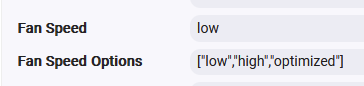
and controlling:
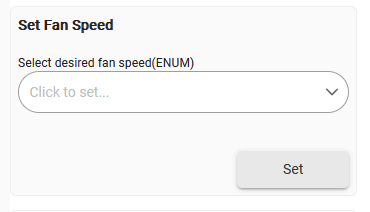
I hadn’t noticed the cloud-side fan-speed control (awesome that the Suite dev added that for you), so that context is really helpful.
So, it’s direct air-handler fan-speed control, with your heat pump acting more like staging.
Yep — next up is install/pair, then run Dump Accessories and share the results. Just a quick heads-up so you know what to expect: the two dumps I’ve tried only showed fan mode (Auto/On) and running status — no speed info.
Your setup’s different enough that it’s definitely worth a closer look!
The driver already shows the ecobee’s extra undecoded details in a customParams attribute (things like c_iid49–c_iid53 that I haven’t cracked yet).
Once you’re paired, switch the air handler from low to high and see if anything in customParams shifts. If one value changes, that’s likely your speed control — and I can decode it and add it to the driver. Doing a before/after Dump Accessories (one on low, one on high) works too — just compare the two to spot the difference.
If nothing changes between low and high, then ecobee probably kept that feature cloud-only, and the Suite remains the go-to tool.
Either way — huge thanks for testing this; it’s exactly the kind of unique setup that helps us see where the local control really ends!
I am not sure which values you are looking for specifically, so here is the full dump from when my thermostat was in the Home comfort profile:
dev:13742026-07-01 12:22:51.531 pminfo===== end dump =====
dev:13742026-07-01 12:22:51.531 pminfo svc iid56 t=85: iid66 t=22 [pr/ev]=0 iid28 t=23 [pr]=Bedroom Motion iid101 t=75 [pr/ev]=1 iid100 t=79 [pr/ev]=0 iid67 t=BFE61C704A4011E6BDF40800200C9A66 [pr]=12728
dev:13742026-07-01 12:22:51.529 pminfo svc iid57 t=86: iid65 t=71 [pr/ev]=0 iid29 t=23 [pr]=Bedroom Occupancy iid117 t=75 [pr/ev]=1 iid116 t=79 [pr/ev]=0 iid68 t=A8F798E04A4011E6BDF40800200C9A66 [pr]=12728
dev:13742026-07-01 12:22:51.529 pminfo svc iid208 t=8A: iid209 t=11 [pr/ev]=20.5 iid210 t=23 [pr]=Bedroom Temperature iid211 t=75 [pr/ev]=1 iid212 t=79 [pr/ev]=0
dev:13742026-07-01 12:22:51.528 pminfo svc iid192 t=96: iid193 t=8F [pr/ev]=2 iid194 t=68 [pr/ev]=100 iid195 t=79 [pr/ev]=0 iid196 t=23 [pr]=Bedroom
dev:13742026-07-01 12:22:51.527 pminfo svc iid1 t=3E: iid2 t=23 [pr]=Bedroom iid3 t=20 [pr]=ecobee Inc. iid4 t=30 [pr]=33WW iid5 t=21 [pr]=EBERS41 iid8 t=52 [pr]=1.0.0 iid6 t=14 [pw]=
dev:13742026-07-01 12:22:51.526 pminfoACC aid=4297808433
dev:13742026-07-01 12:22:51.525 pminfo svc iid56 t=85: iid66 t=22 [pr/ev]=0 iid28 t=23 [pr]=Kitchen Motion iid101 t=75 [pr/ev]=1 iid100 t=79 [pr/ev]=0 iid67 t=BFE61C704A4011E6BDF40800200C9A66 [pr]=1700
dev:13742026-07-01 12:22:51.523 pminfo svc iid57 t=86: iid65 t=71 [pr/ev]=1 iid29 t=23 [pr]=Kitchen Occupancy iid117 t=75 [pr/ev]=1 iid116 t=79 [pr/ev]=0 iid68 t=A8F798E04A4011E6BDF40800200C9A66 [pr]=3152
dev:13742026-07-01 12:22:51.522 pminfo svc iid208 t=8A: iid209 t=11 [pr/ev]=21.7 iid210 t=23 [pr]=Kitchen Temperature iid211 t=75 [pr/ev]=1 iid212 t=79 [pr/ev]=0
dev:13742026-07-01 12:22:51.520 pminfo svc iid192 t=96: iid193 t=8F [pr/ev]=2 iid194 t=68 [pr/ev]=100 iid195 t=79 [pr/ev]=0 iid196 t=23 [pr]=Kitchen
dev:13742026-07-01 12:22:51.519 pminfo svc iid1 t=3E: iid2 t=23 [pr]=Kitchen iid3 t=20 [pr]=ecobee Inc. iid4 t=30 [pr]=BN5W iid5 t=21 [pr]=EBRSE4 iid8 t=52 [pr]=1.0.0 iid6 t=14 [pw]=
dev:13742026-07-01 12:22:51.518 pminfoACC aid=4294978321
dev:13742026-07-01 12:22:51.517 pminfo svc iid56 t=85: iid66 t=22 [pr/ev]=0 iid28 t=23 [pr]=Office Motion iid101 t=75 [pr/ev]=1 iid100 t=79 [pr/ev]=0 iid67 t=BFE61C704A4011E6BDF40800200C9A66 [pr]=3721
dev:13742026-07-01 12:22:51.516 pminfo svc iid57 t=86: iid65 t=71 [pr/ev]=0 iid29 t=23 [pr]=Office Occupancy iid117 t=75 [pr/ev]=1 iid116 t=79 [pr/ev]=0 iid68 t=A8F798E04A4011E6BDF40800200C9A66 [pr]=3721
dev:13742026-07-01 12:22:51.515 pminfo svc iid208 t=8A: iid209 t=11 [pr/ev]=21.2 iid210 t=23 [pr]=Office Temperature iid211 t=75 [pr/ev]=1 iid212 t=79 [pr/ev]=0
dev:13742026-07-01 12:22:51.514 pminfo svc iid192 t=96: iid193 t=8F [pr/ev]=2 iid194 t=68 [pr/ev]=100 iid195 t=79 [pr/ev]=0 iid196 t=23 [pr]=Office
dev:13742026-07-01 12:22:51.513 pminfo svc iid1 t=3E: iid2 t=23 [pr]=Office iid3 t=20 [pr]=ecobee Inc. iid4 t=30 [pr]=BT46 iid5 t=21 [pr]=EBRSE4 iid8 t=52 [pr]=1.0.0 iid6 t=14 [pw]=
dev:13742026-07-01 12:22:51.513 pminfoACC aid=4294983417
dev:13742026-07-01 12:22:51.512 pminfo svc iid192 t=270: iid193 t=B0 [pr/pw]=0 iid194 t=271 [pr/pw]=AQYBAQECAQAAAAEGAQECAgEA iid195 t=272 [pr/ev]=0
dev:13742026-07-01 12:22:51.511 pminfo svc iid208 t=237: iid209 t=238 [pr]=AQEAAgECBAICAA==
dev:13742026-07-01 12:22:51.511 pminfo svc iid2560 t=239: iid2562 t=23C [pr]=
dev:13742026-07-01 12:22:51.509 pminfo svc iid16448 t=22A: iid16450 t=22B [pr]=0 iid16451 t=22C [pr]=11 iid16452 t=22D [pr/pw/ev/tw/wr]=
dev:13742026-07-01 12:22:51.508 pminfo svc iid129 t=DA: iid130 t=E5 [pr/pw/ev]=0 iid131 t=E4 [pr/pw/ev]=AQACAQA=
dev:13742026-07-01 12:22:51.508 pminfo svc iid4144 t=228: iid4146 t=E3 [pr/pw/ev]=My ecobee iid4147 t=E0 [pr/ev]=1 iid4148 t=137 [pr/pw/ev]=0 iid4150 t=11A [pr/pw/ev]=1 iid4149 t=119 [pr/pw/ev]=0 iid4151 t=25B [pr/pw/ev]=0
dev:13742026-07-01 12:22:51.507 pminfo svc iid352 t=26A: iid353 t=E6 [pr]=1 iid354 t=23 [pr]=Alexa iid355 t=B0 [pr/pw/ev]=0
dev:13742026-07-01 12:22:51.506 pminfo svc iid1024 t=267: iid1026 t=268 [pr]=3 iid1027 t=269 [pr/ev]=0
dev:13742026-07-01 12:22:51.506 pminfo svc iid800 t=26A: iid801 t=E6 [pr]=0 iid802 t=23 [pr]=Siri iid803 t=B0 [pr/pw/ev]=1
dev:13742026-07-01 12:22:51.505 pminfo svc iid784 t=253: iid785 t=254 [pr/ev]=AQEA iid786 t=37 [pr]=1.0 iid787 t=E7 [pr/pw/ev]=0 iid788 t=227 [pr/ev]=0
dev:13742026-07-01 12:22:51.504 pminfo svc iid769 t=133: iid771 t=132 [pr]=1 iid772 t=255 [pr/pw/ev]=0 iid773 t=256 [pr/pw/ev]=0 iid774 t=257 [pr/pw/ev]=0 iid775 t=258 [pr/pw/ev]=0 iid777 t=25A [pr]=1.0 iid778 t=26B [pr/ev]=1
dev:13742026-07-01 12:22:51.503 pminfo svc iid512 t=127: iid514 t=115 [pr]=AQ4BAQMCCQEBAQIBAAMBAQIB iid515 t=128 [pr/pw]=AREBAQMCDAEBAQIBAAMBAQQB
dev:13742026-07-01 12:22:51.502 pminfo svc iid240 t=129: iid242 t=130 [pr]=AQMBAQA= iid243 t=131 [pr/pw/wr]= iid244 t=37 [pr]=1.0
dev:13742026-07-01 12:22:51.485 pminfo svc iid57 t=86: iid29 t=23 [pr]=My ecobee Occupancy iid65 t=71 [pr/ev]=1 iid68 t=A8F798E04A4011E6BDF40800200C9A66 [pr/ev]=811
dev:13742026-07-01 12:22:51.484 pminfo svc iid56 t=85: iid28 t=23 [pr]=My ecobee Motion iid66 t=22 [pr/ev]=0 iid67 t=BFE61C704A4011E6BDF40800200C9A66 [pr/ev]=753
dev:13742026-07-01 12:22:51.480 pminfo svc iid16 t=4A: iid17 t=F [pr/ev]=0 iid18 t=33 [pr/pw/ev]=1 iid19 t=11 [pr/ev]=21.4 iid20 t=35 [pr/pw/ev]=21.7 iid21 t=36 [pr/pw/ev]=1 iid22 t=D [pr/pw/ev]=25.0 iid23 t=12 [pr/pw/ev]=15.6 iid24 t=10 [pr/ev]=49.0 iid25 t=34 [pr/pw/ev]=36.0 iid27 t=23 [pr]=My ecobee iid75 t=BF [pr/pw/ev]=1 iid76 t=AF [pr/ev]=0 iid33 t=B7DDB9A354BB457291D2F1F5B0510F8C [pr]=0 iid34 t=E4489BBC5227456993E5B345E3E5508F [pr/pw]=21.7 iid35 t=7D381BAA20F940E59BE9AEB92D4BECEF [pr/pw]=25.6 iid36 t=73AAB542892A4439879AD2A883724B69 [pr/pw]=18.9 iid37 t=5DA985F0898A4850B987B76C6C78D670 [pr/pw]=25.6 iid38 t=5B973746DC0439BA0FACA33F612D425 [pr/pw]=15.6 iid39 t=A251F6E7AC4641909C5D3D06277BDF9F [pr/pw]=25.0 iid40 t=1B300BC2CFFC47FF89F9BD6CCF5F2853 [pw]= iid41 t=1621F5561367443CAF1982AF018E99DE [pr/pw]=2014-01-03T00:00:00-07:0 iid48 t=FA128DE69D7D49A4B6D84E4E234DEE38 [pw]= iid49 t=4A6AE4F6036C495D87CCB3702B437741 [pr]=1 iid50 t=DB7BF261704241948BD13AA22830AEDD [pr]=0 iid51 t=41935E3EB54D42E9B8B9D33C6319F0AF [pr]=0 iid52 t=C35DA3C0E00440E3B15346655CDD9214 [pr/pw]=0 iid53 t=48F62AEC41714B4A8F0E1EEB6708B3FB [pr]=0 iid54 t=1B1515F2CC45409F991FC480987F92C3 [pr]=Your Kitchen sensor is r
dev:13742026-07-01 12:22:51.477 pminfo svc iid30 t=A2: iid31 t=37 [pr]=1.1.0
dev:13742026-07-01 12:22:51.476 pminfo svc iid1 t=3E: iid6 t=14 [pw]= iid3 t=20 [pr]=ecobee Inc. iid5 t=21 [pr]=EB-STATE5 iid2 t=23 [pr]=My ecobee iid4 t=30 [pr]=521702291142 iid8 t=52 [pr]=4.8.70710 iid11 t=34AB8811AC7F4340BAC3FD6A85F9943B [pr/hd]=6.1;7baf7d2f iid10 t=220 [pr/hd]=u4qz9fvXlyo= iid9 t=A6 [pr/ev]=0
dev:13742026-07-01 12:22:51.473 pminfoACC aid=1
dev:13742026-07-01 12:22:51.471 pminfo===== HAP /accessories dump =====
dev:13742026-07-01 12:22:51.198 pminfoHAP: requesting /accessories dump…
The previous dump I gave you was when my thermostat entered NIGHT profile on its own. I can force it to Away and provide another dump and the same with Sleep if that will be helpful? If there is something specific you are looking for in the dump, I can just share that to be easier, but was not sure how to determine that.
Also note that my thermostat is still showing 2026-06-30T23:30:00-07:00T For Hold Ends At.
I have also noticed that my Ecobee HAP device does not seem to be updating as I had to manually Reresh it just now. It still showed on the Hubitat as though it was in SLEEP comfort profile even though the thermostat has been HOME for several hours now.
This is the breakthrough — thank you. On Home your comfort value (iid33) reads 0, and the earlier dump you sent on NIGHT read 3. So custom climates absolutely do get their own index over HomeKit — I was wrong when I guessed "3 = Hold"; it was NIGHT all along (your 4th climate = index 3). The active climate, customs included, is readable locally.
To finish the map I just need two numbers — no full dumps. Force it to Away, then Sleep, and each time give me the single iid33 value from the thermostat line (svc iid16 t=4A: … iid33 …=N). That tells me which index is Away vs Sleep.
And great catch on the stale profile, it’s a real bug I introduced when I moved the engine into the shared library (I somehow omitted that). Those comfort/hold/alert values are read-only with no event push, so they have to be polled; the old driver re-read every 5 min and the new shared engine stopped doing that. I repaired the periodic re-read (fixes your stale Hold Ends At too).
Once I have the the index Away and Sleep Values, I’ll implement those too.
Looking at my device:
Home=0
Sleep=1
Away=2
Every other =3
Hold due to changing a setpoint on Thermo =3
So does mine.
Maybe the Pro (more recent model) shares more …
Away:
iid33 t=B7DDB9A354BB457291D2F1F5B0510F8C [pr]=2
Sleep:
iid33 t=B7DDB9A354BB457291D2F1F5B0510F8C [pr]=1
I also noted this in my logs from 2 hours ago. That Error message
dev:13742026-07-01 3:24:17.212 pminfoHAP: live session up — subscribing to events
dev:13742026-07-01 3:24:12.584 pmwarnHAP: silent 1800s — refreshing session (reconnect, no poll)
dev:13742026-07-01 3:23:51.039 pmerrorparse: javax.crypto.AEADBadTagException: Tag mismatch
That last ERROR message repeated every few minutes, but has stopeed now???
I got the same on mine also. So does that mean the 3 is everything else?
Another observation....
My thermostat is telling me that my Kitchen Sensor battery is low and I can see that message on the Ecobee HAP device page. But on the child device for the sensor it says the battery is 100.
I'm getting errors when trying to install thru HPM.
**p:1**7/01/2026 20:48:47.625
info
Fatal error occurred, rolling back
**app:1**7/01/2026 20:48:41.178
info
Installing Ecobee HAP Thermostat
**app:1**7/01/2026 20:48:40.520
info
Installing RamSet HAP Core from https://raw.githubusercontent.com/RamSet/hubitat/main/bundles/hapCore.zip
**app:1**7/01/2026 20:48:40.429
info
Downloading Ecobee HAP Remote Sensor
**app:1**7/01/2026 20:48:40.319
info
Downloading Ecobee HAP Thermostat
**app:1**7/01/2026 20:48:39.722
debug
Install beginning
**app:1**7/01/2026 20:48:39.721
debug
prefInstall
**app:1**7/01/2026 20:48:35.778
debug
prefInstallVerify
**app:1**7/01/2026 20:48:32.534
debug
prefInstallChoices
**app:1**7/01/2026 20:48:25.665
debug
prefInstallRepositorySearchResults
**app:1**7/01/2026 20:48:10.704
debug
prefInstallRepositorySearch
**app:1**7/01/2026 20:48:08.993
debug
prefPkgInstall
Any suggestions?
See if you can install it manually with the links above.
I’ll investigate the HPM package
The shared library ships as a Hubitat “bundle,” and I’d built that bundle with the same namespace as the library itself, which trips Hubitat’s bundle importer — so the library never installed and the driver couldn’t compile, hence the rollback. Just pushed a fix (rebuilt the bundle with a distinct namespace): Ecobee package 0.15.4.
Could you retry the HPM install now? That both gets you going and confirms the fix on a clean hub, which is exactly what I need.
If it still rolls back, here’s the guaranteed manual path in the meantime:
- Libraries Code → Import → https://raw.githubusercontent.com/RamSet/hubitat/main/libraries/hap-core/hap-core.groovy → Save
- Then run the HPM install again — with the library already present it’ll sail through.
Either way, let me know how the retry goes — appreciate the testing.
I get error when trying to save Thermostat driver:
Expression [MethodCallExpression] is not allowed: java.security.KeyPairGenerator.getInstance(X25519) at line number 531
Most of what you flagged is all set and pushed—please update to Ecobee 0.15.4 in HPM! 
Comfort profile: Great catch—you were spot on! Profile 3 is the catch-all. HomeKit only numbers the three built-in ones (Home=0, Sleep=1, Away=2), while holds, vacations, or custom climates like NIGHT all show up as 3 (and custom names don’t appear in the interface). Now the driver labels Home/Sleep/Away correctly, and for profile 3, it shows “Hold” when there’s a real hold or “Custom” for a non-standard scheduled climate (it tells the difference using the hold-end date). The `onHold` status now reflects an actual hold instead of assuming every 3 is one. Custom names still aren’t visible—HAP doesn’t pass them along.
AEADBadTagException: Fixed! This happened when the encrypted session got out of sync after the thermostat rebooted or re-keyed. The old code waited 30 minutes of silence before reconnecting, causing repeated errors. Now, a decrypt failure triggers an instant reconnect (with a fresh handshake), so it recovers in seconds instead of cluttering the log.
Kitchen sensor battery: Just wanting to be honest—I’m not 100% sure here, so think of this as my best guess! As far as I can tell, the driver isn’t misreading: I checked, and it reads and subscribes to the sensor’s HomeKit BatteryLevel and StatusLowBattery. In your dumps, ecobee itself reported 100% / not-low, so the driver just displayed what ecobee sent. The low warning only shows up in the alert text. My hunch is that ecobee’s early/predictive low-battery flag kicks in before the percentage actually drops—but I can’t confirm the full picture yet. Here’s how we’ll find out: keep an eye on the sensor’s battery/lowBattery over the next few days. If they change as the battery drains, it’s just a lag in the alert; if they stay at 100% until it dies, then ecobee’s sensor battery info over HomeKit might not be reliable. Either way, the parent gets a heads-up through the alert.
Thanks again—your dumps and reports made all three of these improvements possible! 
Found it — and huge thanks, that error was super helpful! The driver was pulling randomness from java.security.KeyPairGenerator, which your hub’s firmware blocks in the sandbox (mine let it through, so I never ran into it — the crypto whitelist changes by hub version). Since it blocks at save time, a try/catch wouldn’t have helped. I’ve updated the engine to use UUID.randomUUID() for entropy instead — something every hub supports (HPM itself uses it too!).
Give the HPM install another shot — it’s Ecobee 0.15.6 now. This should save smoothly and grab the library (I also fixed a separate bundle-install bug earlier, so this is the real test for the whole process). If anything still trips up, just drop the log here and I’ll jump right on it!
Thank you for all the work you have put into this. I just updated to 15.5.
Although I would love to remove the the Suite, it will take a me a time for me to convert all of my rules and automations. I will be running both for a while and if needed I am ok if I need to run both. I know lots of folks are concerned about the memory footprint for the Suite, but it has never been a problem for me.
Given I don't get battery reporting on the sensors anywhere else, I suspect what you are getting may not be correct. It hard to believe that all of my sensors are at 100% battery right now. It is really not a big deal and more of a curious observation. I will wait to change the Kitchen Battery and see what happens and let you know.
I also notice on the Ecobee HAP Sensor child device (the sensor in the thermostat), that it appears that you are reporting the aggregate temperature rather than the individual sensor temperature when comparing to what I see reported by the sensor from the Suite and on the App.