Hey everyone! I’m sharing my Advanced Overcast Detector, an application designed to turn a standard outdoor lux sensor into a high-reliability trigger for your home's indoor and outdoor lighting.
This app is built to solve the "yo-yo" effect of lights turning on and off during patchy cloud cover while adding sophisticated logic for nighttime transitions and proportional dimming.
Key Features
Live System Dashboard:
A real-time snapshot showing current lux levels, system evaluation (Clear vs. Overcast), and the status of your controlled devices.
Astro Countdowns : Built-in tracking for sunrise and sunset times to show exactly when nighttime logic will engage or disengage.
Anti-Yo-Yo Debounce Logic:
Features independent "Cloud Buffer" and "Clear Sky" debounce timers.
Prevents your lights from flickering on and off when a single cloud passes by or when the sun briefly peeks through a storm.
Universal Darkness Enforcement:
Automatically forces your target switches or dimmers to a specific state at sunset, regardless of the current lux reading.
Ensures your home remains secure and properly lit through the night even if sensor data is delayed.
Proportional Dimming:
Optionally control a target dimmer that automatically adjusts its brightness percentage based on real-time lux changes.
Safety & Reliability:
Master System Pause : A global kill-switch to halt all automation instantly.
Application History : Stores the last 20 environmental events in a human-readable log for easy troubleshooting.
Mode Restrictions : Specify which Hubitat modes the app is allowed to run in to prevent unwanted light changes during "Away" or "Sleep" modes.
How to Use
Sensor Selection : Assign your primary outdoor lux sensor.
Define Thresholds : Set the specific lux levels that constitute an "Overcast" vs. "Clear" sky for your specific environment.
Set Debounce Times : Configure how many minutes the sky must stay at a new state before the app triggers a device change.
Configure Outputs : Select the switches or dimmers you want the engine to manage and define your preferred "Night Action."
Licensing & Support
This application is completely free to use, edit, and "steal." I built this to refine how my home responds to changing weather, and I’m happy to share it with the community.
If you have questions, run into issues with a specific sensor, or want to request a new feature, please feel free to ask! I’m happy to help out and keep the code updated.
I should give this a try. I have written my own "rule machine" process to deal with the "bouncing" of dark / light and the occasional bird perching on the sensor. I will have to modify my Tempest WeeWx MQTT driver to publish itself as Illuminance so it will show up as a lux device in Hubitat. Currently I use my rule machine logic to set a hub variable called "isDarkOutside". Which is used in many room scenes.
I made my changes to the MQTT driver for my Tempest station now have a real Illuminance device that Hubitat will find without using a attribute. Just installed your app and it's configured just to watch the sensor data. Just watching it for a bit.
Looks like a great App! I used to do something similar, but I ran into issues with using an outdoor light sensor for indoor lighting, and I had the issue of defining what lux level is cloudy.
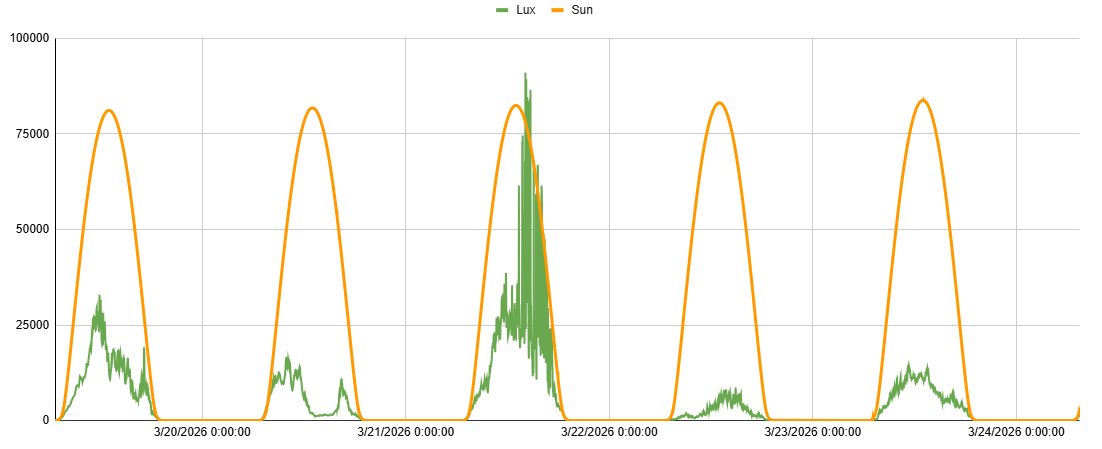
There really are not specific lux levels for that, as it all depends on time of day. That is why I wrote the SunCalc Illuminance Driver, that compares the lux from the sensor to a calculated expected lux for any minute of the day, to determine an actual lux % that stays consistent through the day.
I also used to use my outdoor light sensor for indoor lighting, but I found it is much better to just use indoor light sensors for indoor lighting. So I have another app for indoor lighting that only uses indoor light sensors, and it drives the room to a set lux level based on how much sunlight is coming into the room. When light changes in the room, my app acts as a governor to adjust levels until the lux level in the room matches the room lux setting. It creates very gradual transitions that are not noticeable.
Sounds interesting I have 7 years of solar / lux readings from my station so far collected and I agree cloudy detection has been the hardest. Just take a look at yesterday's partly cloudy day. I can see the dips in lux which means a clouds rolled over my property. But when I run the 5 years of data though AI for insights for detecting clouds Claude.ai was not able to come up with a good pattern to detect them.
Basically, I just calculate the sunny lux curve, and compare current lux to it. That had its own issues, as the difference % is also not consistent, which was the biggest struggle with writing my driver and scaling values based on altitude. This is the last week of my generated lux (orange) and actual lux chart.
I’ve massively upgraded the environmental monitoring capabilities of the app, transitioning it from a simple lux-triggered automator into a predictive micro-weather station. Here is what is new:
24-Hour Lux Trend Graphing: The dashboard now features a live, visual line graph charting your local illuminance over the last 24 hours. The app intelligently samples and stores data points every 15 minutes to keep hub memory usage highly optimized without sacrificing visibility.
Smart Dip & Weather Event Detection: The app no longer just looks at static thresholds; it calculates the Rate of Change. It can now successfully differentiate between the natural, gradual fade of an afternoon sunset and the sudden, sharp lux plunge of an incoming storm or heavy cloud cover.
Weather Event & Cloud History Table: A dedicated UI table now meticulously logs every micro-weather event. It tracks the exact start time, the total duration of the cloud cover (down to the second), the total lux drop experienced, and the lowest lux point reached during the event.
Expected Solar Baseline Tracking: The 24-hour graph now plots a dual-line chart. It calculates a theoretical "perfect clear day" solar curve (based on your hub's daily sunrise and sunset times) and overlays your actual sensor readings on top of it. This makes it instantly obvious if you are having a generally overcast day or a clear day with intermittent clouds.
Custom Sensor Calibration: Because every sensor is placed differently (direct sun vs. shaded under an eave), I added a calibration setting for "Expected Peak Clear-Sky Brightness" to perfectly scale the theoretical solar curve to match your specific hardware setup.
Update the code using the link provided in the main post.
Previously, the app required the absolute lux value to drop below your overcastThreshold (default 2000 lux) before it would log a weather event. This created a logic trap: a massive storm cloud could roll in at solar noon, plunging your sensor from 90,000 lux down to 30,000 lux, and the app wouldn't even flinch because 30,000 is still greater than 2,000.
The Solution: Decoupled Logic & Percentage Drops
I’ve completely decoupled the Weather Event Logging from the Virtual Output Triggers. During the day, we want the app to record these massive weather shifts on the graph, but we don't necessarily want our interior house lights turning on just because it dropped to 30k lux.
Here is what is new in this release:
Dynamic Drop Detection: The app now actively monitors the rate of change. It looks for a 30% lux drop OR a rapid absolute plunge of > 15,000 lux within a 10-minute window to trigger an active cloud event. It completely bypasses the static overcastThreshold for logging purposes.
Smarter Event Recovery: Instead of waiting for the sun to cross back over a static clear-sky number, the app now calculates the actual depth of the lux dip. Once the sky brightens and recovers by at least 50% of the light that was lost, the event is marked as "passed" and closed out in your history log.
Preserved Light Automations: Your Virtual Switch and Proportional Dimmer remain safely isolated from this logging change. They will still strictly enforce your defined overcastThreshold and heavyStormLux limits, ensuring your lights only trigger when it genuinely gets dark outside.
I am going though some LUX history and here in Illinois the "clear sky" values from the shortest day of the year to the longest day of the year are interesting. Here is my graph for the past 365 days. I had to replace my station in June so lost 3 days but you can see the variance. I am wondering if we have to do some "calculus" with Summer and Winter Solstice? Maybe a simple calculation regression:
Low LUX for Winter: 50k
High LUX for Summer: 130k
Delta per day from Low to High: 222 Lux per day for the clear sky calculation?
The question of the century when trying to do Clear Sky calculations. How to handle Lux peak/clear sky calculations. In my rule machine I do a linear calculation based on max to min based on the days from max and subtract the delta value. In your app you have a single value for expected:
That is the question of the century when it comes to environmental lighting. Your linear calculation in Rule Machine is a solid workaround, but I've been thinking about this exact problem and how we can make the app handle it natively.
You're spot on—we need to calculate this based on the time of year, month, day, and location to automatically adjust the expected lux. The great thing is, we don't even need to ask users for their zip code. The hub already knows its coordinates, which means the app can pull the exact sunrise and sunset times for the user's specific location every single day.
I've just updated the app's code to include a dynamic clear sky calculation. It works by taking your base "Clear Sky" threshold and applying two multipliers:
A Time-of-Day Arc: It builds a simulated curve that starts low at sunrise, peaks at solar noon, and drops toward sunset.
A Seasonal Arc: It checks the current day of the year (1-365) to lower the overall daily peak during the winter months and raise it during the summer.
This means a "Clear Sky" requirement at noon in July will be much higher than a "Clear Sky" requirement at 4:00 PM in December, dynamically adjusting the deadband so it stops yo-yoing. Give the updated code a try and let me know how it runs for you!
Thanks, what we were trained to do in school a long time ago was to develop the Arc for time of day and day of year as you stated using Calculus and then validate if the numerical plot of the lux reading was inside the curve for that point. We had "Latitude Tables" that would give min/max for the year for bands across the country. Since I haven't had to do that level of Calculus for a while I was going to hand it over to my son that is in the middle Calculus 3 at his engineering school.
24-Hour Solar Baseline Graphing: The live dashboard now includes a dynamic line chart (via QuickChart.io) that plots your actual 24-hour lux trend against a theoretical "Expected Clear Sky" baseline. You can calibrate this by setting your sensor's peak solar noon lux.
Intelligent Cloud & Weather Event History: The app now analyzes how fast the light drops. If it detects a plunge of 30% or >15,000 lux rapidly, it tracks it as an active weather event rather than a gradual evening fade. It logs the event duration, the total lux drop, and the lowest point reached to a dedicated history table.
Dynamic Solar Logic & Core Upgrades
Dynamic Clear Sky Calculator: You no longer have to rely on a static number for clear skies. If enabled, the app automatically curves the "Clear Sky" recovery threshold based on the time of day and the time of year (season). This completely prevents the system from yo-yoing during winter months or late afternoons.
Multi-Sensor Aggregation & Outlier Filtering: You can now select multiple master lux sensors. The app aggregates the data and automatically drops the highest and lowest readings, filtering out localized shadows (like a bird perching or a swaying tree branch) to give you a true sky average.
Logarithmic Proportional Dimming: The original inverse linear dimming math has been replaced with a logarithmic curve. Because the human eye perceives light logarithmically, this makes the indoor lighting ramp-up feel incredibly smooth and natural as a storm rolls in.
System Fixes & Tweaks
Boot-Up Deadband Fix: If the hub reboots while the sky is between your clear and overcast thresholds, the app now forces an "Assumed Clear" state to prevent your virtual targets from getting stuck out of sync.
Astro Logging Correction: Fixed an issue where booting up at night wouldn't properly log the Nighttime Logic enforcement to the dashboard UI.
Thanks for the update. I did get into a issue where I was "tweaking" some of the values and it gave me the warning that I didn't fill in mandatory fields but yet there were values there. The only work around was to delete the app and re-add. I will let this version soak in a bit before trying to "tweak" anything.
The bad thing is by delete the app all the "collected" data is now gone and will have to rebuild itself.


 The Problem: The "Static Threshold" Trap
 The Solution: Decoupled Logic & Percentage Drops


 Dynamic Solar Logic & Core Upgrades
 System Fixes & Tweaks