That is exactly why I wrote the SunCalc Illuminace Driver. Lots of calculations are needed. I calculate Irradiance from sun altitude and azimuth (what the original SunCalc driver provides) and I derive lux from that. My write-up in that post explains all the issues I encountered with getting a working % lux report for any time of day, allowing me to know the current sky condition and a more general sky condition, using the % of sunny lux value.
Since it is based on sun altitude and azimuth, the sunny lux generated curve changes every day automatically through the year.
Fixed the "Expected Clear Sky" Graph Flatline: Previously, if you had the Dynamic Clear threshold enabled, the graph would plot the internal logic limit (which caps around 4,000 lux) instead of the actual theoretical solar curve. This caused the baseline to look like a flat line at the bottom of a 100k lux chart. The graph now always plots the beautiful, mathematically correct solar sine wave for your visual reference, while keeping the internal limits separate.
All-New "Peak Tracker" for Weather Events: The old logic calculated sudden lux drops by comparing the current reading to the immediate previous reading. The flaw? A massive storm doesn't drop from 85k to 30k in a single millisecond; it sends multiple updates on the way down. Because the baseline reset on every ping, the app was blind to the massive overall drop. The app now utilizes a Peak Tracker that holds the highest recent lux value and measures the total drop over a rolling time window. (You'll also notice the logging terminology has been updated to track these as "Potential Clouding" events).
Dynamic, Hardware-Scaled Timers: This is the biggest functional change. A hardcoded 20-minute rapid-drop window completely breaks if your sensor only reports every 15 minutes (you might miss the bottom of the drop entirely between pings!). There is a new "Sensor Update Interval" preference. You now tell the app exactly how often your specific sensor reports, and the app will dynamically scale its timeout windows and math to ensure it spans across at least two full update cycles. No more missed storms due to lazy Zigbee/Z-Wave reporting limits!
The code has been updated in the usual spot. Just copy, paste, and let the new Peak Tracker do its thing.
In Tempest weatherflow reporting using the UDP to MQTT bridge observations are "streamed" but it looks like LUX will be on the 1 minute boundary. Is that too granular for your algorithm? I did set it to 1 minute just to see what happens.
Hey everyone! I’ve just pushed a major update to the Advanced Overcast Detector. This release focuses on making the app completely hands-off as the seasons change, alongside a critical bug fix for those of you experiencing sunset crashes.
Here is what’s new and the logic behind how it all works under the hood.
Fixed: The BigDecimal Sunset Crash
Some users were seeing a java.lang.UnsupportedOperationException related to BigDecimal in their logs right at sunset.
The Cause: When calculating the duration of a cloud event, the underlying code automatically upgrades division results (like durationSecs / 1000 ) into a BigDecimal to preserve precision. However, the modulo operator (% ) used to calculate the remaining seconds doesn't natively support BigDecimal.
The Fix: We forced the division output to instantly cast back to a standard integer using .toInteger(). No more sunset crashes, and your cloud history events will log perfectly.
New Feature: Smart Learning Mode (Auto-Calibrating Solar Baseline)
Previously, you had to manually input your "Expected Peak Clear-Sky Brightness" (EPCSB) and tweak it a few times a year as the sun got lower in the winter. Not anymore.
How it works: The app now tracks your highest recorded lux every single day. At sunset, it takes that number and adds it to a rolling 30-day average array. This 30-day average becomes your new, dynamically shifting EPCSB.
The "Bad Weather" Rejection Filter: What happens if it rains for a week? We don't want dark, stormy days dragging your 30-day baseline down into the mud.
The Math: At sunset, the app calculates an 80% lower bound from your current baseline (baseline * 0.8 ). If the day's maximum lux doesn't break that 80% threshold, the app flags it as a "Bad Weather Day" and throws the data point out entirely. It only learns from actual clear or mostly-clear days. (Note: It bypasses this rule for the first 3 days after installation to bootstrap a foundation).
Memory Safe: To prevent hub database bloat, the array strictly caps at 30 entries. Once it hits day 31, it drops the oldest entry, keeping the app lightning-fast.
New Feature: Smart Threshold Scaling (Proportional Ratios)
This is the key for hands-off seasonal transitions. A static "Overcast" drop threshold of 2,000 lux might be perfect in July, but totally wrong in December when your daily peak is much lower.
How it works: If you enable Smart Threshold Scaling, the app stops treating your base Overcast and Clear Sky limits as hard numbers, and instead converts them into proportional percentages of your EPCSB.
The Math: If your base peak is set to 10,000 lux, and your base Overcast drop is 2,000 lux, the app knows your target drop ratio is 20% (2000 / 10000 = 0.20). In the winter, when your Smart Learning baseline naturally drops to, say, 6,000 lux, your Overcast threshold will automatically scale down to 1,200 lux (6000 * 0.20). It rides the seasonal curve automatically.
UI Enhancements: Live Dashboard Transparency & Refresh Button
Show Your Work: The Live Dashboard has been upgraded to show you exactly what the Smart Learning algorithm is doing. It displays your Daily Max Lux, your active EPCSB, and explains why it's using that number (e.g., "Learning Active", "Collecting Data (12/30)", or "Static User Setting").
Smart Limit Display: It now visually tells you if your Drop and Clear targets are currently "Smart Scaled" or "Static," so you are never left guessing what the app is looking for.
Refresh Button: Added a manual Refresh Data button right at the top of the app. You no longer need to reload the entire webpage just to pull the latest sensor feeds into the dashboard.
I have a beta version if you want to try it that allows you to set rooms, and link a indoor lux sensor to that room. It will log and trend the rooms peak brightness and automatically start adjusting what it would deem as a "Dark Room" this can be written to a hub variable to be used in other lighting applications.
Great to hear it working good so far! Sometimes releasing things into the wild can be nerve wracking as I've been sitting on most of these apps for awhile.
Sounds good I have the new Inovelli Blue mmWave switches in 5 locations in my home not only occupancy but Lux and where in the room there is occupancy I am already tracking lux for eventual indoor lighting purposes because just one outdoor sensor doesn't tell the whole story.
I’ve just pushed a significant update to the Advanced Overcast Detector. This release focuses heavily on system reliability, local execution, and giving you better visual feedback right from the dashboard.
Here is a breakdown of what’s new:
100% Local, Offline Charting You now have the option to choose your "Chart Engine" in the settings.
QuickChart.io (Cloud): The classic, polished image generation using the QuickChart API.
SVG/HTML (Local): A brand-new, purely local chart engine. This generates the 24-hour Lux Trend graph using inline SVG and HTML directly on your hub. It requires no internet connection and completely eliminates the risk of broken images if an external API goes down.
Advanced Multi-Sensor Averaging Array Relying on a single outdoor sensor can sometimes lead to false positives (e.g., a bird flying over, a stray leaf, or a very specific shadow). You can now build a highly resilient sensor array.
Up to 4 Sensors: Define a Primary Sensor and up to three Auxiliary Sensors.
Smart Outlier Rejection: If you enable the "Average Sensors" feature and use more than two sensors, the app automatically drops the highest and lowest readings before calculating the average. This effectively filters out environmental noise and anomalies.
Individual Graphing: Whether you average them or not, all configured sensors will plot on your 24-hour trend graph with distinct colors so you can easily compare their performance.
Smart Room 24-Hour Max Lux Dashboard For those of you using the Smart Room Darkness Detection to calculate dynamic indoor setpoints, the Live System Dashboard just got an upgrade.
Dynamic Bar Graph: You’ll now see a horizontal bar graph at the bottom of the dashboard tracking the 24-hour maximum lux for each configured room.
At-a-Glance Verification: This makes it incredibly easy to see which rooms are getting the most natural light relative to each other, and helps you verify that your "Learned Setpoints" are aligning with reality.
Let me know how these new features are working for your setups!
Oh man between me writing a new driver for a THIRDREALITY sensor now you update the overcast app. When will I find the time, ok I will load it and give it a full spin today.
Thanks for putting in all this hard work.
Note: I did have to go into settings and set the "Primary" outdoor sensor after the install. All the outdoor sensors were "none selected"
So far so good with this last update. I have now expanded the number of interior lux sensors to all 5 of them this morning. Lets see how that works. Just a question on this section of the configuration I haven't worked with yet.
I assume "heavy storm" is lux of the outdoor sensor when we have a storm move through.
The others I assume it's for global light dimming if I use the app to control lighting directly in the app?
This is correct. I just received my other 4 indoor lux sensors; the algorithm will start tuning itself after it gets its full 30 days or data. I might make this adjustable for a quicker smart output, but 30 days gives the application a more accurate baseline.
I've just pushed a new update to the Advanced Overcast Detector, focusing heavily on improving the Smart Room Darkness Detection and giving you more control over the Smart Learning algorithm.
Previously, the app required a hardcoded 30-day baseline before the dynamic threshold scaling would take over. While 30 days provides highly accurate seasonal data, I know some of you wanted the app to adapt a bit quicker to your spaces.
Here is what’s new in this release:
Custom Learning Periods You are no longer locked into a 30-day wait! Inside the Graph Calibration settings, there is a new dropdown allowing you to select your required learning period: 10, 20, or 30 days.
Want the algorithm to take over faster? Drop it to 10 days.
Want the highest accuracy to smooth out passing storm data? Leave it at 30.
Note: If you ever decide to scale your requirement down (e.g., from 30 back to 10), the app will automatically trim your historical data arrays in the background to keep the math highly accurate.
"Days Learned" Dashboard Tracking It is no longer a guessing game as to when your smart rooms will switch from your manual fallback settings to the dynamic algorithm. I’ve injected a new Days Learned column directly into the Live System Dashboard's Smart Room table.
It dynamically color-codes your progress. You will see an orange "Learning" status while it gathers data, which will flip to a green "Active" status the moment it hits your required threshold and takes over the math.
Under-The-Hood Fixes
Adjusted the daily reset logic to ensure rooms that get minimal natural light (like heavy blackout rooms) don't skew the baseline calculations.
As always, grab the latest code, and let me know how the new learning adjustments are working out in your setups. Feedback and feature requests are always welcome!
 Update: Advanced Overcast Detector - Smart Learning, Auto-Scaling Thresholds, & Bug Fixes
 Fixed: The
  New Feature: Smart Learning Mode (Auto-Calibrating Solar Baseline)
 New Feature: Smart Threshold Scaling (Proportional Ratios)
 UI Enhancements: Live Dashboard Transparency & Refresh Button
 Refresh Data button right at the top of the app. You no longer need to reload the entire webpage just to pull the latest sensor feeds into the dashboard.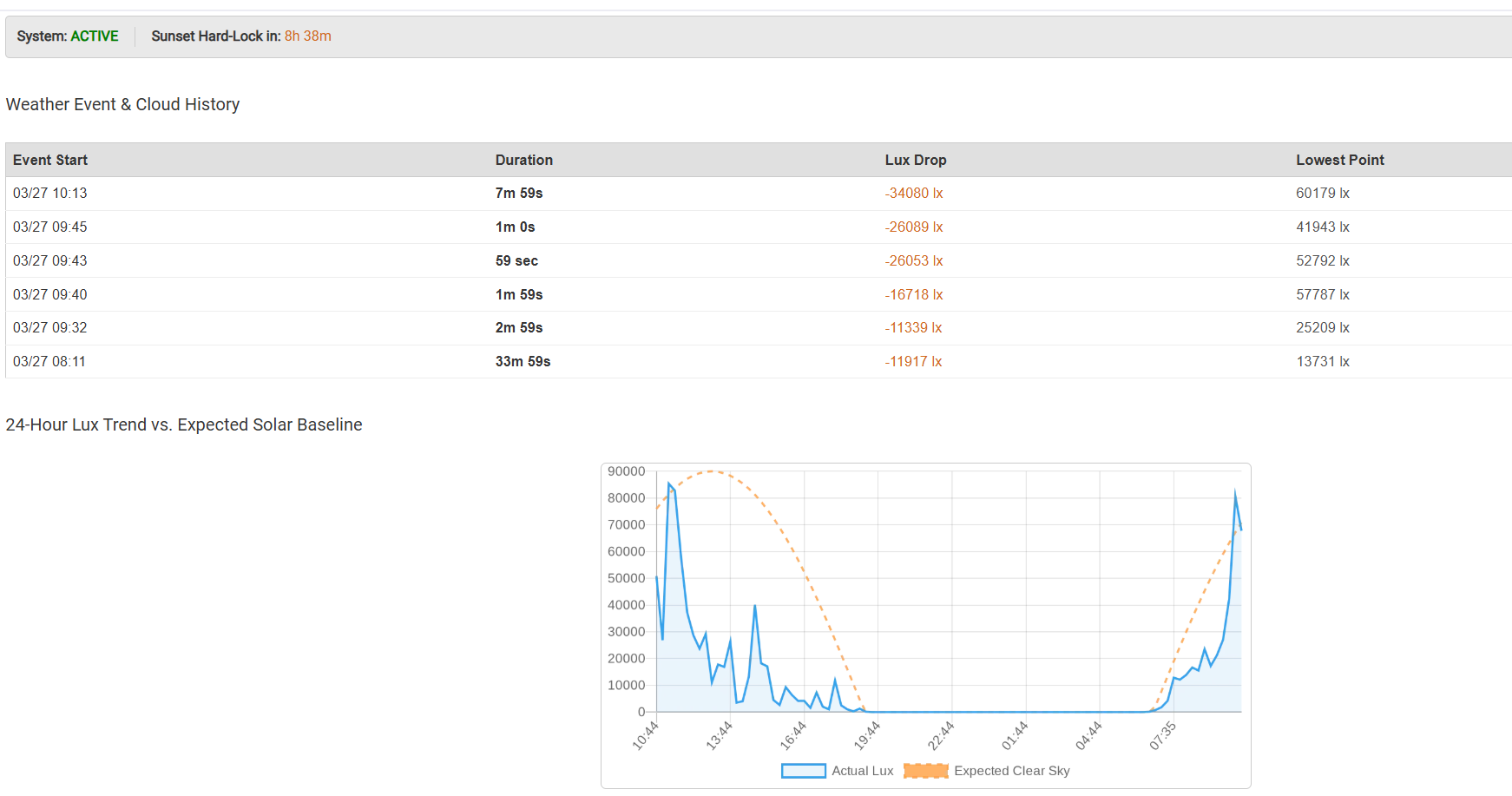

 100% Local, Offline Charting You now have the option to choose your "Chart Engine" in the settings.
 Advanced Multi-Sensor Averaging Array Relying on a single outdoor sensor can sometimes lead to false positives (e.g., a bird flying over, a stray leaf, or a very specific shadow). You can now build a highly resilient sensor array.
 Smart Room 24-Hour Max Lux Dashboard For those of you using the Smart Room Darkness Detection to calculate dynamic indoor setpoints, the Live System Dashboard just got an upgrade.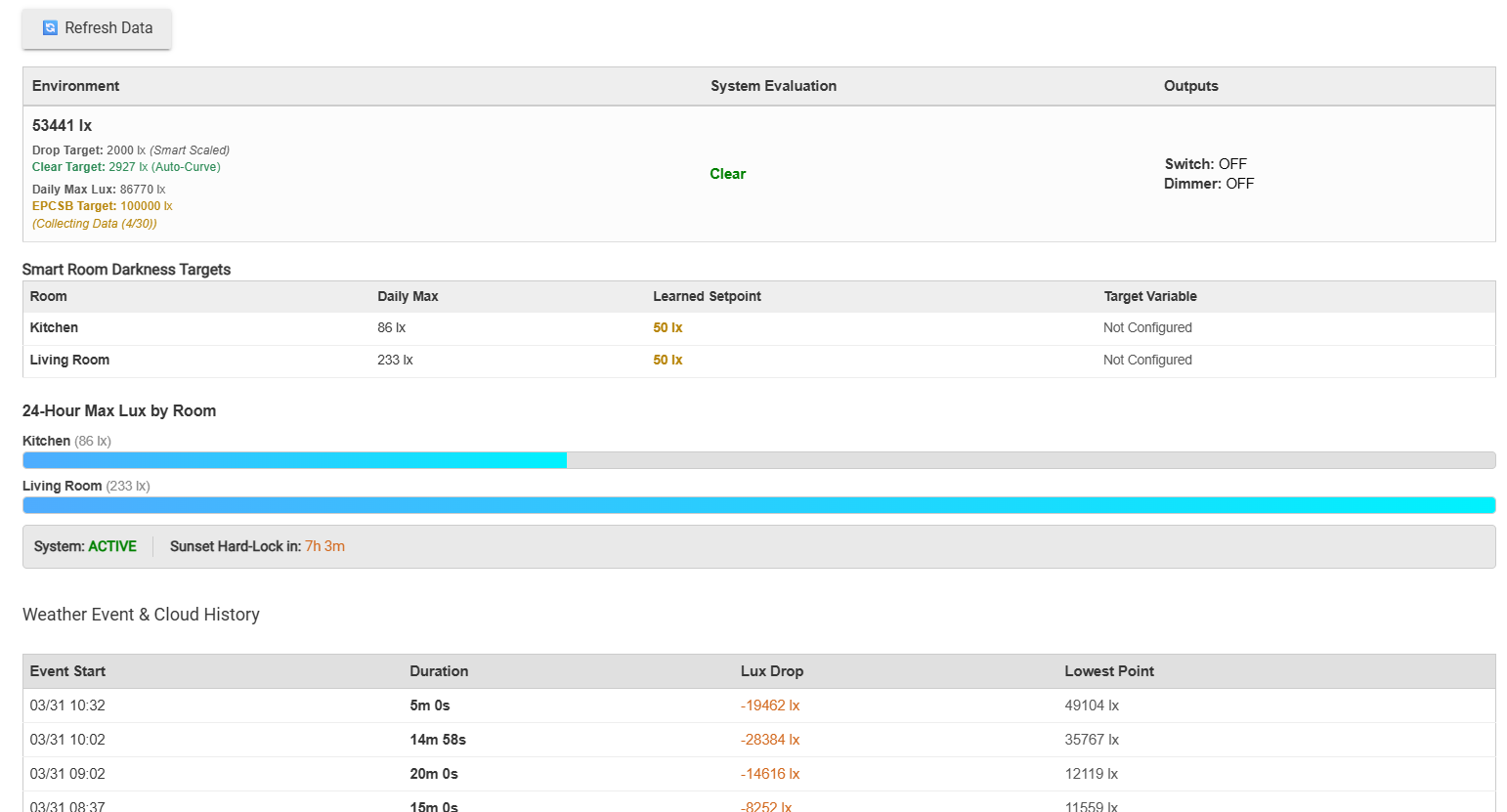


 Custom Learning Periods You are no longer locked into a 30-day wait! Inside the Graph Calibration settings, there is a new dropdown allowing you to select your required learning period: 10, 20, or 30 days.
 Under-The-Hood Fixes