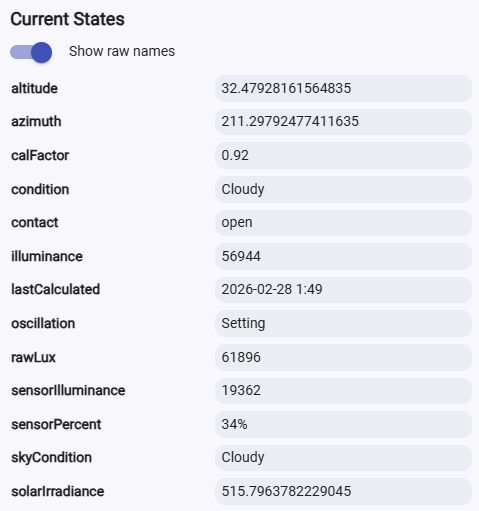
I have modified the original SunCalc Driver by Justin Walker (@augoisms) to also calculate Solar Irradiance and Illuminance based on the existing azimuth and altitude calcs, and then determine the current lux % based on input from an outside lux sensor, and from that, determine a current condition and a sky condition.
This driver is also now a virtual contact sensor that can be set to open and closed based on passing a Lux Percent threshold, to be used as an automation trigger.
Code Links can be found at the bottom of this post.
I guess I am calling this a [RELEASE], even though it will not be in Package Manager. I originally wrote this for myself and it has not been tested yet in other locations. It should also be considered a beta version.
GOAL:
The original goal that set this off was just to know when the sun is shining in a window on a hot summer day, to close the curtains when the AC is running. This topic came up in my post about my new Curtain Robots. (Curtain Robots are Fun 😀)
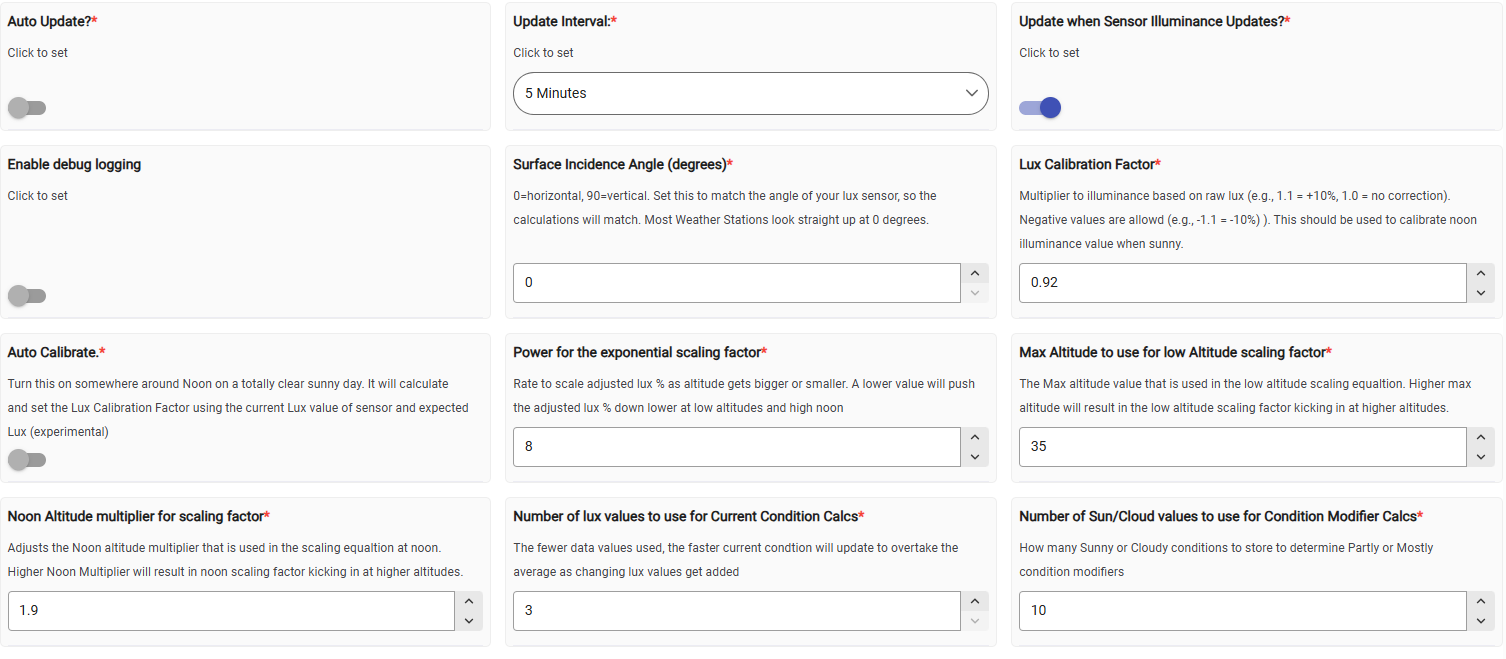
I wanted to know what the “expected” illuminance would be at any time of day, compared to my Ecowitt Lux sensor reading. So this driver will calculate how sunny it is outside, based on input from a Lux sensor compared to expected lux.
My other goal was to have it figure out a sky condition for the last few minutes, as well as a more general sky condition overall, to use as a locally generated current weather condition.
Ultimately, I decided to also turn this driver into a Contact Sensor, with a preference for setting the current Percent of Lux target threshold, to be able to use contact as a trigger to close a shade or curtains when the contact closes, based on the preference % that is set.
Instructions are collapsed here:
Instructions
SENSOR INPUT:
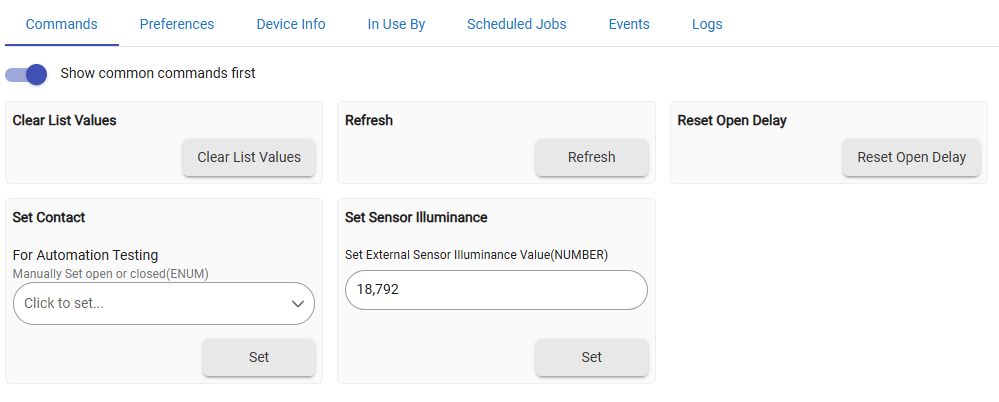
To get the sensor values into the driver, I added a setSensorIlluminance command. The sensor data must be sent to the driver with each sensor lux update with some rule or automation to keep the driver fed the sensor values. I wrote a quick sync app for that, linked below, to save needing to write a rule for the sync. So, if Illuminance changes on the sensor, it gets fed using the setSensorIlluminance(lux) command in the driver. There is also a new preference, that when set to true, will auto refresh the calculations after a sensor lux value is fed to the driver. Turning this preference on will turn off the auto update preference, so the driver doesn’t calculate twice. To get back to just using the auto update timer for only altitude, azimuth and calculated lux without the sensor input, turn off the preference to update with Sensor Illuminance, and turn Auto Update back on.
SENSOR CALIBRATION:
The calculated lux is based on simplified equations for irradiance that assumes a clear day with full sunlight and average atmospheric conditions. Since all sensors are different, the lux calculations must be calibrated to the values being reported by the sensor. Most likely, the calculations are going to be larger than most sensors report, not smaller, the calculated values will probably need to be reduced down to your sensor lux levels. I added a calibration factor preference that will adjust the calculated lux values up or down to match the sensor. This can be done before or after midday on a clear, sunny day, to find a calibration factor that matches the clear day calculated lux to the sensor reading. Do not calibrate right at noon, due to the high noon skew, so I would use at least an hour before or an hour after noon sun altitude for calibrating.
A factor of 1.1 will increase calculated lux by 10%. A value of 0.9 will decrease calculated lux by 10%. I also allowed for the use of negative values, so -1.1 will also decrease calculated lux by 10%.
I also added an automatic calibration preference, though it is experimental. Set this preference to true, and it should take the current calculated lux, and the current sensor reading, and set the calibration factor for you, then reset the preference to false. Otherwise, just experiment with different calibration values, and find a value that puts the calculated lux just a bit above what the lux sensor is reporting from your sensor when it is in full sun. This may need to be further adjusted, based on how it is reporting conditions.
Surface Incidence Angle (degrees): There is a preference used in the Solar Irradiance calculation that takes into account the angle of light hitting the sensor. This is the angle that your light sensor looks at the sun. For my Ecowitt sensor, the sensor is put flat on the top, so it is horizontal at 0 degrees. If the sensor is at all tilted, use that angle in the preference. The Lux calculations will use the same angle as your sensor for a better match with calculated lux.
OPEN/CLOSED CONTACT:
I added the contact sensor capability and attribute as a trigger to open and close curtains/shades based on the DFN%. There is a preference for the DFN% threshold that will set the contact to open or closed, with closed being the state when the sun brightness percent to target passes the closed threshold percent. The idea is to use this to know if light levels at that moment of the day are sunny enough that you would want to close the curtains in the summer, or reopen them, based on the contact attribute changing to open or closed.
CLOSED CONTACT RESTRICTIONS:
There are two preferences for restricting the contact sensor.
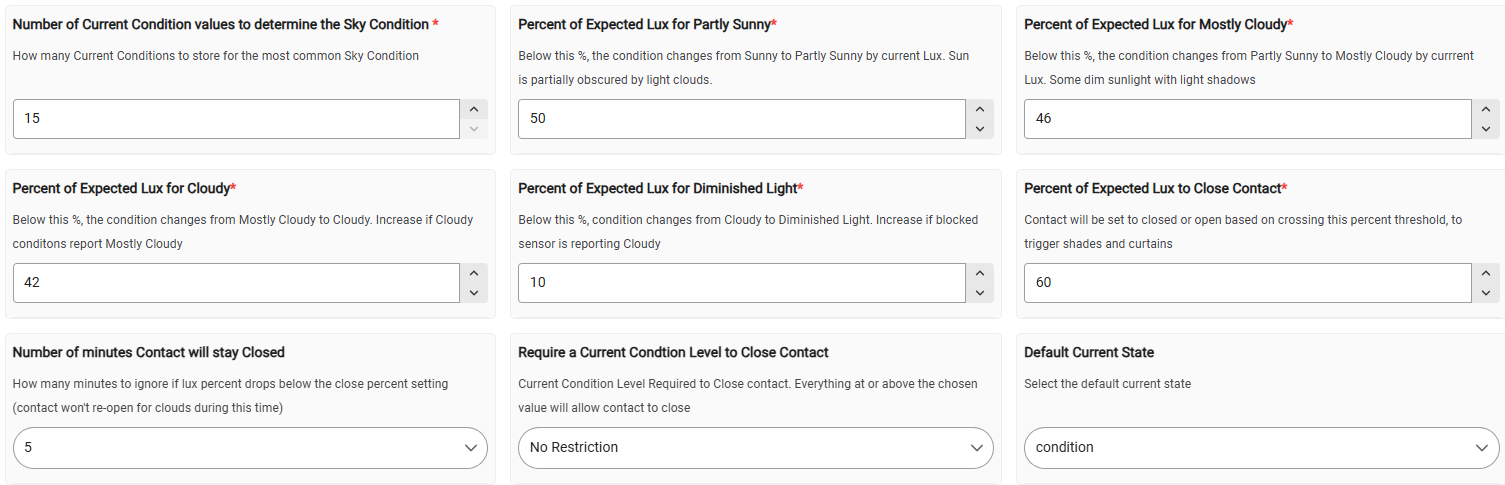
Number of Minutes to Stay Closed: To avoid a stray cloud opening the contact, just to have it close again in a few minutes, this preference will start a timer to ignore the threshold % being crossed for a set time period, to ignore reopening the contact. .
Require a Current Condition Level to Close: If it is less than totally sunny, maybe you don’t want the contact to close at all. Choose a condition level that will stop the contact from closing when the threshold is crossed. Options range from “No Restriction” down to “Partly Cloudy”, the most restrictive. The current condition must at least match the condition level selected, or be any of the clearer conditions above that, to have the contact close at the close threshold %.
For all other preference setting instructions, read the Way More Details section to understand what they do.
Way More Details are collapsed here:
More Details
Nothing is as simple as it seems:
When adding the lux percent difference analysis to the driver, I found that the difference values do not scale linearly through the day to get a consistent lux % to compare to thresholds, so I had to scale sensor lux value down at noon and low altitudes. The % of lux targets are set based on the average % of Sensor Lux to Nominal lux, but when the sensor lux values get relatively bigger at lower altitudes, the % lux rises steadily, though the actual lux % is not rising. This also happens near noon. So I scale the sensor lux average down to be in line with the nominal lux at mid altitudes, adjusted by the current altitude factor. I have been playing around with this for the last month, only trying to get these scaling factors more accurate.
I use an inverse of the low altitude scaling factor formula to also apply a scaling factor right around noon altitudes, to bring those values down a bit to normal levels as the sun altitude rises and falls over the top of the illuminance curve.
At first I scaled based on the whole range from Noon Altitude to 0, with the equation pushing the low attitudes more as altitude got lower, and the inverse of that would push the high altitudes lower. In testing over a few weeks, but the daily rise of the noon altitude value changes the whole range of the scaling, and this results in scaling differently at the low altitudes as noon altitude rises each day. To fix that, and keep low altitudes scaling constant, I use a Max Altitude set in preferences instead of using noon altitude, as the upper range for the equation. For the noon Altitude scaling, the noon altitude is technically the bottom of the range, so for the other side of the range I use half of noon altitude, using calculations to get noon altitude for that day.
I added a preference for the scaling power, hoping it stays pretty constant. There is a preference for the power at which the factor exponentially lowers the percentage as altitudes get are very low and very high. This is a base number, and in the equations, power is changed based on this preference as a reference power. Should it need to be adjusted, all altitudes will scale around the power setting that is set. Raising the value will make the scaling have less of an effect (inverse equation). So raising the power will bring values closer to the raw difference percent, while lowering the power will cause more scaling changes, so lower values push down the final lux % more.
Note: How skewed the reading is from nominal is also related to how bright the sun is. More sun seems to equal more skew and more “false” higher readings. This can lead to over compensation on very cloudy days, but it isn’t too bad since it is a factor, so lux is changed more with higher lux values than lower values. If the day is already cloudy, getting pushed down further isn’t really an issue, unless it pushes it down too much to cause a Diminished Light condition. That would only happen on a very dark day, however.
A NOTE ON LUX SENSORS:
There appears to be many reasons why the percentage sensor lux values are not linear to calculated values as sun altitude changes, causing a difference skew by altitude. For one, lux sensors follow a cosine response, and at higher altitudes small angular deviations between the sensor and sun make larger or smaller relative sensor lux values. My code is attempting to smooth out those altitude sensor lux values and force low altitudes to be in scale with the nominal lux values at mid altitudes, which is the majority of the day. Since there is a skew right around noon, I still adjust only those very high noon values down, but the rest of the higher/mid altitudes for most of the day are considered to be in the normal range. More on lux sensors here: How Does Lux Value Affect The Performance Of A Photocontroller? - chi-swear.com
LOW ALTITUDES AND TWILLIGHT:
The other thing about Lux sensors is that they continue to measure the scattered atmospheric light after sunset, even though the Solar Irradiance calculation has gone to zero before that. My sensor measures visible light until about -0.4 altitude, while the irradiance calculation goes to zero right around 0 altitude or even a bit above. I found an equation that will generate simulated atmospheric Lux values for those negative altitudes, to create a more normal lux curve that matches a lux sensor at negative altitudes Still, generating those values doesn’t help with condition determination at such low altitudes, but at least the driver will calculate a lux value for the expected atmospheric light, even if it is not really useful for determining sky condition at that point. I just wanted the driver to continue calculating atmospheric lux instead of just dropping off to zero while the lux sensor is still reporting, so there is a transition from the lux being calculated from irradiance, over to the simulated twilight calcs.
HOW PERCENT LUX IS CALCULATED:
I keep a running list of generated Lux values, which is used for the nominal lux average value, and I also keep a running list of sensor lux values of the lux sensor from that nominal value. How many data points are used for the two lists is set in preferences for current conditions. The more data points used for the current condition calc will smooth out condition transitions to be less choppy, but it will also take longer for new data to overcome the average. I have been using just three data points for the current condition lux and difference list, and my lux sensor updates every minute, so I get a current sun condition over the last three minutes using that list size for the average. I have tried up to six points, but then the sun can be out for several minutes before the average lux percent changes. It really depends how fast you want the current condition to update when the sky changes.
I calculate an average from the calculated lux list, and I apply the altitude factor to the sensor lux average to make up for low and high altitude effects. The percent lux is the percent of the adjusted average sensor value, compared to the average calculated lux value.
HOW CONDITION DETECTION WORKS:
The targets are calculated for Partly Sunny, Mostly Cloudy, Cloudy, and Diminished Light condition targets based on the target percent thresholds set in preferences.
In addition, I use a list of past sun/cloud conditions to determine a recent cloud percent to modify a sudden change to only a fully Sunny or Cloudy condition. Based on the percent of cloud entries in that list, I get the % of the data points that are Cloudy, to modify Sunny or Cloudy with Partly or Mostly during a changeover. I keep that list a bit longer, at about ten data points. The number of values to use for the Modifier List is set in preferences, to modify the condition to be mostly or cloudy based on the sky over the last ten minutes. This just tries to better match the current condition if clouds have been going in and out. I don’t want to suddenly report totally sunny, if it was cloudy for a period a few minutes before that.
I then send the attribute value for that modified current condition, and I add that condition to another running list of current sky conditions. The Sky Condition list size is also set in preferences, and should be much bigger than the current condition list size to show sky conditions based on a longer period of time. The default is 15 points, to get conditions over a quarter-hour period when lux gets updated once per minute. Each time the current condition is calculated, it is added to the list, and then the most common value in the sky condition list is set as the Sky Condition attribute. This represents more of what the sky should look like, instead of how bright the sun has been in the last few minutes. This list size can be increased to get a better summary of the sky, to maybe 30 or 60 points, to get general sky conditions over a longer time period.
CONDITIONS:
There are three unmodified condition types reported directly from the lux difference dropping below a preference % threshold:
Sunny: The default condition if no other thresholds are crossed
Partly Sunny: Some hazy clouds, but not full sun, but enough sun to cast shadows. This is set when the DFN % crosses the Partly Sunny % threshold set in preferences
Mostly Cloudy: Dim sunlight and trace of shadows. This is set when the DFN % crosses the Mostly Cloudy % threshold set in preferences..
Cloudy: A normal cloudy day light level with no real shadows. This is set when DNF% crosses the Cloudy threshold set in preferences.
Diminished Light: This can indicate a blocked sensor (there is snow/dust on the sensor), or that it is a very dark and cloudy day. It could even mean the sensor is totally shaded by a tree, in partly cloudy conditions. This can be considered a warning condition, telling you that the current lux sensor reading is extremely low compared to the expected lux values, so you can check if the sensor is blocked. Otherwise, it is indicating a very low light condition for the current sun altitude, due to heavy clouds.
I added an attribute that will display the current DFN % value, to be referenced if needed to set the threshold condition preferences, if the default values provided are a bit off on setting the proper condition. If it is Sunny, but the driver is reporting Partly Sunny, for example, check the attribute % value as a reference for what the Partly Sunny % is for your sensor at that moment, and use that value to update the Partly Cloudy % threshold preference.
Note: You may want to just play with the lux calibration factor first, if all condition thresholds seem to be a bit off, as a calibration adjustment will effectively bring all the thresholds up or down together.
CONDITION MODIFIERS:
Beyond determining a Sunny, Party Sunny, Mostly Cloudy or Cloudy condition from the lux sensor lux values directly, I keep track of the recent past sun conditions in another list, as mentioned above.. I’m using a Sunny or Cloudy condition history list to modify a change to Sunny or Cloudy based on the % of cloudy entries in the list. Only purely Sunny or Cloudy conditions are modified, or not, based on the cloud percent in the condition list. A directly modified condition, like Partly Cloudy based on lux %, does not get modified, and the Sunny or Cloudy conditions that are modified are modified based on the past X minutes (depending on preference set for the list size) of data in the past conditions list.
Based on the cloudy % in the condition history list, a Sunny or Cloudy condition can be modified with either Mostly and Partly.
Mostly Cloudy: Based on the percent of Cloudy to Sunny in the list. 50%-80% cloudy when the sun condition is Cloudy, becomes Mostly Cloudy. Mostly cloudy can also arise from the direct lux% as an unmodified condition.
Partly Cloudy: Based on the percent of Cloudy to Sunny in the list. 20%-49% cloudy when the sun condition is Cloudy becomes Partly Cloudy..
Partly Sunny: Based on the percent of Cloudy to Sunny in the list. 50%-80% cloudy when the sun condition is Sunny becomes Partly Sunny. Partly Sunny can also arise from the direct lux % as an unmodified condition.
Mostly Sunny: Based on the percent of Cloudy to Sunny in the list. 20%-49% cloudy when the sun condition is Sunny becomes Mostly Sunny.
The condition will not be modified if it is less than 20% cloudy or more than 80% cloudy, as those stay as fully Sunny or fully Cloudy conditions that need no modifier.
OTHER CONDITION VALUES REPORTED:
Condition calcs at low sun altitudes are not reliable and they do not have much meaning. I also have no real use for sun conditions so early or late in the day. To that end, I added very low altitude conditions that report a named sun period, rather than a sun condition. At the beginning and end of the day, the condition attribute and skyCondition attribute will report::
Morning/Evening: Set when altitude is below 6 degrees, but above 1.0 degrees
Dawn/Dusk: Set when altitude is between 1.0 and 0.0. The bottom of the sun is just above or at the horizon before setting or after rising. Solar Irradiance will pass zero in this range.
Sunrise/Sunset: Set when the altitude is between 0.0 and -1.2. The sun is crossing the horizon. Official sunset/sunrise altitude is considered -0.833, which is in this range.
Twilight: Set when altitude is less than -1.8 and greater than -4.0, as there is still visible atmospheric light that a light sensor will detect after sunset or before sunrise, even though the sun is completely below the horizon at that point.
Night: Set when altitude is below -4.0. Most Lux sensors should read zero by this point. When the lux sensor reports zero, the condition is set to night, no matter what the altitude is when it hits zero. Night also triggers a reset of all lists and reporting attributes, for the next day.
IN-WINDOW SENSOR FOR SHADES/CURTAINS?
I see where there could be another option to use this driver, where the light sensor is put in the window itself, or just outside of it, and then the driver is calibrated to that sensor and the angle it is positioned. Then just make an automation around seeing the contact change to closed, and no sun position data is needed in the automation. That would be fine for one window, but for several windows, the number of lux sensors would add up, plus there would be a need for an instance of SunCalc Illuminance for every window. Using sun position and a single outside sensor probably makes more sense for several windows facing different ways, where rules are restricted based on current azimuth and altitude ranges.
USAGE:
This driver now replaces a more rudimentary way I was using before to determine cloud conditions from my sensor, which I have been using to put the current local condition on my main dashboard, along with my other Ecowitt weather data.
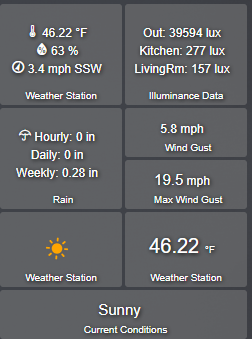
My plan is to also use azimuth and altitude reported from the driver to determine the ranges when the sun is positioned in front of the window unobstructed by trees, where the sun would be shining through the window, if it were sunny out.
The contact attribute changing is the trigger to then check if the sun is in the azimuth and altitude ranges for the sun position in front of the window. If the contact closes and the sun is in front of the window, then close the curtains. If the sun is in front of the window and the contact opens, then open the curtains, given any set restrictions.
It was a fun challenge writing this, and beyond the local sky condition report, I hope it can be useful for me this summer for controlling curtains, but I’m a few months away from that use case right now in VT.
CODE LINKS:
Driver: SunCalc Illuminance Driver.groovy
Sync App: Update SunCalc Illuminance.groovy
INSTALL:
Install the driver the same as the manual install for the standard SunCalc, creating a virtual device from the driver code saved in Drivers Code.
Install the Sync App after if you don’t want to make a rule to push values to SunCalc Illuminance. Add the code to Apps code and install as a user app, choosing your SunCalc Illuminance device, and your lux sensor device in settings.
I’m curious how well this can work with other locations and lux sensors, so please report back here if anyone takes the time to give it a test drive! If nobody cares about this, that’s fine too, I’m just sharing something I wrote for myself anyway, but it would be good to know how it works out in the field.
Screenshots
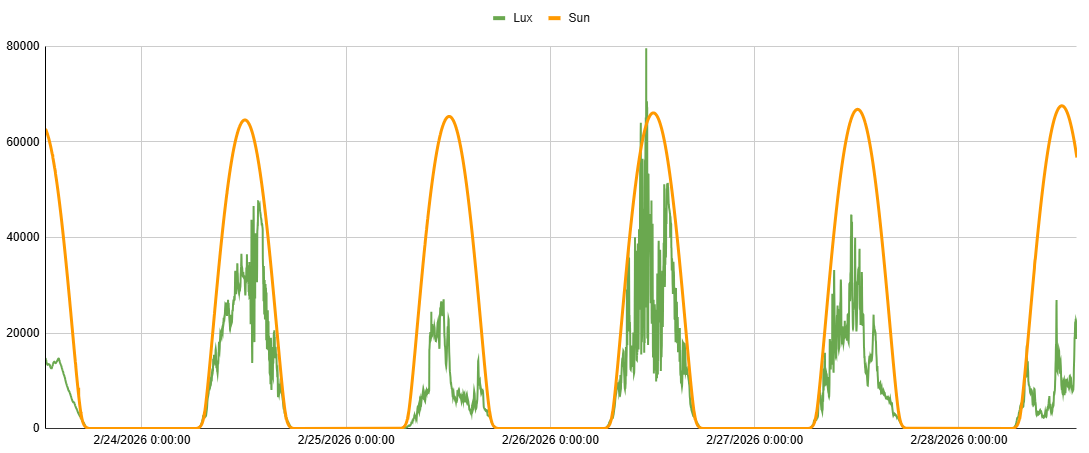
I have been sending data from SunCalc Illuminance to Google Sheets. Here is a chart showing a few days of SunCalc Illuminance in action. Orange is the calculated SunCalc Illuminance curve. Green are the actual values from my sensor. It is easy to see what days were sunny or cloudy, and when, based on the sensor data falling below the calculated sun lux curve.
Preferences: